CBSE Class 5  >  Class 5 Test  >  International Computer Science Olympiad   >  Olympiad Test Level 2: MS Word - 1 - Class 5 MCQ

Olympiad Test Level 2: MS Word - 1 Class 5 International Computer MCQs


MCQ Practice Test & Solutions: Olympiad Test Level 2: MS Word - 1 (10 Questions)

You can prepare effectively for Class 5 International Computer Science Olympiad Class 5 with this dedicated MCQ Practice Test (available with solutions) on the important topic of "Olympiad Test Level 2: MS Word - 1". These 10 questions have been designed by the experts with the latest curriculum of Class 5 2026, to help you master the concept.

Test Highlights:

  • - Format: Multiple Choice Questions (MCQ)
  • - Duration: 20 minutes
  • - Number of Questions: 10

Sign up on EduRev for free to attempt this test and track your preparation progress.

Olympiad Test Level 2: MS Word - 1 - Question 1

Which of the following program allows us to make documents?

Detailed Solution: Question 1

Microsoft Word is a word processing program that is specifically designed to create, edit, and format text-based documents, such as letters, reports, and essays. The other options have different purposes:

  • Microsoft Excel is used for creating spreadsheets and performing calculations.
  • Microsoft Paint is a basic drawing and image editing program.
  • Microsoft PowerPoint is used for creating presentations with slides, often used for visual and multimedia content.

Olympiad Test Level 2: MS Word - 1 - Question 2

Which of the following font style is used to make your letters and characters becomes thicker?

Detailed Solution: Question 2

The Bold font style is used to make letters and characters thicker, making them stand out.

  • Italic slants the text to the right but does not make it thicker.
  • Underline adds a line beneath the text but does not affect the thickness of the characters.
  • All of the above is incorrect because only Bold makes the characters thicker.

Olympiad Test Level 2: MS Word - 1 - Question 3

Which one is UNDO icon?

Detailed Solution: Question 3

The UNDO icon is represented by a curved arrow pointing left. This icon is used in various software applications, including MS Word, to undo the last action performed.
The other icons in the image represent different functions:

  • The first icon (floppy disk) represents Save.
  • The second icon (documents) represents New Document or Copy.
  • The third icon (clipboard) represents Paste.

Olympiad Test Level 2: MS Word - 1 - Question 4

Which of the following options help you to increase the size of the screen with the help of Zoom Slider button?

Detailed Solution: Question 4

By click on + button of zoom slider you can increase the size of the screen. And by click on – button of zoom slider you can decrease the size of the screen.

Olympiad Test Level 2: MS Word - 1 - Question 5

What is the primary purpose of Microsoft Word?

Detailed Solution: Question 5

The primary purpose of Microsoft Word is to create, edit, and format documents. It is not designed for creating spreadsheets (A), editing images (C), or creating presentations (D). Word is specifically a word-processing software used for tasks like writing letters, reports, essays, and other types of documents.

Olympiad Test Level 2: MS Word - 1 - Question 6

Which one is MS WORD icon?

Detailed Solution: Question 6

The icon with the "W" represents Microsoft Word, which is a word-processing software. The other icons represent different Microsoft applications:

  • The second icon (with the "X" on it) represents Microsoft Excel, which is used for spreadsheets.
  • The third icon (with the "P" on it) represents Microsoft PowerPoint, used for presentations.
  • The fourth icon (with the "A" on it) likely represents Microsoft Access, a database management system.

Olympiad Test Level 2: MS Word - 1 - Question 7

How can you open a new document in Microsoft Word?

Detailed Solution: Question 7

To open a new document in Microsoft Word, you can select "Blank document" after launching the program. The "Save As" option (A) is used for saving a document, not opening a new one. "Print" (C) and "Insert" (D) are for printing and inserting content, respectively.

Olympiad Test Level 2: MS Word - 1 - Question 8

What does the "Status Bar" in Microsoft Word display?

Detailed Solution: Question 8

The "Status Bar" in Microsoft Word displays useful information about the document, such as the page number, word count, and the language being used. It provides a quick overview of the document's status. Therefore, the correct answer is D, which includes all the options mentioned.

Olympiad Test Level 2: MS Word - 1 - Question 9

A black blinking line located on the document.

Detailed Solution: Question 9

The black blinking line in a document is called the cursor (or text cursor). It indicates where the next character will be typed.

  • Font color refers to the color of the text.
  • Clipboard refers to the temporary storage area where data can be copied or cut before being pasted elsewhere.
  • Slide refers to a single page in a presentation, such as in Microsoft PowerPoint.

Olympiad Test Level 2: MS Word - 1 - Question 10


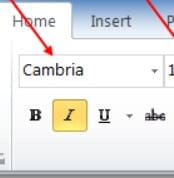
What does the box with the red arrow pointing at means? 

Detailed Solution: Question 10

The box with the red arrow is pointing to the Text Style section, which refers to the font style of the text (such as "Cambria" in this case). This option allows you to choose the type of font for your document. The other options, Text Color and Size, would refer to changing the color and size of the text, but the box highlighted here is for selecting the font style.

23 videos|49 docs|75 tests
Information about Olympiad Test Level 2: MS Word - 1 Page
In this test you can find the Exam questions for Olympiad Test Level 2: MS Word - 1 solved & explained in the simplest way possible. Besides giving Questions and answers for Olympiad Test Level 2: MS Word - 1, EduRev gives you an ample number of Online tests for practice
Download as PDF