Computer & IT for SSS 1 - Notes & Study Material for SSS 1
Free PDF Revision Notes for Computer & IT SSS 1
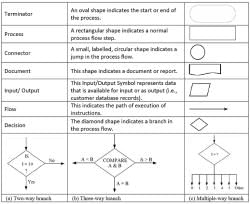
Well-structured revision notes are an indispensable resource for any SSS 1 student looking to master Computer & IT efficiently. Our free PDF notes cover essential topics such as computer organisation, input and output devices, algorithms and flowcharts, and Scratch programming, all written in clear and student-friendly language. Having downloadable notes means you can study offline, annotate key points, and return to difficult sections as many times as needed. These notes are designed to complement your classroom learning and serve as a reliable reference throughout your preparation.
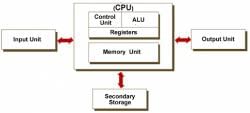
Overview of Computer System



Data and Information
Input Devices


Important Study Materials for SSS 1 Computer Science Concepts
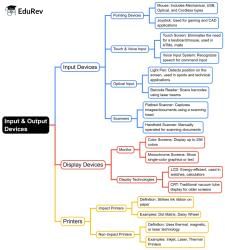
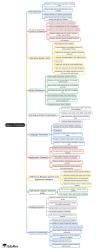
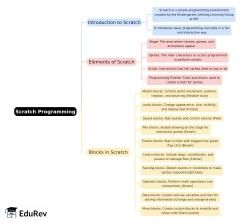
Access to the right study materials can make a significant difference in how well a student understands and retains computer science concepts at the SSS 1 level. Our collection includes mind maps, worksheets, and detailed notes on topics ranging from types of software and communication systems to C language fundamentals and desktop peripherals. These resources are crafted to present information in a logical, easy-to-follow sequence that builds conceptual clarity. Using a variety of study materials - rather than relying on a single source - leads to a more rounded and thorough understanding of the subject.
Output Devices
Computer System Software
Computing Application Software
Topic-Wise Notes and Worksheets to Prepare for SSS 1 Computer Exams
Organised, topic-wise notes and worksheets allow students to focus their preparation on one area at a time, making the entire syllabus feel more manageable. For Computer & IT SSS 1, this means having dedicated resources for subjects like data extraction and information processing, networking basics, and programming fundamentals. Here are some of the key benefits of using topic-wise study materials:
- Easier to review specific topics without sorting through an entire textbook
- Worksheets reinforce learning through structured practice and application
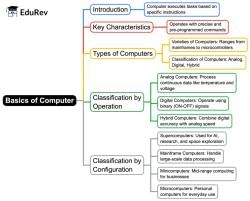
- Mind maps provide a visual summary of complex topics at a glance
- Helps prioritise areas that carry more weight in assessments
Programming Language
BASIC Program Language
Communication Systems
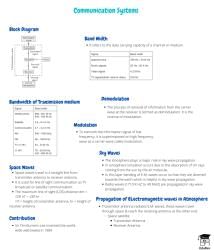
Download Free PDF Resources to Master SSS 1 Computer & IT Syllabus
Having access to downloadable study resources means your preparation is never interrupted by connectivity issues or lack of access to physical books. Our free PDF materials for SSS 1 Computer & IT include worksheet solutions, poster-style summaries, and comprehensive notes on all major syllabus areas. These resources are especially useful during revision periods when students need quick, reliable references rather than lengthy explanations. Whether you are preparing for a class test or an Olympiad, having these materials readily available puts you in a strong position to succeed.