The Memory Hierarchy

Introduction to Memory Hierarchy
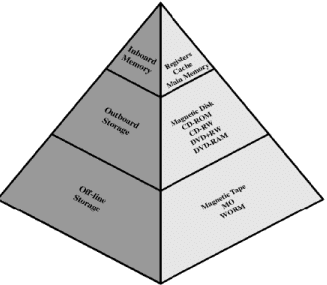
The memory hierarchy organises the various storage devices in a computer system so that the processor can obtain data at the highest possible speed while the overall cost of storage is kept reasonable. Different memory technologies trade off three principal characteristics: capacity, cost per bit and access time. A single memory technology cannot simultaneously provide very large capacity, very low cost and very short access time; the hierarchy combines technologies so that the system gains the best of each.
Why use a hierarchy?
- Not all information is needed by the CPU at the same time; most programs repeatedly access a small fraction of their data and instructions.
- Fast memories are expensive per bit and therefore used in small amounts close to the CPU; slower memories are cheaper and used for large-capacity backup.
- Using several levels of storage gives both high effective speed (by keeping frequently used items in fast memory) and large overall capacity (by storing less-used items in low-cost devices).
- The memory unit that communicates directly with the CPU is called the main memory. Devices that provide large, persistent backup storage are called auxiliary memory.
- The main memory occupies a central position: it can communicate directly with the CPU and with auxiliary memory devices (often through an I/O processor).
- A special, very-high-speed memory called cache is used to increase processing speed by making currently used instructions and data available to the CPU at a rapid rate.
- CPU logic is usually faster than main memory access; hence processing speed is often limited by memory access times and is improved by cache.
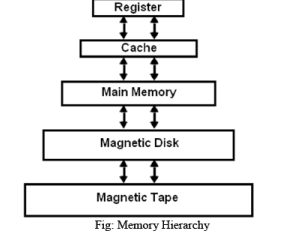
- The memory hierarchy therefore spans from very fast, small storage near the CPU to very slow, very large storage as auxiliary devices; the levels cooperate to give both performance and capacity.
Structure of the hierarchy
- Registers - the fastest, smallest storage inside the CPU used for immediate computation.
- Level 1 (L1) cache - small and very fast; often split into instruction and data caches.
- Level 2 (L2) cache - larger and slower than L1; may be on-chip or off-chip.
- Main memory (RAM) - larger capacity, slower access; directly accessible by the CPU.
- Disk cache - buffer between main memory and disk to reduce disk I/O.
- Disk (HDD/SSD) - large, persistent storage used as primary auxiliary memory.
- Optical (CD/DVD/BD) - removable media for distribution and backup.
- Tape - very high capacity and very low cost per bit, used for archival backup.
Behaviour as you move down the hierarchy
- Cost per bit decreases - lower levels are cheaper to build per unit of storage.
- Capacity increases - lower levels provide much larger storage space.
- Access time increases - lower levels are slower to access.
- Frequency of access decreases - the processor accesses higher-level (faster) memory far more frequently than lower-level memory.
Cache: purpose and basic operation
Cache memory is a small, fast memory placed between the CPU and main memory. It holds copies of a subset of main memory that the CPU is likely to access soon. Cache operation relies on the principle of locality of reference:
- Temporal locality - if a location is referenced, it is likely to be referenced again soon.
- Spatial locality - if a location is referenced, nearby locations are likely to be referenced soon.
A cache stores data in units called blocks or lines. Each cached block is identified by a tag and located by an index (for set selection) and an offset (within the block).
Mapping techniques
- Direct mapping - each memory block maps to exactly one cache line determined by the index; simple and fast but may cause conflicts if multiple blocks map to the same line.
- Fully associative mapping - a memory block may be placed in any cache line; flexible but requires associative search hardware to compare tags with all lines.
- Set-associative mapping - a compromise: cache is divided into sets, each set contains several lines (ways); a memory block maps to exactly one set but can occupy any way within that set. Common designs are 2-way or 4-way set-associative.
Replacement and write policies
- Replacement policies determine which cache block to evict when a new block must be loaded: common policies are Least Recently Used (LRU), First-In First-Out (FIFO), and random.
- Write-through - on a write, data is written to both cache and main memory immediately; simpler but can increase memory traffic.
- Write-back (write-behind) - updates are made only to the cache block and the block is written back to main memory only when it is evicted; reduces memory writes but requires a dirty bit and more complex coherence control.
Cache performance metrics and formula
- Hit - requested data is found in cache.
- Miss - requested data is not in cache and must be fetched from lower-level memory.
- Hit ratio - fraction of accesses that are hits; miss rate = 1 - hit ratio.
- Miss penalty - extra time required to fetch data from lower-level memory on a miss.
- Effective Access Time (EAT) - average time to access memory taking into account hits and misses. The basic formula is: EAT = (hit ratio × tcache) + (miss rate × tmemory), where tcache is cache access time and tmemory is the time to access the required data from lower-level memory including the miss penalty.
Example calculation:
- Given tcache = 1 ns, tmemory = 100 ns and hit ratio = 0.98, compute EAT.
EAT = (0.98 × 1 ns) + (0.02 × 100 ns) = 0.98 ns + 2.0 ns = 2.98 ns.
Main memory, virtual memory and the TLB
Main memory (RAM) is larger and slower than cache and is the primary workspace for programs. When main memory is insufficient for all active data, the system uses virtual memory to give the illusion of a much larger address space by storing some pages on disk and bringing them into RAM on demand. This introduces page faults when a referenced page is not in main memory and must be loaded from disk.
The Translation Lookaside Buffer (TLB) is a small, fast cache that stores recent virtual-to-physical page translations; the TLB sits between the CPU and the page table and greatly speeds up address translation. The TLB itself is part of the memory hierarchy and obeys the same hit/miss and locality principles as caches.
Distinction between cache and virtual memory: caches operate on blocks (cache lines) and speed up access to main memory; virtual memory operates on pages and provides a large address space backed by disk. Both use similar ideas (locality, caching) but serve different purposes and operate at different granularities and levels.
Auxiliary memory and trade-offs
Auxiliary devices (disk, optical, tape) provide persistent storage at much lower cost per bit than main memory and cache. Designers decide how much to invest at each level of the hierarchy by weighing the trade-offs: increasing capacity often increases average access time but reduces cost per bit; increasing speed reduces capacity available at a given cost.
Therefore, designers usually place small, fast memories as close to the CPU as practical (registers and caches), larger and slower memories further away (main memory and disk), and very large but slow, cheap media at the bottom for archival storage (tape and optical). Multi-level caches (L1, L2, L3) are common to smooth the performance/cost curve.
Design considerations and additional topics
- Inclusion and exclusion - multi-level cache designs may enforce that an upper-level cache's contents are included in the lower-level cache (inclusive) or kept exclusive; each choice has performance and coherence implications.
- Cache coherence - in multiprocessor systems, caches must be kept coherent so that copies of a memory location across different caches reflect a consistent value; coherence protocols (MESI, MOESI, etc.) are used.
- Block size - larger cache blocks exploit spatial locality but increase miss penalty and can raise conflict misses; block size is a key design parameter.
- Associativity - higher associativity reduces conflict misses but increases access time and complexity; set-associative caches balance these considerations.
- Cost-performance balance - overall system performance depends on hit ratios, miss penalties, and the relative speeds and costs of each level; designers use simulation and workload analysis to choose sizes and policies.
Summary
The memory hierarchy organises storage into multiple levels so that frequently used data is available quickly and infrequently used data is stored cheaply. Key concepts are locality of reference, cache organisation (mapping, replacement, write policies), performance metrics (hit ratio, miss penalty, effective access time), and the interaction of cache, main memory and virtual memory. Understanding these topics allows designers and programmers to make choices that improve observed performance while controlling cost and capacity.
FAQs on The Memory Hierarchy
| 1. What is the memory hierarchy in computer science engineering? |  |
| 2. How does the memory hierarchy improve computer performance? | |
| 3. What is the role of cache memory in the memory hierarchy? | |
| 4. How is data transferred between different levels of the memory hierarchy? | |
| 5. What are the trade-offs involved in designing the memory hierarchy? | |



 | Explore Courses for Computer Science Engineering (CSE) exam |  |
 | Get EduRev Notes directly in your Google search | |