Intro to Database


What is Database?
Database is a organised collection of information that is stored so it can be easily accessed, managed and updated. A database stores related data items together in a structured form to support efficient retrieval, insertion, update and deletion operations.
What is a Database Management System?
Database Management System (DBMS) is a software package designed to define, manipulate, retrieve and manage data in a database. A DBMS enforces rules for data integrity, security and concurrency, and provides interfaces for users and applications to interact with the data. Fourth‐generation query languages such as SQL (Structured Query Language) are commonly used with DBMSs to express queries and data manipulation commands.
Core services provided by a DBMS include:
- Data definition and data dictionary services.
- Data manipulation and query processing.
- Transaction management and concurrency control.
- Recovery and backup after failures.
- Security and access control.
Real‐time applications that commonly use DBMSs include:
- Banking: transaction processing, account management, ledgers.
- Airlines: reservation systems, schedules, seat inventory.
- Universities: student registration, grades, course management.
- Manufacturing: production planning, inventory, supply chain.
- Healthcare: patient records, prescriptions, appointment systems.
Advantages of a DBMS
- Controls data redundancy: Data is organised centrally so unnecessary duplication is minimised.
- Data sharing: A DBMS allows authorised users and applications across an organisation to share data concurrently.
- Data consistency: Because each data item is stored in a single place with integrity constraints, updates are reflected throughout the system.
- Integration of data: Data stored in tables with well‐defined relationships makes retrieval and updates easier and more meaningful.
- Data security: Access privileges and authentication mechanisms restrict access to sensitive information (for example, financial data or salaries).
- Backup and recovery: DBMSs include utilities for periodic backup and mechanisms to recover the database after hardware, software or other failures.
- Concurrent access: A DBMS manages simultaneous access by multiple users and preserves correctness through concurrency control.
Components of a Database System
- Data
- Hardware
- Software
- Users
Data
Data is the primary component of a database. It includes:
- User data: the actual application data stored in tables (for example, customer records, transactions).
- Metadata: data about the data, such as the number of tables, field names and types, and constraints. The metadata is often stored in a system catalogue or data dictionary.
- Application metadata: structure and format of queries, stored procedures, or application schemas that describe how user data is used.
Hardware
Hardware refers to the physical devices that store and process data. Typical components include storage devices (hard disks, solid‐state drives, optical media), servers, network interfaces, and input/output devices required for database operations.
Software
Software comprises the DBMS itself and any tools used to manage, query and manipulate the data. The DBMS mediates between users/applications and the stored data. Examples of widely used DBMS products include relational systems such as MySQL, PostgreSQL and Oracle Database; these provide query engines, transaction managers and utilities for administration.
Users
Users are the people and programs that interact with the database. Typical user categories are:
- Database Administrators (DBAs): responsible for installation, configuration, tuning, backup, recovery and security.
- Database designers: design the logical and physical schema, relationships and constraints.
- Application programmers: write application code, queries and stored procedures that use the database.
- End users: individuals who query and update the database using applications or query tools; they may be casual, naive or sophisticated users depending on expertise.
Basic Concepts: Schema, Instance and Data Models
Schema is the overall logical design or structure of the database described in a data definition language. Instance is the data stored in the database at a particular moment (the current contents).
Data models describe how data is organised. The most common model for introductory study is the relational model, where data is organised into tables (relations) with rows (tuples) and columns (attributes). Key concepts in the relational model include:
- Primary key: an attribute (or set of attributes) that uniquely identifies a row in a table.
- Foreign key: an attribute in one table that refers to the primary key of another table, establishing a relationship.
- Normalization: a set of techniques to organise tables to reduce redundancy and avoid update anomalies.
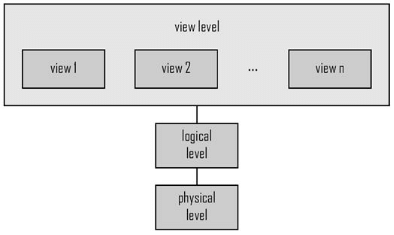
Levels of Abstraction
Physical Level
The physical level describes how data is actually stored on storage media (for example, file structures, indexes, pages). It deals with record placement, storage formats and access paths.
Logical Level
The logical level describes what data is stored in the database and the relationships among those data items. It defines the logical schema seen by DBAs and designers. Example of a logical description for a customer record:
| Attribute | Type |
| cust_id | int |
| cust_name | string / varchar |
| cust_city | string / varchar |
View Level
The view level is the highest level of abstraction. Views present subsets of the database for particular users or applications and hide irrelevant details. Views can also enforce security by hiding sensitive attributes (for example, employee salary).
Transactions and ACID Properties
A transaction is a logical unit of work that may consist of multiple read and write operations. DBMSs ensure transactions follow the ACID properties:
- Atomicity: all parts of a transaction succeed or none do.
- Consistency: a transaction transforms the database from one valid state to another, preserving integrity constraints.
- Isolation: concurrent transactions appear to execute serially; intermediate results are not visible to others.
- Durability: once a transaction commits, its changes persist even after system failures.
FAQs on Intro to Database
| 1. What is a database? |  |
| 2. What are the advantages of using a database? | |
| 3. What is a relational database? | |
| 4. What is the role of a database management system (DBMS)? | |
| 5. What is SQL and its importance in databases? | |