Create First HTML / IT Project

STEP 1: CREATE A FOLDER STRUCTURE FOR YOUR WEB PAGE
Let's create a folder structure to support your web page. A well-designed folder structure will help you quickly navigate to the HTML or CSS files that contain your code.
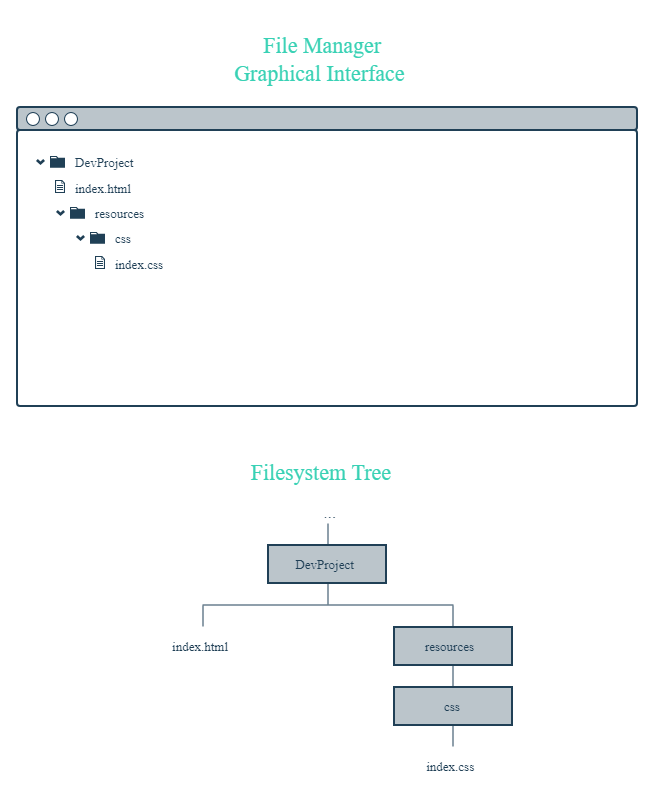
First, open Finder (in Mac) or Explorer (in Windows). Next, create a folder (also known as a directory) called Dev Project. This folder will contain all of the files for your HTML and CSS project.
Open the Dev Project folder. Inside, create the following items:
- A new file called index.html (use your preferred text editor)
- A new folder called resources
The index.html file will contain the HTML code for your web page, while the resources folder will contain all of the necessary resources needed by the HTML files (CSS files, images, etc.).
Next, open the newly created resources folder. Inside of this folder, create the following:
- An additional folder named css
The css folder will contain the CSS files needed to style your web page.
Finally, open the css folder you just created. Inside of this folder, create the following:
- A new file named index.css (use your preferred text editor)
The index.css file will contain all of the CSS styling rules that will be applied to your web page.
This overall folder structure will help support your workflow as you add files or resources. At a high-level, here's what it should look like:
STEP 2: ADD CONTENT TO YOUR WEB PAGE
Great! With your folder structure, HTML, and CSS files all in the right place, we can add content to the web page.
First, open the index.html file in your preferred text editor. Next, add the required boilerplate HTML code:
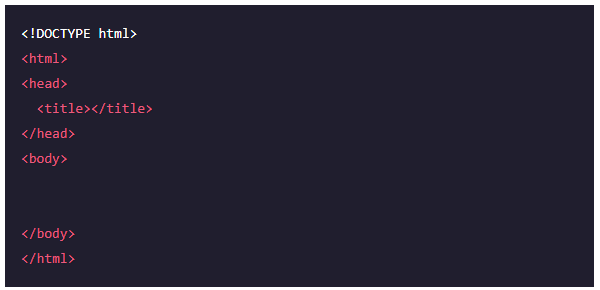
After you add the boilerplate HTML code, feel free to also add the following items:
- Your own title between the
<title>tags - Your own content within the
<body>tags. If you need some quick, pre-written content, feel free to use the following and modify as you wish:
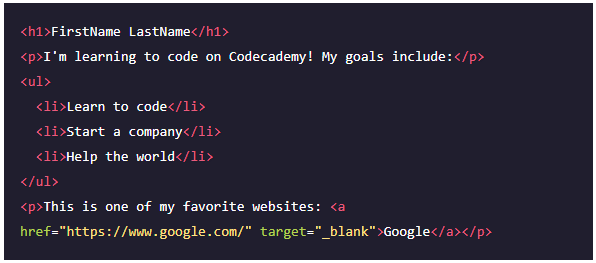
Finally, open the index.css file in your preferred text editor. Add the following pre-written CSS rules to the file (feel free to modify as you wish):
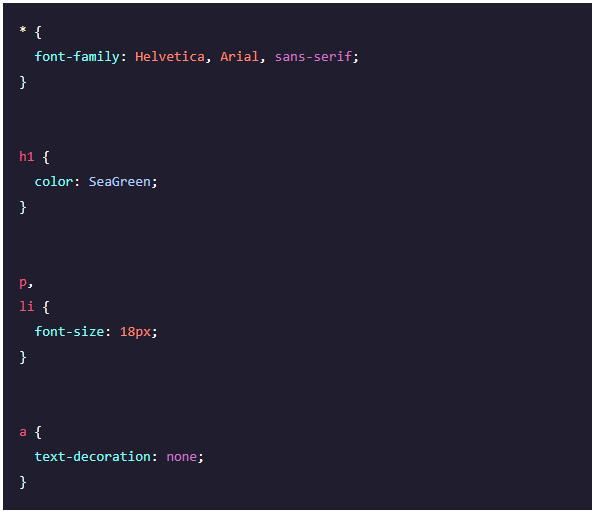
Be sure to save your changes for both files!
STEP 3: LINK YOUR HTML FILE AND CSS FILE
As it turns out, the HTML content you added will not be styled by the CSS rules unless index.html and index.css are linked together. In the <head>section, link the stylesheet to the HTML file.

You might be wondering why the href attribute is set to ./resources/css/index.css. This is because you must specify exactly where the index.css file lives within your folder(s) relative to where index.htmllives (otherwise, the two files won't link).
Again, make sure to save your changes!
STEP 4: VIEW YOUR PROJECT
Great work - let's take a look at your web page in the browser.
Open your preferred web browser. In the menu bar, click on "File" and then click on "Open File..." (or equivalent). Navigate to your index.html file and then click "Open" (or equivalent). The browser should load your web page. What do you see?
At this point, feel free to make changes to your HTML or CSS code. Keep in mind that in order to view any new changes you make, you'll have to refresh your browser.
STUDENT: KING OF IT

