File Organization


File Organization in DBMS
A database contains a very large amount of data. In a relational DBMS a user typically sees data organised as tables, with each table containing related records (rows). Physically, however, this bulk data is stored on secondary storage devices (for example, magnetic disks, magnetic tapes, optical disks) as files. A clear understanding of file organisation and access methods is essential for efficient storage, retrieval and update of data.
File and File Organization - basic definitions
File: A file is a named collection of related information recorded on secondary storage.
File Organization: File organisation describes the logical relationship among the records that constitute a file, especially with respect to how records are identified and how a particular record is accessed. In other words, it is the method used to store records within a file on disk so that required records can be found, inserted, deleted and updated efficiently.
File Structure: The file structure refers to the physical format of record blocks, control records and any metadata kept to manage the file.
Why file organisation matters
- Choice of file organisation affects the cost (time and I/O) of common operations such as search, insertion, deletion and update.
- Different applications have different access patterns: some require sequential scans, others frequent random lookups by key, still others range scans. The organisation should match expected access patterns for performance.
- File organisation also affects space utilisation, fragmentation, and the complexity of maintaining the file as the database grows or shrinks.
Common types of file organisation
- Sequential file organisation
- Heap (unordered) file organisation
- Hash file organisation
- B+ tree file organisation
- Clustered file organisation
Each method has advantages and disadvantages. The DBMS designer selects the most appropriate method according to data size, access patterns and performance requirements.
Sequential File Organisation
In sequential organisation records are stored one after another in a defined order (usually sorted on a key). There are two common implementations:
Pile file (append-only) method
Records are inserted at the end of the file in the order they arrive. There is no attempt to keep records in any key order.
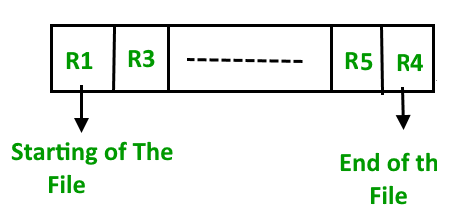
Insertion example
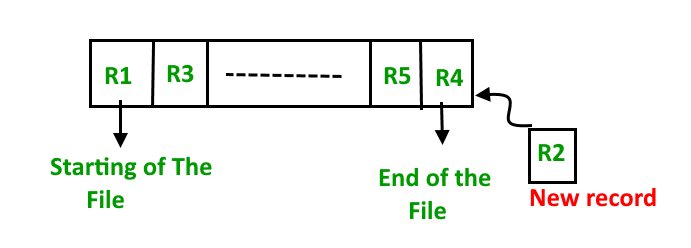
When a new record arrives it is appended; no reordering or shifting of existing records is performed.
- Pros: Simple to implement; fast insertions since records are appended.
- Cons: Sequential scans are required to find particular records unless an index exists; poor performance for random lookups.
Sorted (ordered) file method
Records are stored in sorted order according to a chosen key (for example, primary key). On insertion the record must be placed in the appropriate position to preserve ordering.
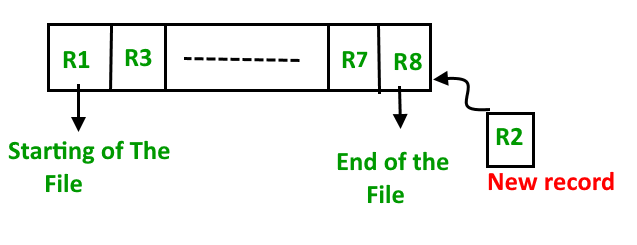
Insertion example
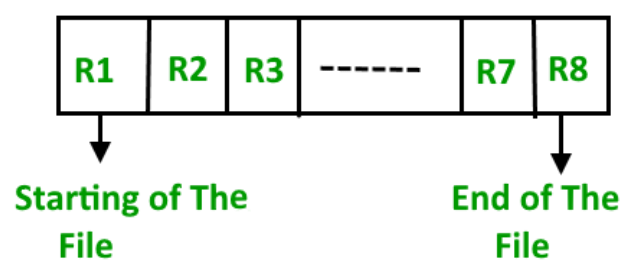
- Pros: Efficient for range queries and sequential processing; useful when many queries request sorted output.
- Cons: Insertions and deletions are costly because records may need to be shifted or files reorganised; expensive for large datasets unless auxiliary structures (like logs or overflow areas) are used.
Heap (Unordered) File Organisation
In heap organisation records are placed into the file without any particular ordering. Records are typically placed in the first available slot inside a data block; when a block becomes full the DBMS stores subsequent records in another block chosen by the storage manager.
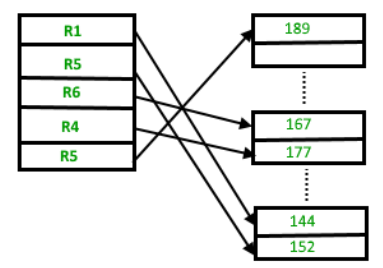
Insertion example
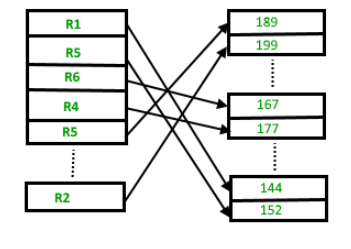
To retrieve, update or delete a particular record the system must search blocks until the record is found (unless an index exists). For very large files this linear search can be expensive.
- Pros: Fast insertion; useful for bulk loading large amounts of data; simple to implement.
- Cons: Inefficient for direct lookups (without an index); fragmentation and unused space inside blocks can waste storage; not suited for workloads dominated by random access reads.
Record blocking and record format (related concepts)
Files are organised into blocks (or pages) on disk. A block may store several records. Important related concepts:
- Blocking factor - the number of records that fit into a block. If block size is B bytes and record size is R bytes (assuming fixed-length records), then blocking factor ≈ floor(B / R).
- Fixed-length vs variable-length records - fixed-length records simplify addressing and blocking; variable-length records require additional information (length fields or delimiters) and may cause internal fragmentation.
- Pointer schemes (for example, free-space pointers, overflow chains) are used to manage block occupancy and deleted-record reuse.
Indexing versus file organisation
File organisation determines how records are laid out on disk. Indexes are auxiliary structures that map search keys to record locations and can be built on top of any file organisation. A good file organisation reduces the need for heavy indexing or improves index performance; conversely, indexes can mitigate weaknesses of a file organisation.
Hash File Organisation
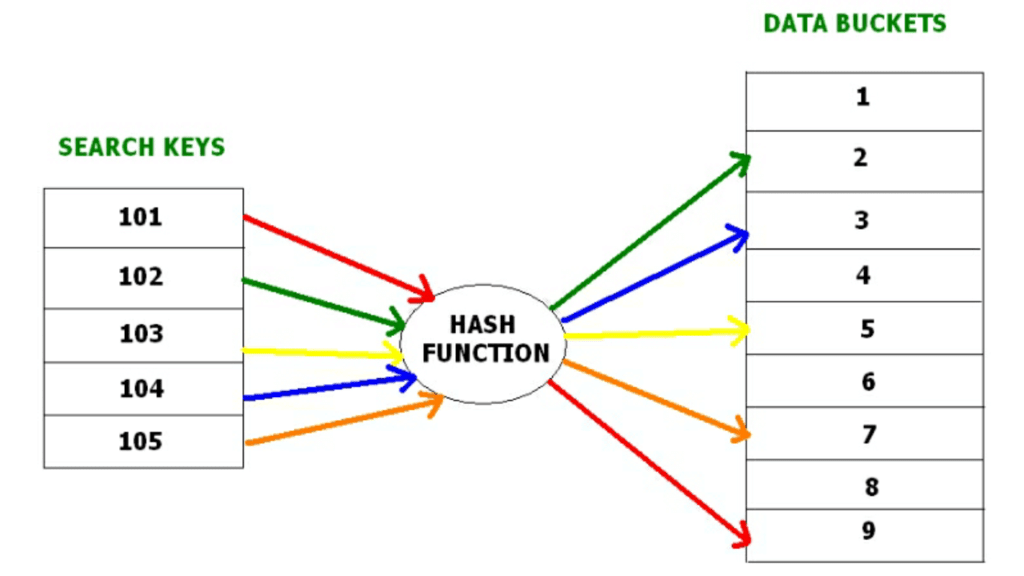
Hashing is an efficient technique to map a search key (for example, a primary key) to a physical location (a bucket or block) with the help of a hash function. Hashing supports near-constant-time direct access to records when lookups are by the hash key.
Key concepts
- Data bucket - the unit of storage (block or set of records) where hashed records are stored.
- Hash function - a mapping function that takes a key and computes an address (bucket number). A simple example is h(K) = K mod N.
- Hash index - a value derived from the hash function (for example, a prefix of the hash value). A depth value may be used to indicate how many bits of the hash are used to address buckets. When the depth increases, more buckets may be allocated.
Types of hashing
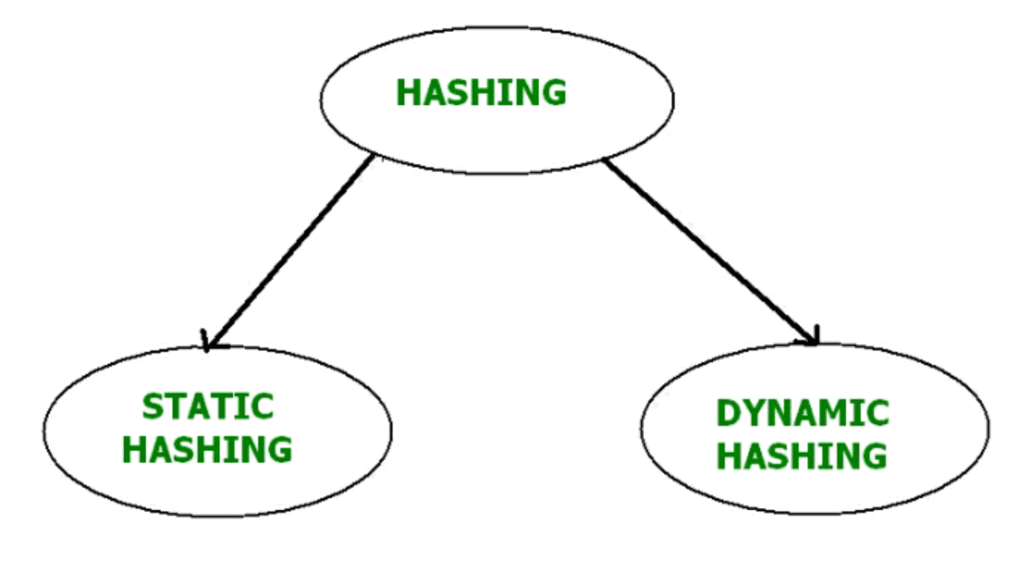
Static hashing
In static hashing the hash function maps a key to the same bucket address always. The number of buckets remains fixed.
Example: with h(K) = K mod 5, STUDENT_ID = 76 maps to bucket 4. This bucket assignment never changes in static hashing.
Operations (static hashing)
- Insertion: Compute bucket address b = h(K); place the record into bucket b (handle overflow if the bucket is full).
- Search: Compute b = h(K); examine bucket b to find the record.
- Deletion: Locate the record using the hash function and remove it from the bucket.
- Update: Find the record via h(K) and modify the contents in place; if the key changes, rehashing or relocation may be necessary.
Bucket overflow in static hashing - resolution methods
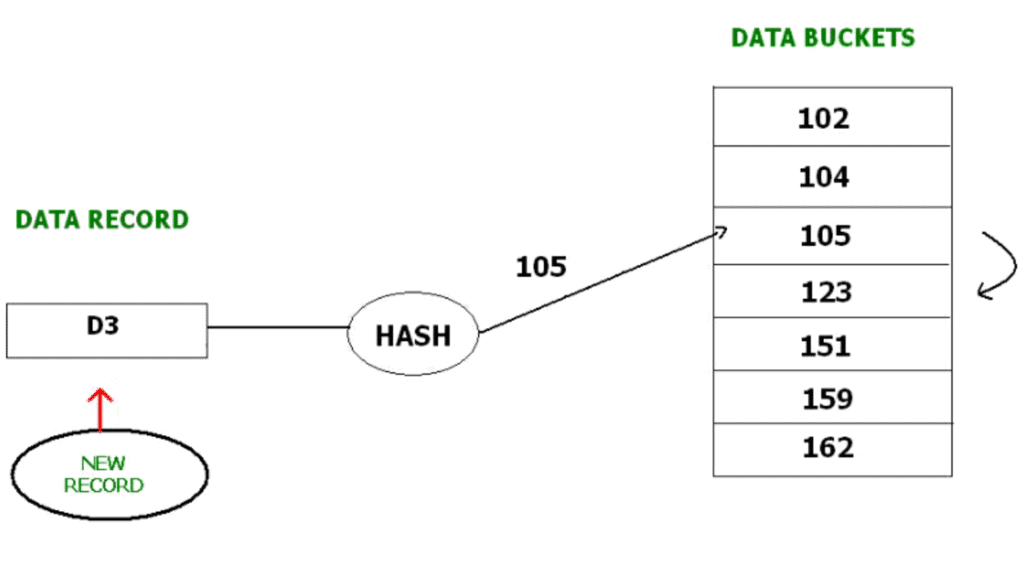
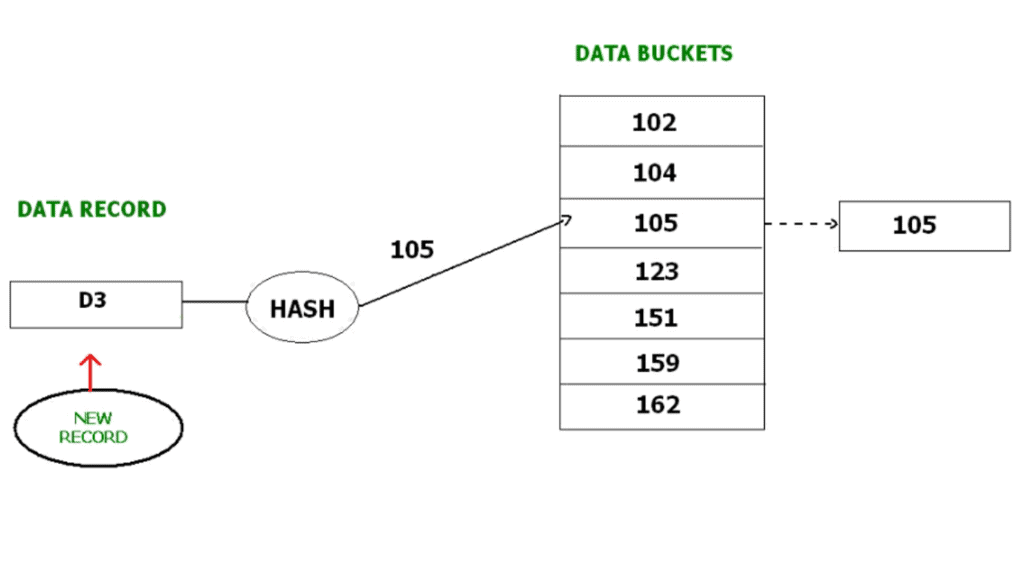
If multiple keys hash to the same bucket and the bucket is full, bucket overflow occurs. Common resolution methods:
- Open hashing (linear probing / open addressing): When the target bucket is full, search for the next available bucket (for example, by linear probing) and insert the record there. The probe sequence is typically linear: b+1, b+2, ... modulo table size.
- Closed hashing (overflow chaining): Keep an overflow chain (linked list) for the bucket. When the bucket is full, allocate an overflow bucket and link it to the full bucket; subsequent records that hash to the same bucket are stored in the chain.
- Quadratic probing: Open-addressing variant where probe offsets follow a quadratic function instead of linear steps (for example, b+1^2, b+2^2, ... ), reducing primary clustering.
- Double hashing: Use a second hash function to compute the probe step size. The i-th probe checks (h1(K) + i·h2(K)) mod N. This reduces clustering further compared to linear probing.
Dynamic hashing (extendible hashing)
Static hashing suffers when the number of records grows: fixed bucket count can lead to heavy overflow and poor performance. Dynamic hashing, also called extendible hashing, allows the hash table to grow or shrink as required.
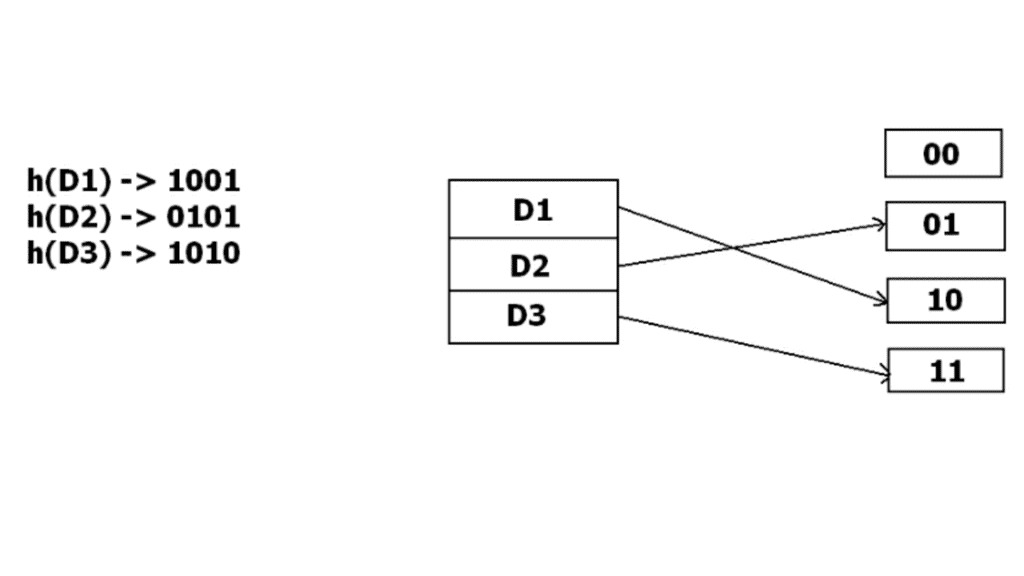
In extendible hashing the hash function produces many bits (for example a binary string). A directory uses a prefix of these bits to index buckets. Two levels of depth are used:
- Global depth: number of bits used by the directory to index buckets (i.e. directory size is 2^global_depth).
- Local depth: number of bits that a bucket recognises; two buckets may share the same prefix until one splits and its local depth increases.
When a bucket overflows, it is split: its local depth increases and records are redistributed according to the next bit(s) of their hash values. If local depth becomes larger than global depth the directory doubles (global depth increases) so that pointers can distinguish the split buckets.
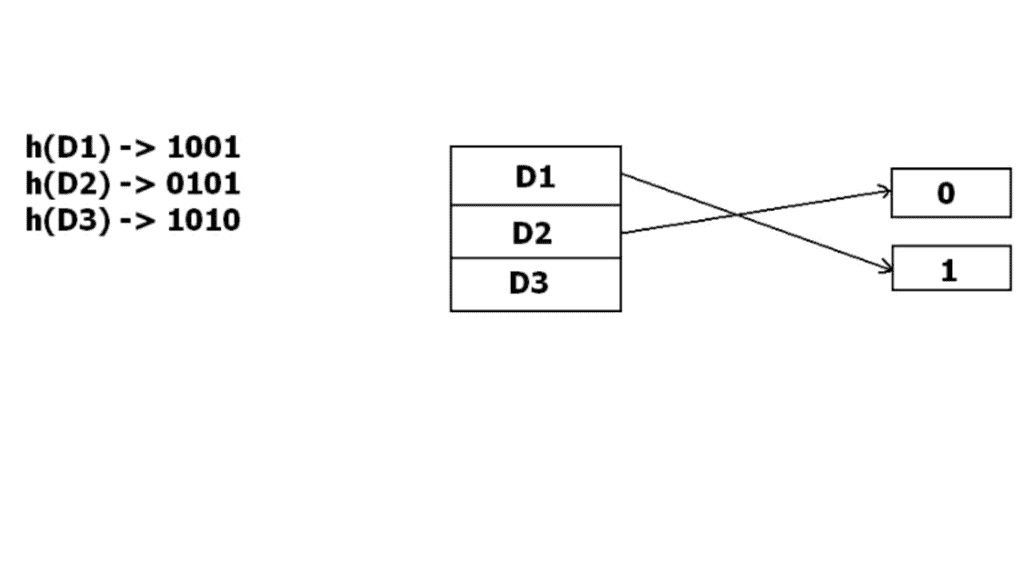
Example: if initially 1 bit is used, buckets are addressed by 0 or 1. When one bucket overflows, buckets may be re-addressed using 2 bits and the directory updated so that the new record can be accommodated.
B+ Tree File Organisation
B+ Tree is a balanced tree data structure commonly used for indexing in databases and for organising file records when sorted access and range queries are important. It is a variation of a B-tree where all actual records (or pointers to records) are stored in the leaf nodes and internal nodes store only keys and child pointers.
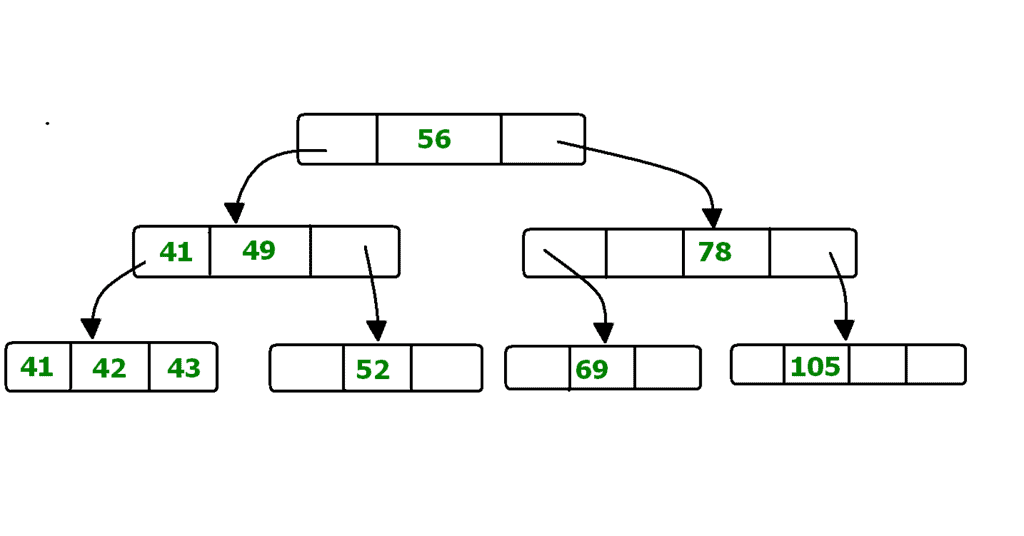
Key properties:
- Internal nodes contain keys and pointers to child nodes; they do not store full records.
- Leaf nodes contain the actual records or pointers to records and are linked together as a sequential linked list to support range queries efficiently.
- The tree is height-balanced; all leaf nodes are at the same level.
- Each node (except root) is at least half full; the branching factor controls the tree height and disk I/O.
Advantages:
- Efficient search, insertion and deletion with logarithmic height; fewer disk accesses compared with binary search trees for large datasets.
- Range queries are efficient because leaves are linked sequentially.
- Tree grows and shrinks dynamically; no full-file reorganisation needed for many updates.
Disadvantages:
- There is overhead for maintaining tree balance on inserts and deletes; not optimal if the table is completely static and only occasionally accessed.
Clustered File Organisation
In clustered file organisation, two or more relations that are frequently accessed together are stored in the same file or physical cluster. Related records from different tables are stored together using the cluster key so that join and related queries require fewer I/O operations.
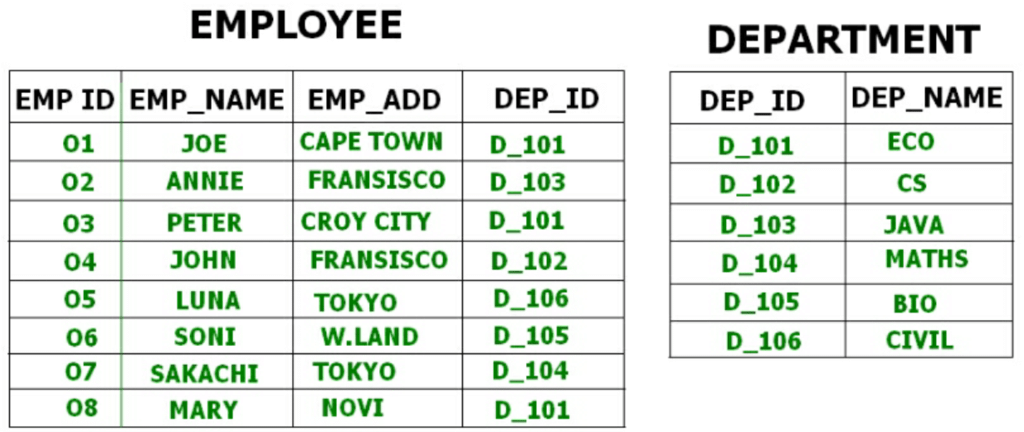
Example: an Employee table and a Department table may be clustered by Department ID so that employee tuples for the same department and the department tuple are stored close together on disk. This reduces I/O cost for queries that access both relations together.
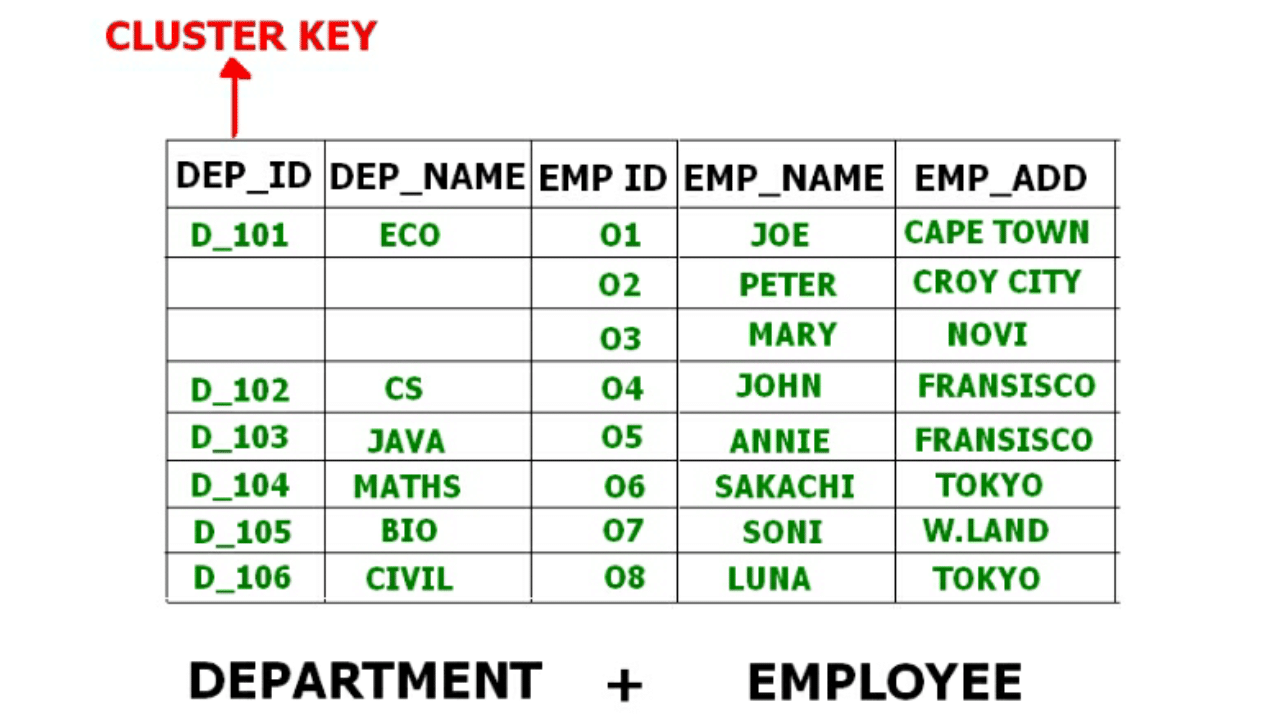
Clustered organisation stores key attributes used for joining only once per cluster or arranges records physically so that related records are co-located. This can significantly speed up join queries and other multi-relation accesses.
Types of clustering
- Indexed clusters: Records from different relations are grouped based on a cluster key and an index maps the cluster key to the group location.
- Hash clusters: Records are grouped by applying a hash function on the cluster key so that records with the same hash value are co-located in the same cluster.
Choosing a file organisation - practical guidelines
- Choose sequential (sorted) organisation when many accesses are range queries or when output must be produced in sorted order frequently.
- Choose heap organisation when bulk loading and append-only workloads dominate and random access is infrequent or when there are strong secondary indexes.
- Choose hashing when lookups by an equality key are the dominant operation and range queries are rare.
- Choose B+ trees when both point lookups and range queries are common, or when the data must support ordered scans efficiently.
- Consider clustering when several relations are frequently joined on the same key and co-location will reduce I/O.
Performance metrics and practical considerations
- Measure performance in terms of disk I/O (number of block reads/writes), CPU time, and response time for typical queries.
- Consider update costs: some organisations (sorted files, B+ trees) incur higher overheads on insert/delete than heap files.
- Space utilisation and fragmentation: organisation and choice of blocking factor affect wasted space and the need for periodic reorganisation.
- Concurrency and recovery: the organisation can affect locking granularity and recovery mechanisms (for example, page-level locks versus record-level locks).
Short summary
File organisation determines how records are laid out on secondary storage and plays a central role in database performance. Common organisations-sequential, heap, hash, B+ tree and clustered-each suit different access patterns. Understanding the trade-offs of insertion, deletion, search and range queries, together with blocking and indexing strategies, allows designers to choose an organisation that meets application requirements while minimising I/O and maintaining scalability.
FAQs on File Organization
| 1. What is file organization in DBMS? |  |
| 2. What is sequential file organization? | |
| 3. What is indexed sequential file organization? | |
| 4. What is direct file organization? | |
| 5. What is hashed file organization? | |


 | Explore Courses for Computer Science Engineering (CSE) exam |  |
 | Get EduRev Notes directly in your Google search | |