Priority CPU Scheduling


Overview
Priority scheduling is a CPU scheduling technique in which the operating system selects the next process to run on the CPU according to a priority value assigned to each process. Processes with higher priority are selected for execution before those with lower priority.
Scope: This document explains the concept, types, working, example, characteristics, advantages and disadvantages, priority assignment methods (static and dynamic), related queue-based scheduling schemes, and common scheduling metrics related to priority scheduling. It does not contain program implementations in any programming language.
What is the Priority Scheduling Algorithm?
The operating system is responsible for deciding the order in which processes obtain the CPU and the amount of CPU time each process receives. This activity is called process scheduling. The scheduler maintains information about processes (process table), and each process has a Process Control Block (PCB) and a unique Process ID (PID).
Scheduling decisions can be based on various criteria such as shortest job first, first-come-first-served, round-robin, and priority. In priority scheduling, each process is assigned a priority value and the scheduler always selects the ready process having the highest priority. The assignment and interpretation of the priority value depend on the system and convention in use.
Common factors that may be considered when assigning priority include:
- task deadlines or time limits
- memory requirements
- ratio of average I/O burst to average CPU burst (I/O-bound processes often receive higher priority to improve responsiveness)
- user or system-defined importance
Priority values are typically represented as integers in a fixed range (for example, 0-7 or 0-4095). Note that systems may follow different conventions: in some systems a lower numeric value means higher priority, while in others a larger numeric value means higher priority. The convention must be known when interpreting priorities.
Scheduling Metrics (important terms and formulas)
When evaluating scheduling algorithms, the following metrics are commonly used:
- CPU utilisation: fraction or percentage of time CPU is busy.
- Throughput: number of processes completed per unit time.
- Turnaround time: completion time - arrival time for a process.
- Waiting time: total time a process spends in the ready queue waiting for the CPU.
- Response time: time from submission until the first response is produced (for interactive systems).
These metrics are used to compare scheduling algorithms and to tune priority assignments. Lower waiting and turnaround times and higher throughput and CPU utilisation are desirable.
Types of Priority Scheduling
Priority scheduling exists in two main forms:
- Non-preemptive priority scheduling
- Preemptive priority scheduling
Non-preemptive Priority Scheduling
In non-preemptive priority scheduling, once the CPU has been allocated to a process, that process continues until it completes its CPU burst or voluntarily releases the CPU (for example, to perform I/O). If a new process with a higher priority arrives while another process is running, the current process will not be interrupted; the scheduler will select the higher priority process only when the CPU becomes free.
Preemptive Priority Scheduling
In preemptive priority scheduling, the currently running process may be preempted (suspended) if a new process arrives with a higher priority. The higher priority process is then given the CPU immediately. After the higher priority process finishes or is blocked, the preempted process may resume execution according to the scheduling policy.
Characteristics of Priority Scheduling
- Selection of processes is based on a numeric priority value associated with each process.
- Priority scheduling is commonly used in systems that need to differentiate the importance of tasks (for example, real-time or interactive systems and some batch systems).
- If two or more processes in the ready queue have the same priority, a tie-breaking policy such as first-come, first-served (FCFS) is commonly applied.
- The interpretation of priority numbers varies by system: some use lower numbers to mean higher priority; other systems use the opposite convention.
- The ready queue is often implemented as a priority queue (for example, a heap) so the scheduler can efficiently choose the highest priority process.
Example: Preemptive Priority Scheduling (conceptual walkthrough)
This example follows the same sequence of steps shown in the original example: five processes P1 ... P5 with given arrival times, burst times and priorities. Definitions first:
- Arrival time: the time at which a process becomes ready and joins the ready queue.
- Burst time (CPU burst): the total CPU time required by the process.
Process parameters are shown in the table below (refer to the image for the concrete values):
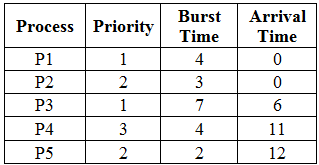
We construct a Gantt chart to track which process runs at each time unit. At time 0 the scheduler examines the ready queue and selects the highest priority process among those that have already arrived.
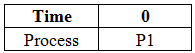
If multiple processes arrive at the same time, the scheduler selects the one with the higher priority; if priorities are equal, FCFS is used. In our example, at time 0 processes P1 and P2 have arrived. P1 has higher priority and is selected first.
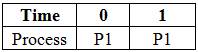
P1 executes from time 0 until it completes at time 4, as no higher priority process arrives in between.

After P1 completes, the scheduler picks the highest priority process in the ready queue. Initially P2 is next and begins execution; later P3 arrives at time 6 with a higher priority than P2, so P2 is preempted and P3 runs.

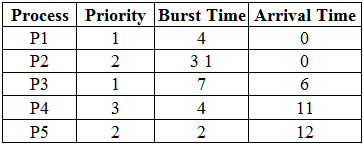

P3 continues until either it completes or is preempted by an even higher priority process. At time 11 P4 arrives but has lower priority than P3 so it waits; P3 completes at time 13.

When the CPU becomes free at time 13, the scheduler examines the ready queue (which contains P2, P4, P5). Between P2 and P5, if they have equal priority, the one with earlier arrival time (P2) is chosen first. P2 resumes for its remaining burst and completes at time 14.

Next P5 (higher priority than P4) runs and completes at time 16, then P4 runs from time 16 to 20 and completes.


The sequence shown in the Gantt charts and images illustrates preemptive priority scheduling where newly arriving higher priority processes can preempt the currently running process.
Advantages and Disadvantages
Advantages
- Important (high-priority) tasks receive CPU promptly and do not wait unnecessarily.
- Priority values allow the system to express relative importance of tasks and meet critical deadlines.
- Flexible when combined with other algorithms (for instance, high priority interactive tasks and lower priority batch jobs).
Disadvantages
- Low priority processes can suffer from starvation (indefinite postponement) if higher priority processes keep arriving.
- If priorities are assigned poorly or arbitrarily, important tasks may be delayed or low-priority tasks may be delayed excessively.
- Systems that lose power or crash may lose in-memory state of low priority jobs in certain batch contexts (this is an implementation/robustness concern rather than an algorithmic property, but is relevant for system design).
Preventing Starvation
A common technique to avoid starvation in priority scheduling is ageing. With ageing, the priority of a process is increased (or its numeric priority value adjusted) the longer it waits in the ready queue. Over time, a low-priority process gains higher effective priority and will eventually obtain the CPU.
Static and Dynamic Priorities
Priority assignment may be classified by when and how priorities are assigned:
- Static priority: priority is assigned at process creation or design time and remains constant for the lifetime of the process. Static priority schemes are simple to implement.
- Dynamic priority: priority can change at run time based on process behaviour, ageing, deadlines, or other runtime attributes (for example, a process that has waited for a long time, or a process approaching a deadline, may receive a higher priority). Dynamic schemes are more flexible and can improve fairness and responsiveness but are more complex to implement.
Related Schemes: Multilevel Queues and Multilevel Feedback Queues
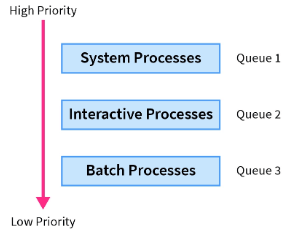
Multilevel queue scheduling organises the ready queue into several separate queues, each for a class of processes (for example, system processes, interactive processes, batch jobs). Each queue can have its own scheduling algorithm (for example, FCFS for batch jobs, SJF for short tasks). Queues themselves are assigned priorities; the scheduler selects processes from higher priority queues before lower priority ones.
Multilevel feedback queue scheduling extends multilevel queue scheduling by allowing a process to move between queues based on its observed behaviour (feedback). If a process uses too much CPU time, it may be moved to a lower priority queue; interactive processes that frequently block for I/O may be promoted to higher priority queues. This feedback mechanism improves responsiveness and allows the scheduler to adapt to changing process behaviour.
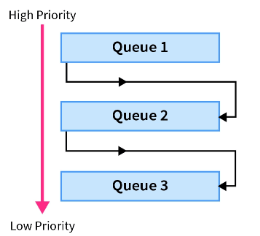
Multilevel feedback queues are more flexible than static multilevel queues, but care must be taken to prevent starvation of lower priority queues; techniques such as time quanta adjustments and ageing are commonly used.
Implementation Notes (conceptual)
- The ready queue for a priority scheduler is often implemented as a priority queue (for example, a binary heap) so that selection of the highest priority process is efficient.
- Tie breaking among equal priorities commonly uses FCFS order.
- Preemptive systems must support context switching: saving the PCB of the running process and restoring the PCB of the selected process.
Conclusion
- Priority scheduling selects processes for CPU service based on assigned priorities; higher priority processes are preferred.
- There are two primary execution modes: non-preemptive (running process continues until completion or block) and preemptive (running process can be interrupted by a higher priority arrival).
- Priorities may be static (fixed) or dynamic (changed at runtime); dynamic approaches and ageing are used to reduce starvation.
- Related schedulers include multilevel queues and multilevel feedback queues, which group processes and may use different scheduling policies per group.
- Key trade-offs include responsiveness for high priority tasks versus fairness for lower priority tasks; appropriate use of ageing and dynamic adjustment helps balance the trade-offs.


 | Explore Courses for Computer Science Engineering (CSE) exam |  |
 | Get EduRev Notes directly in your Google search | |