How to customize your desktop background

Want your computer to feel a bit more like, well, your computer? You might want to consider changing your wallpaper.
The wallpaper is the image that appears behind the icons on your computer's desktop-that's why it's usually called a desktop background. On most computers, you can change your background by right-clicking the desktop and selecting Personalize.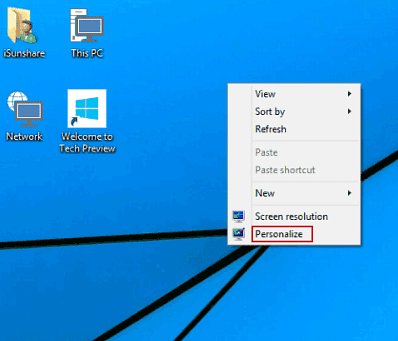
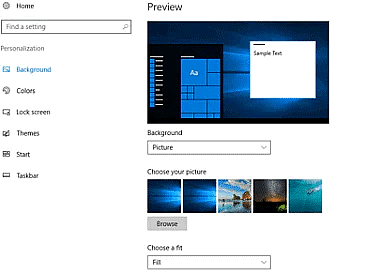
Then select Desktop Background. By default, you'll see the images that were included with your computer.
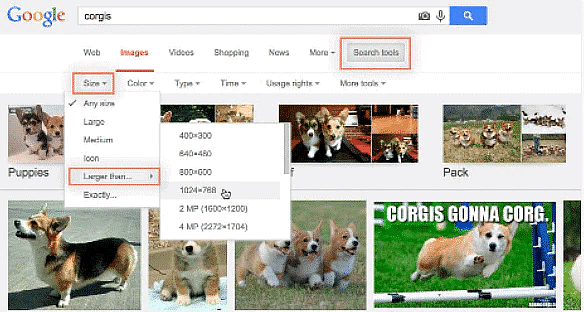
If you're looking for something specific, might we suggest Google Image Search? Its custom search tools allow you to search for images by size, which is perfect when you're looking for a large picture (we recommend an image that's at least 1024 x 768). Anything smaller will look pixelated or grainy when stretched across your desktop.
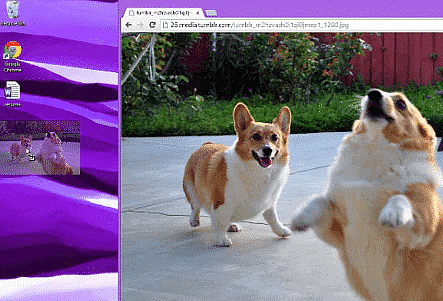
When you find an image you like, just select it and choose View image.
Then click and drag the picture to your desktop.
You can now set the image as your desktop background. Right-click the image and select Set as desktop background.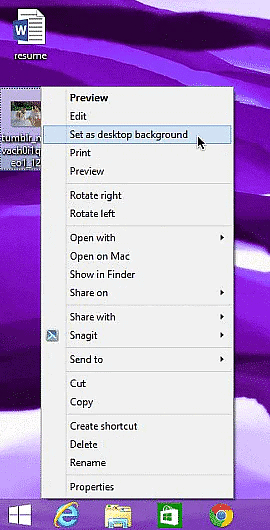
You can use this same technique to turn any of your personal photos into a desktop background.