C++ Introduction & Getting Started | C++ Programming for Beginners - Class 10 PDF Download
| Table of contents |

|
| What is C++? |
|
| Why Use C++ |
|
| Get Started |
|
| C++ Getting Started |
|
| C++ Install IDE |
|
| C++ Quickstart |
|
| Learning C++ |
|

What is C++?
- C++ is a cross-platform language that can be used to create high-performance applications.
- C++ was developed by Bjarne Stroustrup, as an extension to the C language.
- C++ gives programmers a high level of control over system resources and memory.
- The language was updated 4 major times in 2011, 2014, 2017, and 2020 to C++11, C++14, C++17, C++20.
Why Use C++
- C++ is one of the world's most popular programming languages.
- C++ can be found in today's operating systems, Graphical User Interfaces, and embedded systems.
- C++ is an object-oriented programming language which gives a clear structure to programs and allows code to be reused, lowering development costs.
- C++ is portable and can be used to develop applications that can be adapted to multiple platforms.
- C++ is fun and easy to learn!
- As C++ is close to C# and Java, it makes it easy for programmers to switch to C++ or vice versa.
Get Started
- This tutorial will teach you the basics of C++.
- It is not necessary to have any prior programming experience.
C++ Getting Started
To start using C++, you need two things:
- A text editor, like Notepad, to write C++ code
- A compiler, like GCC, to translate the C++ code into a language that the computer will understand
There are many text editors and compilers to choose from. In this tutorial, we will use an IDE (see below).
C++ Install IDE
- An IDE (Integrated Development Environment) is used to edit AND compile the code.
- Popular IDE's include Code::Blocks, Eclipse, and Visual Studio. These are all free, and they can be used to both edit and debug C++ code.
- Note: Web-based IDE's can work as well, but functionality is limited.
- We will use Code::Blocks in our tutorial, which we believe is a good place to start.
C++ Quickstart
- Let's create our first C++ file.
- Open Codeblocks and go to File > New > Empty File.
- Write the following C++ code and save the file as myfirstprogram.cpp (File > Save File as):
myfirstprogram.cpp
#include <iostream>
using namespace std;
int main() {
cout << "Hello World!";
return 0;
}
Don't worry if you don't understand the code above - we will discuss it in detail in later chapters. For now, focus on how to run the code.
In Codeblocks, it should look like this:
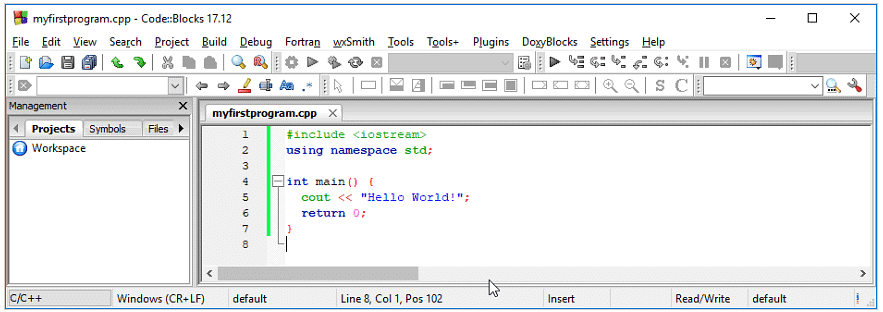
Then, go to Build > Build and Run to run (execute) the program. The result will look something to this:
Hello World!
Process returned 0 (0x0) execution time : 0.011 s
Press any key to continue.
Congratulations! You have now written and executed your first C++ program.
Learning C++
When learning C++ at W3Schools.com, you can use our "Try it Yourself" tool, which shows both the code and the result. This will make it easier for you to understand every part as we move forward:
myfirstprogram.cpp
Code:
#include <iostream>
using namespace std;
int main() {
cout << "Hello World!";
return 0;
}
Result:
Hello World!
|
15 videos|20 docs|13 tests
|
FAQs on C++ Introduction & Getting Started - C++ Programming for Beginners - Class 10
| 1. What is the importance of introduction and getting started in class 7? |  |
| 2. How can introduction and getting started help students in class 7? | |
| 3. What should students expect during the introduction and getting started phase in class 7? | |
| 4. How can students make the most out of the introduction and getting started phase in class 7? | |
| 5. Are there any specific tips or strategies for students to succeed during the introduction and getting started phase in class 7? | |



past year papers
,ppt
,Free
,Previous Year Questions with Solutions
,Objective type Questions
,Semester Notes
,Summary
,C++ Introduction & Getting Started | C++ Programming for Beginners - Class 10
,shortcuts and tricks
,practice quizzes
,Extra Questions
,Viva Questions
,C++ Introduction & Getting Started | C++ Programming for Beginners - Class 10
,Exam
,Important questions
,video lectures
,MCQs
,Sample Paper
,C++ Introduction & Getting Started | C++ Programming for Beginners - Class 10
,mock tests for examination
,study material
;



C++ Introduction & Getting Started Free PDF Download
Importance of C++ Introduction & Getting Started
C++ Introduction & Getting Started Notes
C++ Introduction & Getting Started Class 10 Questions
Study C++ Introduction & Getting Started on the App
|
© EduRev
|
Education Revolution
|


|