Python Keywords

Introduction
In programming, a keyword is a "reserved word" by the language which conveys special meaning to the interpreter. It may be a command or a parameter. Keywords cannot be used as a variable name in the program snippet.
Keywords in Python are reserved words that can not be used as a variable name, function name, or any other identifier.
List of all keywords in Python
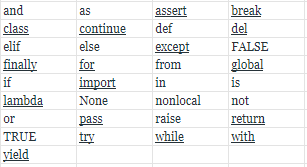
We can also get all the keyword names using the below code.
Example: Python Keywords List
Python3
# Python code to demonstrate working of iskeyword()
# importing "keyword" for keyword operations
import keyword
# printing all keywords at once using "kwlist()"
print("The list of keywords is : ")
print(keyword.kwlist)
Output:
The list of keywords is :
['False', 'None', 'True', 'and', 'as', 'assert', 'async', 'await', 'break', 'class', 'continue', 'def', 'del', 'elif', 'else', 'except', 'finally', 'for', 'from', 'global', 'if', 'import', 'in', 'is', 'lambda', 'nonlocal', 'not', 'or', 'pass', 'raise', 'return', 'try', 'while', 'with', 'yield']
Let's discuss each keyword in detail with the help of good examples.
True, False, None
- True: This keyword is used to represent a boolean true. If a statement is true, "True" is printed.
- False: This keyword is used to represent a boolean false. If a statement is false, "False" is printed.
- None: This is a special constant used to denote a null value or a void. It's important to remember, 0, any empty container(e.g empty list) does not compute to None.
It is an object of its datatype - NoneType. It is not possible to create multiple None objects and can assign them to variables.
Example: True, False, and None Keyword
Python3
print(False == 0)
print(True == 1)
print(True + True + True)
print(True + False + False)
print(None == 0)
print(None == [])
Output
True
True
3
1
False
False
and, or, not, in, is
- and: This a logical operator in python. "and" Return the first false value. If not found return last. The truth table for "and" is depicted below.
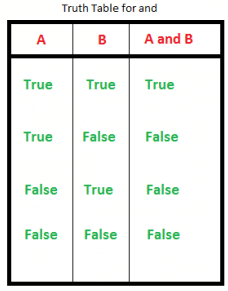
3 and 0 returns 0
3 and 10 returns 10
10 or 20 or 30 or 10 or 70 returns 10
The above statements might be a bit confusing to a programmer coming from a language like C where the logical operators always return boolean values(0 or 1). Following lines are straight from the python docs explaining this:
The expression x and y first evaluates x; if x is false, its value is returned; otherwise, y is evaluated and the resulting value is returned.
The expression x or y first evaluates x; if x is true, its value is returned; otherwise, y is evaluated and the resulting value is returned.
Note that neither and nor or restrict the value and type they return to False and True, but rather return the last evaluated argument. This is sometimes useful, e.g., if s is a string that should be replaced by a default value if it is empty, the expression s or 'foo' yields the desired value. Because not has to create a new value, it returns a boolean value regardless of the type of its argument (for example, not 'foo' produces False rather than ".)
- or: This a logical operator in python. "or" Return the first True value.if not found return last. The truth table for "or" is depicted below.
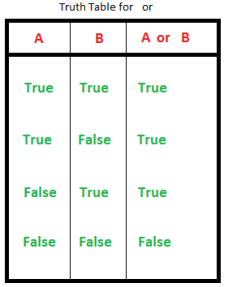
3 or 0 returns 3
3 or 10 returns 3
0 or 0 or 3 or 10 or 0 returns 3
- not: This logical operator inverts the truth value. The truth table for "not" is depicted below.
- in: This keyword is used to check if a container contains a value. This keyword is also used to loop through the container.
- is: This keyword is used to test object identity, i.e to check if both the objects take the same memory location or not.
Example: and, or, not, is and in keyword
Python
# showing logical operation
# or (returns True)
print(True or False)
# showing logical operation
# and (returns False)
print(False and True)
# showing logical operation
# not (returns False)
print(not True)
# using "in" to check
if 's' in 'geeksforgeeks':
print("s is part of geeksforgeeks")
else:
print("s is not part of geeksforgeeks")
# using "in" to loop through
for i in 'geeksforgeeks':
print(i, end=" ")
print("\r")
# using is to check object identity
# string is immutable( cannot be changed once allocated)
# hence occupy same memory location
print(' ' is ' ')
# using is to check object identity
# dictionary is mutable( can be changed once allocated)
# hence occupy different memory location
print({} is {})
Output:
True
False
False
s is part of geeksforgeeks
g e e k s f o r g e e k s
True
False
Iteration Keywords - for, while, break, continue
- for: This keyword is used to control flow and for looping.
- while: Has a similar working like "for", used to control flow and for looping.
- break: "break" is used to control the flow of the loop. The statement is used to break out of the loop and passes the control to the statement following immediately after loop.
- continue: "continue" is also used to control the flow of code. The keyword skips the current iteration of the loop but does not end the loop.
Example: For, while, break, continue keyword
Python3
# Using for loop
for i in range(10):
print(i, end = " ")
# break the loop as soon it sees 6
if i == 6:
break
print()
# loop from 1 to 10
i = 0
while i <10:
# If i is equals to 6,
# continue to next iteration
# without printing
if i == 6:
i+= 1
continue
else:
# otherwise print the value
# of i
print(i, end = " ")
i += 1
Output
0 1 2 3 4 5 6
0 1 2 3 4 5 7 8 9
Conditional keywords - if, else, elif
- if : It is a control statement for decision making. Truth expression forces control to go in "if" statement block.
- else : It is a control statement for decision making. False expression forces control to go in "else" statement block.
- elif : It is a control statement for decision making. It is short for "else if"
Example: if, else, and elif keyword
Python3
# Python program to illustrate if-elif-else ladder
#!/usr/bin/python
i = 20
if (i == 10):
print ("i is 10")
elif (i == 20):
print ("i is 20")
else:
print ("i is not present")
Output
i is 20
def
def keyword is used to declare user defined functions.
Example: def keyword
Python3
# def keyword
def fun():
print("Inside Function")
fun()
Output
Inside Function
Return Keywords - Return, Yield
- return : This keyword is used to return from the function.
- yield : This keyword is used like return statement but is used to return a generator.
Example: Return and Yield Keyword
Python3
# Return keyword
def fun():
S = 0
for i in range(10):
S += i
return S
print(fun())
# Yield Keyword
def fun():
S = 0
for i in range(10):
S += i
yield S
for i in fun():
print(i)
Output
45
0
1
3
6
10
15
21
28
36
45
class
class keyword is used to declare user defined classes.
Example: Class Keyword
Python3
# Python3 program to
# demonstrate instantiating
# a class
class Dog:
# A simple class
# attribute
attr1 = "mammal"
attr2 = "dog"
# A sample method
def fun(self):
print("I'm a", self.attr1)
print("I'm a", self.attr2)
# Driver code
# Object instantiation
Rodger = Dog()
# Accessing class attributes
# and method through objects
print(Rodger.attr1)
Rodger.fun()
Output
mammal
I'm a mammal
I'm a dog
With
with keyword is used to wrap the execution of block of code within methods defined by context manager. This keyword is not used much in day to day programming.
Example: With Keyword
Python3
# using with statement
with open('file_path', 'w') as file:
file.write('hello world !')
as
as keyword is used to create the alias for the module imported. i.e giving a new name to the imported module. E.g import math as mymath.
Example: as Keyword
Python3
import math as gfg
print(gfg.factorial(5))
Output
120
pass
pass is the null statement in python. Nothing happens when this is encountered. This is used to prevent indentation errors and used as a placeholder.
Example: Pass Keyword
Python3
n = 10
for i in range(n):
# pass can be used as placeholder
# when code is to added later
pass
Lambda
Lambda keyword is used to make inline returning functions with no statements allowed internally.
Example: Lambda Keyword
Python3
# Lambda keyword
g = lambda x: x*x*x
print(g(7))
Output
343
Import, From
- import : This statement is used to include a particular module into current program.
- from : Generally used with import, from is used to import particular functionality from the module imported.
Example: Import, From Keyword
Python3
# import keyword
import math
print(math.factorial(10))
# from keyword
from math import factorial
print(factorial(10))
Output
3628800
3628800
Exception Handling Keywords - try, except, raise, finally, and assert
- try : This keyword is used for exception handling, used to catch the errors in the code using the keyword except. Code in "try" block is checked, if there is any type of error, except block is executed.
- except : As explained above, this works together with "try" to catch exceptions.
- finally : No matter what is result of the "try" block, block termed "finally" is always executed.
- raise: We can raise an exception explicitly with the raise keyword
- assert: This function is used for debugging purposes. Usually used to check the correctness of code. If a statement is evaluated to be true, nothing happens, but when it is false, "Assertion Error" is raised. One can also print a message with the error, separated by a comma.
Example: try, except, raise, finally, and assert Keywords
Python3
# initializing number
a = 4
b = 0
# No exception Exception raised in try block
try:
k = a//b # raises divide by zero exception.
print(k)
# handles zerodivision exception
except ZeroDivisionError:
print("Can't divide by zero")
finally:
# this block is always executed
# regardless of exception generation.
print('This is always executed')
# assert Keyword
# using assert to check for 0
print ("The value of a / b is : ")
assert b != 0, "Divide by 0 error"
print (a / b)
Output
Can't divide by zero
This is always executed
The value of a / b is :
Assertion Error: Divide by 0 error
del
del is used to delete a reference to an object. Any variable or list value can be deleted using del.
Example: del Keyword
Python3
my_variable1 = 20
my_variable2 = "GeeksForGeeks"
# check if my_variable1 and my_variable2 exists
print(my_variable1)
print(my_variable2)
# delete both the variables
del my_variable1
del my_variable2
# check if my_variable1 and my_variable2 exists
print(my_variable1)
print(my_variable2)
Output
20
GeeksForGeeks
NameError: name 'my_variable1' is not defined
Global, Nonlocal
- global: This keyword is used to define a variable inside the function to be of a global scope.
- non-local : This keyword works similar to the global, but rather than global, this keyword declares a variable to point to variable of outside enclosing function, in case of nested functions.
Example: Global and nonlocal keywords
Python3
# global variable
a = 15
b = 10
# function to perform addition
def add():
c = a + b
print(c)
# calling a function
add()
# nonlocal keyword
def fun():
var1 = 10
def gun():
# tell python explicitly that it
# has to access var1 initialized
# in fun on line 2
# using the keyword nonlocal
nonlocal var1
var1 = var1 + 10
print(var1)
gun()
fun()
Output
25
20

