DRAM (Dynamic Random Access Memory)


Introduction
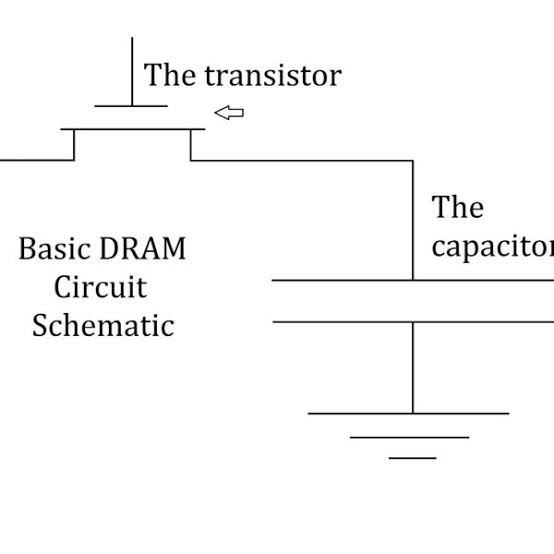
DRAM stands for Dynamic Random Access Memory. It's a type of memory used in computers, phones, and other gadgets to store data. Each tiny piece of data (called a bit) is kept in a little memory cell made up of a capacitor and a transistor. These parts are based on MOS technology (a kind of electronics), which makes DRAM easy to build, able to hold lots of data, and pretty cheap.
Why is it Called "Dynamic"?
The "dynamic" part means it needs to keep refreshing the data all the time. The capacitor in each cell is like a tiny bucket that holds an electric charge (a 1 or 0). But this charge leaks out over time, so the data could change-like a 1 turning into a 0. To stop this from happening, the memory gets refreshed regularly by putting the charge back into the capacitors. That's what keeps the data safe.
Features of DRAM
- It needs constant refreshing to keep the data from disappearing.
- It's cheaper than other memory types, like SRAM.
- It's slower than SRAM.
- It uses less power than some memory types, but more than SRAM.
- It's smaller in size compared to other options.
- The data doesn't last long without refreshing.
Example of DRAM
The most common place you'll find DRAM is in a computer's main memory-like the RAM in your laptop or desktop. It's used there because it's a good mix of speed, cost, and storage space.
How Does DRAM Work?
Memory in a computer is like a big grid where data or program code is stored as tiny bits (0s and 1s). DRAM, or Dynamic Random Access Memory, keeps each bit in a small storage cell made of a capacitor and a transistor. These cells are arranged in a neat rectangular pattern, like rows and columns on a checkerboard.
Here's how it works: When the computer needs to use a bit, it sends an electric charge down a column. This turns on the transistor in that cell, letting the capacitor either store or release its charge (a 0 or 1). But because DRAM is "dynamic," the charge in the capacitor leaks out after a few milliseconds. To keep the data from disappearing, the memory gets refreshed-like recharging the capacitors-over and over again.
Other circuits help out too. Some figure out which row and column to use, others handle the refreshing, and some decide whether a cell should take a new charge or let the computer read or fix the data inside. It's like a team effort to keep everything running smoothly.
DRAM is just one type of memory a computer designer can pick. Others include static RAM (SRAM), electrically erasable programmable read-only memory (EEPROM), NOR flash, and NAND flash. Most systems mix different types of memory depending on what they need.
Types of DRAM
There are lots of flavors of DRAM, each with a special twist. Here are some examples:
- Synchronous DRAM (SDRAM): This matches the memory's speed to the computer's clock, so the CPU knows exactly when to grab data. It helps the computer do more tasks at once.
- Rambus DRAM (RDRAM): This was popular in the early 2000s, especially for graphics cards in things like gaming systems.
- Double Data Rate SDRAM (DDR SDRAM): This doubles the speed of regular SDRAM by sending data twice per clock tick-once when the clock goes up and once when it goes down. It's come in versions like DDR2, DDR3, and DDR4 over the years.
- Fast Page Mode DRAM (FPM DRAM): This is an older type that speeds up access to data on the same "page" (a chunk of memory).
- Extended Data Out DRAM (EDO DRAM): This makes reading memory faster, especially on older chips like Intel Pentiums.
Big companies making DRAM include Kingston Technology, Micron, Samsung, and SK Hynix.
Types of DRAM Packages
DRAM comes in two main package types-how it's physically built into a chip:
- Single Inline Memory Module (SIMM): These were used in the 1980s and 1990s but are old news now. They had 30 or 72 pins (connectors) and moved data 32 bits at a time.
- Dual Inline Memory Module (DIMM): These are common today, with pins on both sides of the chip-like 168 pins or more-and they move data 64 bits at a time, making them faster.
For DIMMs, there are different styles:
- Unbuffered DIMMs: Used in desktops and laptops. They're cheap and quick but not super stable.
- Registered DIMMs: Used in servers. They're more stable and easier on the CPU, but a bit slower.
- Fully Buffered DIMMs: Used in big systems. They're reliable, catch errors better, and keep signals clear.
Advantages
- It's simple-just one transistor per cell.
- It's cheaper than options like SRAM.
- It can pack in more data (higher density).
- It holds more info in less space.
- You can refresh or erase it while the computer's running.
Disadvantages
- It forgets everything when the power's off (volatile).
- It uses more power than some other memory types.
- Making it is trickier than it looks.
- It needs constant refreshing to keep data alive.
- It's slower than SRAM.
Conclusion
DRAM is a key part of how computers work. It's not the fastest memory out there, and it needs constant refreshing, but it's affordable and can hold a lot of data. That makes it perfect for the main memory in computers. Compared to SRAM, which is faster but more expensive and complicated, DRAM is the go-to choice when you need a big, cost-effective memory solution.
FAQs on DRAM (Dynamic Random Access Memory)
| 1. What is DRAM and how is it different from other types of RAM? |  |
| 2. What are the main features of DRAM? | |
| 3. How does DRAM work and what is the refresh cycle? | |
| 4. What are the different types of DRAM available? | |
| 5. What are the advantages and disadvantages of using DRAM? | |


 | Explore Courses for Electronics and Communication Engineering (ECE) exam |  |
 | Get EduRev Notes directly in your Google search | |