File Handling in Python

Introduction to File Handling in Python
File handling refers to managing file-related operations like creating, opening, reading, writing, and closing files through a programming interface. It ensures smooth data transfer between a program and the file system on a storage device, helping to handle data securely and efficiently.
Opening a File in Python
To open a file in Python, the open() function is used. It requires two arguments: the file path and the mode in which the file should be opened.
Example:
# Open the file in read mode
with open('edurev.txt', 'r') as file:
content = file.read()
This code opens the file named "edurev.txt" in read mode.
File Opening Modes in Python
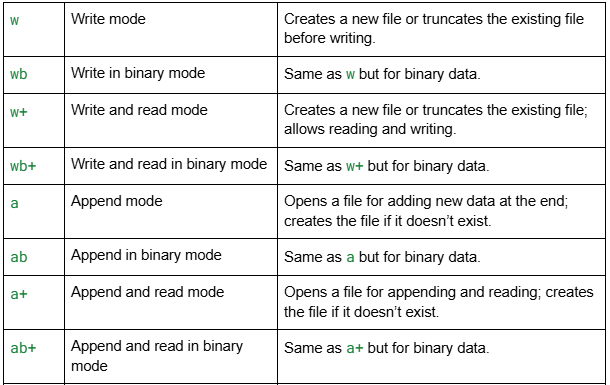
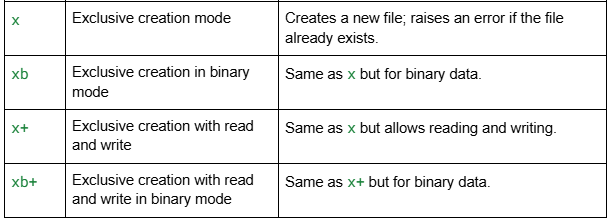
When opening a file, you must specify a mode that defines how you intend to interact with the file. The table below summarizes the available modes: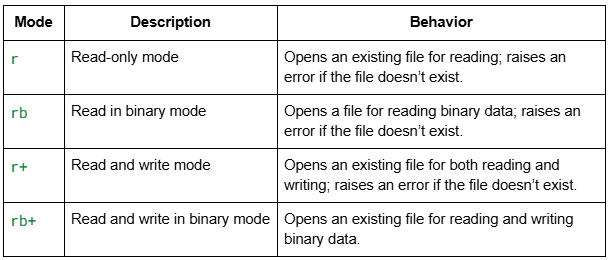
Reading a File
The read() method allows you to read a file's contents. After reading, the file should be closed using close() to free up system resources.
Example:
file = open("edurevks.txt", "r")
content = file.read()
print(content)
file.close()
Output:
Hello world
EduRev
123 456
Reading in Binary Mode:
file = open("edurev.txt", "rb")
content = file.read()
print(content)
file.close()
Output:
b'Hello world\r\nEduRev\r\n123 456'
Writing to a File
The write() method is used to write data to a file. If the file exists, its content is erased; if not, a new file is created.
Example (Write Mode):
file = open("edurev.txt", "w")
file.write("Hello, World!")
file.close()
Appending to a File:
The write() method can also be used to add data to the end of a file without erasing its content.
Example (Append Mode):
file = open('edurev.txt', 'a')
file.write("This will add this line")
file.close()
Closing a File
Closing a file is necessary to release system resources and ensure that changes are saved properly.
Example:
file = open("edurev.txt", "r")
# Perform operations
file.close()
Using the "with" Statement
The with statement simplifies file handling by automatically closing the file once the block of code is executed, even if an error occurs.
Example:
with open("edurev.txt", "r") as file:
content = file.read()
print(content)
Output:
Hello, World!
Appended text.
Handling Exceptions When Closing a File
To ensure files are properly closed even if an error occurs, use a try-finally block.
Example:
try:
file = open("geeks.txt", "r")
content = file.read()
print(content)
finally:
file.close()
Advantages of File Handling in Python
- Versatility: Supports creating, reading, writing, appending, renaming, and deleting files.
- Flexibility: Works with different file types (e.g., text, binary, CSV).
- User-Friendly: Easy-to-use functions for handling files.
- Cross-Platform: Works consistently across Windows, Mac, and Linux.
Disadvantages of File Handling in Python
- Error-Prone: File operations can fail due to permissions or file locks.
- Security Risks: Mishandling user input could lead to security breaches.
- Complexity: Handling advanced file formats can be complicated.
- Performance: Operations on large files can be slow.
FAQs
Q1. What is file handling in Python?
Ans: It refers to the process of creating, reading, writing, and managing files in Python.
Q2. What are the two types of files in Python?
Ans:
Text files - Store data as plain text (.txt).
Binary files - Store data in a binary format (e.g., images, videos).
Q3. What are the four main file handling functions?
Ans:
open() - Opens a file.
read() - Reads file content.
write() - Writes data to a file.
close() - Closes a file.
Q4. Why is file handling useful?
Ans: File handling allows data persistence, logging, configuration management, and data analysis.
Q5. What is tell() in Python file handling?
Ans: The tell() method returns the current position of the file pointer in bytes from the beginning of the file.
Example:
file = open('example.txt', 'r')
content = file.read(10)
print(content)
position = file.tell()
print("Current position:", position)
file.close()
Output:
Hello Worl
Current position: 10
- read(10) reads the first 10 characters.
- tell() returns the current file pointer position.
FAQs on File Handling in Python
| 1. What are the different file opening modes in Python? |  |
| 2. How do you open a file in Python? | |
| 3. What are the best practices for handling files in Python? | |
| 4. How can exceptions be handled when closing a file in Python? | |
| 5. What should you do if a file does not exist when attempting to open it in Python? | |