Introduction to Kotlin Programming for Android


Kotlin is a modern programming language used to build Android applications. It was developed by JetBrains and officially supported by Google for Android development in 2017. Kotlin makes coding simpler, safer, and more enjoyable compared to older languages. Learning Kotlin helps you create mobile apps, games, and useful software that runs on billions of Android devices worldwide.
1. What is Kotlin?
Kotlin is a statically-typed programming language that runs on the Java Virtual Machine (JVM). This means Kotlin code is checked for errors before the program runs, making it more reliable.
- Origin: Created by JetBrains in 2011, named after Kotlin Island near St. Petersburg, Russia
- Official Android Language: Google announced Kotlin as an official language for Android in 2017
- Interoperability: Kotlin works seamlessly with Java code, allowing both languages to exist in the same project
- Open Source: Kotlin is free to use and its source code is available for everyone
1.1 Why Learn Kotlin for Android?
- Concise Code: Kotlin requires fewer lines of code than Java to perform the same task (approximately 40% less code)
- Null Safety: Kotlin prevents common errors called null pointer exceptions that crash apps
- Easy to Learn: Simpler syntax makes it beginner-friendly for new programmers
- Industry Standard: Most modern Android apps are now built using Kotlin
2. Setting Up Kotlin Development Environment
To write and run Kotlin programs for Android, you need specific software tools installed on your computer.
2.1 Required Software
- Android Studio: The official Integrated Development Environment (IDE) for Android development. It includes everything needed to write, test, and run Kotlin code
- JDK (Java Development Kit): Required software that allows Kotlin to run. Version 8 or higher is needed
- Android SDK (Software Development Kit): Collection of tools and libraries for building Android apps. Comes bundled with Android Studio
2.2 Creating Your First Kotlin Project
- Open Android Studio and click "New Project"
- Select "Empty Activity" template
- Choose Kotlin as the programming language (not Java)
- Set minimum SDK version (usually API 21 or higher)
- Click "Finish" to create the project structure
3. Basic Structure of a Kotlin Program
Every Kotlin program follows a specific structure with important components that make the code work properly.
3.1 The Main Function
The main function is the entry point where program execution begins. Every Kotlin program must have a main function.
- Syntax:
fun main() { } - Keyword 'fun': Used to declare any function in Kotlin
- Curly Braces { }: Contain the code that will execute when the program runs
3.2 Print Statements
To display output on the screen, Kotlin uses built-in print functions.
- println(): Prints text and moves to a new line automatically
- print(): Prints text without moving to a new line
- Example:
println("Hello, Android!")displays the message on screen
3.3 Comments in Kotlin
Comments are notes written in code that the computer ignores. They help programmers understand what the code does.
- Single-line Comment:
// This is a comment - Multi-line Comment:
/* This comment spans multiple lines */ - Documentation Comment:
/** Used for official documentation */
4. Variables and Data Types
Variables are containers that store information. Kotlin has different types of variables for different kinds of data.
4.1 Declaring Variables
Kotlin provides two keywords to create variables: val and var.
- val (Value): Creates an immutable variable (cannot be changed after assignment). Similar to a constant
- var (Variable): Creates a mutable variable (can be changed multiple times)
- Syntax:
val name = "Rahul"orvar age = 15 - Best Practice: Use val by default; only use var when the value needs to change
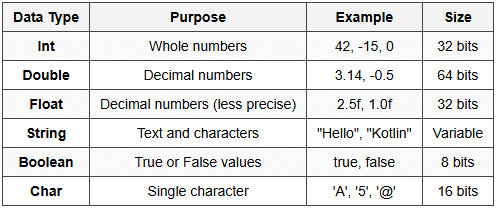
4.2 Basic Data Types
Kotlin has several built-in data types for storing different kinds of information.
4.3 Type Inference
Type inference means Kotlin automatically detects the data type based on the assigned value. You don't always need to specify the type explicitly.
- Automatic:
val age = 15(Kotlin knows this is Int) - Explicit:
val age: Int = 15(Type specified manually) - Advantage: Makes code shorter and easier to write
4.4 String Templates
String templates allow you to insert variables directly inside text using the dollar sign ($).
- Simple:
val name = "Priya"; println("Hello, $name")outputs "Hello, Priya" - Expression:
println("Sum is ${5 + 3}")outputs "Sum is 8" - Benefit: Combines text and variables without using plus (+) operators
5. Operators in Kotlin
Operators are symbols that perform operations on variables and values. Kotlin supports various types of operators.
5.1 Arithmetic Operators
Used to perform mathematical calculations.
- Addition (+):
5 + 3 = 8 - Subtraction (-):
10 - 4 = 6 - Multiplication (×):
6 × 7 = 42 - Division (÷):
20 ÷ 4 = 5 - Modulus (%):
17 % 5 = 2(gives remainder after division)
5.2 Comparison Operators
Used to compare two values. Result is always a Boolean (true or false).
- Equal to (==):
5 == 5returns true - Not equal to (!=):
5 != 3returns true - Greater than (>):
8 > 5returns true - Less than (<>
3 <>returns true - Greater than or equal (≥):
5 >= 5returns true - Less than or equal (≤):
4 <=>returns false
5.3 Logical Operators
Used to combine multiple conditions together.
- AND (&&): Both conditions must be true. Example:
(5 > 3) && (8 > 6)returns true - OR (||): At least one condition must be true. Example:
(5 > 3) || (2 > 6)returns true - NOT (!): Reverses the condition. Example:
!(5 > 3)returns false
5.4 Assignment Operators
Used to assign values to variables with shortcuts for common operations.
- Simple (=):
var x = 10 - Add and assign (+=):
x += 5meansx = x + 5 - Subtract and assign (-=):
x -= 3meansx = x - 3 - Multiply and assign (*=):
x *= 2meansx = x × 2 - Divide and assign (/=):
x /= 4meansx = x ÷ 4
6. Control Flow Statements
Control flow statements decide which code will execute based on conditions. They control the order in which instructions run.
6.1 If-Else Statements
The if statement executes code only when a condition is true. The else statement provides an alternative when the condition is false.
- Basic If:
if (age >= 18) { println("Adult") } - If-Else:
if (marks >= 40) { println("Pass") } else { println("Fail") } - If-Else-If Ladder: Multiple conditions checked in sequence
- Kotlin Special: If can be used as an expression that returns a value:
val result = if (a > b) a else b
6.2 When Expression
The when expression is Kotlin's replacement for switch-case statements. It matches a value against multiple options.
- Syntax:
when (variable) { value1 → action1; value2 → action2; else → defaultAction } - Advantage: More flexible and powerful than traditional switch statements
- Multiple Values:
when (x) { 1, 2, 3 → println("Small number") } - Range Check:
when (age) { in 0..17 → println("Minor") }
7. Loops in Kotlin
Loops repeat a block of code multiple times. Kotlin provides different types of loops for various situations.
7.1 For Loop
The for loop repeats code for a specific number of times or iterates through a collection.
- Range Loop:
for (i in 1..5) { println(i) }prints numbers 1 to 5 - Until Loop:
for (i in 1 until 5) { println(i) }prints 1 to 4 (excludes 5) - Step Loop:
for (i in 1..10 step 2) { println(i) }prints 1, 3, 5, 7, 9 - Reverse Loop:
for (i in 5 downTo 1) { println(i) }prints 5 to 1 backwards
7.2 While Loop
The while loop repeats code as long as a condition remains true. The condition is checked before each iteration.
- Syntax:
while (condition) { code to repeat } - Example:
var count = 1; while (count <= 5)="" {="" println(count);="" count++=""> - Use Case: When you don't know how many times the loop should run
7.3 Do-While Loop
The do-while loop executes code at least once, then checks the condition. Different from while loop which checks condition first.
- Syntax:
do { code to repeat } while (condition) - Guarantee: Code inside do block always runs at least one time
- Example:
var x = 0; do { println(x); x++ } while (x <>
7.4 Loop Control Statements
- break: Immediately exits the loop completely
- continue: Skips the current iteration and moves to the next one
- return: Exits from the entire function
8. Functions in Kotlin
Functions are reusable blocks of code that perform specific tasks. They help organize code and avoid repetition.
8.1 Declaring Functions
Functions in Kotlin are declared using the fun keyword.
- Basic Syntax:
fun functionName() { code } - With Parameters:
fun greet(name: String) { println("Hello, $name") } - With Return Type:
fun add(a: Int, b: Int): Int { return a + b } - Single Expression:
fun multiply(x: Int, y: Int) = x * y(return type inferred)
8.2 Function Parameters
Parameters are inputs that functions receive to perform their tasks.
- Required Parameters: Must be provided when calling the function
- Default Parameters:
fun greet(name: String = "User") { }uses "User" if no name provided - Named Arguments:
greet(name = "Amit")makes code clearer when multiple parameters exist
8.3 Return Types
- Explicit Return: Function specifies what type of value it returns using colon and type
- Unit Type: If function doesn't return anything, return type is Unit (similar to void in other languages)
- Nothing Type: Special type indicating function never returns normally (always throws exception or infinite loop)
9. Null Safety in Kotlin
Null safety is Kotlin's most important feature. It prevents NullPointerException errors that commonly crash programs.
9.1 Nullable and Non-Nullable Types
By default, Kotlin variables cannot hold null values. You must explicitly allow nullability.
- Non-Nullable:
var name: String = "Raj"cannot be assigned null - Nullable:
var name: String? = nullcan hold null (note the question mark) - Question Mark (?): Added after type to indicate variable can be null
9.2 Safe Call Operator
The safe call operator (?.)) safely accesses properties or methods of nullable variables.
- Syntax:
name?.length - Behavior: Returns null if variable is null; otherwise returns the property value
- Prevents Crashes: Program continues running even if variable is null
9.3 Elvis Operator
The Elvis operator (?:) provides a default value when a variable is null.
- Syntax:
val length = name?.length ?: 0 - Meaning: If name is null, use 0 instead
- Use Case: Ensures your program always has a valid value to work with
9.4 Not-Null Assertion
The not-null assertion operator (!!) forces Kotlin to treat a nullable variable as non-null.
- Syntax:
name!!.length - Warning: Throws NullPointerException if variable is actually null
- Recommendation: Avoid using !! unless absolutely certain variable is not null
10. Collections in Kotlin
Collections are containers that store multiple values together. Kotlin provides different types for different needs.
10.1 Lists
A List stores ordered elements that can be accessed by index position.
- Immutable List:
val numbers = listOf(1, 2, 3, 4, 5)cannot be modified - Mutable List:
val numbers = mutableListOf(1, 2, 3)can add or remove elements - Access:
numbers[0]gets first element (indexing starts at 0) - Common Operations:
add(),remove(),size,contains()
10.2 Sets
A Set stores unique elements with no duplicates allowed. Order is not guaranteed.
- Immutable Set:
val fruits = setOf("apple", "banana", "apple")keeps only one "apple" - Mutable Set:
val fruits = mutableSetOf("mango", "orange") - Use Case: When you need to ensure no duplicate values exist
10.3 Maps
A Map stores data as key-value pairs. Each key is unique and maps to exactly one value.
- Immutable Map:
val capitals = mapOf("India" to "New Delhi", "France" to "Paris") - Mutable Map:
val scores = mutableMapOf("Priya" to 95, "Amit" to 87) - Access:
capitals["India"]returns "New Delhi" - Add Entry:
scores["Neha"] = 92
11. Common Student Mistakes and Confusing Points
11.1 Variable Declaration Confusion
- Mistake: Using var when val should be used. Students often make everything mutable unnecessarily
- Correct Approach: Always use val first; change to var only if you need to modify the value
- Trap:
val list = mutableListOf(1, 2)is valid. The reference is immutable but list contents can change
11.2 Null Safety Misunderstanding
- Mistake: Using !! everywhere to quickly fix null errors without understanding consequences
- Trap:
var name: String? = null; println(name.length)won't compile. Must usename?.length - Confusion: Safe call returns nullable type:
name?.lengthreturns Int? not Int
11.3 Loop Range Confusion
- Trap:
1..5includes 5, but1 until 5excludes 5 (only goes to 4) - Mistake: Forgetting that ranges are inclusive on both ends by default
- Off-by-One Error: Common when converting between .. and until operators
11.4 Function Return Type
- Confusion: When return type is required vs optional
- Rule: Single-expression functions don't need explicit return type:
fun double(x: Int) = x * 2 - Mistake: Forgetting to specify return type in block body functions:
fun add(a: Int, b: Int): Int { return a + b }
11.5 Immutable vs Mutable Collections
- Trap:
listOf()creates read-only list. Cannot useadd()orremove() - Confusion: "Immutable" means the list structure can't change, but if it contains mutable objects, those objects can still be modified
- Mistake: Trying to modify immutable collections results in compilation error, not runtime error
12. Best Practices for Beginners
- Meaningful Names: Use descriptive variable and function names like
studentAgeinstead ofx - Consistent Formatting: Follow camelCase for variables and functions, PascalCase for classes
- Comment Wisely: Explain why code does something, not what it does (code should be self-explanatory)
- Prefer val over var: Makes code safer and easier to understand
- Use String Templates: Instead of concatenation with +, use $variable or ${expression}
- Handle Nulls Properly: Use safe calls (?.) and Elvis operator (?:) instead of !!
- Keep Functions Small: Each function should do one specific task
- Test Frequently: Run code often to catch errors early
Kotlin provides a modern, safe, and beginner-friendly approach to programming for Android. Its concise syntax reduces code complexity while null safety features prevent common crashes. Mastering these basics-variables, data types, operators, control flow, functions, and collections-forms the foundation for building Android applications. Practice writing small programs regularly to strengthen understanding. Remember that Kotlin's design prioritizes developer productivity and code safety, making it an excellent choice for learning programming concepts.