IP Address, Internet, and Intranet Explained


This topic covers the fundamental building blocks of digital networking - how devices are identified (IP Address), how the global network connects us (Internet), and how organizations create their own private networks (Intranet). Understanding these concepts is essential for cyber security and safe digital communication. These form the foundation for learning how data travels between devices and how networks are organized.
1. IP Address (Internet Protocol Address)
An IP Address is a unique numerical label assigned to each device connected to a computer network. It serves two main purposes: identifying the device and locating it on the network. Think of it like a postal address for your home - it tells where to deliver information.
1.1 What is an IP Address?
- Definition: A unique number that identifies every device on a network or the internet.
- Purpose: It helps devices find and communicate with each other across networks.
- Format: IP addresses are written as a series of numbers separated by dots.
- Example: 192.168.1.1 is a common IP address format.
1.2 Types of IP Addresses
There are two main versions of IP addresses used today:
- IPv4 (Internet Protocol version 4): The older and most common type. It consists of four numbers separated by dots. Each number ranges from 0 to 255. Example: 192.168.0.1
- IPv6 (Internet Protocol version 6): The newer version created because IPv4 addresses were running out. It uses longer addresses with letters and numbers. Example: 2001:0db8:85a3:0000:0000:8a2e:0370:7334
1.3 Classification of IP Addresses
IP addresses can be classified based on how they are assigned and their scope:
1.3.1 Based on Assignment
- Static IP Address: A permanent address that does not change. Useful for servers and devices that need to be found at the same address always.
- Dynamic IP Address: A temporary address that changes each time a device connects to the network. Most home computers and smartphones use dynamic IP addresses.
1.3.2 Based on Network Scope
- Public IP Address: An address visible on the internet. It is unique across the entire internet. Your home router has a public IP address.
- Private IP Address: An address used within a local network (like your home or school). Not visible directly on the internet. Example: 192.168.x.x or 10.x.x.x
1.4 How IP Addresses Work
- Device Connection: When a device connects to a network, it is assigned an IP address.
- Data Packets: Information sent over the internet is broken into small pieces called packets.
- Addressing: Each packet contains the sender's IP address and the receiver's IP address.
- Routing: Routers read the IP address on packets and send them to the correct destination.
- Delivery: The packet reaches the destination device using its IP address.
1.5 Finding Your IP Address
- Windows: Open Command Prompt and type "ipconfig" to see your IP address.
- Mac/Linux: Open Terminal and type "ifconfig" to view your IP address.
- Online Method: Search "What is my IP" in a web browser to see your public IP address.
1.6 Importance in Cyber Security
- Device Identification: IP addresses help identify which device is accessing a network or website.
- Tracking: Websites can track visitor locations and activities using IP addresses.
- Security Logs: Network administrators monitor IP addresses to detect unauthorized access attempts.
- Blocking: Suspicious IP addresses can be blocked to prevent cyber attacks.
2. Internet
The Internet is a global network of interconnected computers and devices. It allows billions of devices worldwide to communicate and share information. It is called a "network of networks" because it connects many smaller networks together.
2.1 What is the Internet?
- Definition: A worldwide system of connected computer networks that use the Internet Protocol (IP) to communicate.
- Global Nature: It connects devices across countries and continents.
- Public Access: Anyone with an internet connection can access it.
- Infrastructure: Built using cables (fiber optic, copper), satellites, and wireless technologies.
2.2 Key Components of the Internet
- Servers: Powerful computers that store websites, files, and data. They respond to requests from client devices.
- Clients: Devices like computers, smartphones, and tablets that request information from servers.
- Routers: Devices that direct data packets to their correct destination across networks.
- Internet Service Provider (ISP): Companies that provide internet connection to homes and businesses. Examples: Airtel, Jio, BSNL.
- Protocols: Rules that govern how data is transmitted. The main protocol is TCP/IP (Transmission Control Protocol/Internet Protocol).
2.3 How the Internet Works
- Connection: Your device connects to an ISP using cable, fiber, or wireless connection.
- Request: When you type a website address (URL), your device sends a request through your ISP.
- DNS Lookup: The Domain Name System (DNS) converts the website name into an IP address.
- Routing: Data travels through multiple routers across the internet to reach the destination server.
- Response: The server sends the requested information back to your device.
- Display: Your browser displays the website or content.
2.4 Common Internet Services
- World Wide Web (WWW): A system of websites and web pages accessed through browsers like Chrome, Firefox, or Safari.
- Email: Electronic mail service for sending and receiving messages. Examples: Gmail, Yahoo Mail.
- File Transfer: Services like cloud storage (Google Drive, Dropbox) for sharing and storing files.
- Video Conferencing: Real-time communication using video and audio. Examples: Zoom, Google Meet.
- Social Media: Platforms for connecting and sharing content. Examples: Facebook, Instagram, Twitter.
- Instant Messaging: Real-time text communication. Examples: WhatsApp, Telegram.
2.5 Internet vs World Wide Web
Common Mistake: Students often confuse the Internet with the World Wide Web. They are different!
- Internet: The physical network infrastructure of cables, routers, and servers that connects devices globally.
- World Wide Web (WWW): A service that runs on the Internet. It consists of websites and web pages accessed through browsers.
- Analogy: Think of the Internet as roads and highways, while the WWW is like the vehicles that travel on those roads.
2.6 Advantages of the Internet
- Global Communication: Connect with people anywhere in the world instantly.
- Information Access: Vast amount of knowledge available on any topic.
- Online Learning: Educational resources, courses, and tutorials available for free or at low cost.
- E-commerce: Buy and sell products online from home.
- Entertainment: Access to music, videos, games, and movies.
2.7 Internet Safety and Security Concerns
- Privacy Risks: Personal information can be tracked or stolen by hackers.
- Cyber Crimes: Online fraud, identity theft, and hacking are common threats.
- Inappropriate Content: Children may access harmful or age-inappropriate material.
- Malware: Viruses and harmful software can infect devices through internet downloads.
- Cyberbullying: Online harassment through social media or messaging platforms.
3. Intranet
An Intranet is a private network that uses internet technologies but is accessible only within an organization. It is like a mini-internet that works inside a company, school, or institution. Only authorized members can access it.
3.1 What is an Intranet?
- Definition: A private computer network that uses Internet Protocol technology to share information within an organization.
- Restricted Access: Only employees or members of the organization can access it.
- Similar Technology: Uses the same technology as the Internet (websites, browsers, email) but kept private.
- Security: Protected by firewalls and passwords to prevent unauthorized access.
3.2 Features of an Intranet
- Internal Websites: Organizations create internal websites for sharing company news, policies, and resources.
- File Sharing: Employees can share documents, reports, and files securely within the organization.
- Internal Communication: Email systems and messaging platforms for communication between employees.
- Collaboration Tools: Shared calendars, project management tools, and team workspaces.
- Database Access: Employees can access company databases and records securely.
3.3 How Intranet Works
- Local Network Setup: The organization sets up a Local Area Network (LAN) connecting all computers.
- Server Installation: Internal servers host websites, files, and applications.
- Access Control: Employees receive usernames and passwords for authentication.
- Firewall Protection: A firewall separates the intranet from the public internet.
- Usage: Employees access the intranet through web browsers, just like accessing websites on the internet.
3.4 Common Uses of Intranet
- Company Announcements: Sharing news, updates, and important notices with all employees.
- Employee Directory: Contact information and details of all staff members.
- Policy Documents: Access to company policies, handbooks, and procedures.
- Training Resources: Online training materials and educational content for employees.
- Project Management: Tracking projects, tasks, and deadlines within teams.
- Internal Job Postings: Advertising job openings within the organization first.
3.5 Advantages of Intranet
- Improved Communication: Faster and easier communication between employees and departments.
- Cost Savings: Reduces paper usage and printing costs by sharing documents digitally.
- Centralized Information: All important information stored in one accessible place.
- Enhanced Security: Sensitive company information stays within the organization.
- Productivity: Employees can quickly find information and collaborate on projects.
3.6 Examples of Intranet Usage
- Schools: Teachers access lesson plans, student records, and administrative information through the school intranet.
- Hospitals: Medical staff access patient records and medical databases securely.
- Companies: Employees access company policies, submit leave applications, and collaborate on projects.
- Government Offices: Officials share confidential documents and communicate internally.
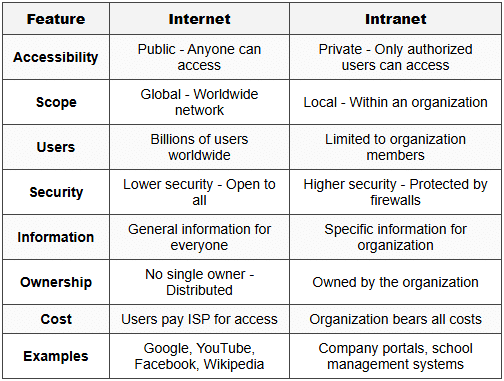
4. Comparison: Internet vs Intranet
Understanding the differences between Internet and Intranet is crucial for exams. Here is a detailed comparison:
5. Extranet (Additional Concept)
An Extranet is an extension of an intranet that allows controlled access to external users like business partners, suppliers, or customers.
- Definition: A private network that allows limited access to external authorized users.
- Purpose: Enables collaboration between organizations while maintaining security.
- Access Level: More restricted than Internet but less restricted than Intranet.
- Example: A company allows its suppliers to check inventory levels through a secure extranet portal.
6. Important Terms and Concepts
6.1 Network-Related Terms
- Protocol: A set of rules that govern how data is transmitted over a network. Example: TCP/IP, HTTP, HTTPS.
- Router: A device that forwards data packets between networks and directs traffic on the internet.
- Firewall: A security system that monitors and controls incoming and outgoing network traffic based on security rules.
- DNS (Domain Name System): Translates human-readable website names (like google.com) into IP addresses.
- ISP (Internet Service Provider): A company that provides internet access to customers.
- Bandwidth: The maximum amount of data that can be transmitted over a network in a given time. Measured in Mbps (Megabits per second).
6.2 Address-Related Terms
- URL (Uniform Resource Locator): The complete web address of a page or resource. Example: https://www.example.com/page.html
- Domain Name: The readable name of a website. Example: google.com, wikipedia.org
- MAC Address (Media Access Control): A unique hardware identifier assigned to network devices. Different from IP address.
7. Cyber Security Implications
7.1 IP Address Security Concerns
- Tracking: Websites and hackers can track your online activities using your IP address.
- Location Exposure: IP addresses reveal your approximate geographic location.
- IP Spoofing: Hackers can fake their IP address to hide their identity or bypass security.
- DDoS Attacks: Attackers can overwhelm a server by flooding it with requests from multiple IP addresses.
7.2 Protecting Your Network
- Use Strong Passwords: Protect your router and intranet access with complex passwords.
- Enable Firewall: Always keep firewalls active on devices and networks.
- Regular Updates: Update router firmware and security software regularly.
- VPN (Virtual Private Network): Hides your real IP address and encrypts your internet connection.
- Monitor Access Logs: Check who is accessing your network regularly.
7.3 Safe Internet Practices
- Verify Websites: Check for HTTPS in the URL before entering personal information.
- Avoid Public WiFi: Public networks are less secure and easier for hackers to intercept data.
- Use Antivirus Software: Protect devices from malware and viruses.
- Be Cautious with Links: Do not click on suspicious links in emails or messages.
- Privacy Settings: Adjust privacy settings on social media and applications.
8. Practical Applications for Students
8.1 School Network Scenario
- School Intranet: Students access study materials, assignments, and announcements through the school's private network.
- Computer Lab: All computers in the lab are connected through a Local Area Network (LAN) with private IP addresses.
- Internet Access: The school router has a public IP address that connects to the ISP.
- Filtering: Schools use firewalls to block inappropriate websites and protect students online.
8.2 Home Network Setup
- Router Assignment: Your home router receives a public IP address from your ISP.
- Device Connections: Each device (laptop, phone, tablet) gets a private IP address from the router.
- NAT (Network Address Translation): The router translates between public and private IP addresses.
- WiFi Security: Use WPA2 or WPA3 encryption to protect your home network.
Understanding IP addresses, the Internet, and Intranets is fundamental to cyber security and networking. IP addresses serve as unique identifiers for devices, enabling communication across networks. The Internet connects billions of devices globally using standardized protocols, while Intranets provide secure, private networks for organizations. Knowledge of these concepts helps in understanding network security, safe digital communication, and how information travels in the digital world. Always practice safe internet habits and be aware of security measures to protect your personal information and devices.