Physical & Environmental Controls


Physical and environmental controls form a critical layer of information security that protects IT assets, data centers, and computing resources from unauthorized access, environmental hazards, and physical threats. These controls are the first line of defense in a comprehensive security framework. For the ISC section, understanding how organizations implement and audit these controls is essential. This topic tests your ability to evaluate control effectiveness, identify vulnerabilities, and recommend improvements in physical security measures that safeguard an organization's information assets.
1. Data Center Security Fundamentals
A data center is a centralized facility housing critical IT infrastructure, including servers, networking equipment, storage systems, and backup power supplies. Data center security involves implementing multiple layers of protection to ensure confidentiality, integrity, and availability of information assets.
1.1 Defense-in-Depth Strategy
Data center security follows a layered security approach (also called defense-in-depth). This means multiple independent security controls work together to protect assets.
- Perimeter Security: Fencing, barriers, security guards, and vehicle access controls protect the outer boundary of the facility
- Building Access Controls: Reception areas, visitor management systems, and controlled entry points restrict unauthorized entry
- Floor/Zone Access Controls: Different security levels for different areas within the building based on sensitivity
- Cabinet/Rack Level Security: Individual equipment cabinets with separate locks or biometric access
1.2 Site Selection and Construction Considerations
- Geographic Risk Assessment: Avoid areas prone to natural disasters (flood zones, earthquake fault lines, hurricane paths)
- Inconspicuous Location: Data centers should not advertise their purpose through signage or distinctive architecture
- Structural Integrity: Reinforced walls, ceilings, and floors; false floors for cable management and airflow
- Fire-Resistant Construction: Use of non-combustible materials with appropriate fire ratings (typically 2-hour fire-resistance rating for walls)
1.3 Redundancy and Availability Controls
- Dual Power Feeds: Multiple utility connections from different substations to ensure continuous power
- Multiple Network Carriers: Diverse telecommunications providers entering through different physical paths
- Geographic Redundancy: Mirror sites or hot sites located in different geographical areas to ensure business continuity
- N+1 Redundancy: Having one more unit than minimum required (e.g., if 3 cooling units needed, install 4)
Trap Alert: Many students confuse physical redundancy with logical redundancy. Physical redundancy refers to duplicate physical infrastructure (power, cooling, network paths), while logical redundancy refers to data replication and backup strategies. Both are necessary but serve different purposes.
2. Physical Access Restrictions and Controls
Physical access controls prevent unauthorized individuals from entering secure areas. These controls must balance security requirements with operational efficiency and emergency egress requirements.
2.1 Access Control Technologies
Authentication Methods verify identity before granting access. Organizations typically implement multiple authentication factors for high-security areas.
- Something You Have: Proximity cards, smart cards, key fobs, magnetic stripe cards
- Something You Know: PIN codes, passwords entered at keypads
- Something You Are: Biometric authentication (fingerprints, iris scans, facial recognition, hand geometry)
- Multi-Factor Authentication (MFA): Combining two or more methods (e.g., card plus PIN, or biometric plus card)
2.2 Access Control Mechanisms
- Mantrap/Access Control Vestibule: Small room with two interlocking doors; only one door can open at a time, preventing tailgating and ensuring only one person enters per authentication
- Turnstiles: Rotating barriers that allow one person to pass per valid authentication
- Bollards: Strong posts preventing vehicle access to sensitive areas
- Security Guards/Receptionists: Human verification of identity and authorization; can make judgment calls in unusual situations
2.3 Access Control Administration
Effective access control requires ongoing management and monitoring processes.
- Access Authorization Matrix: Document specifying which individuals or roles have access to which areas and time periods
- Visitor Management: Sign-in procedures, badge issuance, escort requirements, and access logging for non-employees
- Badge Types: Different colored or marked badges distinguishing employees, contractors, visitors, and maintenance personnel
- Access Logging: Electronic records capturing who accessed what area and when; essential for audit trails
2.4 Access Monitoring and Incident Response
- Failed Access Attempts: System alerts when invalid credentials are used repeatedly
- Forced Entry Detection: Alarms triggered when doors are opened without valid authentication
- Tailgating/Piggybacking Detection: Weight sensors or cameras detecting multiple people entering on single authentication
- Access Log Review: Regular analysis of access patterns to identify anomalies (e.g., access at unusual times)
Exam Tip: Understand the difference between tailgating (unauthorized person following authorized person without their knowledge) and piggybacking (unauthorized person following with authorized person's knowledge/consent). Both are security violations, but piggybacking involves social engineering.
2.5 Key Management and Lock Controls
Physical keys remain important for backup access and certain security scenarios.
- Master Key Systems: Hierarchical key structure where higher-level keys open multiple locks; requires strict control over master keys
- Key Inventory and Tracking: Records of all keys issued, to whom, and for which locks
- Rekeying Procedures: Changing locks when keys are lost, employees terminate, or security is compromised
- Combination Locks: Should have combinations changed regularly and after personnel changes
3. Surveillance and Monitoring Systems
Surveillance systems provide detection, deterrence, and forensic capabilities. They create evidence trails for investigations and enable rapid response to security incidents.
3.1 Video Surveillance (CCTV)
Closed-Circuit Television (CCTV) systems record and monitor activities in and around facilities.
- Camera Placement: Cover all entry/exit points, sensitive areas, equipment rooms, loading docks, and parking areas
- Camera Types: Fixed cameras for specific monitoring; PTZ (Pan-Tilt-Zoom) cameras for flexible coverage; dome cameras for discreet monitoring
- Recording Requirements: Continuous recording vs. motion-activated; retention periods typically 30-90 days depending on regulations
- Resolution and Lighting: Sufficient image quality for identification; infrared or low-light cameras for 24/7 coverage
3.2 Video Management and Storage
- Digital Video Recording (DVR/NVR): Systems storing camera feeds digitally with indexing and search capabilities
- Storage Capacity Planning: Calculate required storage based on: number of cameras × resolution × frame rate × retention period
- Video Analytics: Software detecting unusual patterns, counting people, identifying loitering, or recognizing license plates
- Evidence Preservation: Procedures for securing and protecting video evidence for investigations or legal proceedings
3.3 Intrusion Detection Systems (Physical)
These systems detect unauthorized entry attempts or presence in restricted areas.
- Motion Detectors: Passive Infrared (PIR) sensors detecting heat signatures; microwave sensors detecting movement
- Door and Window Contacts: Magnetic switches triggering alarms when doors/windows open unexpectedly
- Glass Break Detectors: Acoustic sensors identifying sound frequency of breaking glass
- Pressure Mats: Floor sensors detecting weight/pressure in restricted areas
3.4 Alarm Systems and Response
- Alarm Monitoring: 24/7 security operations center (SOC) or contracted monitoring service
- Alarm Types: Local alarms (audible/visible on-site); remote alarms (signal transmitted to monitoring center); silent alarms (no local indication)
- Response Procedures: Documented protocols for different alarm types; escalation procedures; coordination with law enforcement
- False Alarm Management: Procedures to verify alarms before full response; penalties for excessive false alarms in some jurisdictions
3.5 Audit Trail and Logging Requirements
- Access Logs: Who accessed which area, at what time, using which credential
- Alarm Logs: All alarm activations, whether verified or false, and response actions taken
- Video Footage Index: Searchable database linking events to corresponding video segments
- Log Retention: Maintain logs for audit purposes; typically minimum 90 days, often longer for compliance
Trap Alert: Video surveillance alone is a detective control, not a preventive control. It detects incidents after they occur but doesn't prevent them. However, visible cameras provide some deterrent effect, making them partially preventive as well.
4. Environmental Controls
Environmental controls maintain optimal operating conditions for IT equipment and protect against environmental hazards. Equipment failure due to environmental factors can cause significant downtime and data loss.
4.1 Temperature and Humidity Control (HVAC)
HVAC (Heating, Ventilation, and Air Conditioning) systems are critical for data center operations. IT equipment generates significant heat and requires precise environmental conditions.
- Optimal Temperature Range: 18-27°C (64-80°F) for most data centers; ASHRAE standards recommend 18-27°C as acceptable range
- Optimal Humidity Range: 40-60% relative humidity; prevents static electricity (low humidity) and condensation (high humidity)
- Hot Aisle/Cold Aisle Configuration: Server racks arranged so fronts face each other (cold aisle) and backs face each other (hot aisle) for efficient cooling
- Redundant HVAC Systems: Multiple units with N+1 or N+2 redundancy ensuring continued operation if one unit fails
4.2 Temperature and Humidity Monitoring
- Environmental Sensors: Continuous monitoring of temperature and humidity at multiple locations throughout data center
- Threshold Alerts: Automated alarms when conditions exceed acceptable parameters
- Trend Analysis: Tracking patterns to predict potential HVAC failures before they occur
- Documentation: Maintaining records of environmental conditions for compliance and troubleshooting
4.3 Power Supply and Distribution
Reliable power is essential for continuous operations. Power failures or fluctuations can damage equipment and cause data loss.
- Uninterruptible Power Supply (UPS): Battery-backed systems providing immediate power during outages; typically provides 10-30 minutes of runtime
- Emergency Generators: Diesel or natural gas generators providing extended power during prolonged outages; typically start within 10-15 seconds
- Automatic Transfer Switch (ATS): Automatically switches power source from utility to generator when utility power fails
- Power Conditioning: Equipment protecting against power surges, sags, spikes, and electrical noise
4.4 Power Quality Issues
Understanding power problems helps identify appropriate protective controls.
- Power Surge/Spike: Sudden increase in voltage; can damage equipment; prevented by surge protectors
- Power Sag/Brownout: Temporary decrease in voltage; UPS systems maintain steady voltage
- Blackout: Complete loss of power; UPS provides immediate backup, generator provides extended backup
- Electrical Noise: Interference from electromagnetic sources; power conditioning filters noise
4.5 Fire Detection and Suppression
Fire protection systems must detect fires early and suppress them without damaging sensitive electronic equipment.
Fire Detection Systems:
- Smoke Detectors: Photoelectric or ionization types detecting smoke particles; preferred as earliest warning
- Heat Detectors: Fixed-temperature or rate-of-rise types; less sensitive than smoke detectors but fewer false alarms
- Flame Detectors: Optical sensors detecting infrared or ultraviolet light from flames; fastest detection for open flames
- Air Sampling Systems (VESDA): Very Early Smoke Detection Apparatus continuously samples air; earliest possible detection
Fire Suppression Systems:
- Water-Based Sprinkler Systems: Effective but can damage electronic equipment; wet-pipe (always filled) or dry-pipe (filled on activation)
- Pre-Action Systems: Sprinkler system requiring two triggers (smoke detection + heat); reduces accidental discharge risk
- Gaseous Suppression (Clean Agent): FM-200, Inergen, or CO₂ displacing oxygen without leaving residue; safe for electronics
- Portable Fire Extinguishers: Class C extinguishers for electrical fires; strategically placed throughout facility
4.6 Fire Suppression System Comparison
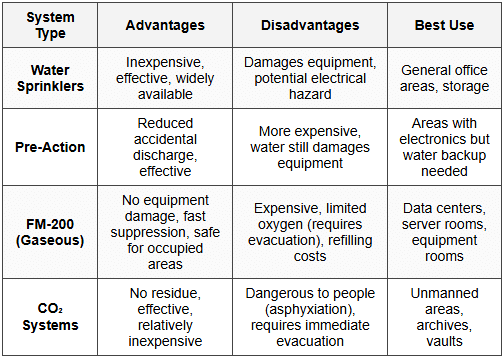
Exam Tip: Halon fire suppression systems were previously common but are now banned under the Montreal Protocol due to ozone depletion. Existing systems may remain, but new installations must use alternatives like FM-200. This is a frequent exam question.
4.7 Water Detection and Protection
- Water Detection Sensors: Floor-level sensors detecting leaks from HVAC, plumbing, or roof leaks
- Raised Flooring: Creates space for cabling and allows water to flow away from equipment
- Floor Drains: Properly positioned drains removing water quickly
- Leak Detection Systems: Automated alerts when water is detected; integrated with building management systems
4.8 Environmental Monitoring Systems
Building Management System (BMS) or Building Automation System (BAS) integrates and controls environmental systems.
- Centralized Monitoring: Single interface monitoring HVAC, power, fire, water, and access systems
- Automated Responses: System automatically adjusting conditions or triggering alarms based on sensor inputs
- Historical Data: Tracking trends and generating reports for analysis and compliance
- Remote Monitoring: Ability to monitor and control systems from off-site locations
5. Hardware Disposal and End-of-Life Controls
Improper disposal of hardware can expose sensitive data and create security breaches. Organizations must implement controls ensuring data is irrecoverable before equipment leaves their control.
5.1 Data Sanitization Methods
Data sanitization is the process of permanently removing data from storage media. The appropriate method depends on security requirements and whether equipment will be reused or destroyed.
- Clearing: Overwriting data using software methods; makes data unrecoverable by normal means but may be recoverable with forensic tools; suitable for internal reuse
- Purging: More thorough overwriting using multiple passes with different patterns; data unrecoverable even with forensic tools; suitable for selling/donating equipment
- Degaussing: Using strong magnetic field to disrupt magnetic media (hard drives, tapes); renders media unusable; effective for magnetic storage only
- Physical Destruction: Shredding, pulverizing, melting, or incinerating media; ensures complete data destruction; required for highest security levels
5.2 Data Sanitization Standards
- DoD 5220.22-M Standard: US Department of Defense standard requiring three-pass overwriting (now superseded but still referenced); Pass 1: write zeros, Pass 2: write ones, Pass 3: write random data
- NIST SP 800-88: Current standard providing guidelines for media sanitization; recommends methods based on confidentiality levels and media types
- Verification: Testing random samples after sanitization to confirm data is unrecoverable
5.3 Asset Disposal Procedures
Formal procedures ensure consistent and secure disposal of IT assets.
- Asset Inventory Tracking: Maintaining records of all hardware through entire lifecycle including disposal
- Disposal Authorization: Formal approval process before equipment can be disposed of or transferred
- Data Classification Review: Identifying sensitivity of data on device to determine appropriate sanitization method
- Sanitization Documentation: Certificates of destruction or sanitization reports documenting what was done, when, by whom, and method used
5.4 Third-Party Disposal Services
Organizations often use specialized vendors for equipment disposal and data destruction.
- Vendor Due Diligence: Verifying vendor's security practices, certifications, and insurance coverage before engagement
- Chain of Custody: Documented tracking of equipment from organization to vendor to final disposal; prevents loss or diversion
- Certificates of Destruction: Vendor provides documentation certifying destruction method, date, and list of destroyed items
- On-Site vs. Off-Site Destruction: Highly sensitive data may require destruction to occur on organization's premises under supervision
5.5 Special Considerations for Different Media Types
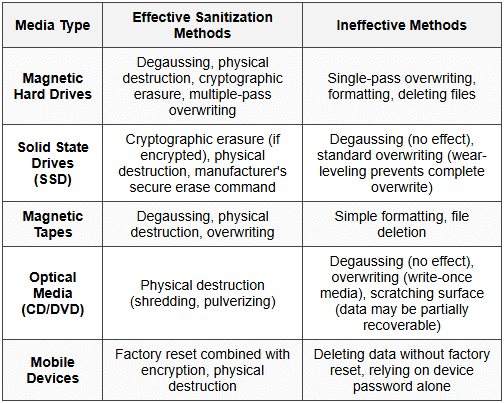
Trap Alert: Degaussing does not work on SSDs or optical media because they don't use magnetic storage. This is a common misconception. SSDs require cryptographic erasure or physical destruction. Many students incorrectly think degaussing works on all storage types.
5.6 Regulatory and Compliance Considerations
- HIPAA Requirements: Healthcare data requires documented sanitization procedures and verification for covered entities
- PCI DSS Requirements: Cardholder data must be rendered unrecoverable; requires specific sanitization methods and documentation
- GDPR Right to Erasure: Organizations must securely destroy personal data when no longer needed or upon request
- SOX Compliance: Financial records on disposed equipment must be completely destroyed to prevent fraud
5.7 Equipment Reuse and Remarketing
Organizations may choose to resell or donate equipment after sanitization.
- Sanitization Before Reuse: All data must be removed before equipment is reused internally or externally
- License Management: Software licenses must be properly removed or transferred
- Liability Considerations: Organization remains liable for data breaches if sanitization was inadequate
- Asset Value Recovery: Proper sanitization allows organizations to recover residual value from equipment
6. Audit Procedures for Physical and Environmental Controls
As a CPA, you must evaluate whether physical and environmental controls are designed effectively and operating as intended. This requires understanding audit procedures specific to these controls.
6.1 Testing Physical Access Controls
- Observation: Physically visiting facilities to observe access control mechanisms in operation; watching for tailgating, propped doors, or unescorted visitors
- Access Log Review: Sampling electronic access logs to verify only authorized individuals accessed restricted areas; looking for access at unusual times
- Badge Testing: Attempting to use terminated employee badges to verify they've been deactivated
- Authorization Documentation: Reviewing access authorization forms to verify appropriate approval before access granted
6.2 Testing Environmental Controls
- Environmental Monitoring Reports: Reviewing temperature and humidity logs to verify conditions remained within acceptable ranges
- HVAC Maintenance Records: Examining preventive maintenance schedules and completed work orders
- Power System Testing: Reviewing UPS test logs and generator test run documentation; verifying regular testing occurs
- Fire Suppression Testing: Examining fire system inspection certificates and test records
6.3 Testing Surveillance Systems
- Camera Coverage Evaluation: Verifying all critical areas have camera coverage and cameras are operational
- Recording Verification: Testing that systems are actually recording and storing footage for required retention period
- Incident Response Testing: Reviewing how organization responded to past security incidents captured on video
- Video Quality Assessment: Verifying recorded images have sufficient quality for identification purposes
6.4 Testing Hardware Disposal Controls
- Disposal Log Review: Examining records of disposed equipment including sanitization methods and dates
- Certificate Verification: Reviewing certificates of destruction from disposal vendors
- Policy Compliance Testing: Verifying actual disposal procedures match documented policies
- Vendor Assessment: Evaluating due diligence performed when selecting disposal vendors
6.5 Control Deficiency Identification
Common deficiencies auditors should watch for in physical and environmental controls:
- Missing Detective Controls: No cameras or access logging in sensitive areas
- Single Points of Failure: No redundancy in HVAC, power, or network connectivity
- Inadequate Monitoring: Alarms not monitored 24/7 or logs not reviewed regularly
- Poor Visitor Management: Visitors not escorted or not required to sign in/out
- Incomplete Sanitization: Equipment disposed without proper data destruction
- Lack of Environmental Monitoring: No sensors tracking temperature, humidity, or water leaks
7. Integration with Overall Security Framework
Physical and environmental controls don't operate in isolation. They must integrate with logical and administrative controls to create comprehensive security.
7.1 Relationship to Other Control Types
- Administrative Controls: Policies and procedures governing physical security; background checks for personnel with physical access; security awareness training on tailgating prevention
- Logical Controls: Access control systems integrate with network authentication systems; surveillance systems use network infrastructure; environmental monitoring data feeds into IT service management
- Preventive, Detective, and Corrective: Physical controls span all three categories and must work together
7.2 Physical Security in Risk Assessment
- Threat Identification: Natural disasters, theft, sabotage, terrorism, espionage
- Vulnerability Assessment: Identifying weaknesses in physical security that could be exploited
- Impact Analysis: Determining potential loss if physical security is breached
- Control Selection: Implementing controls proportionate to identified risks
7.3 Business Continuity and Disaster Recovery
Physical and environmental controls are foundational to business continuity planning.
- Prevention First: Robust environmental controls reduce likelihood of disasters
- Early Detection: Monitoring systems provide early warning allowing faster response
- Recovery Enablement: Proper equipment protection reduces damage and accelerates recovery
- Alternative Sites: Physical security at backup sites must match or exceed primary site
8. Exam-Focused Practice Questions
Question 1: Data Center Redundancy
Question: A company's data center has three cooling units, each capable of handling 50% of the total cooling load. What type of redundancy configuration is this, and what is the primary risk?
Solution:
- Configuration: This is N+1 redundancy where N=2 (two units needed to meet 100% capacity) plus 1 additional unit
- Calculation: Total capacity = 3 units × 50% = 150%; Required capacity = 100%; Excess capacity = 50% (one unit)
- Primary Risk: If two units fail simultaneously, cooling capacity drops to 50%, which is insufficient. This could occur if units share common failure points (same power circuit, same age/model, same maintenance window)
- Best Practice: Units should be maintained on different schedules, connected to different power sources, and ideally from different manufacturers
Question 2: Fire Suppression Selection
Question: An organization is designing fire suppression for a new server room that will house critical financial systems. The room will have staff present during business hours. The organization is concerned about both fire protection and equipment damage. Recommend an appropriate fire suppression system and justify your choice.
Solution:
- Recommended System: Pre-action sprinkler system with FM-200 or Inergen gaseous suppression as primary
- Justification:
- FM-200/Inergen are clean agents causing no equipment damage
- Safe for occupied spaces (unlike CO₂ which causes asphyxiation)
- Fast suppression minimizes fire damage
- Pre-action sprinkler as backup provides redundancy if gaseous system fails
- Pre-action requires two triggers reducing accidental water discharge
- Not Recommended:
- Water sprinklers alone - would damage equipment
- CO₂ system - dangerous when staff present
- Halon - no longer allowed for new installations
- Additional Considerations: Install very early smoke detection (VESDA), ensure adequate egress for staff evacuation, provide manual discharge abort switches
Question 3: SSD Disposal
Question: A healthcare organization is disposing of 50 solid-state drives (SSDs) that previously stored patient health information. The IT manager proposes using DoD 5220.22-M three-pass overwriting followed by degaussing. Evaluate this approach and recommend corrections if needed.
Solution:
Problems with Proposed Approach:
- Overwriting Ineffective on SSDs: SSDs use wear-leveling algorithms that distribute writes across all cells, meaning overwriting doesn't reliably eliminate data from all storage locations. Some data remnants will remain in unallocated areas.
- Degaussing Ineffective on SSDs: SSDs use flash memory (electronic, not magnetic storage), so magnetic degaussing has no effect whatsoever
- HIPAA Compliance Risk: Healthcare data requires proven sanitization methods; proposed approach creates breach risk
Recommended Approach:
- Verify Encryption: If drives were encrypted using full-disk encryption (FDE), use cryptographic erasure by securely destroying encryption keys
- Manufacturer Secure Erase: Use manufacturer's ATA Secure Erase command (if supported) which accesses all cells including over-provisioned areas
- Physical Destruction: As final step, physically shred or pulverize drives to ensure no data recovery is possible
- Documentation: Obtain certificates of destruction showing serial numbers, destruction method, date, and responsible party
- Vendor Option: Use NAID AAA certified destruction vendor if internal capabilities insufficient
Key Principle: Always match sanitization method to storage technology. Methods effective for magnetic media may be ineffective for solid-state media.
Question 4: Physical Access Control Audit
Question: During an audit, you observe the following: (a) Access badges are required to enter the data center, (b) Access logs are generated but not reviewed, (c) Terminated employee badges are collected but not always disabled immediately, (d) No cameras monitor the data center entrance. Identify the control deficiencies and classify their severity.
Solution:
Control Deficiency Analysis:
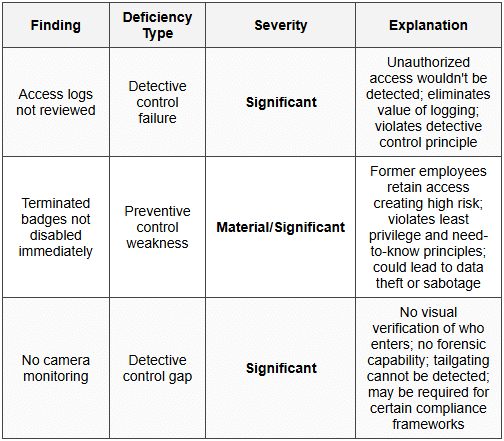
Recommendations:
- Immediate Action: Disable all badges for terminated employees immediately; implement emergency procedure to review and disable badges for all terminations in past 6 months
- Short-term: Implement automated weekly access log review with investigation of anomalies; install CCTV at data center entrance with 90-day retention; implement automated badge deactivation triggered by HR termination process
- Long-term: Deploy mantrap or turnstile to prevent tailgating; integrate access control system with HR system for automatic badge management; implement real-time alerting for after-hours access
Audit Opinion Impact: These deficiencies collectively represent a significant deficiency in internal controls over information security. If other compensating controls are weak, this could rise to material weakness.
Question 5: Environmental Monitoring
Question: A data center experiences an unexpected server failure. Investigation reveals the server overheated. The facility has HVAC systems but no temperature monitoring sensors. The HVAC vendor confirms all units were operating normally. What control deficiency exists, and what should be implemented?
Solution:
Root Cause Analysis:
- Control Deficiency: Lack of environmental monitoring constitutes a significant gap in preventive and detective controls
- Possible Scenarios: HVAC capacity insufficient for actual heat load; airflow blocked by equipment placement; hot/cold aisle configuration improper; localized hot spot not detected
- Why HVAC "Working" Isn't Enough: HVAC units functioning doesn't guarantee adequate cooling at equipment level; must monitor temperature where equipment actually operates
Required Implementations:
- Temperature Monitoring System:
- Install multiple temperature sensors at different locations (top, middle, bottom of racks; cold aisles and hot aisles)
- Sensors should report in real-time to Building Management System (BMS)
- Establish baseline: optimal range 18-27°C (64-80°F)
- Humidity Monitoring:
- Install humidity sensors (optimal: 40-60% relative humidity)
- Low humidity increases static electricity risk
- High humidity risks condensation
- Alerting System:
- Configure threshold alerts: warning at 26°C, critical at 28°C
- Alerts should go to 24/7 monitored system
- Escalation procedure if alerts not acknowledged
- Trending and Reporting:
- Historical data to identify patterns
- Capacity planning: determine when additional HVAC needed
- Preventive maintenance scheduling based on performance trends
- Integration:
- Link monitoring to HVAC controls for automatic response
- Integrate with IT service management for coordinated incident response
Cost-Benefit Consideration: Environmental monitoring is relatively inexpensive (sensors cost hundreds to thousands) compared to potential losses from server failures (tens or hundreds of thousands including downtime, data loss, and equipment replacement).
Question 6: Multi-Factor Authentication
Question: A company implements "two-factor authentication" for data center access requiring employees to swipe their badge and enter a PIN. The CISO claims this provides strong security. Evaluate this claim and identify any weaknesses.
Solution:
Technical Accuracy Assessment:
- Is It Two-Factor? Yes, technically this is two-factor authentication combining:
- Factor 1 (Something You Have): Physical badge
- Factor 2 (Something You Know): PIN code
- Authentication Factor Categories:
- Something You Know (password, PIN)
- Something You Have (badge, token, phone)
- Something You Are (biometric: fingerprint, iris, facial recognition)
Weaknesses in Implementation:
- Shared PIN Vulnerability:
- If employees share PINs (common in practice), both factors can be compromised together
- Badge + PIN combination can be observed through shoulder surfing
- Social engineering can obtain PIN from legitimate user
- Badge Lending:
- Employees might lend badge and share PIN with colleagues
- No way to verify person using badge is actual authorized person
- PIN Security Issues:
- PINs often short (4-6 digits) and easier to guess than passwords
- No complexity requirements typical for PINs
- PINs may not change regularly
- Keypad wear patterns can reveal frequently used digits
Stronger Alternative:
- Badge + Biometric: Combining badge (something you have) with fingerprint or iris scan (something you are) provides stronger authentication because biometrics cannot be shared or observed
- Advantages: Non-repudiation (proves specific person entered), cannot be lent to others, no shoulder surfing risk, no password/PIN to remember or share
- Considerations: Higher cost, privacy concerns, potential false rejection rate, backup authentication needed if biometric fails
Audit Perspective: While technically compliant with "two-factor" requirement, this implementation has practical weaknesses. Auditor should assess whether controls are operating effectively in practice, not just whether they exist on paper. Look for evidence of shared credentials or badge lending in access logs (same badge used multiple times in short period, access patterns inconsistent with single individual).
Conclusion: The existing control is adequate for moderate security requirements but insufficient for high-security environments. Recommendation depends on data sensitivity and risk assessment.
9. Common Pitfalls and Exam Tips
9.1 Frequent Student Mistakes
- Confusing Detective and Preventive Controls: Cameras are detective (they record incidents); locked doors are preventive (they prevent entry). Many controls have aspects of both.
- Overreliance on Single Control: Effective security requires defense-in-depth with multiple layers; no single control is sufficient
- Assuming Technology Alone Solves Problems: Technical controls must be combined with administrative (policies, training) and physical controls
- Forgetting Media Type Matters: Sanitization methods effective for magnetic media don't work for solid-state or optical media
- Ignoring Human Factors: Social engineering, tailgating, and insider threats bypass technical controls; human factors are critical
9.2 Key Formulas and Calculations
HVAC Capacity Planning:
Heat Load (BTU/hr) = Server Power (Watts) × 3.41 (conversion factor)
Example: 100 servers × 500W each × 3.41 = 170,500 BTU/hr cooling required
UPS Runtime Calculation:
Runtime (hours) = (Battery Capacity in Amp-hours × Battery Voltage × Number of Batteries) ÷ Load in Watts
Example: (100 Ah × 12V × 10 batteries) ÷ 3000W load = 4 hours runtime
Video Storage Calculation:
Storage (GB) = (Bitrate in Mbps ÷ 8) × 3600 × Hours × Cameras
Example: (4 Mbps ÷ 8) × 3600 × 720 hours (30 days) × 20 cameras = 2,592,000 MB = 2,592 GB ≈ 2.6 TB
9.3 Memory Aids
Fire Suppression Mnemonic - "WWPG":
- Water - Traditional sprinklers (general areas)
- Watch out - Pre-action (two triggers)
- People safe - FM-200, Inergen (gaseous, safe for people)
- Get out - CO₂ (dangerous, evacuate immediately)
Authentication Factors - "HAK":
- Have - Something you have (badge, token)
- Are - Something you are (biometric)
- Know - Something you know (password, PIN)
Data Sanitization - "CPD-D":
- Clearing - Overwrite for internal reuse
- Purging - Thorough overwrite for external transfer
- Degaussing - Magnetic disruption (magnetic media only)
- Destruction - Physical destruction (highest security)
9.4 Exam Strategy Recommendations
- Read Questions Carefully: Distinguish between what control exists vs. what control is needed; between design effectiveness vs. operating effectiveness
- Consider Context: Appropriate controls depend on risk level, data sensitivity, and regulatory requirements
- Think Holistically: Physical security integrates with logical and administrative controls; consider all three domains
- Watch for "Best" vs. "Adequate": Questions may ask for minimum adequate control vs. best practice control; these are different answers
- Prioritize Life Safety: In questions involving fire suppression or emergencies, life safety always takes precedence over asset protection
Physical and environmental controls form the foundation of information security by protecting the tangible assets that store and process data. Master these concepts by understanding not just what controls exist, but why they're necessary, how they work together, and how to evaluate their effectiveness. For ISC exam success, focus on control classification (preventive/detective/corrective), integration with other control types, audit procedures, and practical application of concepts to business scenarios. Remember that no single control provides complete protection-effective security requires multiple layers working together in a defense-in-depth strategy.