Public vs Private IP & IP Classes


Public vs Private IP & IP Classes
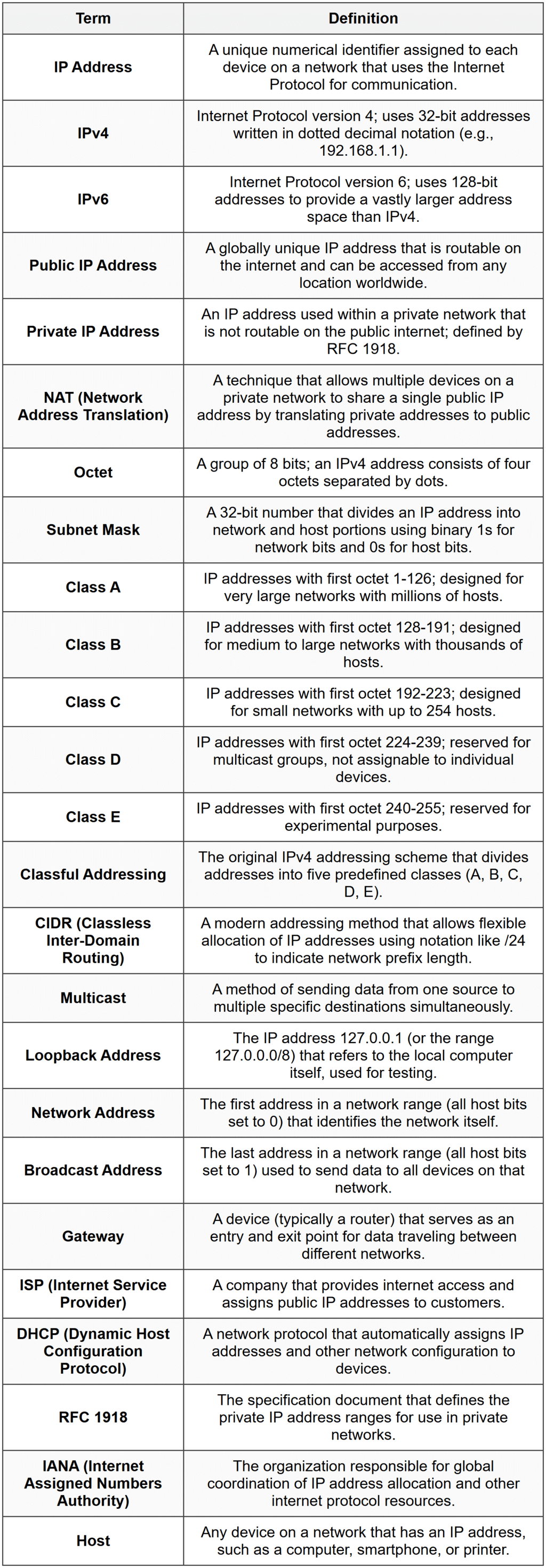
Every device connected to a network needs an address so it can send and receive information, just like every house needs a street address to receive mail. In computer networking, this address is called an IP address (Internet Protocol address). Understanding the different types of IP addresses-specifically public versus private, and how they are organized into classes-is fundamental to understanding how networks operate and how devices communicate across the internet and within local networks.
This document will guide you through the essential concepts of IP addressing, explaining what makes an IP address public or private, how IP addresses are divided into different classes, and why these distinctions matter in real-world networking.
What is an IP Address?
An IP address is a unique numerical identifier assigned to every device connected to a network that uses the Internet Protocol for communication. Think of it as a phone number for your computer, smartphone, printer, or any other network-enabled device.
IP addresses come in two main versions:
- IPv4 (Internet Protocol version 4): The older and most widely used version, consisting of four numbers separated by dots, such as
192.168.1.1 - IPv6 (Internet Protocol version 6): A newer version designed to provide more addresses, using a longer hexadecimal format
In this document, we will focus primarily on IPv4 addresses because they are the standard used when discussing IP classes and the public/private distinction.
Structure of an IPv4 Address
An IPv4 address consists of 32 bits (binary digits), which are divided into four octets. Each octet contains 8 bits and is represented as a decimal number from 0 to 255.
For example, the IP address 192.168.1.1 looks like this in binary:
11000000.10101000.00000001.00000001Each of the four parts (192, 168, 1, 1) is one octet. Since each octet is 8 bits, and 8 bits can represent 28 = 256 different values (0 through 255), each section ranges from 0 to 255.
The total number of possible IPv4 addresses is:
\[2^{32} = 4{,}294{,}967{,}296 \text{ addresses}\]Where \(2^{32}\) represents 2 raised to the power of 32, since there are 32 bits in total.
Public IP Addresses
A public IP address is an IP address that is accessible over the internet. It is globally unique, meaning no two devices on the public internet can have the same public IP address at the same time.
Think of a public IP address like your home's street address. It's unique in the world, and anyone who knows it can send you mail (or data packets) from anywhere.
Characteristics of Public IP Addresses
- Globally unique: Assigned by Internet Service Providers (ISPs) and regulated by organizations like IANA (Internet Assigned Numbers Authority) and regional registries
- Routable on the internet: These addresses can be reached from any location on the internet
- Limited in number: Because IPv4 has a finite number of addresses, public IPs are a scarce resource
- Usually assigned dynamically or statically by ISPs: Your router receives a public IP address when it connects to your ISP
Examples of Public IP Addresses
Examples of public IP addresses include:
8.8.8.8(Google's public DNS server)142.250.185.46(a Google web server)151.101.1.140(a content delivery network server)
Uses of Public IP Addresses
Public IP addresses are essential for:
- Hosting websites and servers that need to be accessible from anywhere on the internet
- Connecting your home or office network to the internet
- Enabling devices to communicate across different networks globally
- Running services like email servers, gaming servers, and remote access systems
Private IP Addresses
A private IP address is an IP address used within a private network (such as your home or office network) and is not routable on the public internet. Multiple private networks around the world can use the same private IP addresses without conflict because these addresses are only meaningful within their own local network.
Think of a private IP address like an apartment number within a building. Apartment 5B exists in thousands of buildings around the world, but within each building, it uniquely identifies one apartment. The building's street address (the public IP) is what makes each "Apartment 5B" globally distinguishable.
Characteristics of Private IP Addresses
- Not globally unique: The same private IP addresses can be reused in different private networks
- Not routable on the internet: Routers on the public internet will not forward packets destined to private IP addresses
- Reserved address ranges: Specific ranges of IP addresses are officially designated for private use
- Used with NAT: Private addresses are translated to public addresses using Network Address Translation (NAT) when accessing the internet
Private IP Address Ranges
The Internet Engineering Task Force (IETF) has reserved specific ranges of IP addresses for private networks. These are defined in RFC 1918 and include three ranges:
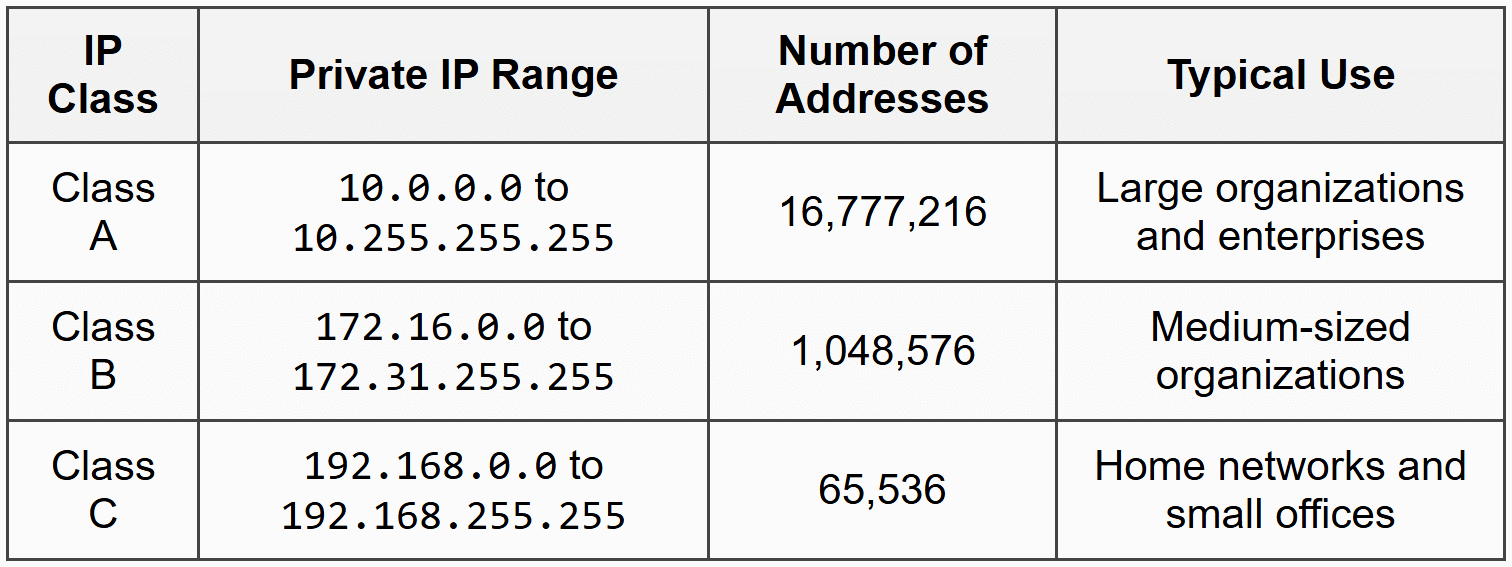
Examples of Private IP Addresses
Common examples you might see in your home or office network include:
192.168.1.1(commonly used as a router's default gateway)192.168.0.100(a device on a home network)10.0.0.5(a device in a corporate network)172.16.5.23(a server in a company's internal network)
Why Use Private IP Addresses?
Private IP addresses solve several important problems:
- Address conservation: With only about 4.3 billion IPv4 addresses available and billions of devices needing connectivity, private addresses allow many devices to share one public IP address
- Security: Devices using private IP addresses are not directly accessible from the internet, providing a layer of protection
- Network organization: Private addresses make it easier to organize and manage internal networks without coordinating with external authorities
- Cost efficiency: Organizations don't need to purchase multiple public IP addresses for every device
Network Address Translation (NAT)
Since private IP addresses cannot be routed on the internet, a mechanism called Network Address Translation (NAT) is used to allow devices with private IP addresses to communicate with the internet.
NAT is typically performed by your router or gateway device. Here's how it works:
- A device on your private network (e.g., your laptop with IP
192.168.1.5) wants to access a website - The device sends a request to the router
- The router replaces the private source IP address with its own public IP address
- The router keeps track of this translation in a NAT table
- When the website responds, it sends data back to the router's public IP
- The router looks up the NAT table and forwards the data to the correct private IP (
192.168.1.5)
Imagine a large office building with one main mailbox (public IP) but many offices inside (private IPs). When someone in Office 5B wants to send mail, the mailroom stamps the building's return address on the envelope, not "Office 5B." When mail returns, the mailroom checks its log to know which office originally sent it, then delivers it to Office 5B.
This process allows thousands of devices on a private network to share a single public IP address, dramatically conserving the limited IPv4 address space.
IP Address Classes
When the IPv4 addressing system was first designed, IP addresses were divided into different classes to organize and allocate addresses efficiently. This system is called classful addressing.
Although modern networks primarily use classless addressing (CIDR - Classless Inter-Domain Routing), understanding IP classes remains important because:
- They form the historical foundation of IP addressing
- Private IP ranges are defined based on these classes
- Many networking concepts and default subnet masks reference these classes
- They appear in networking exams and documentation
IP addresses are divided into five classes: A, B, C, D, and E. The class of an IP address is determined by the first few bits of the address (or simply by looking at the first octet in decimal form).
Class A IP Addresses
Structure and Range
In Class A addresses, the first bit is always 0. This means the first octet ranges from 0 to 127 in decimal.
Range: 0.0.0.0 to 127.255.255.255
However, two ranges within Class A are special:
0.0.0.0to0.255.255.255is reserved and not used for regular addressing127.0.0.0to127.255.255.255is reserved for loopback addresses (the address127.0.0.1refers to "this computer")
Usable Class A range: 1.0.0.0 to 126.255.255.255
Network and Host Portions
In Class A addresses:
- The first octet identifies the network (network portion)
- The last three octets identify the host (host portion)
This division is represented as:
N.H.H.H
where N = Network, H = Host
Default Subnet Mask
The default subnet mask for Class A is 255.0.0.0, which in binary is:
11111111.00000000.00000000.00000000This mask indicates that the first 8 bits are for the network, and the remaining 24 bits are for hosts.
Number of Networks and Hosts
For Class A:
Number of networks:
\[2^7 - 2 = 126 \text{ networks}\]We use 7 bits (since the first bit is fixed at 0) and subtract 2 for reserved ranges.
Number of hosts per network:
\[2^{24} - 2 = 16{,}777{,}214 \text{ hosts}\]We use 24 bits for hosts and subtract 2 because the first address (all host bits 0) is the network address, and the last address (all host bits 1) is the broadcast address.
Typical Use
Class A addresses are designed for very large networks, such as:
- Large corporations and multinational companies
- Internet Service Providers
- Major organizations that need millions of addresses
Example: The network 10.0.0.0 (a private Class A network) can support over 16 million devices.
Class B IP Addresses
Structure and Range
In Class B addresses, the first two bits are always 10. This means the first octet ranges from 128 to 191.
Range: 128.0.0.0 to 191.255.255.255
Network and Host Portions
In Class B addresses:
- The first two octets identify the network
- The last two octets identify the host
N.N.H.H
where N = Network, H = Host
Default Subnet Mask
The default subnet mask for Class B is 255.255.0.0, which in binary is:
11111111.11111111.00000000.00000000This indicates the first 16 bits are for the network, and the remaining 16 bits are for hosts.
Number of Networks and Hosts
Number of networks:
\[2^{14} = 16{,}384 \text{ networks}\]We use 14 bits for the network portion (16 bits minus the 2 fixed bits "10").
Number of hosts per network:
\[2^{16} - 2 = 65{,}534 \text{ hosts}\]We use 16 bits for hosts and subtract 2 for the network and broadcast addresses.
Typical Use
Class B addresses are designed for medium to large networks, such as:
- Universities and colleges
- Medium-sized companies
- Regional organizations
Example: A university might use a Class B network like 172.16.0.0 to connect tens of thousands of computers across campus.
Class C IP Addresses
Structure and Range
In Class C addresses, the first three bits are always 110. This means the first octet ranges from 192 to 223.
Range: 192.0.0.0 to 223.255.255.255
Network and Host Portions
In Class C addresses:
- The first three octets identify the network
- The last octet identifies the host
N.N.N.H
where N = Network, H = Host
Default Subnet Mask
The default subnet mask for Class C is 255.255.255.0, which in binary is:
11111111.11111111.11111111.00000000This indicates the first 24 bits are for the network, and the remaining 8 bits are for hosts.
Number of Networks and Hosts
Number of networks:
\[2^{21} = 2{,}097{,}152 \text{ networks}\]We use 21 bits for the network portion (24 bits minus the 3 fixed bits "110").
Number of hosts per network:
\[2^8 - 2 = 254 \text{ hosts}\]We use 8 bits for hosts and subtract 2 for the network and broadcast addresses.
Typical Use
Class C addresses are designed for small networks, such as:
- Home networks
- Small businesses
- Small offices
Example: A home router typically uses the Class C private network 192.168.1.0, which can support up to 254 devices.
Class D IP Addresses
Structure and Range
Class D addresses have the first four bits set to 1110. The first octet ranges from 224 to 239.
Range: 224.0.0.0 to 239.255.255.255
Purpose
Class D addresses are reserved for multicast groups. Multicasting is a method of sending data from one source to multiple destinations simultaneously.
Think of multicasting like a radio broadcast. One radio station transmits, and multiple radios tuned to that frequency receive the signal at the same time.
Characteristics
- Not divided into network and host portions
- No subnet mask is used
- Cannot be assigned to individual devices as their IP address
- Used for protocols like IPTV, video conferencing, and streaming
Common Multicast Addresses
224.0.0.1: All hosts on the local network segment224.0.0.2: All routers on the local network segment224.0.0.9: RIP version 2 routing protocol239.255.255.255: Reserved for administrative scoping
Class E IP Addresses
Structure and Range
Class E addresses have the first four bits set to 1111. The first octet ranges from 240 to 255.
Range: 240.0.0.0 to 255.255.255.255
Purpose
Class E addresses are reserved for experimental and research purposes. They are not used in normal network operations and are not allocated to any organizations or devices.
Special Address
Within Class E, the address 255.255.255.255 is special. It is used as the limited broadcast address, which means "send to all devices on this local network."
Summary Comparison of IP Classes
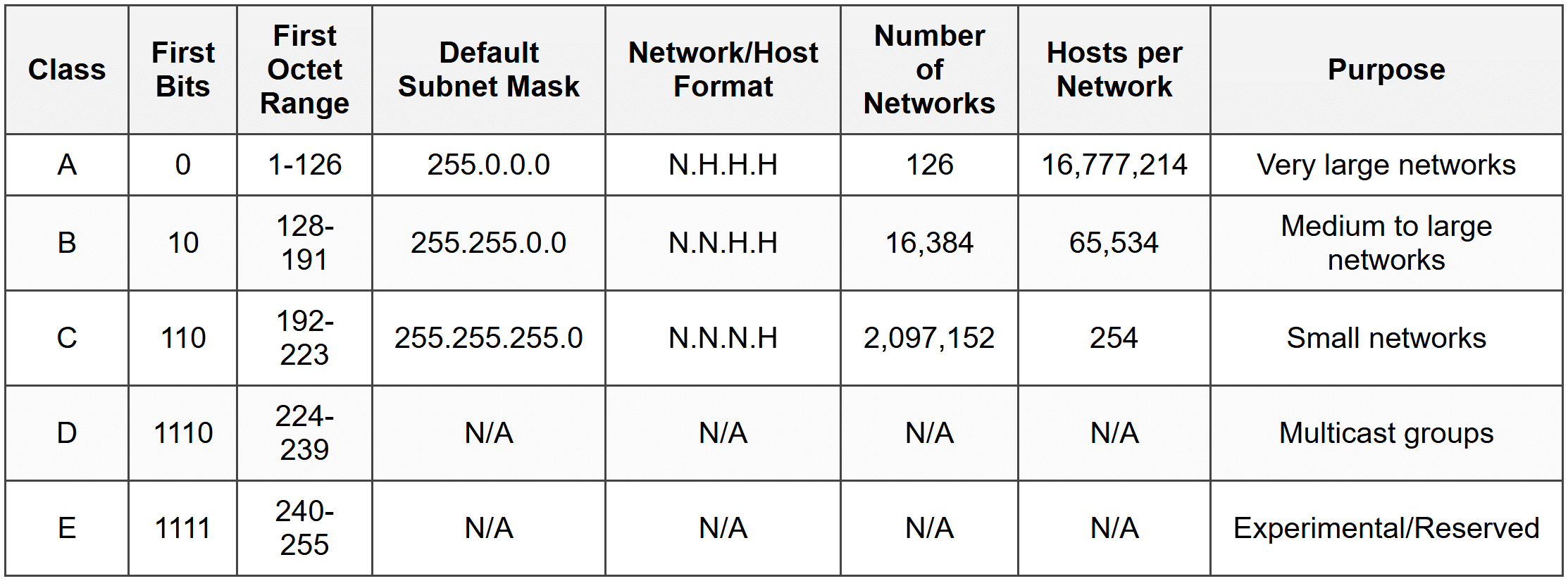
Identifying IP Class from an Address
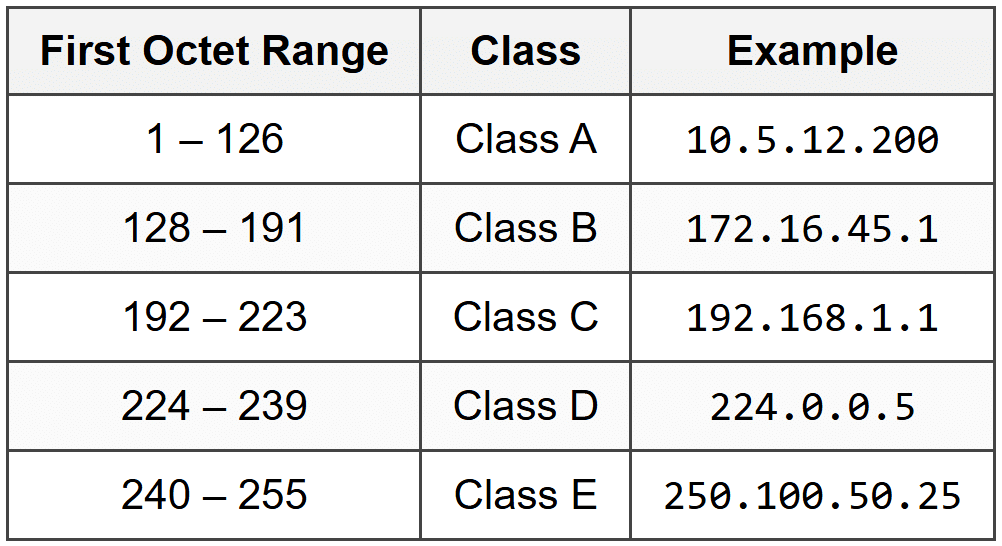
Given any IP address, you can quickly determine its class by looking at the first octet (the first number):
Practice Examples
Let's identify the class of the following IP addresses:
85.12.45.200: First octet is 85, which falls between 1-126 → Class A150.100.50.25: First octet is 150, which falls between 128-191 → Class B200.50.75.10: First octet is 200, which falls between 192-223 → Class C230.5.10.15: First octet is 230, which falls between 224-239 → Class D245.100.200.50: First octet is 245, which falls between 240-255 → Class E
Public vs Private: Key Differences
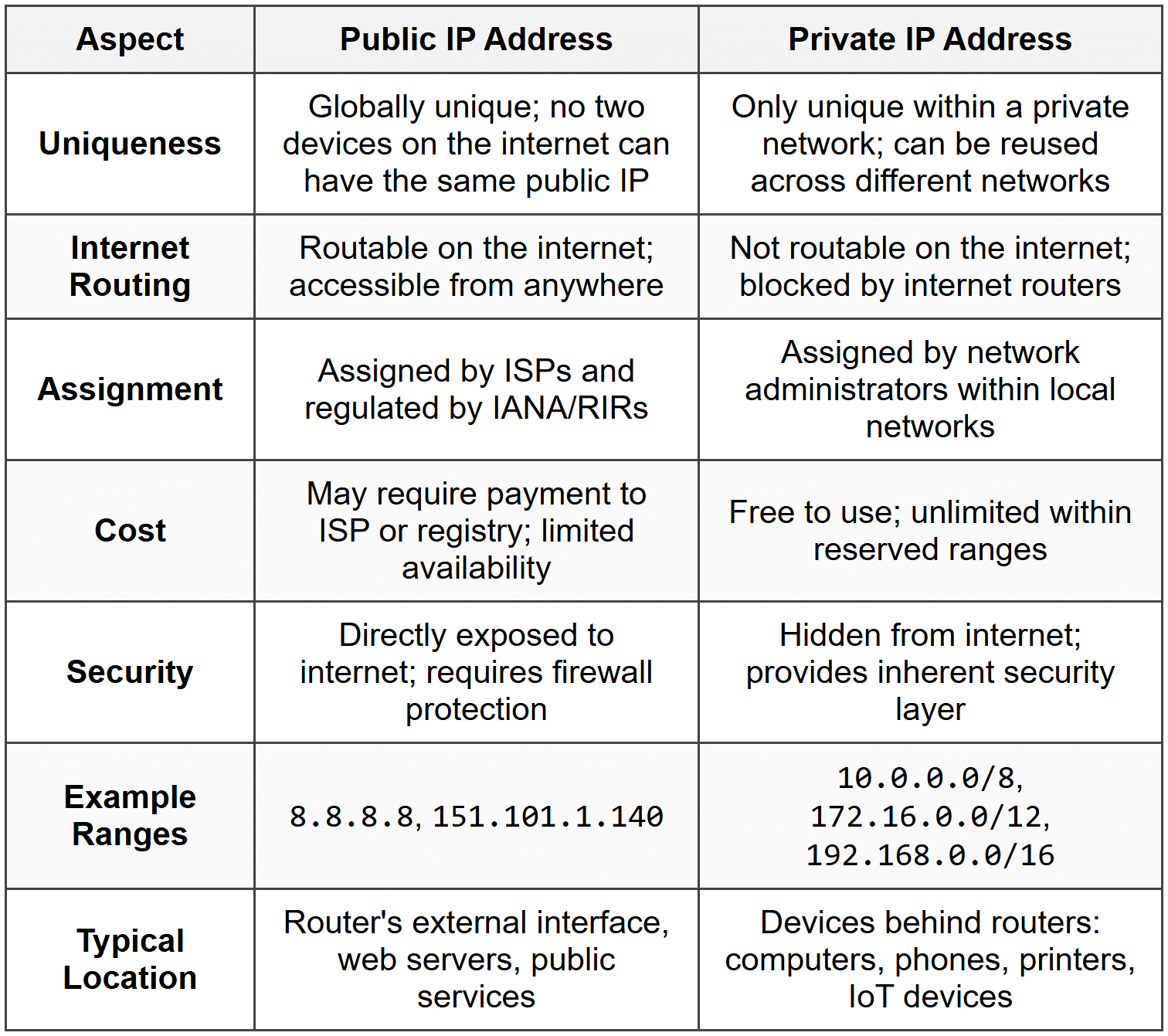
Now that we understand IP classes, let's clearly distinguish between public and private IP addresses:
Special IP Addresses and Reserved Ranges
Beyond the public and private distinction, several IP address ranges have special meanings and reserved purposes:
Loopback Addresses
Range: 127.0.0.0 to 127.255.255.255
The most commonly used loopback address is 127.0.0.1, often referred to as localhost. When a device sends data to this address, the data is routed back to itself without leaving the computer. This is useful for testing network software and services.
Link-Local Addresses
Range: 169.254.0.0 to 169.254.255.255
These addresses are automatically assigned by a device when it cannot obtain an IP address from a DHCP server. This is called APIPA (Automatic Private IP Addressing). Devices with these addresses can only communicate with other devices on the same local network segment.
Broadcast Addresses
- Limited Broadcast:
255.255.255.255- sends to all devices on the local network - Directed Broadcast: The last address in any network range (all host bits set to 1) - sends to all devices in a specific network
Example: In the network 192.168.1.0/24, the directed broadcast address is 192.168.1.255.
Network Address
The first address in any network range (all host bits set to 0) identifies the network itself and cannot be assigned to a device.
Example: In the network 192.168.1.0/24, the network address is 192.168.1.0.
Documentation and Example Ranges
Certain ranges are reserved for use in documentation, books, and examples:
192.0.2.0/24(TEST-NET-1)198.51.100.0/24(TEST-NET-2)203.0.113.0/24(TEST-NET-3)
These addresses should never appear in real networks and are safe to use in teaching materials and documentation.
Subnet Masks and Their Role
A subnet mask is a 32-bit number that divides an IP address into the network portion and the host portion. It works by using binary 1s to mark the network bits and binary 0s to mark the host bits.
How Subnet Masks Work
When you perform a bitwise AND operation between an IP address and its subnet mask, you get the network address.
Example:
IP Address:192.168.1.10→11000000.10101000.00000001.00001010
Subnet Mask:255.255.255.0→11111111.11111111.11111111.00000000
Network Address:192.168.1.0→11000000.10101000.00000001.00000000
The subnet mask tells the device: "The first 24 bits identify your network, and the last 8 bits identify you within that network."
CIDR Notation
CIDR (Classless Inter-Domain Routing) notation is a more compact way to represent subnet masks. Instead of writing 255.255.255.0, you write /24, which indicates the number of network bits.
Examples:
192.168.1.0/24means subnet mask255.255.255.010.0.0.0/8means subnet mask255.0.0.0172.16.0.0/16means subnet mask255.255.0.0
Default Subnet Masks for Each Class
- Class A:
255.0.0.0or/8 - Class B:
255.255.0.0or/16 - Class C:
255.255.255.0or/24
Real-World Scenario: Home Network
Let's walk through a practical example to see how public and private IP addresses work together in a typical home network.
The Setup
You have:
- An Internet Service Provider (ISP) connection
- A home router
- Several devices: laptop, smartphone, smart TV, and printer
IP Address Assignment
Public IP Address:
Your ISP assigns your router a public IP address: 203.0.113.45
Private IP Addresses:
Your router creates a private network using the range 192.168.1.0/24 and assigns:
- Router (gateway):
192.168.1.1 - Laptop:
192.168.1.10 - Smartphone:
192.168.1.11 - Smart TV:
192.168.1.12 - Printer:
192.168.1.13
Communication Flow
Within the home network:
When your laptop (192.168.1.10) wants to print a document, it sends data directly to the printer (192.168.1.13). Both devices are on the same private network, so no translation is needed.
Accessing the internet:
- Your laptop wants to visit
www.example.com - The laptop sends a request from
192.168.1.10to the router at192.168.1.1 - The router uses NAT to replace the source address
192.168.1.10with the public IP203.0.113.45 - The request travels across the internet to the web server
- The web server responds to
203.0.113.45 - The router receives the response and uses its NAT table to determine it belongs to
192.168.1.10 - The router forwards the data to your laptop
From the web server's perspective, all devices in your home appear to have the same IP address: 203.0.113.45. The router keeps track of which internal device made which request using port numbers and connection tracking.Advantages and Disadvantages
Advantages of Private IP Addresses
- Address conservation: Allows billions of devices to connect to the internet despite limited IPv4 addresses
- Enhanced security: Devices are not directly accessible from the internet, reducing attack surface
- Network flexibility: Easy to reorganize internal networks without affecting external connectivity
- Cost savings: No need to purchase multiple public IP addresses
- Simplified management: Network administrators have full control over internal address allocation
Disadvantages of Private IP Addresses
- NAT complexity: Adds complexity to routing and can cause issues with certain applications and protocols
- Limited incoming connections: Hosting servers or services requires port forwarding or other NAT traversal techniques
- Performance overhead: NAT translation adds small processing delays
- End-to-end connectivity: Breaks the original internet principle of direct device-to-device communication
Advantages of Public IP Addresses
- Direct accessibility: Devices can be reached directly from anywhere on the internet
- Simplified hosting: Easy to run servers, websites, and services
- No NAT issues: Applications work without NAT-related complications
- Better for peer-to-peer: Direct connections for gaming, video calls, and file sharing
Disadvantages of Public IP Addresses
- Scarcity: Limited number of IPv4 addresses available
- Cost: May require payment for static IP addresses
- Security risk: Devices are directly exposed to internet threats
- Management complexity: Requires careful security configuration and firewall rules
IPv4 Address Exhaustion and Future Solutions
As mentioned earlier, IPv4 provides approximately 4.3 billion addresses. With the explosive growth of internet-connected devices-computers, smartphones, IoT devices, and more-we've essentially run out of available IPv4 addresses. This problem is known as IPv4 address exhaustion.
Why We Haven't Run Out Completely
Several technologies have extended the life of IPv4:
- NAT (Network Address Translation): Allows thousands of devices to share one public IP
- Private IP addresses: Reduces the need for public IPs for internal devices
- CIDR (Classless Inter-Domain Routing): More efficient address allocation than classful addressing
- Address reclamation: Recovering unused address blocks from organizations
The Long-Term Solution: IPv6
IPv6 (Internet Protocol version 6) is the successor to IPv4, designed to provide a virtually unlimited number of addresses.
Key features of IPv6:
- 128-bit addresses: Provides 2128 ≈ 340 undecillion addresses
- Hexadecimal notation: Written as eight groups of four hexadecimal digits, like
2001:0db8:85a3:0000:0000:8a2e:0370:7334 - No need for NAT: Every device can have its own globally unique address
- Built-in security: IPsec support is mandatory
- Simplified header: More efficient routing
While IPv6 adoption is growing, IPv4 remains the dominant protocol, and both will coexist for many years through dual-stack implementations (devices supporting both IPv4 and IPv6).
Review Questions
- What is an IP address, and why is it necessary for computer networks?
- Explain the difference between a public IP address and a private IP address. Give two examples of each.
- What are the three reserved private IP address ranges, and which IP class does each belong to?
- An IP address starts with 156. Which class does it belong to, and what is the default subnet mask for that class?
- How many usable host addresses are available in a Class C network? Show your calculation.
- What is the purpose of Network Address Translation (NAT), and why is it important in modern networks?
- What are Class D IP addresses used for, and why can't they be assigned to individual devices?
- Identify the class of the following IP addresses:
10.50.25.100,180.45.90.12,225.100.50.25 - What is the significance of the IP address
127.0.0.1? - Explain why private IP addresses help conserve the IPv4 address space.
- What is a subnet mask, and how does it help divide an IP address into network and host portions?
- In a home network using
192.168.1.0/24, what is the network address, broadcast address, and how many devices can be connected? - Why was IPv6 developed, and what is its main advantage over IPv4?
- Can a device on your home network with private IP address
192.168.1.5be directly accessed from the internet? Why or why not? - What is CIDR notation, and what does
/16mean when written after an IP address?
Glossary