Load Balancers


Load Balancers
A load balancer is a specialized network device or software application that distributes incoming network traffic across multiple servers. Its primary purpose is to ensure that no single server becomes overwhelmed with too many requests, which could slow down performance or cause the server to fail entirely. By spreading the workload evenly, load balancers improve the availability, reliability, and performance of applications and websites.
Think of a load balancer like a restaurant host who greets customers at the entrance. Instead of sending all customers to one waiter (which would overwhelm that person), the host distributes customers evenly among all available waiters. This ensures faster service and prevents any single waiter from being overworked.
Load balancers are essential components in modern network infrastructure, especially for high-traffic websites, cloud services, and enterprise applications. They work silently in the background to ensure users receive fast, reliable access to services.
Why Load Balancers Are Necessary
To understand why load balancers are important, we need to first understand the challenges that arise when many users try to access the same service simultaneously.
The Single Server Problem
Imagine a simple website hosted on a single server. When only a few users visit the website, the server can handle all the requests quickly. However, as traffic grows, several problems emerge:
- Performance degradation: Each server has limited processing power, memory, and network bandwidth. When too many requests arrive at once, the server slows down significantly.
- Single point of failure: If the server crashes, experiences hardware failure, or needs maintenance, the entire website becomes unavailable to all users.
- Scalability limits: There is a maximum capacity for any single server. Beyond that point, it simply cannot handle more traffic, no matter how optimized the software is.
- Geographic latency: Users far away from the server's physical location experience longer response times due to the distance data must travel.
How Load Balancers Solve These Problems
Load balancers address these challenges by introducing multiple servers working together as a server pool or server farm. The load balancer sits between users and the servers, managing the distribution of requests:
- Improved performance: Traffic is distributed across multiple servers, so each server handles only a portion of the total load.
- High availability: If one server fails, the load balancer automatically redirects traffic to the remaining healthy servers, ensuring continuous service.
- Horizontal scalability: You can add more servers to the pool as traffic grows, rather than trying to upgrade a single server indefinitely.
- Reduced latency: Load balancers can direct users to the geographically nearest server or the server with the fastest response time.
- Maintenance flexibility: Servers can be taken offline for updates or maintenance without disrupting service to users.
How Load Balancers Work
At a fundamental level, a load balancer receives incoming requests from clients (such as web browsers or mobile apps) and forwards those requests to one of several backend servers. Once a server processes the request, it sends the response back through the load balancer to the client.
Basic Operation Flow
- A client sends a request to access a service (for example, visiting www.example.com).
- The DNS system resolves the domain name to the IP address of the load balancer, not an individual server.
- The request arrives at the load balancer.
- The load balancer selects one server from the available pool using a specific algorithm.
- The load balancer forwards the request to the chosen server.
- The server processes the request and generates a response.
- The server sends the response back to the load balancer.
- The load balancer forwards the response to the original client.
Important: From the client's perspective, it appears to communicate with a single server. The client is unaware that a load balancer and multiple servers are working behind the scenes.
Health Monitoring
Load balancers continuously monitor the health and availability of backend servers through health checks. These are automated tests performed at regular intervals:
- Ping checks: Sending a simple network ping to verify the server is reachable.
- TCP connection checks: Attempting to establish a TCP connection on a specific port.
- HTTP/HTTPS checks: Requesting a specific webpage or endpoint and verifying the response code (typically expecting a 200 OK status).
- Application-level checks: Testing specific application functionality to ensure the server is not just online but fully operational.
If a health check fails repeatedly, the load balancer marks that server as unhealthy and stops sending new requests to it. Once the server recovers and passes health checks again, the load balancer returns it to the active pool.
Types of Load Balancers
Load balancers can be categorized based on their implementation method and the network layer at which they operate.
Based on Implementation
Hardware Load Balancers
Hardware load balancers are dedicated physical devices specifically designed and optimized for load balancing. They are manufactured by specialized vendors and installed in data centers.
Characteristics:
- High performance and throughput capabilities
- Specialized processors optimized for network traffic handling
- Expensive initial investment and maintenance costs
- Vendor-specific features and management interfaces
- Limited flexibility for rapid configuration changes
- Typically used in large enterprise environments
Software Load Balancers
Software load balancers are applications that run on standard servers or virtual machines. Popular examples include NGINX, HAProxy, and Apache Traffic Server.
Characteristics:
- Lower cost compared to hardware solutions
- Greater flexibility and easier configuration updates
- Can run on commodity hardware or cloud instances
- Easier to scale horizontally by adding more instances
- May require more manual configuration and management
- Performance depends on the underlying hardware
Cloud-Based Load Balancers
Cloud-based load balancers are load balancing services offered by cloud providers such as Amazon Web Services (AWS Elastic Load Balancing), Google Cloud Load Balancing, and Microsoft Azure Load Balancer.
Characteristics:
- Fully managed service requiring minimal configuration
- Pay-as-you-go pricing model
- Automatic scaling to handle traffic spikes
- Integrated with other cloud services
- High availability built into the service itself
- No hardware maintenance required
Based on Network Layer (OSI Model)
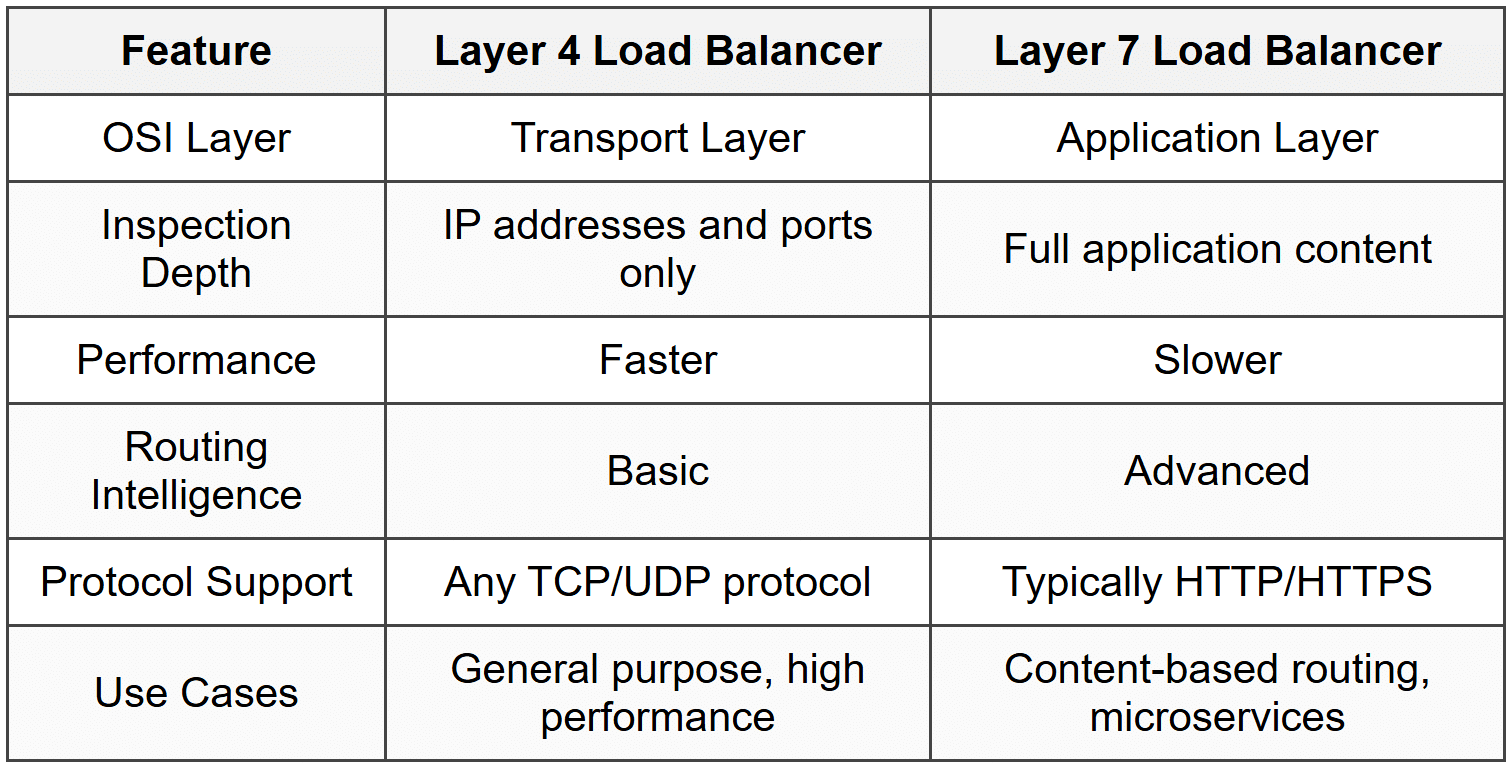
Load balancers operate at different layers of the OSI networking model, which determines what information they can use to make routing decisions.
Layer 4 Load Balancers (Transport Layer)
Layer 4 load balancers operate at the Transport Layer of the OSI model. They make routing decisions based on information available in the transport layer headers, specifically:
- Source IP address
- Destination IP address
- Source port number
- Destination port number
- Protocol type (TCP or UDP)
Layer 4 load balancers do not inspect the actual content of the packets (the application data). They simply look at the network and transport information to make fast routing decisions.
Advantages:
- Very fast performance due to minimal packet inspection
- Lower processing overhead
- Can handle any type of traffic (HTTP, FTP, databases, etc.)
- Simpler configuration
Disadvantages:
- Limited routing intelligence-cannot make decisions based on content
- Cannot perform application-aware load balancing
- Less flexible for complex routing scenarios
Layer 7 Load Balancers (Application Layer)
Layer 7 load balancers operate at the Application Layer of the OSI model. They can inspect the actual content of the requests, including:
- HTTP headers
- URL paths
- Cookies
- Request methods (GET, POST, etc.)
- Message content
- User authentication information
This deeper inspection allows for much more sophisticated routing decisions.
Advantages:
- Intelligent routing based on content (e.g., send video requests to specialized servers)
- Can modify or inspect application data
- Support for advanced features like SSL termination
- Can route based on user identity or session information
- Better suited for modern microservices architectures
Disadvantages:
- Higher processing overhead due to deeper packet inspection
- Slower than Layer 4 load balancers
- More complex configuration
- Specific to certain protocols (typically HTTP/HTTPS)
Load Balancing Algorithms
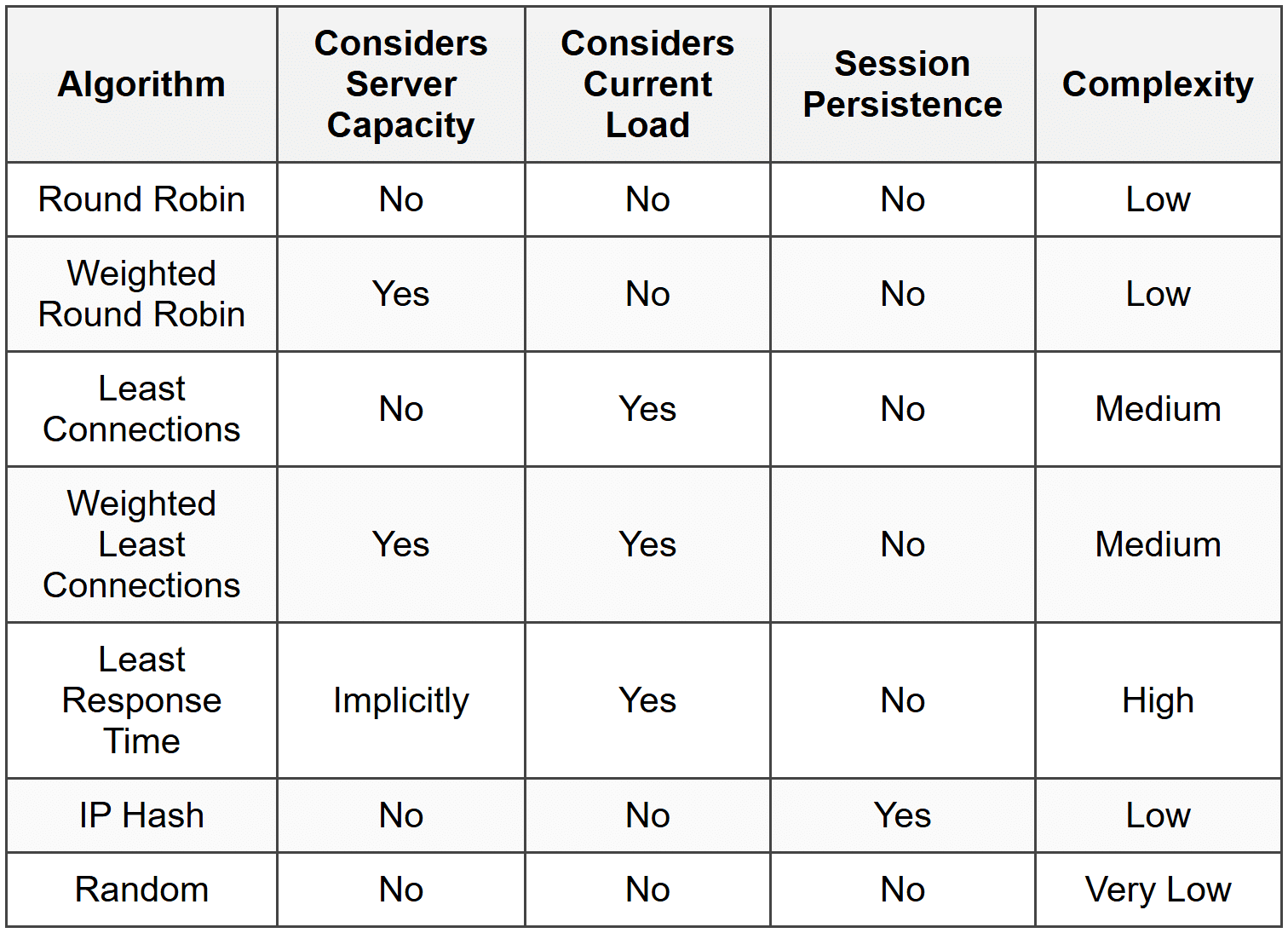
The load balancing algorithm determines how the load balancer selects which server receives each incoming request. Different algorithms are suited to different scenarios.
Round Robin
The Round Robin algorithm distributes requests sequentially to each server in the pool, one after another in circular order.
How it works:
- Request 1 goes to Server A
- Request 2 goes to Server B
- Request 3 goes to Server C
- Request 4 goes to Server A (starting over)
- Request 5 goes to Server B
- And so on...
Advantages:
- Simple and easy to implement
- Fair distribution when all servers have equal capacity
- No complex calculations required
Disadvantages:
- Doesn't account for server capacity differences
- Doesn't consider current server load
- All requests treated equally regardless of processing complexity
Best used when all servers have identical capabilities and all requests require similar processing time.
Weighted Round Robin
The Weighted Round Robin algorithm is similar to Round Robin, but assigns a weight to each server based on its capacity. Servers with higher weights receive proportionally more requests.
If Server A has weight 3, Server B has weight 2, and Server C has weight 1, then out of every 6 requests, Server A receives 3, Server B receives 2, and Server C receives 1.
Advantages:
- Accounts for different server capacities
- More efficient use of heterogeneous server pools
- Still relatively simple to implement
Disadvantages:
- Requires manual configuration of weights
- Still doesn't adapt to real-time load changes
Least Connections
The Least Connections algorithm directs new requests to the server with the fewest active connections at that moment.
How it works:
- The load balancer tracks how many active connections each server currently has
- When a new request arrives, it goes to the server with the lowest connection count
- When a connection closes, the count for that server decreases
Advantages:
- Adapts to actual server load in real-time
- Better for applications where connection duration varies significantly
- Prevents overloading slower servers
Disadvantages:
- More complex tracking required
- Assumes all connections are equally resource-intensive (which may not be true)
Weighted Least Connections
The Weighted Least Connections algorithm combines the concepts of weighting and connection counting. It considers both the number of active connections and the server's assigned capacity weight.
The effective load is calculated as:
[/[ \text{Effective Load} = \frac{\text{Active Connections}}{\text{Server Weight}} ]/]
Where:
- Active Connections is the current number of connections to the server
- Server Weight is the assigned capacity weight for that server
The server with the lowest effective load receives the next request.
Least Response Time
The Least Response Time algorithm sends requests to the server with the fastest average response time and fewest active connections.
Advantages:
- Optimizes for actual user experience
- Adapts to real performance variations
- Accounts for both server speed and current load
Disadvantages:
- Requires continuous monitoring and calculation
- Higher overhead for the load balancer
IP Hash
The IP Hash algorithm uses the client's IP address to determine which server receives the request. The IP address is run through a hash function that consistently maps to the same server.
How it works:
- Extract the client's IP address from the request
- Apply a hash function to the IP address
- Use the hash result to select a server from the pool
- All future requests from the same IP address go to the same server
Advantages:
- Ensures session persistence without session tracking
- Simple and deterministic
- No need for shared session storage
Disadvantages:
- Uneven distribution if many users share IP addresses (corporate networks, NAT)
- Server removal or addition changes the hash mapping
- Doesn't account for server load
Random
The Random algorithm selects a server randomly for each request.
Advantages:
- Extremely simple
- Statistically even distribution over many requests
Disadvantages:
- No optimization
- Short-term distribution can be uneven
- No consideration of server capabilities or load
Session Persistence
Session persistence (also called sticky sessions) is a feature that ensures requests from the same client are consistently routed to the same backend server throughout a session.
Why Session Persistence Is Needed
Many web applications maintain session state-temporary information about a user's interaction with the application. Examples include:
- Shopping cart contents in an e-commerce site
- User authentication status
- Form data entered across multiple pages
- Application preferences and settings
When session data is stored locally on a server (in memory or on disk), that data is not automatically available to other servers in the pool. If a user's second request goes to a different server than their first request, the new server won't have access to the session data.
Imagine shopping online and adding items to your cart. If your next page load is handled by a different server that doesn't know about your cart, it would appear empty-a frustrating user experience!
Methods to Achieve Session Persistence
Cookie-Based Persistence
The load balancer inserts a special cookie in the client's browser that identifies which server handled the first request. Subsequent requests include this cookie, and the load balancer uses it to route to the same server.
IP-Based Persistence
All requests from the same source IP address are routed to the same server. This is essentially what the IP Hash algorithm provides.
Session ID in URL
Some systems encode the server identifier in the URL or session ID. The load balancer extracts this information to route correctly.
Alternatives to Session Persistence
Modern application architectures often avoid relying on session persistence by using:
- Centralized session storage: Store session data in a shared database or cache (like Redis or Memcached) accessible to all servers
- Stateless design: Design applications to not maintain server-side session state; instead, send all necessary data with each request (often using tokens like JWT)
- Database-backed sessions: Store session information in a database rather than server memory
These approaches provide better scalability and reliability because any server can handle any request without dependency on sticky sessions.
Advanced Load Balancer Features
SSL/TLS Termination
SSL termination (also called TLS termination) is when the load balancer handles the encryption and decryption of HTTPS traffic, rather than passing it through to backend servers.
How it works:
- Client establishes an encrypted HTTPS connection with the load balancer
- Load balancer decrypts the incoming traffic
- Load balancer forwards the unencrypted traffic to backend servers over the internal network
- Backend server processes the request and sends unencrypted response to load balancer
- Load balancer encrypts the response
- Load balancer sends encrypted response to client
Benefits:
- Reduces CPU load on backend servers (encryption/decryption is computationally expensive)
- Centralizes SSL certificate management
- Simplifies certificate updates and renewals
- Allows load balancer to inspect encrypted traffic for routing decisions
Considerations:
- Traffic between load balancer and servers is unencrypted (acceptable if on a trusted internal network)
- Load balancer becomes responsible for certificate security
SSL/TLS Passthrough
As an alternative to termination, SSL passthrough forwards encrypted traffic directly to backend servers without decrypting it. The servers handle all encryption and decryption.
This approach:
- Maintains end-to-end encryption
- Requires each server to have its own SSL certificate
- Prevents the load balancer from inspecting content
- Increases CPU load on backend servers
Content-Based Routing
Content-based routing (available in Layer 7 load balancers) directs traffic to different server pools based on the content of the request.
Examples:
- Route requests for
/api/*to application servers - Route requests for
/images/*to static content servers - Route mobile user-agent requests to mobile-optimized servers
- Route video streaming requests to high-bandwidth servers
This is like a large hospital where the receptionist (load balancer) directs patients to different departments based on their needs: emergency cases to the ER, surgery patients to the surgical wing, and routine checkups to general practitioners.
Global Server Load Balancing (GSLB)
Global Server Load Balancing distributes traffic across multiple data centers in different geographic locations. It typically works at the DNS level.
When a user requests a domain name:
- The GSLB-enabled DNS server determines the user's geographic location
- It returns the IP address of the nearest or best-performing data center
- Subsequent traffic goes directly to that data center
Benefits:
- Reduced latency by directing users to nearby servers
- Disaster recovery-traffic automatically redirects if a data center fails
- Geographic traffic distribution for compliance or performance
Auto-Scaling Integration
Modern load balancers, especially cloud-based ones, integrate with auto-scaling systems that automatically add or remove servers based on traffic patterns.
Process:
- Load balancer monitors traffic volume and server health
- When traffic exceeds thresholds, the system automatically provisions new servers
- Load balancer adds new servers to the pool and begins routing traffic to them
- When traffic decreases, servers are removed to reduce costs
DDoS Protection
Some advanced load balancers include features to detect and mitigate Distributed Denial of Service (DDoS) attacks:
- Rate limiting: Restricting the number of requests from a single IP address
- Traffic pattern analysis: Identifying abnormal traffic spikes
- Challenge-response mechanisms: Requiring clients to prove they're legitimate
- IP blacklisting: Blocking known malicious sources
Load Balancer Deployment Architectures
Single Load Balancer
The simplest deployment uses one load balancer sitting between clients and servers.
Advantages:
- Simple to configure and manage
- Lower cost
- Sufficient for many applications
Disadvantages:
- The load balancer itself becomes a single point of failure
- Limited capacity-can only handle so much traffic
Active-Passive High Availability
In this configuration, two load balancers are deployed: one active and one passive (standby).
How it works:
- The active load balancer handles all traffic normally
- The passive load balancer monitors the active one continuously
- If the active load balancer fails, the passive one detects this and takes over using a shared virtual IP address
- This switchover is called failover
Benefits:
- Eliminates single point of failure
- Automatic recovery from load balancer failures
Drawbacks:
- The passive load balancer sits idle most of the time (inefficient resource use)
- Brief service interruption during failover
Active-Active High Availability
In active-active deployment, multiple load balancers all handle traffic simultaneously.
Implementation approaches:
- DNS round-robin distributes traffic among multiple load balancer IP addresses
- Equal-cost multi-path (ECMP) routing distributes traffic at the network layer
Benefits:
- Better resource utilization-all load balancers actively work
- Higher total capacity
- No wasted standby resources
Multi-Tier Load Balancing
Complex applications often use multiple layers of load balancers:
- External load balancer: Handles internet traffic and routes to web servers
- Internal load balancer: Distributes traffic from web servers to application servers
- Database load balancer: Distributes database queries across database replicas
This approach allows for independent scaling of each application tier.
Common Protocols and Standards
Virtual IP Address (VIP)
A Virtual IP address is the IP address that clients connect to when accessing a load-balanced service. This single IP address represents the entire server pool, not any individual server.
The load balancer owns this VIP and responds to all traffic directed to it. Backend servers have their own real IP addresses that are not directly exposed to clients.
Direct Server Return (DSR)
Direct Server Return is an optimization technique where request traffic flows through the load balancer, but response traffic goes directly from the server to the client, bypassing the load balancer.
Flow:
- Client sends request to load balancer's VIP
- Load balancer forwards request to selected server
- Server processes request
- Server sends response directly to client (not through load balancer)
Benefits:
- Reduces load on the load balancer (response traffic is often larger than request traffic)
- Lower latency for responses
- Higher overall system capacity
Requirements:
- Servers must be configured with the VIP as a secondary address
- Network routing must be configured to allow this traffic flow
Proxy vs. Reverse Proxy
Load balancers often function as reverse proxies. Understanding the difference is important:
A forward proxy (or simply "proxy") sits on the client side and makes requests on behalf of clients. It hides client identities from servers.
A reverse proxy sits on the server side and receives requests on behalf of servers. It hides server identities and infrastructure from clients.
Load balancers are reverse proxies because they:
- Accept client requests
- Forward them to backend servers
- Return server responses to clients
- Hide the actual server infrastructure from clients
Monitoring and Metrics
Effective load balancer operation requires continuous monitoring of various metrics.
Key Metrics to Monitor
Request Rate
The number of requests processed per second. This indicates traffic volume and helps identify patterns and spikes.
Response Time
The time taken to process requests. Increasing response times may indicate overloaded servers or application problems.
Error Rate
The percentage of requests resulting in errors (4xx or 5xx HTTP status codes). High error rates indicate application or infrastructure problems.
Active Connections
The current number of active client connections. This helps assess current load and capacity usage.
Server Health Status
The number of healthy vs. unhealthy servers in the pool. A declining number of healthy servers requires immediate attention.
Backend Server Response Times
Individual response times for each backend server. This helps identify underperforming or problematic servers.
Throughput
The amount of data transferred, typically measured in megabits per second (Mbps) or gigabits per second (Gbps).
CPU and Memory Usage
Resource utilization on the load balancer itself. High utilization may indicate the need for load balancer scaling.
Logging
Comprehensive logging is essential for troubleshooting and analysis. Load balancers typically log:
- Client IP addresses
- Request timestamps
- Requested URLs or resources
- Backend server selected
- Response status codes
- Response times
- Bytes transferred
- User agent information
Common Use Cases
Web Applications
Load balancers are essential for high-traffic websites and web applications. They distribute HTTP/HTTPS requests across multiple web servers, ensuring fast response times and high availability.
API Gateways
Modern applications often expose APIs consumed by mobile apps, web applications, and third-party integrations. Load balancers distribute API requests across backend services, preventing any single service from being overwhelmed.
Database Query Distribution
Load balancers can distribute read queries across multiple database replicas while directing write operations to the primary database. This improves database performance and scalability.
Video Streaming
Video streaming services require massive bandwidth and processing power. Load balancers distribute streaming requests across content delivery servers, often using geographic proximity to reduce latency.
Gaming Servers
Online gaming platforms use load balancers to distribute players across multiple game server instances, ensuring optimal performance and low latency.
Email Services
Email systems use load balancers to distribute SMTP, IMAP, and POP3 connections across multiple mail servers, ensuring reliable email delivery and retrieval.
Enterprise Applications
Large organizations run critical business applications (ERP, CRM, etc.) that must be highly available. Load balancers ensure these applications remain accessible even during server failures or maintenance.
Security Considerations
Load Balancers as Security Boundaries
Load balancers often serve as security boundaries between the public internet and internal infrastructure. They can provide:
- IP whitelisting/blacklisting: Allowing or blocking traffic from specific IP addresses
- Rate limiting: Preventing abuse by limiting requests from individual clients
- SSL/TLS enforcement: Rejecting non-encrypted connections
- Certificate validation: Ensuring proper SSL/TLS certificates
Hiding Backend Infrastructure
By presenting only the load balancer's IP address to the public, the actual server infrastructure remains hidden. This provides security through obscurity and makes targeted attacks more difficult.
Web Application Firewall (WAF) Integration
Many modern load balancers integrate with Web Application Firewalls that inspect HTTP traffic for malicious patterns:
- SQL injection attempts
- Cross-site scripting (XSS)
- Malformed requests
- Known attack signatures
DDoS Mitigation
Load balancers can help absorb and mitigate Distributed Denial of Service attacks through:
- Traffic scrubbing-filtering out malicious requests
- Connection limiting per source IP
- Traffic pattern analysis and anomaly detection
- Integration with upstream DDoS protection services
Secure Communication
Even internal communication between the load balancer and backend servers should be secured:
- Use private networks or VLANs not accessible from the internet
- Consider encrypting internal traffic in highly sensitive environments
- Implement mutual authentication between load balancer and servers
Advantages and Disadvantages
Advantages of Load Balancers
- Improved performance: Distribute load across multiple servers for faster response times
- High availability: Eliminate single points of failure through redundancy
- Scalability: Easily add or remove servers as demand changes
- Flexibility: Perform maintenance without downtime by taking servers offline individually
- Reliability: Automatic health checking and failover to healthy servers
- Geographic distribution: Serve users from nearby locations for reduced latency
- Security: Provide an additional security layer and hide backend infrastructure
- SSL termination: Centralize and simplify SSL/TLS certificate management
- Efficient resource utilization: Ensure all servers contribute to handling load
Disadvantages and Challenges
- Additional complexity: Adds another component to configure, monitor, and maintain
- Potential bottleneck: The load balancer itself can become a performance bottleneck if undersized
- Cost: Hardware load balancers are expensive; even software solutions require resources
- Single point of failure: Without proper redundancy, the load balancer can fail
- Configuration complexity: Advanced features require expertise to configure correctly
- Session persistence challenges: Maintaining sessions across distributed servers requires careful planning
- Monitoring overhead: Requires dedicated monitoring and alerting infrastructure
- Latency: Adds a small amount of processing time (usually negligible)
Troubleshooting Common Issues
Uneven Load Distribution
Symptoms: Some servers receive much more traffic than others.
Possible causes and solutions:
- Using session persistence when not necessary-consider disabling or using stateless architecture
- IP hash algorithm with many users behind NAT-switch to a different algorithm
- Incorrect server weights-review and adjust weight configurations
Health Check Failures
Symptoms: Servers marked as unhealthy when they're actually functioning.
Possible causes and solutions:
- Health check interval too short-increase the interval between checks
- Health check too strict-check using a lighter endpoint that doesn't require database access
- Network connectivity issues-verify network paths between load balancer and servers
- Firewall blocking health checks-ensure health check traffic is allowed
High Latency
Symptoms: Requests take longer to complete than expected.
Possible causes and solutions:
- Load balancer overloaded-scale up load balancer capacity or add more load balancers
- SSL termination consuming too many resources-consider dedicated SSL acceleration hardware
- Poor algorithm choice-switch to an algorithm that considers server load
- Backend servers overloaded-add more servers to the pool
- Network congestion-investigate network infrastructure
Connection Timeout Errors
Symptoms: Clients receive connection timeout errors.
Possible causes and solutions:
- All backend servers down or unhealthy-investigate server health
- Load balancer timeout settings too aggressive-increase timeout values
- Maximum connection limits reached-increase connection limits or add capacity
- Firewall or security group blocking traffic-verify network security rules
SSL Certificate Errors
Symptoms: Browser warnings about invalid or expired certificates.
Possible causes and solutions:
- Expired certificate-renew the SSL certificate
- Certificate doesn't match domain name-ensure certificate covers all necessary domain names
- Missing intermediate certificates-install the complete certificate chain
- Wrong certificate installed-verify correct certificate is configured on load balancer
Review Questions
- What is the primary purpose of a load balancer in a network infrastructure?
- Explain the difference between a Layer 4 and a Layer 7 load balancer. Provide one advantage of each.
- Describe how the Round Robin load balancing algorithm works and identify one scenario where it would not be the best choice.
- What is session persistence (sticky sessions) and why is it sometimes necessary?
- What are health checks in the context of load balancing, and what happens when a server fails a health check?
- Compare and contrast hardware load balancers with software load balancers. List two advantages of each.
- What is SSL termination and what are two benefits it provides?
- Explain the difference between active-passive and active-active high availability configurations for load balancers.
- What is the Least Connections algorithm and in what type of scenario would it perform better than Round Robin?
- How does Global Server Load Balancing (GSLB) differ from traditional load balancing?
- What is a Virtual IP Address (VIP) and why is it used in load balancing?
- Describe three security benefits that load balancers can provide.
- What metrics should be monitored to ensure a load balancer is functioning properly?
- Explain content-based routing and provide two examples of how it might be used.
- What is Direct Server Return (DSR) and what advantage does it provide?
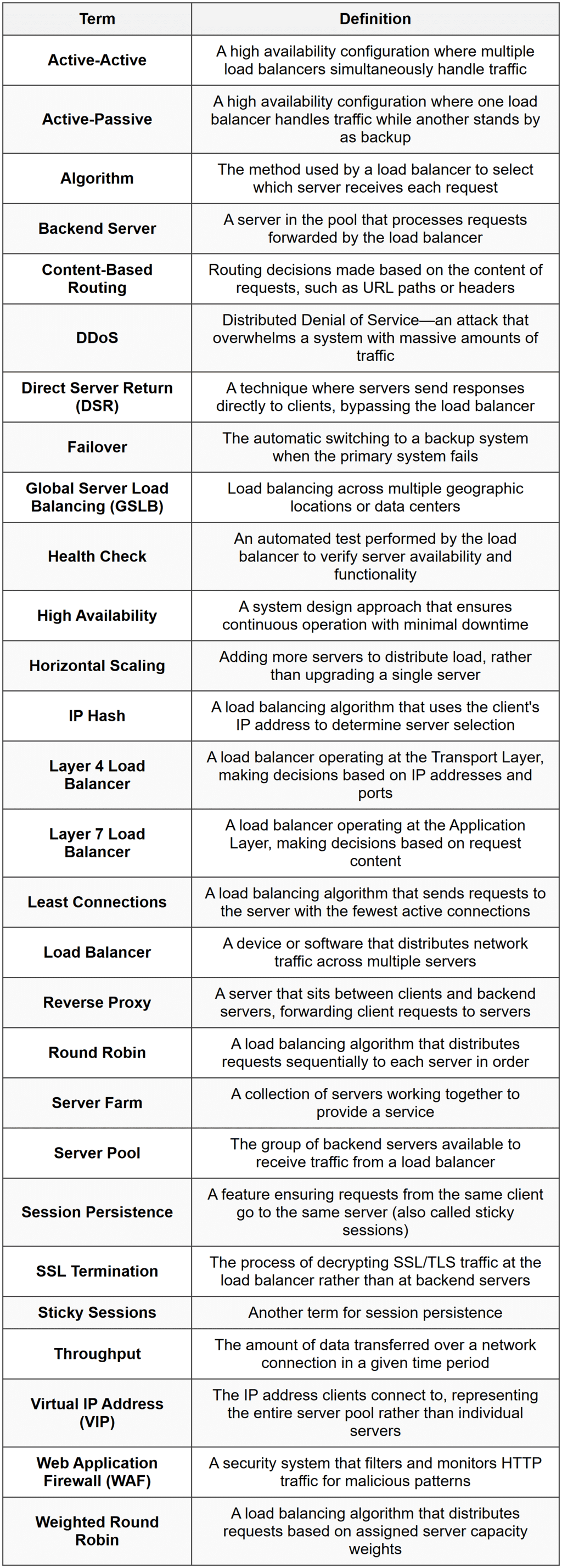
Glossary