UI vs UX vs Product Design


UI vs UX vs Product Design
When you first step into the world of digital design, you'll quickly encounter three terms that seem to overlap: UI Design, UX Design, and Product Design. While these roles share common ground and often collaborate closely, they each focus on different aspects of creating digital products. Understanding these distinctions will help you navigate your learning journey and potentially identify which path resonates most with your interests and strengths.
Think of creating a digital product like building a house. The UX designer is like the architect who plans the layout, ensures rooms flow logically, and makes sure the house meets the inhabitants' needs. The UI designer is like the interior designer who chooses colors, furniture, lighting, and decorative elements that make each room beautiful and functional. The Product designer is like the general contractor who oversees the entire project, understanding both architecture and interior design, while also considering budget, timeline, market demands, and long-term maintenance.
What is UX Design?
User Experience (UX) Design focuses on the overall experience a person has when interacting with a product, service, or system. It's about understanding users deeply-their needs, frustrations, goals, and behaviors-and designing solutions that are intuitive, efficient, and satisfying to use.
The Core Philosophy of UX Design
UX design operates on a fundamental principle: the user comes first. Every decision should be informed by user research and validated through testing. A UX designer doesn't design based on personal preferences or assumptions; instead, they gather evidence about what users actually need and how they behave.
Imagine you're designing a food delivery app. A UX designer wouldn't just jump into creating screens. They would first ask:
- Who are our users? (Students? Busy professionals? Families?)
- What problems are they trying to solve? (Save time? Discover new restaurants? Track dietary restrictions?)
- When and where do they use the app? (On their commute? At their desk? While watching TV?)
- What frustrates them about current solutions?
- What delights them?
Key Responsibilities of UX Designers
UX designers wear many hats throughout the design process. Their work typically includes:
- User Research: Conducting interviews, surveys, and observations to understand user needs, behaviors, and pain points
- Information Architecture: Organizing and structuring content in a logical way that makes sense to users
- User Flows: Mapping out the paths users take to complete specific tasks within a product
- Wireframing: Creating low-fidelity sketches or digital blueprints of screens that focus on layout and functionality rather than visual design
- Prototyping: Building interactive mockups that simulate how the final product will work
- Usability Testing: Observing real users as they interact with prototypes or existing products to identify problems and opportunities for improvement
- Iteration: Continuously refining designs based on feedback and test results
What UX Design Is Not About
It's equally important to understand what UX design doesn't focus on:
- UX designers typically don't make final decisions about colors, fonts, or visual styling
- They don't write production code (though understanding technical constraints is valuable)
- They don't focus primarily on how things look, but rather on how things work
- They don't design based on trends or aesthetics alone
The UX Design Deliverables
UX designers communicate their work through various documents and artifacts:
- User Personas: Fictional characters representing different user types, based on research
- Journey Maps: Visual representations of the user's experience across all touchpoints
- Site Maps: Hierarchical diagrams showing the structure of a website or app
- User Flow Diagrams: Charts showing the steps users take to accomplish tasks
- Wireframes: Simple layouts showing where elements will be placed
- Interactive Prototypes: Clickable mockups that simulate functionality
- Usability Test Reports: Documentation of testing findings and recommendations
Real-World Example: When designing a checkout process for an e-commerce site, a UX designer might discover through research that users abandon their carts when forced to create an account. The UX solution would be to offer a "guest checkout" option, reducing friction and increasing completion rates. Notice that this decision is about the flow and functionality, not about button colors or font sizes.
What is UI Design?
User Interface (UI) Design is the craft of designing the visual and interactive elements that users engage with directly. While UX focuses on the overall experience and structure, UI focuses on the presentation and interactivity of each individual screen or page.
The Essence of UI Design
UI design is where function meets beauty. A UI designer takes the wireframes and structures created by UX designers and transforms them into polished, visually appealing interfaces that guide users through their tasks while creating an emotional connection with the product.
Think of a mobile banking app. The UX designer has determined what features users need, how the navigation should work, and where everything should be positioned. Now the UI designer steps in to decide:
- What colors convey trust and professionalism?
- Which typography is both readable and aligned with the brand?
- How should buttons look when they're tapped?
- What icons best represent different functions?
- How can animation make transitions feel smooth and intuitive?
Key Responsibilities of UI Designers
UI designers focus on the tangible elements users see and interact with:
- Visual Design: Creating the look and feel through color schemes, typography, spacing, and imagery
- Design Systems: Developing consistent patterns, components, and guidelines for interface elements
- Interactive Elements: Designing buttons, forms, sliders, menus, and other controls
- Iconography: Creating or selecting icons that clearly communicate meaning
- Responsive Design: Ensuring interfaces work beautifully across different screen sizes and devices
- Micro-interactions: Designing subtle animations and feedback that make interactions feel responsive and alive
- Brand Integration: Ensuring the interface reflects and reinforces brand identity
The Art and Science of UI Design
Great UI design balances artistic creativity with scientific principles. UI designers must understand:
- Visual Hierarchy: Using size, color, and placement to guide the user's attention to what's most important
- Consistency: Maintaining patterns so users can predict how things will work
- Contrast: Making important elements stand out while ensuring adequate readability
- Accessibility: Designing for users with various abilities, including visual, motor, and cognitive considerations
- Feedback: Providing clear visual responses to user actions
- White Space: Using empty space strategically to create breathing room and focus
UI Design Deliverables
UI designers produce visual specifications and assets:
- High-Fidelity Mockups: Pixel-perfect designs showing exactly how screens will look
- Style Guides: Documentation of colors, typography, and visual standards
- Component Libraries: Collections of reusable interface elements
- Design Specifications: Detailed measurements, colors, and styling information for developers
- Interactive Prototypes: Polished, clickable versions demonstrating animations and transitions
- Icon Sets: Custom or curated icons for the interface
- Asset Exports: Images, graphics, and other visual resources prepared for development
Real-World Example: Consider the "Like" button on social media platforms. The UX designer decided where it should be placed and when it should appear. The UI designer chose the heart or thumbs-up icon, selected its color (often red or blue), designed what happens when you click it (a subtle animation, perhaps), and ensured it's large enough to tap easily on mobile devices but doesn't overwhelm the interface.
The Relationship Between UX and UI
UX and UI are distinct disciplines, but they're deeply intertwined and interdependent. Neither can exist effectively without the other in digital product design.
How UX and UI Work Together
The relationship between UX and UI is sequential and collaborative:
- UX lays the foundation: Through research and strategy, UX determines what the product should do and how it should be structured
- UI builds on that foundation: Taking the wireframes and flows, UI creates the visual expression of those ideas
- Both iterate together: As UI designs are created, they may reveal UX issues that need refinement, and as UX testing continues, UI adjustments may be needed
Where Confusion Arises
The lines between UX and UI can blur because:
- Many professionals do both, especially at smaller companies or on smaller projects
- Job titles aren't standardized across the industry (some "UX Designers" do significant UI work and vice versa)
- Design tools have evolved to support both disciplines, making it easier for one person to handle both
- The work overlaps in areas like prototyping and interaction design
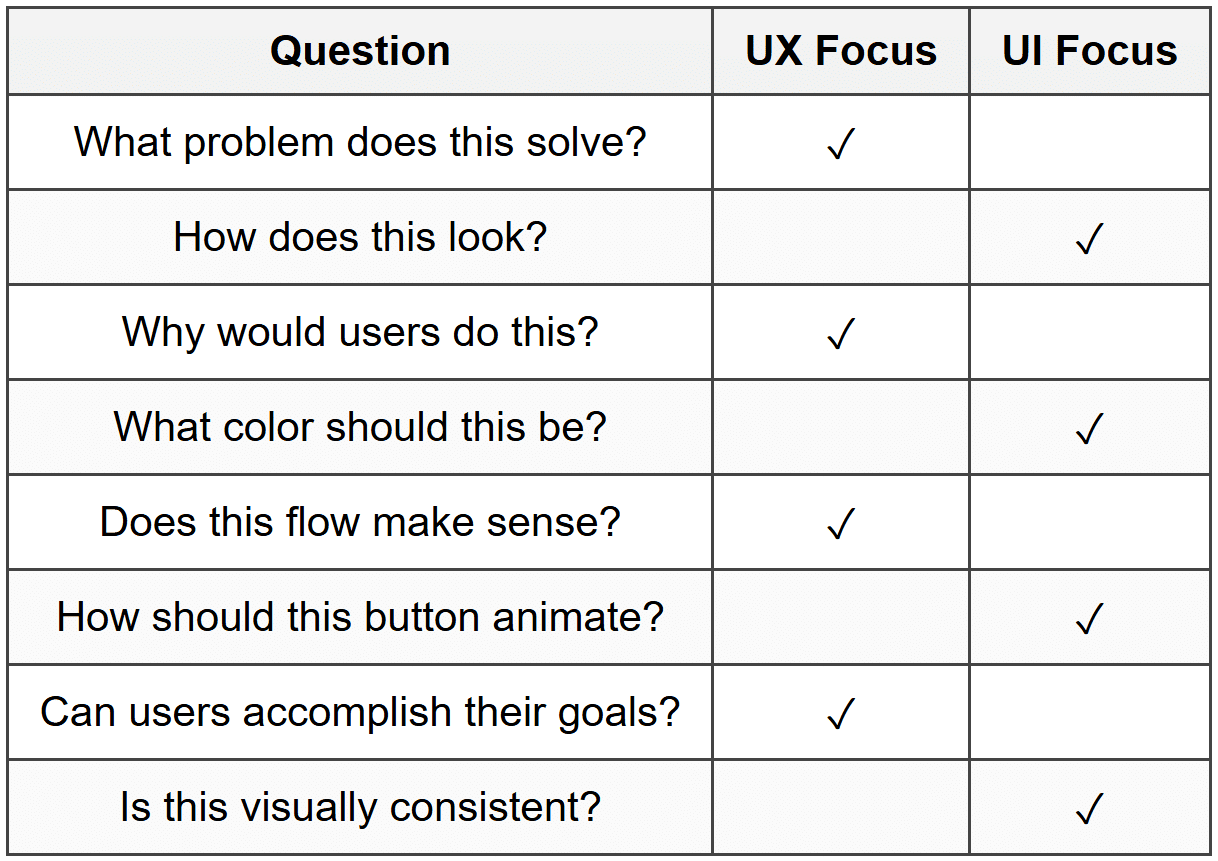
A Simple Framework to Tell Them Apart
When in doubt, ask yourself these questions:
What is Product Design?
Product Design represents a holistic approach that encompasses both UX and UI while extending beyond them to consider the product's entire lifecycle, business goals, technical constraints, and market positioning.
The Broader Scope of Product Design
Product designers are generalists with deep expertise. They understand that creating successful digital products requires more than good UX and beautiful UI-it requires strategic thinking about the business, technology, and market.
If UX designers ask "What should this product do?" and UI designers ask "How should this product look?", product designers ask broader questions:
- Why are we building this product at all?
- Who are we building it for, and what value does it provide them?
- How does this align with business objectives?
- What's technically feasible within our constraints?
- How will this product evolve over time?
- What makes this product competitive in the market?
Key Responsibilities of Product Designers
Product designers often handle everything UX and UI designers do, plus additional responsibilities:
- Product Strategy: Helping define what the product is, who it's for, and what problems it solves
- Feature Prioritization: Working with stakeholders to decide what to build now versus later
- Cross-Functional Collaboration: Acting as a bridge between design, engineering, marketing, and business teams
- Business Analysis: Understanding metrics, KPIs, and how design decisions impact business outcomes
- Technical Collaboration: Working closely with developers to ensure designs are feasible and efficient to implement
- Competitive Analysis: Researching market trends and competitor products
- Product Roadmapping: Participating in planning future product development
- End-to-End Design: Owning the entire design process from concept to launch and beyond
The T-Shaped Designer
Product designers are often described as T-shaped professionals. The vertical line of the "T" represents deep expertise in design (both UX and UI), while the horizontal line represents broad knowledge across multiple disciplines:
- Understanding of business models and strategy
- Familiarity with technology and development processes
- Knowledge of marketing and growth strategies
- Awareness of data analysis and metrics
- Understanding of customer support and feedback loops
Product Design in Practice
Let's imagine you're designing a fitness tracking app. Here's how the different roles might approach it:
UX Designer's Approach:
Research what motivates people to exercise, identify pain points with existing apps, create user flows for logging workouts, design the information architecture for viewing progress, and test navigation patterns with users.
UI Designer's Approach:
Create a visual style that feels energetic and motivating, design clear data visualizations for fitness metrics, choose colors that work for both light and dark modes, design icons for different exercise types, and create animations that celebrate achievements.
Product Designer's Approach:
All of the above, plus: Analyze the competitive landscape to find opportunities for differentiation, work with the business team to define the monetization strategy (free vs. premium features), collaborate with engineering to understand which features are feasible for the first release, help prioritize which features to build first based on user needs and business goals, participate in planning the marketing strategy, and design for future expansion (like social features or wearable device integration).
When Do Organizations Have Product Designers?
Product design roles are most common in:
- Startups: Where designers need to wear multiple hats and think strategically about the entire product
- Tech Companies: Especially those with complex digital products and mature design cultures
- Smaller Teams: Where it's not practical to have separate UX and UI specialists
- Product-Led Organizations: Companies where the product itself is the primary driver of growth
Larger organizations with more resources might have specialized UX and UI designers working on specific aspects of a product, while smaller teams benefit from product designers who can handle the full spectrum.
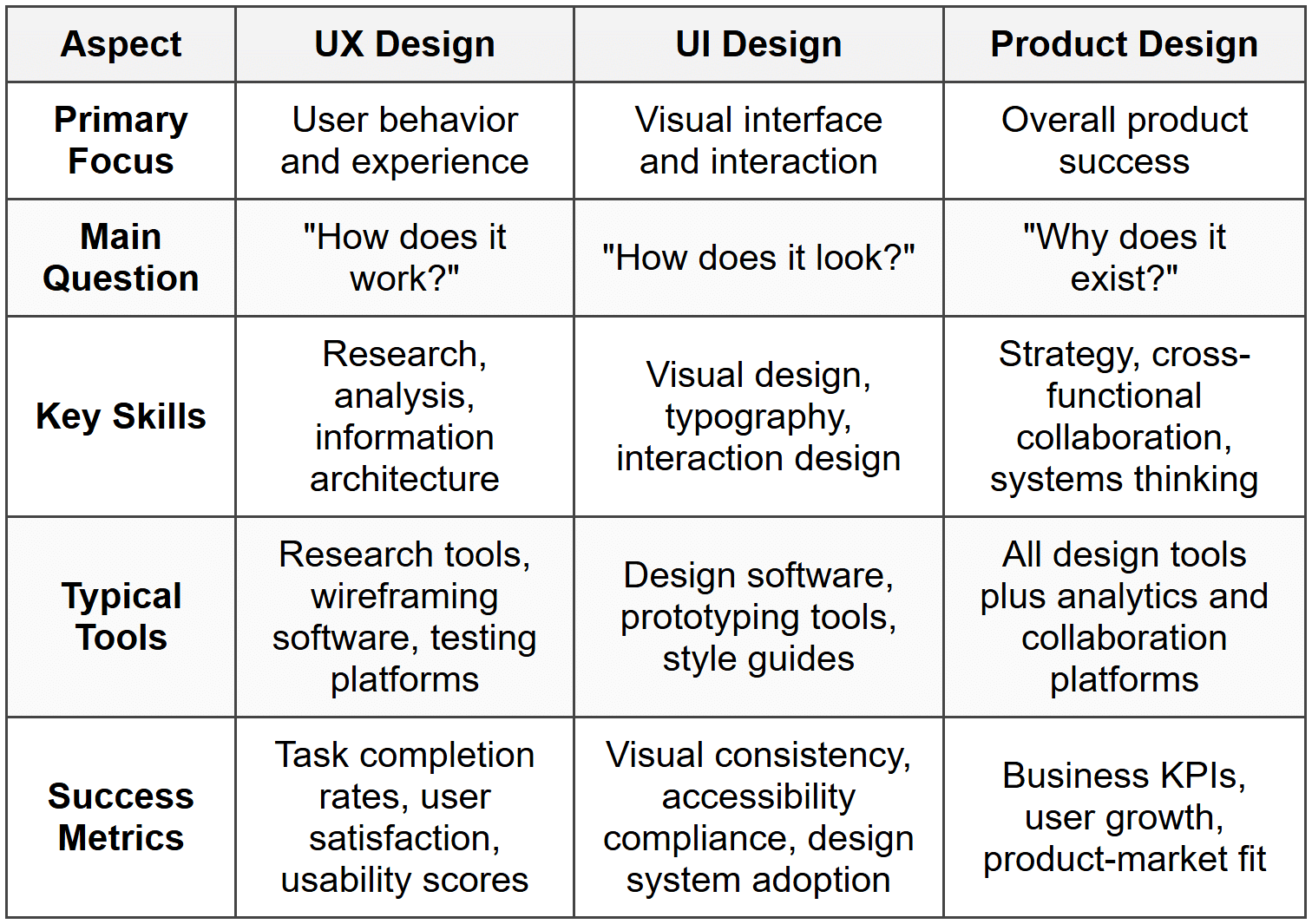
Comparing the Three Disciplines
Core Focus Areas
Skill Overlap and Distinctions
While these roles have distinct focuses, there's significant overlap in skills and knowledge:
Skills All Three Share:
- Empathy for users
- Problem-solving abilities
- Communication and presentation skills
- Collaboration with cross-functional teams
- Understanding of design principles
- Prototyping and iteration
- Knowledge of design tools
UX-Specific Skills:
- User research methodologies
- Data analysis and synthesis
- Information architecture
- Cognitive psychology principles
- Usability testing facilitation
- Journey mapping
UI-Specific Skills:
- Visual design theory (color, typography, composition)
- Design systems development
- Animation and motion design
- Brand integration
- Accessibility standards (WCAG)
- Responsive design patterns
Product Design-Specific Skills:
- Business strategy understanding
- Technical feasibility assessment
- Stakeholder management
- Product roadmap planning
- Competitive analysis
- Metrics and analytics interpretation
- Feature prioritization frameworks
The Evolution of Design Roles
Understanding these three roles also requires understanding how they've evolved and where they're heading.
Historical Context
In the early days of the web, there was simply "web design"-one person often handled everything from strategy to code. As digital products became more complex and user expectations grew, specialization emerged:
- Late 1990s - Early 2000s: "Web designers" did everything-design, code, and even some server-side work
- Mid 2000s: The term "User Experience" gained prominence, and UX became recognized as a distinct discipline focused on research and usability
- Late 2000s - Early 2010s: With the rise of smartphones and apps, UI design emerged as its own specialty requiring deep expertise in mobile patterns and visual design
- Mid 2010s - Present: Product design emerged as companies recognized the need for designers who could think strategically about the entire product, not just isolated features or screens
Current Industry Trends
Today's design landscape shows several patterns:
- Role Fluidity: Job titles don't always match actual responsibilities-a "UX Designer" at one company might do what a "Product Designer" does at another
- Generalist vs. Specialist: Some organizations value T-shaped product designers who can do everything, while others prefer specialists with deep expertise in UX or UI
- Company Size Matters: Smaller companies tend toward product designers or combined UX/UI roles, while larger companies can afford specialized UX and UI teams
- Increasing Expectations: Regardless of title, designers are increasingly expected to understand business goals, technical constraints, and quantitative metrics
Emerging Specializations
As the field matures, even more specialized roles are emerging:
- UX Researchers: Dedicated solely to user research and testing
- Interaction Designers: Focusing specifically on how users interact with interfaces
- Content Designers/UX Writers: Specializing in the language and messaging within products
- Design Systems Designers: Creating and maintaining component libraries and design standards
- Service Designers: Looking beyond digital products to design entire service experiences
Choosing Your Path
If you're starting your journey in design, you might wonder which path is right for you. The good news is that you don't need to decide immediately, and your path can evolve over time.
Starting as a Generalist
Most designers benefit from starting broad and learning fundamentals across UX, UI, and product thinking. This foundation allows you to:
- Understand how all the pieces fit together
- Discover what aspects of design you enjoy most
- Communicate effectively with specialists in different areas
- Be more employable, especially early in your career
- Make better decisions by understanding the full picture
Finding Your Specialty
As you gain experience, you might naturally gravitate toward certain aspects:
You might lean toward UX if you:
Love understanding people's behavior and psychology
Enjoy research and data analysis
Find satisfaction in solving complex problems
Like creating structure and organizing information
Prefer working with lower-fidelity materials like wireframes
Are fascinated by how people think and make decisions
You might lean toward UI if you:
Have a strong visual sense and attention to detail
Enjoy working with color, typography, and composition
Like bringing ideas to life through polished visuals
Find satisfaction in pixel-perfect execution
Are interested in animation and motion design
Love creating cohesive design systems
You might lean toward Product Design if you:
Enjoy thinking about business strategy
Like working across multiple disciplines
Want to influence product direction
Thrive on variety and switching between different types of work
Are comfortable with ambiguity and complexity
Want to see the direct impact of your work on business outcomes
Building Your Skills
Regardless of which path you choose, focus on building these foundational capabilities:
- Design Fundamentals: Learn the principles that underpin all good design-hierarchy, contrast, balance, and consistency
- User Empathy: Develop the ability to see through users' eyes and understand their needs
- Tools Proficiency: Become comfortable with industry-standard design tools
- Critical Thinking: Question assumptions and validate decisions with research and data
- Communication: Learn to articulate and defend your design decisions
- Collaboration: Practice working with others, incorporating feedback, and compromising when necessary
- Business Awareness: Understand that design exists within business contexts and must deliver value
- Technical Understanding: Learn enough about technology to design realistic, implementable solutions
Working Together: The Collaborative Reality
In practice, successful digital products emerge from collaboration between all these roles, plus many others including developers, product managers, marketers, and business stakeholders.
The Design Process as Teamwork
A typical product development process might look like this:
- Discovery Phase: Product designers and UX researchers explore the problem space, conduct user research, and identify opportunities
- Strategy Phase: Product designers work with business stakeholders to define goals, success metrics, and product strategy
- UX Phase: UX designers create information architecture, user flows, and wireframes
- UI Phase: UI designers develop the visual language and create high-fidelity designs
- Validation Phase: UX designers conduct usability testing while UI designers refine based on feedback
- Implementation Phase: All designers work closely with developers to ensure accurate implementation
- Launch and Iteration: Product designers monitor metrics and plan future improvements
This is a simplified view-in reality, these phases overlap, and all designers contribute throughout the process.
Communication Between Roles
Effective collaboration requires clear communication and mutual respect between different design roles:
- UX to UI: UX designers provide wireframes, user flows, and research insights that inform UI decisions. UI designers might discover visual solutions that improve the UX
- UI to Development: UI designers provide detailed specifications and assets. Developers raise technical constraints that might require design adjustments
- Product Design to Stakeholders: Product designers translate business requirements into design strategy and communicate design impact on business goals
- All to Users: Continuous user testing and feedback loops ensure all design work stays grounded in real user needs
Avoiding Silos
The biggest risk in having specialized roles is creating silos where each discipline works in isolation. Successful teams prevent this by:
- Holding regular design reviews and critiques
- Sharing research findings and insights across the team
- Involving all designers in key decisions
- Creating shared documentation and knowledge bases
- Encouraging cross-functional pairing and mentorship
- Maintaining shared design systems and standards
Real-World Application
Let's examine how these three roles might approach designing a specific feature to see their distinct contributions in action.
Scenario: Designing a Notification System
Imagine your team is building a notification system for a project management application. Users have complained about missing important updates while feeling overwhelmed by too many notifications.
The UX Designer's Contribution:
The UX designer would approach this by:
- Conducting research to understand what information users actually need to be notified about and when
- Analyzing usage patterns to see when users check the app and how they currently discover updates
- Creating user flows showing different notification scenarios (in-app, push, email)
- Designing the information architecture for notification settings
- Wireframing the notification center where users can view all their notifications
- Testing different approaches to help users prioritize and filter notifications
- Defining notification rules and logic based on user needs
The UI Designer's Contribution:
Building on the UX foundation, the UI designer would:
- Design the visual appearance of notification badges, indicators, and alerts
- Create clear visual distinctions between different notification types (urgent vs. informational)
- Design the notification center interface with appropriate typography and spacing
- Develop micro-interactions for dismissing, marking as read, or taking action on notifications
- Create a color system that draws attention without being alarming
- Design the settings interface to be clear and scannable
- Ensure notification designs work consistently across different screen sizes
- Design animations for new notifications appearing
The Product Designer's Contribution:
A product designer would handle both UX and UI responsibilities while also:
- Working with product management to understand how notifications align with business goals (e.g., increasing engagement)
- Collaborating with engineering to understand technical constraints (e.g., push notification limitations)
- Defining success metrics for the notification system (e.g., notification click-through rates, user retention)
- Balancing user needs with business needs (e.g., promotional notifications vs. system notifications)
- Planning how the notification system will scale as new features are added
- Considering how this feature impacts the overall product strategy
- Working with the marketing team on notification content and timing
Notice how each role contributes essential value, and the final feature benefits from all these perspectives working together.
The Bigger Picture: Design's Role in Product Success
Whether you're working as a UX designer, UI designer, or product designer, it's crucial to understand that design doesn't exist in isolation. Design is one crucial element in a larger ecosystem that includes:
The Product Team
- Product Managers: Define what gets built and why, prioritize features, and coordinate across teams
- Engineers: Build the actual product, raise technical constraints, and often contribute design ideas
- Designers: Define how it works and looks, advocate for user needs, and maintain quality standards
- Data Analysts: Track metrics, identify patterns, and inform decisions with quantitative insights
- Content Writers: Craft the language and messaging throughout the product
Supporting Functions
- Marketing: Position the product, acquire users, and communicate value
- Customer Support: Help users and provide valuable feedback about pain points
- Sales: Understand customer needs and communicate product capabilities
- Business Leadership: Set strategy, allocate resources, and define success
Design's Unique Value
In this ecosystem, design plays several critical roles:
- User Advocate: Designers represent user needs in business and technical discussions
- Quality Guardian: Designers maintain standards for usability, aesthetics, and consistency
- Problem Solver: Designers find creative solutions to complex challenges
- Bridge Builder: Designers translate between user needs, business goals, and technical constraints
- Innovator: Designers explore new possibilities and push products forward
Moving Forward in Your Design Journey
As you continue learning about web and UI design, keep these key insights in mind:
Understanding Leads to Better Work
Even if you end up specializing in one area, understanding all three disciplines-UX, UI, and Product Design-makes you a more effective designer. You'll:
- Make better decisions by seeing the bigger picture
- Communicate more effectively with specialists in other areas
- Anticipate how your work impacts other parts of the product
- Identify opportunities others might miss
- Build more cohesive, successful products
Labels Matter Less Than Skills
Don't get too hung up on job titles or labels. Focus instead on developing valuable skills:
- Deeply understanding users and their needs
- Creating clear, intuitive structures and flows
- Designing beautiful, accessible interfaces
- Thinking strategically about products
- Collaborating effectively with diverse teams
- Communicating and defending design decisions
- Iterating based on feedback and data
Context Shapes Roles
Remember that how these roles manifest depends heavily on context:
- A UX designer at a large tech company might focus entirely on research
- A UI designer at a design agency might also do significant UX work
- A product designer at a startup might also write code
- Your role title might not perfectly describe what you actually do
The Field Keeps Evolving
Design as a profession continues to evolve. New tools, methodologies, and specializations emerge regularly. The most successful designers are those who:
- Stay curious and keep learning
- Adapt to new contexts and challenges
- Build strong fundamentals that transcend specific tools or trends
- Remain focused on solving real problems for real users
- Collaborate openly with others
Conclusion
Understanding the distinctions and relationships between UX Design, UI Design, and Product Design provides a solid foundation for your design education. While UX focuses on how things work, UI on how things look, and Product Design on the strategic big picture, all three share a common goal: creating digital products that solve real problems for real people while achieving business objectives.
As you progress through your learning journey, you'll develop your own perspective on these roles based on your experiences, interests, and strengths. You might find yourself drawn to the research and structure of UX, the visual craft of UI, or the strategic scope of Product Design. Or you might discover that you enjoy working across all three areas.
Whatever path you choose, remember that great design emerges from a combination of user empathy, visual craft, strategic thinking, and collaborative teamwork. By understanding these different dimensions of design, you're better equipped to contribute meaningfully to creating products that users love and businesses value.
The next chapters will build on this foundation, diving deeper into specific skills and methodologies that span these disciplines. For now, embrace the complexity and richness of design as a field, and recognize that your understanding of these roles will continue to deepen as you gain hands-on experience.



