Creating User Personas


Creating User Personas
Imagine you're designing a new kitchen knife. Would you design the same knife for a professional chef, a college student cooking in a dorm, and a parent preparing meals for young children? Probably not. Each of these people has different needs, skills, and goals. This is exactly why we create user personas in design - they help us understand who we're designing for and make better decisions throughout the design process.
In this document, we'll explore what user personas are, why they matter, and how to create them effectively. By the end, you'll have a practical understanding of how to develop personas that guide real design decisions.
What Are User Personas?
A user persona is a fictional character that represents a specific type of user who might interact with your product or service. Think of it as a detailed character sketch that brings your target audience to life. Instead of designing for "everyone" or some vague idea of "users," you design for Sarah, the busy marketing manager, or Miguel, the retired teacher learning new technology.
Personas are based on real research and data about actual users, not just made-up stereotypes. They typically include:
- Demographic information (age, occupation, location)
- Goals and motivations
- Frustrations and pain points
- Behaviors and habits
- Technology comfort level
- Context of use
Here's the key insight: personas transform abstract data into something human and relatable. When you're making a design decision, it's much easier to ask "Would this work for Sarah?" than "Would this work for users aged 35-45 with moderate technical skills?"
The Purpose of Personas in Design
Personas serve several critical functions in the design process:
- Creating empathy: They help design teams step into the shoes of real users and understand their perspectives
- Focusing decisions: When faced with conflicting design choices, personas help prioritize what matters most
- Aligning teams: Everyone from designers to developers to marketers can refer to the same personas, ensuring consistent understanding
- Preventing assumptions: Personas based on research challenge designers' personal biases and assumptions
- Communicating user needs: They provide a shorthand way to discuss different user groups without lengthy explanations
Types of Personas
Not all personas serve the same purpose. Depending on your project needs, you might create different types of personas.
Goal-Directed Personas
These personas focus primarily on what users want to accomplish. They emphasize user goals, motivations, and the context in which they use your product. This is the most common type used in UX design.
Example: "Emma wants to quickly find healthy recipes that take less than 30 minutes to prepare because she's a working parent with limited time after picking up her kids from school."
Role-Based Personas
These focus on the user's role within an organization or context. They're particularly useful for designing enterprise software or B2B products where job functions matter significantly.
Example: "James is a sales manager who needs to track team performance, generate reports for executives, and coach individual sales representatives."
Engagement Personas
These personas center on how users interact with your product or service - their level of engagement, frequency of use, and relationship with the brand.
Example: "Casual Carlos checks the app once or twice a week, while Power-User Patricia logs in multiple times daily and uses advanced features."
Research: The Foundation of Personas
The most important thing to understand about personas is this: they must be based on real user research. A persona created from assumptions or stereotypes is worse than no persona at all because it gives you false confidence in decisions based on fiction.
Research Methods for Persona Development
Good personas emerge from multiple research sources. Here are the most effective methods:
User Interviews
One-on-one conversations with actual or potential users provide deep insights into motivations, frustrations, and behaviors. During interviews, you're not just collecting facts - you're understanding the why behind user actions.
Effective interview questions explore:
- Daily routines and workflows
- Current solutions and workarounds
- Frustrations with existing products
- Goals and what success looks like
- Decision-making processes
Surveys and Questionnaires
While less deep than interviews, surveys allow you to gather data from many more people. They're excellent for identifying patterns and validating assumptions across a broader audience.
Analytics and Usage Data
If you're working with an existing product, behavioral data reveals what users actually do (which often differs from what they say they do). Look at:
- Feature usage patterns
- Navigation paths
- Time spent on tasks
- Drop-off points
- Device and platform preferences
Field Studies and Observation
Watching users in their natural environment provides context that interviews alone cannot capture. You see the interruptions, the workarounds, the physical environment, and the social context of use.
Customer Support Data
Support tickets, chat logs, and call transcripts reveal real problems users face and the language they use to describe those problems.
How Much Research Is Enough?
There's no magic number, but research shows that interviewing 5-7 users from each user group typically uncovers the majority of patterns and insights. You're looking for patterns that repeat across multiple users, not documenting every unique individual.
You know you have enough research when:
- You start hearing similar stories and pain points repeatedly
- New interviews aren't revealing significantly new information
- You can identify clear patterns in user behaviors and goals
- You understand the context in which users operate
Analyzing Research Data
Once you've gathered research, you need to make sense of it. This analysis phase is where personas actually emerge from the data.
Looking for Patterns
Spread out all your research notes, transcripts, and data. Look for recurring themes:
- Behavioral patterns: How do different groups of users approach tasks?
- Goal alignment: Which users share similar objectives?
- Pain points: What frustrations come up repeatedly?
- Context similarities: Are there common environments or situations?
- Skill levels: How do technical abilities cluster?
Affinity Mapping
A practical technique for finding patterns is affinity mapping. Here's how it works:
- Write each observation, quote, or data point on a separate note (physical sticky notes or digital equivalents)
- Group related notes together without overthinking it
- Label each group with a theme or category
- Look for larger patterns across groups
- Identify which groups of characteristics tend to appear together
For example, you might notice that users who value speed also tend to be experienced with technology and prefer keyboard shortcuts, while users who prioritize guidance prefer visual interfaces and step-by-step workflows.
Identifying Distinct User Groups
Your goal is to identify distinct user segments that benefit from different design approaches. These segments should be:
- Meaningfully different: The differences matter for design decisions
- Internally consistent: Members of each segment share important characteristics
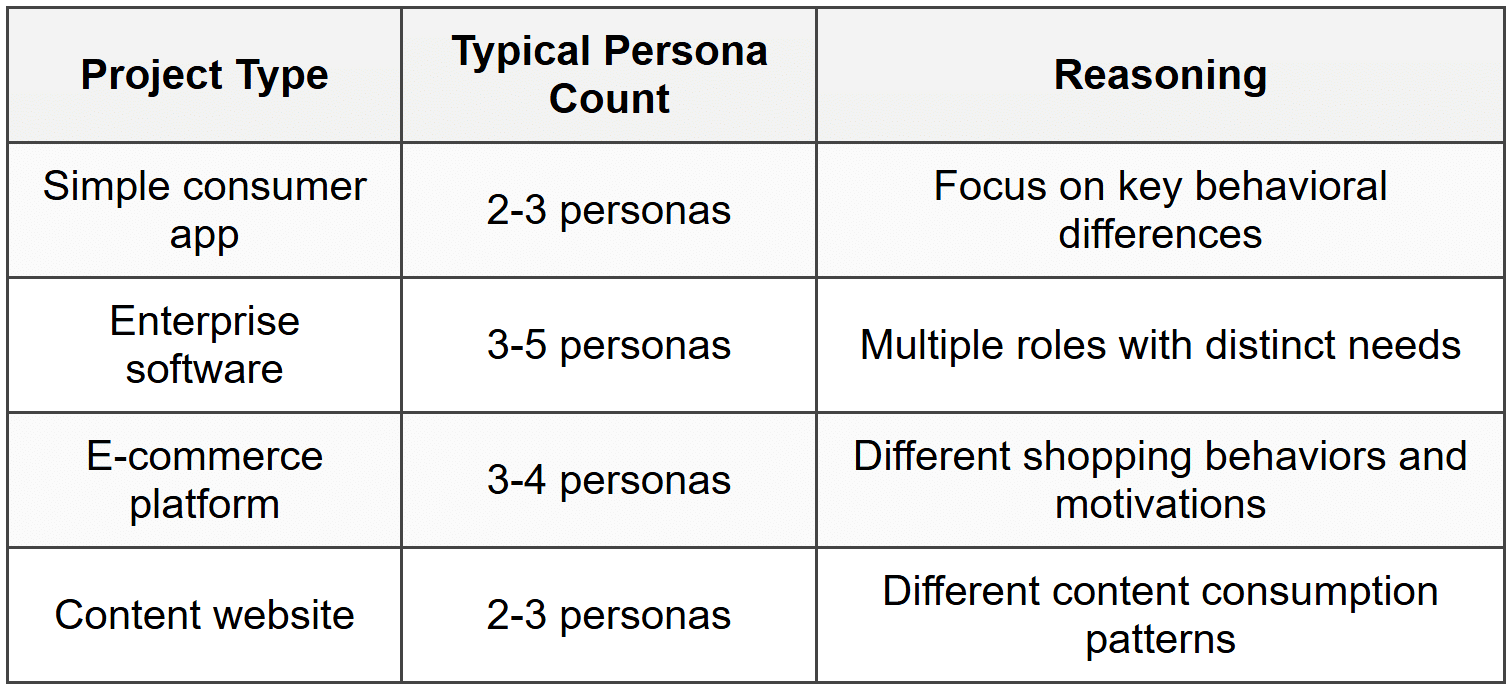
- Not too numerous: Most projects work best with 3-5 primary personas
Don't create personas based on minor differences. If two potential personas would lead to the same design decisions, they should probably be one persona.
Building the Persona
Now comes the creative part: transforming your research insights into a compelling, useful persona. Let's build a persona step by step.
Start with Demographics (But Don't Stop There)
Basic demographic information makes the persona feel real, but it's just the foundation:
- Name: Choose something memorable and appropriate for the demographic
- Age range: Be specific enough to be meaningful but avoid excessive precision
- Occupation: Include job title and industry if relevant
- Location: Consider if geography affects usage patterns
- Education level: When it impacts how they approach your product
Remember: these details only matter if they connect to actual differences in how people use your product. Don't include demographics just for completeness.
Define Goals and Motivations
This is the heart of the persona. What is this person trying to achieve? Goals typically fall into three categories:
Experience Goals
How the user wants to feel while using your product:
- "I want to feel confident that I'm making the right choice"
- "I want to feel in control of my data"
- "I want to feel like an expert, not a beginner"
End Goals
The ultimate outcome the user wants to achieve:
- "I want to grow my small business"
- "I want to stay connected with my family"
- "I want to advance my career"
Life Goals
Broader aspirations that contextualize product use:
- "I want to achieve work-life balance"
- "I want to be seen as competent and professional"
- "I want to maintain my independence"
Document Pain Points and Frustrations
What gets in this person's way? What frustrates them about current solutions? Be specific:
Not: "She doesn't like complicated interfaces"
Better: "She gets frustrated when software requires her to read documentation before she can accomplish basic tasks. She expects to learn by doing and wants tooltips and contextual help instead of manuals."
Describe Behaviors and Habits
How does this person actually behave? Include details like:
- How they typically discover new products or services
- Their research process before making decisions
- Preferred devices and platforms
- Time of day and location of typical use
- Multitasking patterns and interruptions
- Social influences (do they consult others?)
Technology Comfort and Context
Assess their relationship with technology:
- Overall tech-savviness
- Willingness to explore new features
- Preference for efficiency vs. guidance
- Common technical challenges they face
- Tools and platforms they already use
Add a Photo and Quote
While optional, these elements make personas more memorable and human:
- Photo: Use a stock photo that matches the demographic and feels authentic (avoid overly polished corporate headshots)
- Quote: A brief statement in the persona's voice that captures their perspective: "I don't have time to learn complex software - I just need it to work."
A Complete Persona Example
Let's look at a fully developed persona to see how all these elements come together:
Marcus Chen - The Efficiency-Focused Manager
Age: 38
Occupation: Operations Manager at a mid-size manufacturing company
Location: Suburban Chicago
Tech Comfort: High - early adopter of productivity toolsQuote: "If I can't do it in three clicks, I'll find a workaround or a different tool."
Goals:
- Streamline team workflows to reduce waste and delays
- Make data-driven decisions quickly
- Spend less time on administrative tasks, more time on strategy
- Be recognized as someone who delivers results
Frustrations:
- Software that requires too many steps to complete routine tasks
- Tools that don't integrate with existing systems
- Dashboards with irrelevant metrics that obscure important data
- Having to train team members on overly complex systems
Behaviors:
- Checks dashboards first thing in the morning and during lunch
- Heavily uses keyboard shortcuts and customization options
- Evaluates new tools by testing them immediately rather than reading documentation
- Shares productivity tips with colleagues and values community recommendations
- Primarily works from desktop but checks mobile app for urgent notifications
Context: Marcus works in a fast-paced environment with frequent interruptions. He needs to access information quickly between meetings and make decisions on the spot. He's comfortable with technology and becomes frustrated when software treats him like a novice. He's willing to invest time in initial setup and customization if it saves time long-term.
Notice how this persona tells a coherent story. You can imagine Marcus as a real person, and more importantly, you can use this persona to make design decisions. Should you include a lengthy tutorial? Probably not for Marcus - he'll skip it anyway. Should you provide keyboard shortcuts? Absolutely. Should the mobile experience be fully featured? Not necessarily - Marcus primarily needs quick access to key information on mobile.
How Many Personas Do You Need?
There's a balance to strike. Too few personas and you're oversimplifying your user base. Too many and they become unwieldy and unused.
The Primary Persona
Most projects benefit from identifying one primary persona - the main user whose needs drive the majority of design decisions. This is typically the largest or most important user segment for your product's success.
Secondary Personas
These represent other significant user groups whose needs differ meaningfully from the primary persona. You might have 2-3 secondary personas. The key question: "Would designing only for the primary persona create serious problems for this group?"
Tertiary Personas and Edge Cases
Some teams document tertiary personas or edge cases - users who are less common but might have special needs. These typically don't drive design decisions but help ensure you're not actively excluding anyone.
Practical Guidelines
Using Personas in the Design Process
Creating personas is only valuable if you actually use them. Here's how to integrate personas into your workflow:
During Ideation
When brainstorming features or solutions, frame questions in terms of personas:
- "How would Marcus accomplish this task?"
- "What would frustrate Sarah about this approach?"
- "Does this align with David's goals?"
During Design Decisions
Use personas to evaluate competing design options. Walk through each design with specific personas in mind. Which option better serves your primary persona? Does any option create significant problems for secondary personas?
In User Stories and Requirements
Structure user stories around personas:
"As Marcus (efficiency-focused manager), I want to customize my dashboard so that I can see only the metrics relevant to my current projects, allowing me to make quick decisions without sorting through irrelevant data."
During Design Reviews
When presenting designs to stakeholders or team members, reference personas to explain design decisions:
"We kept the navigation simple because Sarah, our primary persona, gets overwhelmed by too many options and prefers guided experiences."
In Testing and Validation
When recruiting for usability testing, use personas as recruitment criteria. Try to test with real users who match your persona profiles.
Common Mistakes to Avoid
Even experienced designers sometimes create or use personas ineffectively. Watch out for these pitfalls:
Creating Personas Without Research
The biggest mistake is basing personas on assumptions, stereotypes, or what you think users are like. These "assumption personas" are dangerous because they codify biases and give them false authority.
If you don't have time or resources for proper research, it's better to acknowledge that you're working with provisional hypotheses that need validation, rather than treating made-up personas as fact.
Making Personas Too Generic
Personas like "Sarah, 25-45, likes easy-to-use products" don't help anyone. They're too vague to guide decisions. Good personas are specific enough that you can predict how they'd react to design choices.
Including Irrelevant Details
Not every persona needs a favorite movie or pet's name. Include details that connect to how the person uses your product. If you can't explain why a detail matters for design decisions, leave it out.
Creating Too Many Personas
Seven personas for a simple mobile app probably means you're documenting minor variations rather than meaningful differences. More personas dilute focus rather than enhance it.
Forgetting About Personas After Creation
Beautiful persona documents that sit in a folder unused don't help anyone. Personas only provide value when the team actively references them. Print them out, put them on the wall, reference them in meetings, and include them in documentation.
Treating Personas as Fixed Forever
User needs evolve. Technology changes. Your understanding deepens with more research. Personas should be living documents that you revisit and refine. Schedule periodic reviews to ensure personas still accurately reflect your users.
Confusing Demographics with Behavior
Age, gender, and location matter less than you might think. A 25-year-old and a 55-year-old might use your product in exactly the same way if they share goals and behaviors. Focus on what people do and why, not just who they are.
Communicating Personas to Your Team
Personas only work if everyone on your team understands and uses them. Here are effective ways to share personas:
Persona Posters or One-Pagers
Create visually appealing, easy-to-scan documents that include:
- Photo and name prominently displayed
- Key quote that captures their perspective
- Top 3-4 goals
- Top 3-4 frustrations
- Essential behaviors and context
Keep it to one page per persona so people will actually read it.
Persona Presentation or Workshop
Don't just email personas and expect adoption. Hold a session where you:
- Present each persona and the research behind it
- Tell stories from real user research that illustrate persona characteristics
- Practice using personas by walking through scenarios
- Answer questions and clarify details
Reference Cards
Create quick-reference cards that team members can keep at their desks. These condense personas to the absolute essentials - perfect for quick checks during daily work.
Regular Reminders
Reference personas in meetings, design reviews, and documentation. The more frequently the team encounters personas, the more naturally they'll think in terms of user needs.
Personas in Different Design Contexts
While the fundamentals remain the same, how you create and use personas varies slightly depending on your design context.
B2C (Business to Consumer) Products
Consumer personas often emphasize:
- Emotional motivations and lifestyle factors
- Personal goals and aspirations
- Individual decision-making processes
- Context of personal use
B2B (Business to Business) Products
Enterprise personas typically include:
- Role within the organization
- Decision-making authority and influences
- Professional goals and success metrics
- Organizational constraints and processes
- Relationship with other roles (who do they report to, who reports to them)
Multi-Sided Platforms
Platforms serving multiple user types (like marketplaces connecting buyers and sellers) need personas for each side of the platform. Consider how these different user types interact and what each needs from the platform.
Evolving Beyond Basic Personas
As you become more comfortable with personas, you might explore more sophisticated approaches:
Jobs to Be Done Framework
This approach focuses less on who the user is and more on what job they're trying to accomplish. It complements traditional personas by emphasizing the functional, social, and emotional dimensions of user goals.
Journey-Based Personas
These personas integrate information about the user's journey - how needs and behaviors change across different stages of product use or customer lifecycle.
Data-Driven Personas
For products with substantial usage data, you can create personas validated by statistical analysis, clustering users based on actual behavioral patterns rather than just qualitative research.
Validation and Iteration
How do you know if your personas are accurate and useful?
Testing Against Real Users
When you conduct usability testing or interviews, note whether participants match your persona profiles. Do actual users behave as your personas predicted? When you find mismatches, investigate whether:
- Your persona needs refinement
- You're testing with the wrong participants
- You've discovered a new user segment
Team Feedback
Ask developers, product managers, and other team members whether the personas help them make decisions. If people find personas confusing or irrelevant, work to understand why and improve them.
Design Outcomes
Ultimately, personas should lead to better designs that better serve users. If your product metrics improve - higher engagement, better task completion, fewer support requests - your personas are likely guiding you well.
Practical Exercise: Creating Your First Persona
Let's walk through a practical approach to creating your first persona:
Step 1: Gather Your Research
Collect all available research about your users:
- Interview transcripts or notes
- Survey results
- Analytics data
- Support tickets
- Any observational research
Step 2: List Observed Behaviors
Write down every distinct behavior you've observed. Don't filter yet - just list:
- How do people approach tasks?
- What do they do first?
- Where do they get stuck?
- What language do they use?
- What patterns repeat across multiple users?
Step 3: Group Similar Behaviors
Arrange your behavior list into clusters. Look for behaviors that tend to appear together in the same users.
Step 4: Identify Goals and Frustrations
For each behavior cluster, note the underlying goals and pain points. Why do users behave this way? What are they trying to achieve? What's getting in their way?
Step 5: Name and Humanize
Give your emerging persona a name and demographic details that fit the profile. Add a photo that represents this type of user.
Step 6: Write the Narrative
Compose a brief narrative that brings together all the elements. Tell the story of this person - their context, goals, behaviors, and frustrations.
Step 7: Validate
Share with colleagues who also have user contact. Does this persona ring true? Can they think of real users who match this profile?
Step 8: Make It Usable
Format your persona for easy reference and sharing. Create both a detailed version for deep reference and a quick-reference version for daily use.
Final Thoughts
Creating effective user personas is both an art and a science. It requires rigorous research and analytical thinking to identify patterns, but also creativity and empathy to bring those patterns to life as relatable characters.
The personas you create are tools - they're only as valuable as their ability to help you make better design decisions. A mediocre persona that gets used constantly is more valuable than a perfect persona that sits ignored in a document folder.
Start simple. Create one solid persona based on real research. Use it consistently in your design process. Pay attention to whether it helps clarify decisions or predict user reactions. Refine it based on what you learn. Then, if needed, add additional personas to represent other distinct user groups.
Remember that personas represent real people - people who will use what you design, whose days will be made easier or harder by your decisions. Treat that responsibility seriously, and let genuine understanding of user needs guide your design work.
As you practice creating and using personas, you'll develop intuition for what makes them effective. You'll learn to spot the meaningful differences between user groups and ignore superficial variations. You'll become more skilled at translating research data into actionable design guidance. Most importantly, you'll design with real humans in mind, not abstract "users" - and that makes all the difference.



