WordPress Hooks (Actions & Filters)


WordPress Hooks (Actions & Filters)
Imagine you're watching a movie, and at certain key moments, the director allows you to pause the film and add your own scenes or modify what's happening on screen. WordPress hooks work in a similar way-they are specific points in WordPress code where you can "hook in" your own custom code to either add new functionality or modify existing behavior.
Hooks are the foundation of WordPress plugin development and theme customization. They allow you to extend WordPress without modifying its core files, which means your customizations remain intact even when WordPress updates. This is what makes WordPress so flexible and extensible.
Understanding the Hook System
WordPress processes requests in a specific order, executing various functions along the way. The hook system provides "entry points" throughout this process where developers can inject their own code. Think of WordPress execution like a train journey with multiple stations-hooks are the stations where you can get on and off.
There are two types of hooks in WordPress:
- Actions - Allow you to add or execute custom code at specific points
- Filters - Allow you to modify data before it's displayed or saved
Both actions and filters use the same underlying mechanism, but they serve different purposes and are used in different contexts.
Actions: Adding Functionality
Actions are hooks that let you execute your own code at specific points during WordPress execution. When WordPress reaches an action hook, it checks if any functions are "hooked" to that action and runs them in order.
Real-World Analogy
Think of actions like announcement points at an airport. When the flight status changes to "boarding," the airport makes an announcement (the action fires), and various departments respond: gate agents prepare to check tickets, cleaning crews get ready to clean the previous flight's mess, and catering staff prepare for the next service. Each department has "hooked" their procedures to the "boarding announcement" action.
How Actions Work
WordPress has numerous action hooks built into its core. When certain events happen, WordPress "fires" or "triggers" these actions. Here's the basic flow:
- You write a custom function that does what you want
- You "hook" that function to a specific action using add_action()
- When WordPress reaches that point in execution, it fires the action
- Your function executes automatically
Basic Action Syntax
To use an action, you need two things: a custom function and a call to add_action().
add_action( $hook_name, $function_name, $priority, $accepted_args );
Let's break down each parameter:
- $hook_name - The name of the action hook you want to attach to (e.g., 'wp_head', 'init')
- $function_name - The name of your custom function to execute
- $priority - Optional. Determines the order of execution (default is 10, lower numbers run first)
- $accepted_args - Optional. How many arguments your function accepts from the hook (default is 1)
Simple Action Example
Let's create a function that adds a custom message to the WordPress admin footer:
function my_custom_admin_footer() { echo 'Thank you for using our custom plugin!'; } add_action( 'admin_footer_text', 'my_custom_admin_footer' );
In this example:
- We defined a function called my_custom_admin_footer()
- We hooked it to the admin_footer_text action
- When WordPress renders the admin footer, our message appears
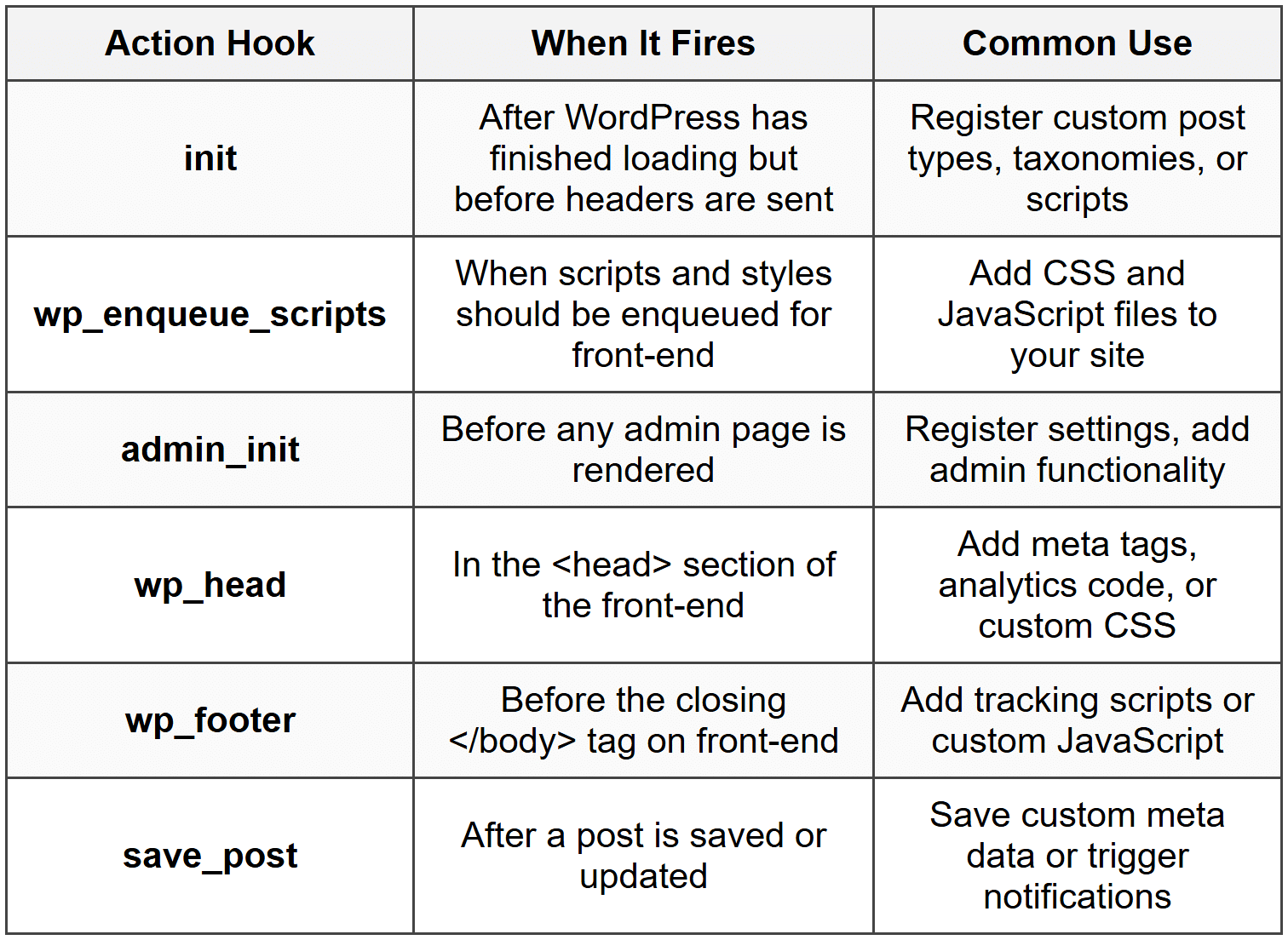
Common Action Hooks
WordPress provides hundreds of action hooks. Here are some frequently used ones:
Action Priority
When multiple functions are hooked to the same action, the priority parameter determines their execution order. Lower numbers execute first.
function first_function() { echo 'I run first!'; } function second_function() { echo 'I run second!'; } add_action( 'wp_footer', 'first_function', 10 ); add_action( 'wp_footer', 'second_function', 20 );
The default priority is 10. If you don't specify a priority, your function will run with priority 10, in the order it was added.
Actions with Parameters
Some actions pass data to the hooked functions. You need to specify how many arguments your function accepts using the fourth parameter of add_action().
function log_post_save( $post_id, $post, $update ) { error_log( 'Post ID ' . $post_id . ' was saved.' ); } add_action( 'save_post', 'log_post_save', 10, 3 );
In this example:
- The save_post action passes three parameters: post ID, post object, and update status
- Our function accepts all three by declaring them as parameters
- We tell WordPress we're accepting 3 arguments with the fourth parameter of add_action()
Filters: Modifying Data
While actions let you add functionality, filters let you modify data. Filters intercept data, allow you to change it, and then pass it along to its destination.
Real-World Analogy
Think of filters like a photo editing app. The original photo (data) passes through various filters-you might adjust brightness, add a vintage effect, or crop it. Each filter receives the image, modifies it, and passes it to the next filter. The final result is the modified image that gets displayed or saved.
How Filters Work
Filters follow a similar pattern to actions, but with one crucial difference: they must return a value. Here's the flow:
- WordPress has data it wants to process (like post content, a title, or a URL)
- Before using that data, WordPress passes it through an apply_filters() call
- Any functions hooked to that filter receive the data
- Your function modifies the data and returns it
- WordPress uses the modified data
Basic Filter Syntax
To use a filter, you create a function that accepts data, modifies it, and returns it, then hook it with add_filter().
add_filter( $hook_name, $function_name, $priority, $accepted_args );
The parameters are identical to add_action():
- $hook_name - The name of the filter hook
- $function_name - Your custom function name
- $priority - Optional. Order of execution (default 10)
- $accepted_args - Optional. Number of arguments (default 1)
Simple Filter Example
Let's modify the length of post excerpts:
function custom_excerpt_length( $length ) { return 50; } add_filter( 'excerpt_length', 'custom_excerpt_length' );
In this example:
- WordPress passes the default excerpt length (usually 55 words) to our function
- We ignore the passed value and return 50 instead
- WordPress uses our value, making all excerpts 50 words long
Critical Rule: Always Return a Value
The most important rule with filters is: always return a value. If you forget to return the data, you'll break the functionality that depends on that filter.
// WRONG - This breaks the content! function bad_filter( $content ) { $content = $content . ' Extra text'; // Forgot to return! } // CORRECT - This works properly function good_filter( $content ) { $content = $content . ' Extra text'; return $content; }
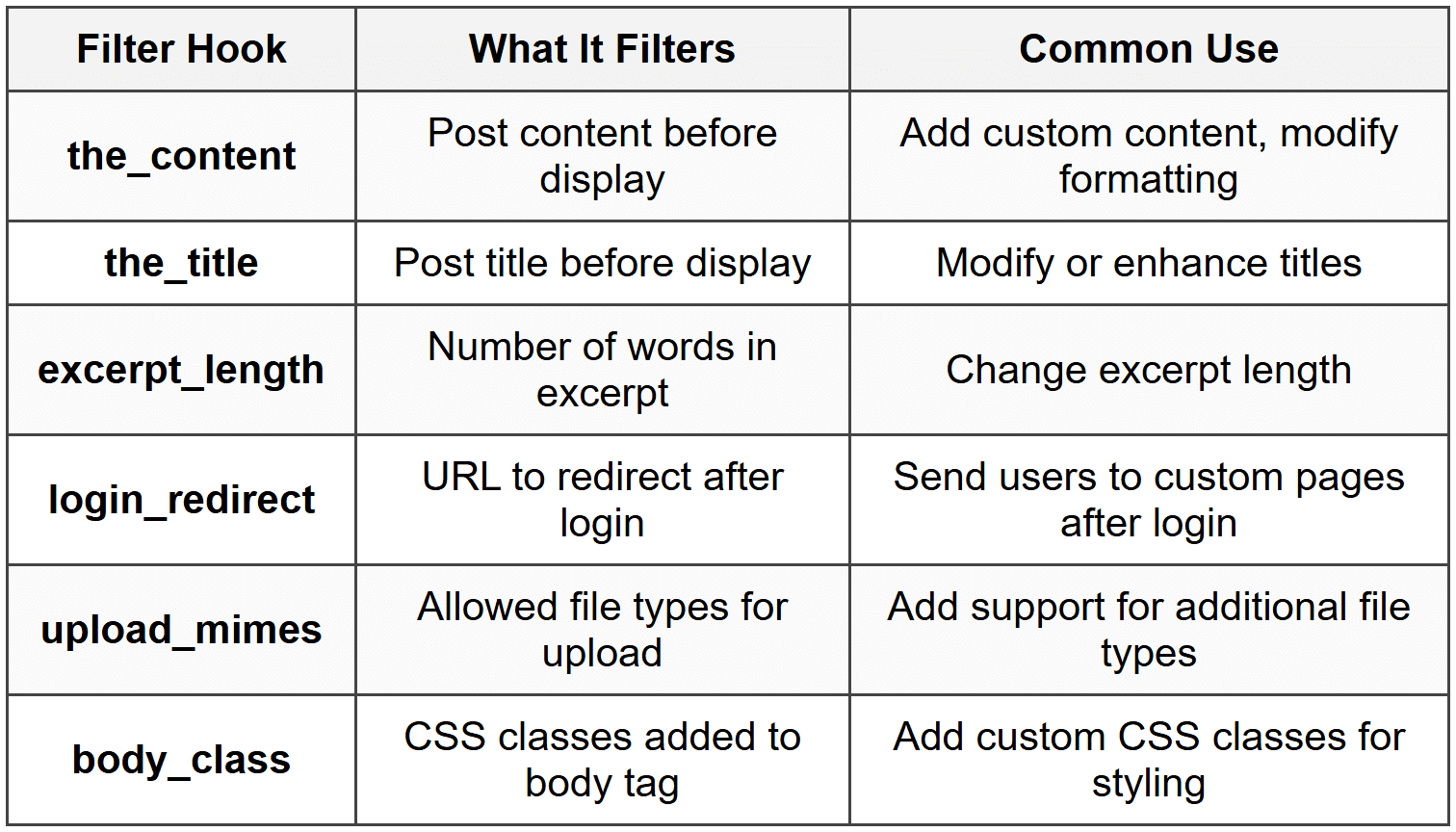
Common Filter Hooks
Here are some frequently used filter hooks:
Filters with Multiple Parameters
Many filters pass additional context data. You must accept and return the first parameter (the data being filtered), but you can use the additional parameters for decision-making.
function modify_title_for_posts( $title, $post_id ) { $post = get_post( $post_id ); if ( $post->post_type === 'post' ) { $title = '[Blog] ' . $title; } return $title; } add_filter( 'the_title', 'modify_title_for_posts', 10, 2 );
In this example:
- The the_title filter passes both the title and the post ID
- We accept both parameters in our function
- We use the post ID to check the post type
- We modify and return the title only for regular posts
- We specify we're accepting 2 arguments in add_filter()
Practical Filter Example
Let's create a filter that adds a reading time estimate to post content:
function add_reading_time( $content ) { // Only on single posts if ( ! is_single() ) { return $content; } // Count words $word_count = str_word_count( strip_tags( $content ) ); // Calculate reading time (average 200 words per minute) $reading_time = ceil( $word_count / 200 ); // Create message $message = '<p><em>Estimated reading time: ' . $reading_time . ' minute(s)</em></p>'; // Add to beginning of content $content = $message . $content; return $content; } add_filter( 'the_content', 'add_reading_time' );
This filter:
- Receives the post content
- Checks if we're on a single post page
- Calculates word count and reading time
- Adds a message to the content
- Returns the modified content
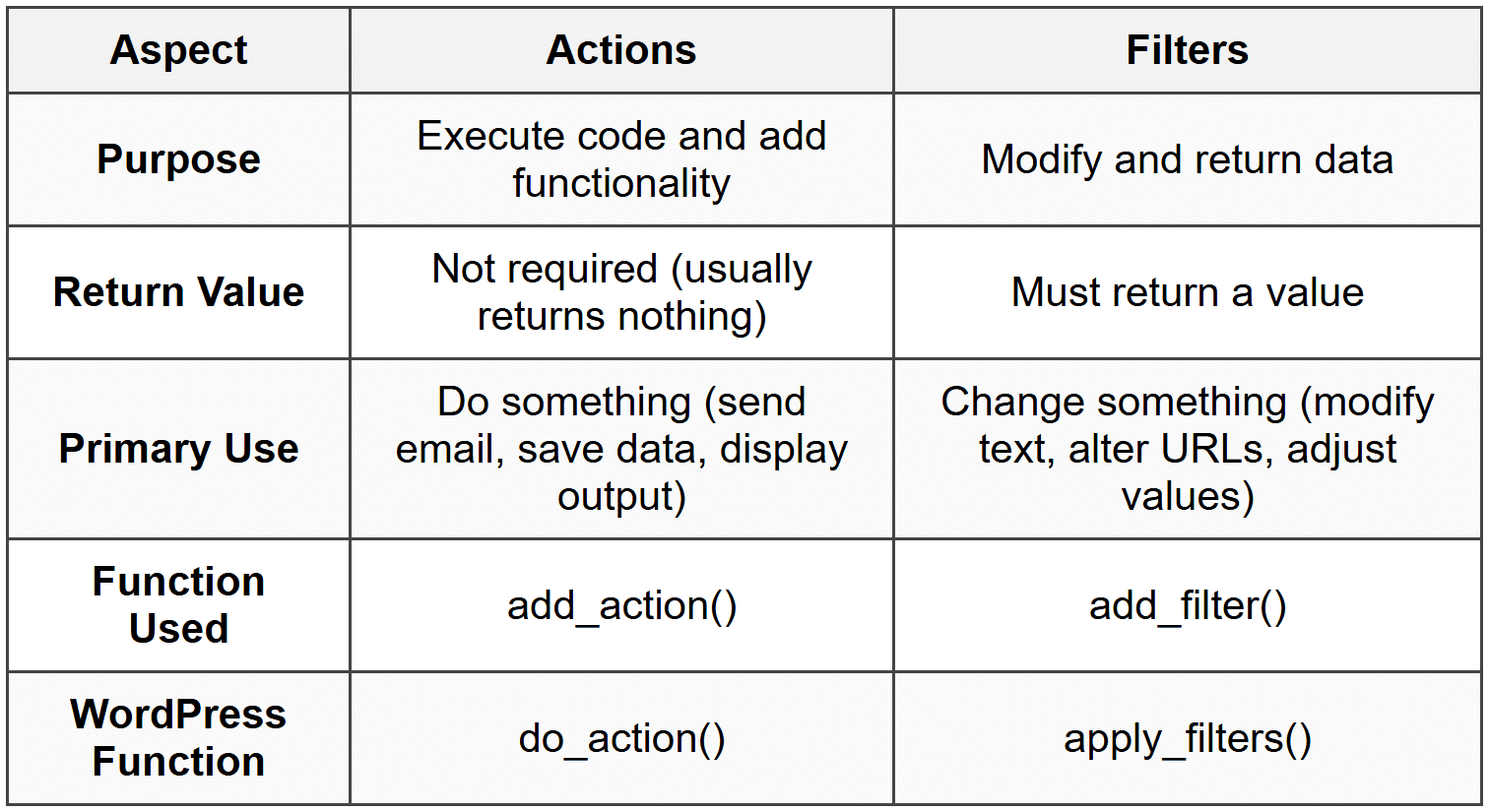
Actions vs. Filters: Key Differences
While both actions and filters are hooks, understanding their differences is crucial for proper implementation.
Choosing Between Actions and Filters
Ask yourself these questions:
- Am I modifying existing data? → Use a filter
- Am I adding new functionality at a specific point? → Use an action
- Do I need to return something? → Use a filter
- Am I just doing something (like sending an email or saving data)? → Use an action
Creating Your Own Hooks
You're not limited to WordPress's built-in hooks. When developing plugins or themes, you can create your own custom hooks to make your code extensible.
Creating Custom Actions
To create a custom action, use do_action() in your code:
function my_plugin_process_data() { // Do some processing $data = array( 'item1', 'item2' ); // Allow other developers to hook in do_action( 'my_plugin_before_save', $data ); // Save the data update_option( 'my_plugin_data', $data ); // Another hook point after saving do_action( 'my_plugin_after_save', $data ); }
Now other developers (or you in different parts of your code) can hook into these custom actions:
function log_before_save( $data ) { error_log( 'About to save: ' . print_r( $data, true ) ); } add_action( 'my_plugin_before_save', 'log_before_save' );
Creating Custom Filters
To create a custom filter, use apply_filters():
function my_plugin_get_greeting() { $greeting = 'Hello, World!'; // Allow filtering of the greeting $greeting = apply_filters( 'my_plugin_greeting', $greeting ); return $greeting; }
Others can now modify the greeting:
function custom_greeting( $greeting ) { return 'Welcome, dear visitor!'; } add_filter( 'my_plugin_greeting', 'custom_greeting' );
Naming Conventions for Custom Hooks
When creating custom hooks, follow these best practices:
- Prefix hook names with your plugin or theme name to avoid conflicts
- Use descriptive names that indicate when the hook fires
- Use underscores to separate words (snake_case)
- For actions, use verbs that describe what's happening (e.g., 'before_save', 'after_delete')
- For filters, use nouns that describe what's being filtered (e.g., 'greeting_text', 'button_color')
Removing Hooks
Sometimes you need to remove hooks that were added by WordPress core, plugins, or themes. This is done with remove_action() and remove_filter().
Removing Actions
remove_action( $hook_name, $function_name, $priority );
To remove an action, you must know:
- The exact hook name
- The exact function name
- The exact priority (if not default 10)
// Remove WordPress emoji script function disable_emojis() { remove_action( 'wp_head', 'print_emoji_detection_script', 7 ); remove_action( 'wp_print_styles', 'print_emoji_styles' ); } add_action( 'init', 'disable_emojis' );
Removing Filters
remove_filter( $hook_name, $function_name, $priority );
Removing filters works identically to removing actions:
// Remove automatic paragraph tags from content remove_filter( 'the_content', 'wpautop' );
Timing is Critical
You must remove hooks after they've been added but before they execute. Usually, you should remove hooks on the same action where they were added, or on an action that fires earlier in the WordPress execution order.
// This works - removing on init after the hook was added function my_remove_hooks() { remove_action( 'wp_head', 'some_function', 10 ); } add_action( 'init', 'my_remove_hooks' );
Hook Priority and Execution Order
Understanding hook priority is essential when multiple functions hook into the same action or filter.
How Priority Works
- Lower numbers execute first (priority 5 runs before priority 10)
- Default priority is 10
- Priority can be any integer (negative numbers are allowed)
- Functions with the same priority execute in the order they were added
Practical Priority Example
function add_prefix( $title ) { return 'PREFIX: ' . $title; } function add_suffix( $title ) { return $title . ' :SUFFIX'; } function add_middle( $title ) { return str_replace( 'PREFIX:', 'PREFIX: [MIDDLE]', $title ); } add_filter( 'the_title', 'add_prefix', 10 ); add_filter( 'the_title', 'add_suffix', 30 ); add_filter( 'the_title', 'add_middle', 20 );
With a title of "My Post", the execution order would be:
- Priority 10: "My Post" becomes "PREFIX: My Post"
- Priority 20: "PREFIX: My Post" becomes "PREFIX: [MIDDLE] My Post"
- Priority 30: "PREFIX: [MIDDLE] My Post" becomes "PREFIX: [MIDDLE] My Post :SUFFIX"
Strategic Use of Priority
Use priority strategically:
- Early (1-5): When you need to run before most other functions
- Default (10): For most standard hooks
- Late (15-20): When you need other modifications to happen first
- Very Late (100+): When you need to run after everything else, or as a "final say"
Debugging Hooks
When working with hooks, you'll often need to debug them to understand what's happening.
Check If a Hook Exists
Use has_action() or has_filter() to check if a function is hooked:
if ( has_action( 'init', 'my_function' ) ) { echo 'my_function is hooked to init'; } // Returns the priority if hooked, false if not $priority = has_filter( 'the_content', 'my_content_filter' );
See All Hooked Functions
The global $wp_filter variable stores all hooks. You can inspect it:
global $wp_filter; // See all functions hooked to 'the_content' if ( isset( $wp_filter['the_content'] ) ) { print_r( $wp_filter['the_content'] ); }
Useful Debugging Functions
- current_action() - Returns the name of the action currently being executed
- current_filter() - Returns the name of the filter currently being executed
- doing_action( $action_name ) - Checks if a specific action is currently executing
- doing_filter( $filter_name ) - Checks if a specific filter is currently executing
Best Practices for Working with Hooks
General Guidelines
- Use unique function names: Prefix your functions with your plugin/theme name to avoid conflicts
- Keep functions focused: Each hooked function should do one thing well
- Check context: Use conditional tags to ensure your code runs only when appropriate
- Always return in filters: Never forget to return the filtered value
- Document your hooks: Comment your code explaining what each hook does and why
Performance Considerations
- Avoid heavy processing in frequently-called hooks like the_content or the_title
- Use caching when performing database queries in hooks
- Remove hooks you don't need rather than adding conditional logic
- Be mindful of hook priority-don't use unnecessarily high or low priorities
Security Considerations
- Always sanitize and validate data received through hook parameters
- Escape output when displaying data in hooks
- Check user capabilities before performing privileged actions
- Use nonces for form submissions triggered by hooked functions
function secure_hooked_function( $content ) { // Validate data if ( ! is_string( $content ) ) { return $content; } // Check user capability if needed if ( ! current_user_can( 'edit_posts' ) ) { return $content; } // Escape output $message = '<p>' . esc_html( 'Your custom message' ) . '</p>'; return $content . $message; }
Common Hook Patterns
Conditional Hook Execution
Often you want hooks to execute only under certain conditions:
function conditional_content_addition( $content ) { // Only on single posts if ( ! is_single() ) { return $content; } // Only for 'post' post type if ( get_post_type() !== 'post' ) { return $content; } // Only for logged-in users if ( ! is_user_logged_in() ) { return $content; } $content .= '<p>Special content for logged-in users</p>'; return $content; } add_filter( 'the_content', 'conditional_content_addition' );
Enqueuing Scripts and Styles
A very common pattern is enqueuing CSS and JavaScript files:
function my_plugin_enqueue_assets() { // Enqueue stylesheet wp_enqueue_style( 'my-plugin-style', plugin_dir_url( __FILE__ ) . 'css/style.css', array(), '1.0.0' ); // Enqueue script wp_enqueue_script( 'my-plugin-script', plugin_dir_url( __FILE__ ) . 'js/script.js', array( 'jquery' ), '1.0.0', true ); } add_action( 'wp_enqueue_scripts', 'my_plugin_enqueue_assets' );
Saving Custom Meta Data
Saving additional data when posts are saved:
function save_custom_meta( $post_id ) { // Check if this is an autosave if ( defined( 'DOING_AUTOSAVE' ) && DOING_AUTOSAVE ) { return; } // Check user permissions if ( ! current_user_can( 'edit_post', $post_id ) ) { return; } // Save custom field if ( isset( $_POST['my_custom_field'] ) ) { update_post_meta( $post_id, 'my_custom_field', sanitize_text_field( $_POST['my_custom_field'] ) ); } } add_action( 'save_post', 'save_custom_meta' );
Modifying Query Parameters
Altering WordPress queries before they execute:
function modify_main_query( $query ) { // Only modify the main query on the front-end if ( ! is_admin() && $query->is_main_query() ) { // On the home page, show only 5 posts if ( $query->is_home() ) { $query->set( 'posts_per_page', 5 ); } // On category pages, order by title if ( $query->is_category() ) { $query->set( 'orderby', 'title' ); $query->set( 'order', 'ASC' ); } } } add_action( 'pre_get_posts', 'modify_main_query' );
Advanced Hook Techniques
Using Closures (Anonymous Functions)
For simple, one-off hooks, you can use anonymous functions:
add_filter( 'excerpt_length', function( $length ) { return 40; } ); add_action( 'wp_footer', function() { echo '<!-- Custom footer comment -->'; } );
Note: Anonymous functions cannot be removed with remove_action() or remove_filter() since they don't have a name, so use them carefully.
Class Methods as Hooks
You can hook class methods, which is common in object-oriented plugin development:
class My_Plugin { public function __construct() { add_action( 'init', array( $this, 'initialize' ) ); add_filter( 'the_content', array( $this, 'modify_content' ) ); } public function initialize() { // Initialization code } public function modify_content( $content ) { return $content . '<p>Added by plugin</p>'; } } $my_plugin = new My_Plugin();
Passing Custom Data to Hooks
When creating custom hooks, you can pass multiple pieces of data:
// Creating a hook with multiple parameters function process_order( $order_id ) { $order_data = get_order_data( $order_id ); $customer = get_customer( $order_data['customer_id'] ); do_action( 'my_plugin_order_processed', $order_id, $order_data, $customer ); } // Using the hook function send_order_notification( $order_id, $order_data, $customer ) { wp_mail( $customer['email'], 'Order Confirmation', 'Your order #' . $order_id . ' has been processed.' ); } add_action( 'my_plugin_order_processed', 'send_order_notification', 10, 3 );
WordPress Hook Execution Timeline
Understanding when different hooks fire during a WordPress request helps you choose the right hook for your needs.
Typical Page Load Sequence
- muplugins_loaded - After must-use plugins are loaded
- plugins_loaded - After all plugins are loaded
- setup_theme - Before the theme is loaded
- after_setup_theme - After theme setup
- init - WordPress is fully loaded, good for initialization
- wp_loaded - WordPress, plugins, and theme are all loaded
- template_redirect - Before template is chosen
- wp_enqueue_scripts - Time to enqueue scripts and styles
- wp_head - Inside the <head> section
- wp_footer - Before closing </body> tag
- wp_print_footer_scripts - Print footer scripts
- shutdown - End of page execution
This is a simplified view. WordPress fires dozens of hooks during each request, but these are the most commonly used ones.
Practical Complete Example
Let's build a complete feature using both actions and filters: a simple "Related Posts" feature that adds related posts to the end of single post content.
// Main function to add related posts function add_related_posts_to_content( $content ) { // Only on single posts if ( ! is_single() ) { return $content; } // Get related posts $related_posts = get_related_posts(); // If no related posts, return original content if ( empty( $related_posts ) ) { return $content; } // Build related posts HTML $related_html = build_related_posts_html( $related_posts ); // Allow filtering of the HTML $related_html = apply_filters( 'my_plugin_related_posts_html', $related_html, $related_posts ); // Add to content return $content . $related_html; } // Get related posts based on categories function get_related_posts() { global $post; $categories = get_the_category( $post->ID ); if ( empty( $categories ) ) { return array(); } $category_ids = array(); foreach ( $categories as $category ) { $category_ids[] = $category->term_id; } // Query for related posts $args = array( 'category__in' => $category_ids, 'post__not_in' => array( $post->ID ), 'posts_per_page' => 3, 'orderby' => 'rand' ); // Allow filtering of query arguments $args = apply_filters( 'my_plugin_related_posts_args', $args ); $related_query = new WP_Query( $args ); return $related_query->posts; } // Build the HTML for related posts function build_related_posts_html( $posts ) { $html = '<div class="related-posts">'; $html .= '<h3>Related Posts</h3>'; $html .= '<ul>'; foreach ( $posts as $post ) { $html .= '<li>'; $html .= '<a href="' . get_permalink( $post->ID ) . '">'; $html .= esc_html( $post->post_title ); $html .= '</a>'; $html .= '</li>'; } $html .= '</ul>'; $html .= '</div>'; return $html; } // Hook everything together add_filter( 'the_content', 'add_related_posts_to_content' ); // Fire an action after related posts are displayed add_action( 'wp_footer', function() { if ( is_single() ) { do_action( 'my_plugin_after_related_posts' ); } } );
This example demonstrates:
- Using the the_content filter to modify post content
- Creating custom filters (my_plugin_related_posts_html and my_plugin_related_posts_args) so others can customize behavior
- Creating a custom action (my_plugin_after_related_posts) for extensibility
- Proper conditional checks to ensure code runs only when needed
- Escaping output for security
WordPress hooks are the backbone of plugin and theme development. They provide a powerful, flexible system for extending WordPress without modifying core files. By mastering actions and filters, you can create robust, maintainable code that integrates seamlessly with WordPress and plays well with other plugins and themes.



