Assignment : Wireless Networking


Wireless networking enables devices to communicate and exchange data without physical cable connections. It uses electromagnetic waves (radio frequencies, infrared, or microwaves) to transmit information through the air. This technology is fundamental to modern computing, supporting mobile devices, IoT systems, enterprise networks, and home connectivity. Understanding wireless networking principles, standards, topologies, security mechanisms, and protocols is essential for network design, troubleshooting, and optimization.
1. Fundamentals of Wireless Communication
1.1 Basic Concepts
- Wireless Medium: Uses electromagnetic spectrum instead of physical cables. Signals propagate through air or vacuum.
- Transmission Modes: Radio Frequency (RF), Infrared (IR), Microwave, and Satellite communication.
- Frequency Bands: Wireless networks operate on specific frequency ranges measured in Hertz (Hz).
- Bandwidth: Range of frequencies available for data transmission. Higher bandwidth enables faster data rates.
- Channel: Specific frequency or frequency range used for communication between devices.
1.2 Key Characteristics
- Mobility: Devices can move freely while maintaining network connectivity within coverage area.
- Range: Distance over which wireless signals can effectively transmit and receive data.
- Data Rate: Speed of data transmission, measured in bits per second (bps, Mbps, Gbps).
- Shared Medium: Multiple devices share the same wireless channel, requiring coordination mechanisms.
- Signal Attenuation: Wireless signals weaken with distance and obstacles (walls, furniture, interference).
1.3 Advantages and Limitations
Advantages:
- Mobility and flexibility for users and devices
- Reduced installation costs (no cabling infrastructure)
- Easy network expansion and reconfiguration
- Access in areas where cabling is impractical
Limitations:
- Lower data rates compared to wired networks (generally)
- Security vulnerabilities due to broadcast nature
- Interference from other devices and environmental factors
- Limited range and signal degradation
- Higher power consumption for mobile devices
2. Wireless Network Standards (IEEE 802.11)
2.1 IEEE 802.11 Family Overview
The IEEE 802.11 is the set of standards for Wireless Local Area Networks (WLANs). Also known as Wi-Fi, these standards define protocols for wireless communication.
2.2 Major 802.11 Standards
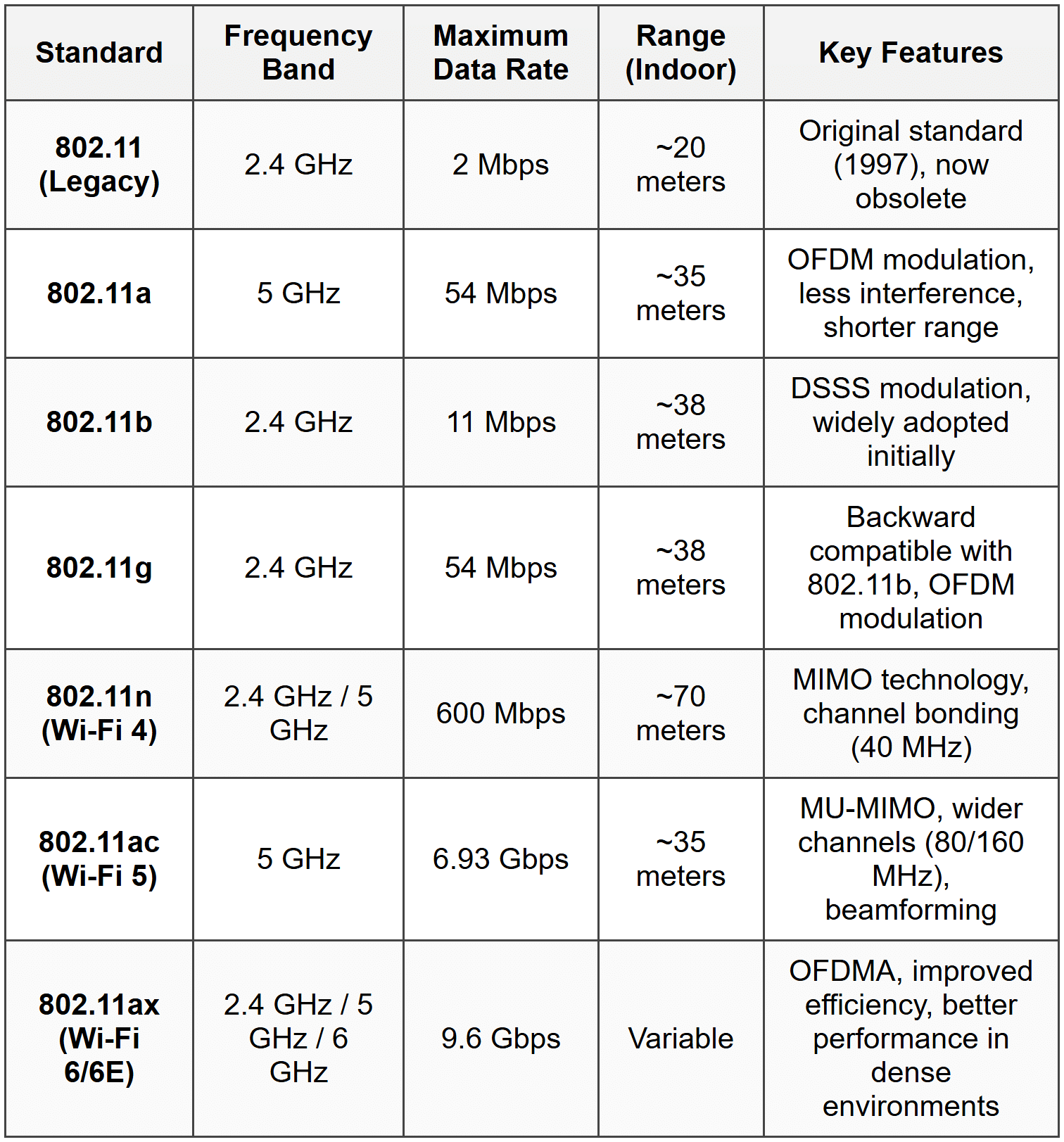
2.3 Key Technologies in Modern Standards
- MIMO (Multiple Input Multiple Output): Uses multiple antennas at transmitter and receiver to increase data throughput and range.
- MU-MIMO (Multi-User MIMO): Allows simultaneous communication with multiple devices, improving network efficiency.
- OFDM (Orthogonal Frequency Division Multiplexing): Divides channel into multiple sub-carriers for parallel data transmission.
- OFDMA (Orthogonal Frequency Division Multiple Access): Extension of OFDM allowing multiple users to share sub-carriers simultaneously.
- Channel Bonding: Combines multiple adjacent channels to increase bandwidth and data rates.
- Beamforming: Focuses wireless signal toward specific devices rather than broadcasting in all directions.
3. Wireless Network Topologies
3.1 Infrastructure Mode
Devices (stations) connect through a central Access Point (AP). The AP acts as a bridge between wireless clients and wired network.
- BSS (Basic Service Set): Single AP with connected wireless clients. Identified by BSSID (MAC address of AP).
- ESS (Extended Service Set): Multiple BSSs connected via a distribution system (wired backbone). Provides seamless roaming across APs.
- SSID (Service Set Identifier): Network name broadcast by AP. Maximum 32 characters.
- Distribution System: Wired or wireless backbone connecting multiple APs in ESS.
3.2 Ad-Hoc Mode (IBSS)
Independent Basic Service Set (IBSS) allows peer-to-peer communication without AP. Devices communicate directly with each other.
- No central coordination point
- Limited range and scalability
- Used for temporary networks or file sharing between nearby devices
- Each device maintains its own security and routing
3.3 Mesh Topology
Devices act as both clients and routers, forwarding data for other nodes. Creates self-healing, redundant network paths.
- Mesh APs: Wireless routers that relay traffic between each other
- Self-configuring: Automatically discovers optimal paths
- Self-healing: Routes around failed nodes automatically
- Used in large-area coverage, IoT deployments, smart cities
4. Wireless Network Components
4.1 Access Point (AP)
- Central device that connects wireless clients to wired network
- Functions at Layer 2 (Data Link Layer)
- Broadcasts SSID beacon frames periodically
- Manages association and authentication of clients
- Coordinates channel access using CSMA/CA protocol
4.2 Wireless Network Interface Card (NIC)
- Hardware component in client devices enabling wireless connectivity
- Contains radio transceiver and antenna
- Implements MAC layer protocols
- Available as built-in, USB, or PCIe adapters
4.3 Wireless Router
- Combines AP functionality with routing capabilities
- Includes DHCP server, NAT, and firewall features
- Connects wireless network to internet or other networks
- Operates at Layer 3 (Network Layer) and Layer 2
4.4 Wireless Controller
- Centralized management device for enterprise wireless networks
- Manages multiple APs from single interface
- Handles configuration, security policies, load balancing
- Provides seamless roaming across APs
4.5 Repeater/Range Extender
- Amplifies and retransmits wireless signals to extend coverage
- Reduces effective bandwidth (typically 50% reduction)
- Simple deployment for coverage gaps
5. Wireless MAC Protocol (CSMA/CA)
5.1 CSMA/CA Overview
Carrier Sense Multiple Access with Collision Avoidance is the MAC protocol used in wireless networks. Unlike CSMA/CD (used in Ethernet), wireless cannot detect collisions during transmission.
5.2 CSMA/CA Operation
- Carrier Sensing: Device listens to channel before transmitting. If busy, defers transmission.
- Random Backoff: After channel becomes idle, device waits for random backoff time to avoid simultaneous transmissions.
- Frame Transmission: Device transmits data frame if channel remains idle after backoff.
- Acknowledgment: Receiver sends ACK frame upon successful reception. No ACK indicates collision or error.
- Retransmission: Sender retransmits if ACK not received within timeout period.
5.3 Inter-Frame Spacing (IFS)
Different time intervals used to prioritize different frame types:
- SIFS (Short IFS): Shortest interval for high-priority frames (ACK, CTS). Typically 10 μs.
- DIFS (DCF IFS): Standard interval for data frames. DIFS = SIFS + 2 × Slot Time.
- EIFS (Extended IFS): Used after receiving corrupted frame. Longest interval.
5.4 RTS/CTS Mechanism
Optional mechanism to address hidden node problem:
- RTS (Request to Send): Sender transmits short RTS frame reserving channel.
- CTS (Clear to Send): Receiver responds with CTS frame if channel available.
- Data Transmission: Sender transmits data after receiving CTS.
- NAV (Network Allocation Vector): Other stations set timer based on RTS/CTS, deferring transmission during reserved period.
- Reduces collision overhead for large frames but adds overhead for small frames.
5.5 Hidden Node and Exposed Node Problems
Hidden Node Problem: Two stations cannot hear each other but both can reach the AP. Causes collisions at AP. RTS/CTS helps mitigate this.
Exposed Node Problem: Station defers transmission unnecessarily because it hears another transmission not affecting its intended receiver. Reduces network efficiency.
6. Wireless Security
6.1 Security Threats in Wireless Networks
- Eavesdropping: Unauthorized interception of wireless transmissions.
- Unauthorized Access: Attackers connecting to network without permission.
- Man-in-the-Middle (MITM): Attacker intercepts and relays communications between parties.
- Denial of Service (DoS): Jamming signals or flooding network to disrupt service.
- Rogue Access Points: Unauthorized APs creating security vulnerabilities.
- Evil Twin Attack: Malicious AP mimicking legitimate network to steal credentials.
6.2 WEP (Wired Equivalent Privacy)
- Original 802.11 security protocol (deprecated, insecure)
- Uses RC4 stream cipher with 40-bit or 104-bit keys
- 24-bit Initialization Vector (IV) transmitted in plaintext
- Vulnerabilities: Short IV causes repetition, weak key scheduling, easily cracked within minutes
- Should never be used in modern networks
6.3 WPA (Wi-Fi Protected Access)
- Interim solution addressing WEP vulnerabilities
- Uses TKIP (Temporal Key Integrity Protocol) with RC4 cipher
- Per-packet key mixing prevents key reuse
- Message Integrity Check (MIC) prevents tampering
- 48-bit IV (much longer than WEP's 24-bit)
- Considered weak; WPA2 preferred
6.4 WPA2 (Current Standard)
- Based on 802.11i standard
- Uses AES (Advanced Encryption Standard) with CCMP (Counter Mode with CBC-MAC Protocol)
- 128-bit encryption (much stronger than WEP/WPA)
- Two modes: WPA2-Personal (PSK - Pre-Shared Key) and WPA2-Enterprise (802.1X authentication)
- Industry standard for secure wireless networks
- Vulnerability: KRACK attack (2017) exploits 4-way handshake, requires patching
6.5 WPA3 (Latest Standard)
- Released in 2018, addresses WPA2 vulnerabilities
- Uses SAE (Simultaneous Authentication of Equals) instead of PSK
- Forward secrecy: Past traffic cannot be decrypted even if password compromised
- Protection against offline dictionary attacks
- 192-bit security suite for enterprise networks
- Enhanced Open: Opportunistic Wireless Encryption (OWE) for public networks
6.6 Authentication Methods
Open System Authentication:
- No authentication required
- Any device can connect
- Used in public hotspots (often with captive portal)
Pre-Shared Key (PSK):
- Common password shared among all users
- Used in WPA2-Personal, WPA3-Personal
- Suitable for home and small office networks
802.1X/EAP (Enterprise Authentication):
- Port-based network access control
- Requires RADIUS server for authentication
- Individual credentials for each user
- Uses EAP (Extensible Authentication Protocol) methods: EAP-TLS, EAP-TTLS, PEAP
- Provides centralized authentication, authorization, and accounting (AAA)
6.7 Additional Security Measures
- SSID Hiding: Disabling SSID broadcast (security through obscurity, limited effectiveness).
- MAC Address Filtering: Whitelist/blacklist based on device MAC addresses (easily spoofed, not reliable alone).
- Disable WPS: Wi-Fi Protected Setup has known vulnerabilities allowing PIN brute-force attacks.
- VPN (Virtual Private Network): Encrypts all traffic end-to-end, especially important on public networks.
- Guest Networks: Isolated network segment for visitors, preventing access to internal resources.
- Regular Firmware Updates: Patches security vulnerabilities in APs and routers.
7. Wireless Frequency Bands and Channels
7.1 2.4 GHz Band
- Frequency range: 2.4 GHz to 2.4835 GHz
- 14 channels (availability varies by country; US uses channels 1-11)
- Channel width: 20 MHz or 40 MHz (with bonding)
- Non-overlapping channels: 1, 6, 11 (in 20 MHz mode) for interference-free operation
- Better penetration through obstacles
- Longer range compared to 5 GHz
- Interference: Crowded band; many devices (Bluetooth, microwaves, cordless phones) share this spectrum
7.2 5 GHz Band
- Multiple sub-bands: UNII-1, UNII-2, UNII-2 Extended, UNII-3
- More channels available (typically 24+ non-overlapping channels in 20 MHz mode)
- Channel widths: 20 MHz, 40 MHz, 80 MHz, 160 MHz
- Less interference from consumer devices
- Higher data rates possible
- Shorter range and poorer obstacle penetration than 2.4 GHz
- DFS (Dynamic Frequency Selection): Required on certain channels to avoid interference with radar systems
7.3 6 GHz Band (Wi-Fi 6E)
- Newly available spectrum (5.925-7.125 GHz)
- Provides 1200 MHz of additional spectrum
- Up to 59 additional 20 MHz channels or 7 additional 160 MHz channels
- No legacy device interference
- Similar propagation characteristics to 5 GHz
7.4 Channel Planning
- Co-channel Interference: APs on same channel interfere with each other. Minimize by using different channels for adjacent APs.
- Adjacent Channel Interference: Overlapping channels (e.g., 1 and 2) cause interference. Use non-overlapping channels only.
- Site Survey: Analyze RF environment to identify optimal channel selection and AP placement.
- Automatic Channel Selection: Modern APs can automatically select least congested channels.
8. Other Wireless Technologies
8.1 Bluetooth
- IEEE 802.15.1 standard for Wireless Personal Area Networks (WPAN)
- Operates in 2.4 GHz ISM band
- Short range: 10 meters (Class 2) to 100 meters (Class 1)
- Data rates: 1-3 Mbps (Classic), up to 24 Mbps (Bluetooth 5.0)
- Piconet: Master device connects to up to 7 active slave devices
- Scatternet: Multiple piconets linked together
- Uses frequency hopping spread spectrum (FHSS) across 79 channels
- Common uses: wireless peripherals, audio devices, IoT sensors
- BLE (Bluetooth Low Energy): Optimized for low power consumption, used in wearables and sensors
8.2 Zigbee
- IEEE 802.15.4 based low-power, low-data-rate wireless standard
- Operates in 2.4 GHz (global), 915 MHz (Americas), 868 MHz (Europe)
- Data rates: 20-250 kbps
- Range: 10-100 meters
- Mesh topology with self-healing capabilities
- Very low power consumption (battery life of months to years)
- Primary use: home automation, industrial controls, smart lighting, sensor networks
8.3 WiMAX (Worldwide Interoperability for Microwave Access)
- IEEE 802.16 standard for Wireless Metropolitan Area Networks (WMAN)
- Long-range wireless broadband access
- Range: up to 50 km (line of sight)
- Data rates: up to 1 Gbps (802.16m)
- Operates in licensed and unlicensed spectrum (2-66 GHz)
- Point-to-multipoint architecture
- Use cases: last-mile broadband, backhaul, rural connectivity
- Largely superseded by LTE and 5G cellular technologies
8.4 Cellular Networks (Mobile Networks)
- GSM/GPRS/EDGE (2G): Basic voice and low-speed data (up to 384 kbps)
- UMTS/HSPA (3G): Mobile broadband up to 42 Mbps (HSPA+)
- LTE/LTE-A (4G): High-speed mobile data up to 1 Gbps (LTE-Advanced)
- 5G NR: Ultra-high speed (up to 20 Gbps), low latency (<1 ms), massive device connectivity
- Uses licensed spectrum in multiple frequency bands
- Cellular architecture with base stations (towers) and core network
- Handoff/handover enables mobility across cells
8.5 NFC (Near Field Communication)
- Very short-range communication (typically <10 cm)
- Operates at 13.56 MHz
- Data rates: 106-424 kbps
- Based on RFID technology
- Three modes: reader/writer, peer-to-peer, card emulation
- Uses: contactless payments, access control, device pairing, data exchange
8.6 RFID (Radio Frequency Identification)
- Uses radio waves to identify and track objects
- Passive RFID: No battery, powered by reader's electromagnetic field. Range: few centimeters to meters.
- Active RFID: Battery-powered tags, longer range (up to 100 meters).
- Frequency bands: LF (125-134 kHz), HF (13.56 MHz), UHF (860-960 MHz)
- Applications: inventory management, supply chain, access control, animal tracking
9. Wireless Network Performance Factors
9.1 Signal Strength and Quality
- RSSI (Received Signal Strength Indicator): Measurement of received signal power. Measured in dBm (negative values; closer to 0 is stronger).
- SNR (Signal-to-Noise Ratio): Ratio of signal power to noise power. Higher SNR indicates better quality. Measured in dB.
- Typical RSSI values: -30 dBm (excellent), -67 dBm (good), -70 dBm (fair), -80 dBm (poor), below -90 dBm (unusable)
- SNR above 25 dB is excellent, 15-25 dB is good, below 10 dB causes problems
9.2 Interference
- Co-channel Interference: Multiple APs using same channel in overlapping coverage areas
- Adjacent Channel Interference: Signals from nearby channels bleeding into current channel
- Non-Wi-Fi Interference: Bluetooth, microwaves, cordless phones, baby monitors on 2.4 GHz
- Mitigation: Proper channel planning, using 5 GHz or 6 GHz bands, shielding, power adjustment
9.3 Path Loss and Attenuation
- Free Space Path Loss: Signal weakens with distance following inverse square law
- Obstacle Attenuation: Walls, floors, furniture absorb/reflect signals
- Different materials have different attenuation: Wood (low), concrete (medium), metal (high)
- Multipath Propagation: Signal reaches receiver via multiple paths causing constructive/destructive interference
9.4 Roaming
- Process of client moving between APs while maintaining connectivity
- Roaming Decision: Client decides when to switch APs based on signal strength thresholds
- Seamless Roaming: Fast handoff with minimal disruption (important for voice/video)
- 802.11k (Radio Resource Management): Helps clients make informed roaming decisions
- 802.11r (Fast Roaming): Reduces handoff time for time-sensitive applications
- 802.11v (Wireless Network Management): AP can suggest better APs to clients
9.5 Load Balancing
- Distributing clients across multiple APs to prevent overloading single AP
- Band Steering: Directing dual-band clients to less congested 5 GHz band
- Airtime Fairness: Preventing slow clients from monopolizing AP time
- Wireless controllers coordinate load distribution across APs
10. Wireless Network Planning and Deployment
10.1 Site Survey
- Passive Survey: Analyzing existing RF environment, detecting APs, measuring signal strength and interference
- Active Survey: Testing actual network performance (throughput, latency, packet loss) with temporary APs
- Predictive Survey: Using software models to plan AP placement before physical installation
- Identifies coverage gaps, interference sources, optimal AP locations
- Creates heat maps showing signal strength distribution
10.2 Capacity Planning
- Estimating number of concurrent users per AP
- Calculating bandwidth requirements based on applications (web, video, VoIP)
- Planning for peak usage periods
- Typical capacity: 25-50 active users per AP (varies based on usage patterns)
10.3 AP Placement Guidelines
- Mount APs on ceilings in central locations for optimal coverage
- Avoid mounting near metal objects or electromagnetic interference sources
- 20-30% cell overlap between adjacent APs for seamless roaming
- Higher density in areas with high user concentration
- Consider 3D environment (multiple floors require vertical planning)
10.4 Power and Channel Configuration
- Transmit Power Adjustment: Reduce power to minimize interference, but maintain adequate coverage
- Channel Assignment: Use non-overlapping channels, stagger channels in adjacent APs
- Automatic RF Management: Modern systems dynamically adjust power and channels based on environment
11. Common Wireless Network Issues and Troubleshooting
11.1 Connectivity Issues
- Cannot connect to network: Check SSID visibility, authentication credentials, MAC filtering
- Intermittent disconnections: Weak signal, interference, roaming problems, driver issues
- Authentication failures: Incorrect password, unsupported security protocol, expired certificates (802.1X)
11.2 Performance Problems
- Slow speeds: Interference, channel congestion, too many users, outdated standards (802.11b/g)
- High latency: Distance from AP, interference, network congestion, bufferbloat
- Packet loss: Weak signal, interference, AP overload
11.3 Coverage Problems
- Dead zones: Insufficient APs, physical obstacles, improper AP placement
- Weak signal areas: Too far from AP, attenuation from walls/floors, low transmit power
- Solutions: Add APs, use repeaters/extenders, optimize AP placement, adjust power settings
11.4 Diagnostic Tools
- Wi-Fi Analyzers: Show nearby networks, channels, signal strengths (e.g., inSSIDer, NetSpot, Wireshark)
- Speed Test Tools: Measure throughput and latency (e.g., Iperf, Speedtest)
- Ping and Traceroute: Test connectivity and identify network path issues
- AP Management Interface: Check client associations, channel utilization, interference levels
12. Common Student Mistakes and Trap Alerts
- Trap: Confusing CSMA/CA (wireless) with CSMA/CD (wired). Wireless cannot detect collisions, only avoid them.
- Trap: Assuming higher frequency means better performance. 5 GHz has higher speeds but shorter range and worse penetration than 2.4 GHz.
- Trap: Thinking WEP is acceptable for any use. WEP is completely broken and should never be used.
- Trap: Believing SSID hiding provides real security. SSIDs can be easily detected by sniffing tools; use proper encryption instead.
- Trap: Confusing data rate with throughput. Advertised rates (e.g., 600 Mbps for 802.11n) are theoretical maximum; actual throughput is typically 40-50% of this.
- Trap: Thinking all channels in 2.4 GHz are independent. Only channels 1, 6, and 11 are non-overlapping; using channel 3 or 9 creates adjacent channel interference.
- Trap: Assuming infrastructure mode and ad-hoc mode can coexist easily. These are fundamentally different topologies with different frame formats.
- Trap: Believing more APs always improve performance. Overlapping coverage with poor channel planning increases interference and reduces performance.
- Trap: Confusing Wi-Fi generations. 802.11ac is Wi-Fi 5, 802.11ax is Wi-Fi 6 (not vice versa).
- Trap: Thinking RTS/CTS is always beneficial. For small frames, the overhead of RTS/CTS reduces efficiency; it's only helpful for large frames in congested environments.
Wireless networking is a complex field combining radio frequency engineering, networking protocols, and security mechanisms. Understanding the standards evolution from 802.11b to Wi-Fi 6E, the operation of CSMA/CA, security progression from WEP to WPA3, and practical deployment considerations is essential for designing, implementing, and troubleshooting modern wireless networks. Key focus areas include channel planning to minimize interference, proper security configuration to protect data, understanding the trade-offs between frequency bands, and implementing seamless roaming for mobile users. As wireless technology continues to evolve with Wi-Fi 7 and beyond, the fundamental principles of wireless communication, MAC protocols, and RF management remain crucial for network professionals.