Assignment : Presentation and Public Speaking Skills


Presentation and public speaking skills are critical competencies in business communication. These skills enable professionals to convey ideas clearly, persuade audiences, build credibility, and influence decision-making. Effective presentations combine structured content, confident delivery, audience engagement, and visual support. Mastering these skills enhances professional impact, leadership presence, and career advancement opportunities.
1. Fundamentals of Presentation Skills
1.1 Definition and Purpose
- Presentation: A structured communication process where a speaker delivers information to an audience using verbal, non-verbal, and visual means to inform, persuade, or inspire.
- Core Purposes: To inform (share data/knowledge), persuade (influence decisions/opinions), inspire (motivate action), or train (develop skills/understanding).
- Business Context: Used in sales pitches, project updates, board meetings, client proposals, training sessions, and conference speeches.
1.2 Key Components of Effective Presentations
- Content: Clear message with logical structure, relevant data, and compelling arguments tailored to audience needs.
- Delivery: Speaker's voice modulation, pace, body language, eye contact, and confidence level.
- Visual Aids: Slides, charts, videos, or props that reinforce key points without overwhelming the audience.
- Audience Engagement: Interactive elements like questions, polls, stories, or demonstrations that maintain attention and interest.
2. Planning and Preparation
2.1 Audience Analysis
- Demographic Profile: Understand age, education level, professional background, cultural context, and seniority of audience members.
- Knowledge Level: Assess whether audience is beginner, intermediate, or expert to adjust content depth and technical terminology accordingly.
- Expectations and Needs: Identify what the audience wants to learn, their pain points, and how your presentation can address their concerns.
- Attitude Assessment: Determine if the audience is supportive, neutral, skeptical, or hostile to tailor your persuasive approach.
2.2 Objective Setting
- SMART Goals: Specific (precise outcome), Measurable (quantifiable result), Achievable (realistic), Relevant (aligned with audience needs), Time-bound (clear timeframe).
- Primary Objective: Single, clear goal such as "convince management to approve budget increase by 15%."
- Secondary Objectives: Supporting goals like building credibility, addressing concerns, or creating action plans.
2.3 Content Structuring
The Three-Part Structure is the standard framework for presentations:
- Introduction (10-15%): Grab attention with a hook (story, statistic, question), establish credibility, preview main points, state objectives clearly.
- Body (70-80%): Develop 3-5 main points with supporting evidence (data, examples, case studies), maintain logical flow, use transitions between sections.
- Conclusion (10-15%): Summarize key messages, reinforce main objective, provide clear call-to-action, end with memorable closing statement.
2.4 Research and Content Development
- Credible Sources: Use verified data from industry reports, academic research, case studies, and expert opinions to build authority.
- Evidence Types: Statistics (numerical proof), testimonials (expert validation), examples (concrete illustrations), analogies (simplified explanations).
- Content Balance: Mix facts with stories, data with visuals, and theory with practical applications to maintain engagement.
- Relevance Filter: Include only information that directly supports your objective; eliminate tangential or excessive details.
3. Presentation Design and Visual Aids
3.1 Slide Design Principles
- 6×6 Rule: Maximum 6 bullet points per slide, maximum 6 words per bullet point to prevent text overload.
- One Idea Per Slide: Focus each slide on a single concept or message for clarity and retention.
- Visual Hierarchy: Use size, color, and placement to guide audience attention to the most important elements first.
- White Space: Leave 40-50% of slide empty to improve readability and reduce cognitive load on viewers.
- Consistency: Maintain uniform fonts (2-3 types maximum), colors (brand-aligned palette), and layout throughout the presentation.
3.2 Visual Elements
- Charts and Graphs: Bar charts (comparisons), line graphs (trends over time), pie charts (proportions, limited to 5-6 segments), scatter plots (correlations).
- Images: Use high-quality, relevant photographs or illustrations that emotionally connect with content; avoid generic stock photos.
- Icons and Symbols: Simple graphics that represent concepts quickly (e.g., lightbulb for ideas, arrow for growth).
- Color Psychology: Blue (trust, professionalism), red (urgency, passion), green (growth, sustainability), yellow (optimism, caution).
3.3 Common Design Mistakes to Avoid
- Text Overload: Reading entire paragraphs from slides reduces engagement and makes the speaker redundant.
- Complex Charts: Overly detailed graphs confuse audiences; simplify data to show only essential information.
- Animation Abuse: Excessive transitions and effects distract from content; use sparingly for emphasis only.
- Low Contrast: Light text on light background or dark text on dark background reduces readability from distance.
4. Delivery Techniques
4.1 Verbal Communication
- Voice Modulation: Vary pitch (high/low), volume (loud/soft), and tone (serious/enthusiastic) to emphasize key points and maintain interest.
- Pace Control: Speak at 120-150 words per minute for clarity; slow down for complex ideas, speed up for familiar concepts.
- Pausing: Use strategic pauses after important statements (3-5 seconds) to let ideas sink in and create dramatic effect.
- Articulation: Pronounce words clearly, especially technical terms; avoid mumbling or rushing through critical information.
- Filler Words: Eliminate "um," "uh," "like," "you know" through practice; use silence instead when collecting thoughts.
4.2 Non-Verbal Communication
- Eye Contact: Maintain 3-5 seconds with individual audience members; scan entire room to create connection with all participants.
- Posture: Stand straight with shoulders back to project confidence; avoid slouching, leaning on podium, or crossing arms defensively.
- Gestures: Use open hand movements to emphasize points; keep gestures above waist and within shoulder width for professionalism.
- Facial Expressions: Smile naturally, show enthusiasm through expressions that match content; avoid blank or tense facial features.
- Movement: Move purposefully to different areas of stage/room to engage entire audience; avoid pacing nervously or standing completely static.
4.3 Space and Positioning
- Power Position: Center stage with clear visibility to all audience members; avoid blocking slides or standing in shadows.
- Proximity Variation: Move closer to audience during storytelling or Q&A to build intimacy; step back for formal data presentation.
- Triangle Technique: Move in triangular pattern on stage to naturally cover all areas and maintain dynamic presence.
5. Audience Engagement Strategies
5.1 Interactive Techniques
- Rhetorical Questions: Pose thought-provoking questions that make audience mentally engage without requiring verbal response.
- Live Polls: Use digital tools or hand-raising to gather instant feedback and involve audience in content direction.
- Q&A Sessions: Allocate time for questions; repeat questions for entire audience, answer concisely, bridge to key messages.
- Group Activities: For longer presentations, include brief discussions, brainstorming, or problem-solving exercises in small groups.
- Demonstrations: Show physical products, conduct live experiments, or perform processes to provide tangible understanding.
5.2 Storytelling in Presentations
- Story Structure: Setup (context/character), conflict (problem/challenge), resolution (solution/lesson learned) creates emotional connection.
- Personal Anecdotes: Share relevant personal experiences to build authenticity and relatability with audience.
- Case Studies: Present real business examples showing problem-solution-result framework to demonstrate practical application.
- Metaphors and Analogies: Simplify complex concepts by comparing to familiar situations (e.g., "firewall is like a security guard for your computer").
5.3 Maintaining Attention
- Attention Span Reality: Average audience attention peaks at 10-15 minutes then declines; reset attention through activity changes.
- Variety in Delivery: Alternate between slides, videos, stories, data, and interaction every 7-10 minutes to prevent monotony.
- Surprise Elements: Introduce unexpected statistics, contrarian viewpoints, or dramatic reveals to re-engage wandering attention.
- Energy Management: Increase vocal energy and physical animation during middle sections when attention naturally drops.
6. Managing Presentation Anxiety
6.1 Understanding Nervousness
- Physiological Response: Increased heart rate, sweating, trembling, dry mouth are normal fight-or-flight reactions to perceived threat.
- Positive Reframing: Interpret nervousness as excitement and readiness rather than fear; both produce similar physical sensations.
- Prevalence: Approximately 75% of people experience presentation anxiety; recognizing its commonality reduces self-judgment.
6.2 Anxiety Management Techniques
- Preparation and Practice: Rehearse presentation 5-7 times to build familiarity and confidence; practice with timer and recording.
- Breathing Exercises: Deep diaphragmatic breathing (4 seconds inhale, 4 seconds hold, 6 seconds exhale) reduces physiological arousal before presenting.
- Visualization: Mentally rehearse successful presentation, imagining positive audience reactions and smooth delivery to build neural pathways.
- Progressive Muscle Relaxation: Tense and release muscle groups systematically to reduce physical tension before speaking.
- Power Posing: Stand in confident poses (hands on hips, arms raised) for 2 minutes before presentation to boost testosterone and reduce cortisol.
6.3 During-Presentation Strategies
- Start Strong: Memorize opening 2-3 sentences perfectly to establish early confidence and momentum.
- Focus on Friendly Faces: Identify supportive audience members and make frequent eye contact with them for reassurance.
- Accept Imperfection: Minor mistakes are normal and often unnoticed; acknowledge briefly if major, then continue without dwelling.
- Water Breaks: Keep water nearby to address dry mouth; taking sips provides natural pauses to collect thoughts.
7. Handling Questions and Objections
7.1 Question Management Framework
- Listen Completely: Allow questioner to finish without interruption; take notes if question is complex or multi-part.
- Clarify if Needed: Paraphrase question to ensure understanding: "If I understand correctly, you're asking about..."
- Bridge to Key Messages: Connect answer back to presentation objectives and main points when relevant.
- Answer Concisely: Provide direct response in 30-60 seconds; avoid rambling or going off-topic.
- Check for Satisfaction: Confirm answer addressed the question: "Does that answer your question?"
7.2 Difficult Question Strategies
- Unknown Answer: Admit honestly ("I don't have that data currently"), commit to follow-up ("I'll research and send you details by Friday").
- Hostile Questions: Stay calm and professional, acknowledge concern, respond to underlying issue rather than emotion, avoid defensive reactions.
- Off-Topic Questions: Politely redirect ("That's an interesting point for another discussion, but today we're focusing on...").
- Multiple Questions: Address one at a time, ask which is priority if time-constrained, or note others for later response.
- Loaded Questions: Recognize false premises, gently correct misunderstanding, then provide accurate information.
7.3 Objection Handling
- Acknowledge Validity: Show respect for objection: "That's a legitimate concern many organizations have..."
- Provide Counter-Evidence: Share data, case studies, or logic that addresses the objection directly.
- Find Common Ground: Identify areas of agreement before addressing disagreement to maintain rapport.
- Reframe Perspective: Present the issue from alternative viewpoint that aligns with audience interests.
8. Special Presentation Contexts
8.1 Virtual Presentations
- Technical Preparation: Test audio/video quality, internet stability, screen sharing function, and backup devices 30 minutes before session.
- Camera Presence: Position camera at eye level, maintain direct eye contact with camera lens (not screen), ensure proper lighting from front.
- Engagement Challenges: Use polls, chat interaction, frequent check-ins ("Can everyone see the screen?"), and shorter segments (5-7 minutes) due to screen fatigue.
- Background Management: Use neutral, professional background or appropriate virtual background; eliminate distracting elements and noise.
- Platform Features: Master breakout rooms, screen annotation, virtual whiteboard, and recording functions relevant to platform being used.
8.2 Impromptu Speaking
- PREP Formula: Point (state main message), Reason (explain why), Example (provide illustration), Point (restate main message).
- Past-Present-Future: Structure response around what happened before, current situation, and future implications.
- Problem-Solution: Briefly describe challenge, then focus majority of time on proposed solution and benefits.
- Buying Time: Use phrases like "That's an excellent question" or "Let me think about that for a moment" to gather thoughts.
8.3 Team Presentations
- Role Distribution: Assign clear responsibilities (introduction, technical content, case study, Q&A) based on individual strengths.
- Transition Smoothness: Plan and practice handoffs between speakers with clear verbal cues ("Now Sarah will discuss implementation...").
- Unified Message: Ensure all team members understand core objectives and key messages to maintain consistency.
- Active Listening: Non-speaking members should appear engaged (no phone use, attentive body language) and prepared to support if needed.
- Coordinated Q&A: Designate who handles which topics; allow most qualified person to answer regardless of presentation order.
9. Evaluation and Continuous Improvement
9.1 Self-Assessment Framework
- Recording Analysis: Video record presentations to objectively assess body language, verbal tics, pacing, and content clarity.
- Objective Achievement: Measure whether presentation goals were met (decision made, budget approved, audience informed).
- Time Management: Track whether presentation fit allocated time, identify sections that ran long or short for adjustment.
- Content Balance: Evaluate if sufficient evidence supported claims, if examples were clear, and if complexity matched audience level.
9.2 Audience Feedback
- Formal Evaluation Forms: Collect structured feedback on content clarity (1-5 scale), delivery effectiveness, visual quality, and overall satisfaction.
- Informal Conversations: Engage audience members post-presentation for candid insights about memorable points or confusing sections.
- Behavioral Indicators: Observe engagement levels (note-taking, questions asked, body language) during presentation as real-time feedback.
- Results Tracking: Monitor tangible outcomes (sales closed, projects approved, behavior change) to assess presentation impact.
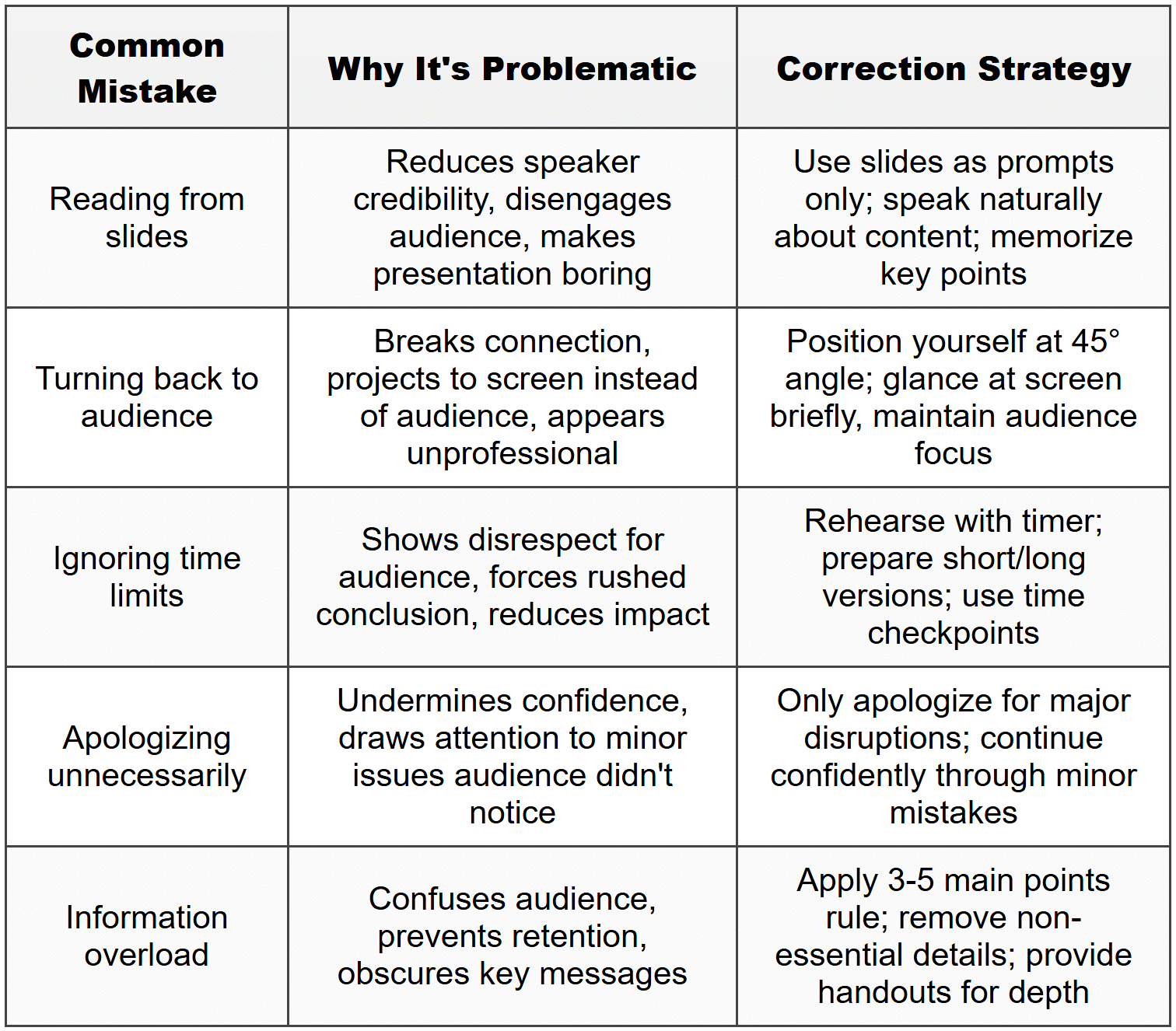
9.3 Common Mistakes and Corrections
9.4 Skill Development Path
- Toastmasters/Public Speaking Clubs: Join structured programs offering regular practice, peer feedback, and progressive skill challenges.
- Professional Training: Attend workshops on advanced techniques (storytelling, persuasion, executive presence) for targeted improvement.
- Mentorship: Observe skilled presenters, request constructive critique from experienced speakers, adopt best practices.
- Incremental Challenges: Gradually increase presentation difficulty (larger audiences, higher stakes, less preparation time) to build competence.
- Specialization: Develop expertise in specific presentation types (technical, sales, motivational) aligned with career goals.
10. Supporting Tools and Technologies
10.1 Presentation Software
- Microsoft PowerPoint: Industry standard with extensive features, templates, and animation options; best for traditional business settings.
- Google Slides: Cloud-based collaboration, real-time editing, easy sharing; ideal for team presentations and remote access.
- Prezi: Non-linear, zoom-based presentations for creative, visual storytelling; suits innovative or design-focused content.
- Keynote (Apple): Elegant templates, smooth animations, intuitive interface; preferred for visually sophisticated presentations.
10.2 Audience Engagement Tools
- Mentimeter/Slido: Live polling, Q&A collection, word clouds for interactive audience participation during presentation.
- Kahoot: Gamified quizzes and knowledge checks to energize training sessions and assess understanding.
- Zoom/Teams Features: Breakout rooms, reactions, whiteboard, screen annotation for enhanced virtual presentation engagement.
10.3 Preparation Resources
- Canva: Design tool for creating professional slides, infographics, and visual elements without advanced graphic design skills.
- Stock Resources: Unsplash, Pexels (free images), Flaticon (icons), Freepik (graphics) for high-quality visual content.
- Teleprompter Apps: For scripted presentations, displays scrolling text while maintaining eye contact with camera (virtual settings).
- Timer Tools: Presentation timers with vibration/visual alerts to manage pacing without obviously checking watch.
Mastering presentation and public speaking skills requires deliberate practice, continuous self-assessment, and adaptation to different contexts and audiences. The combination of thorough preparation, confident delivery, engaging content, effective visual support, and audience interaction creates impactful presentations that achieve communication objectives. Developing these competencies enhances professional credibility, leadership presence, and career advancement. Regular practice in diverse settings, incorporating feedback, and studying skilled speakers accelerates improvement. Remember that even experienced presenters continue refining their skills throughout their careers-the journey of improvement is ongoing and rewarding.