CompTIA A+ Exam > CompTIA A+ Notes > Core 1 > Cheatsheet: Networking Fundamentals
Cheatsheet: Networking Fundamentals


1. Network Models
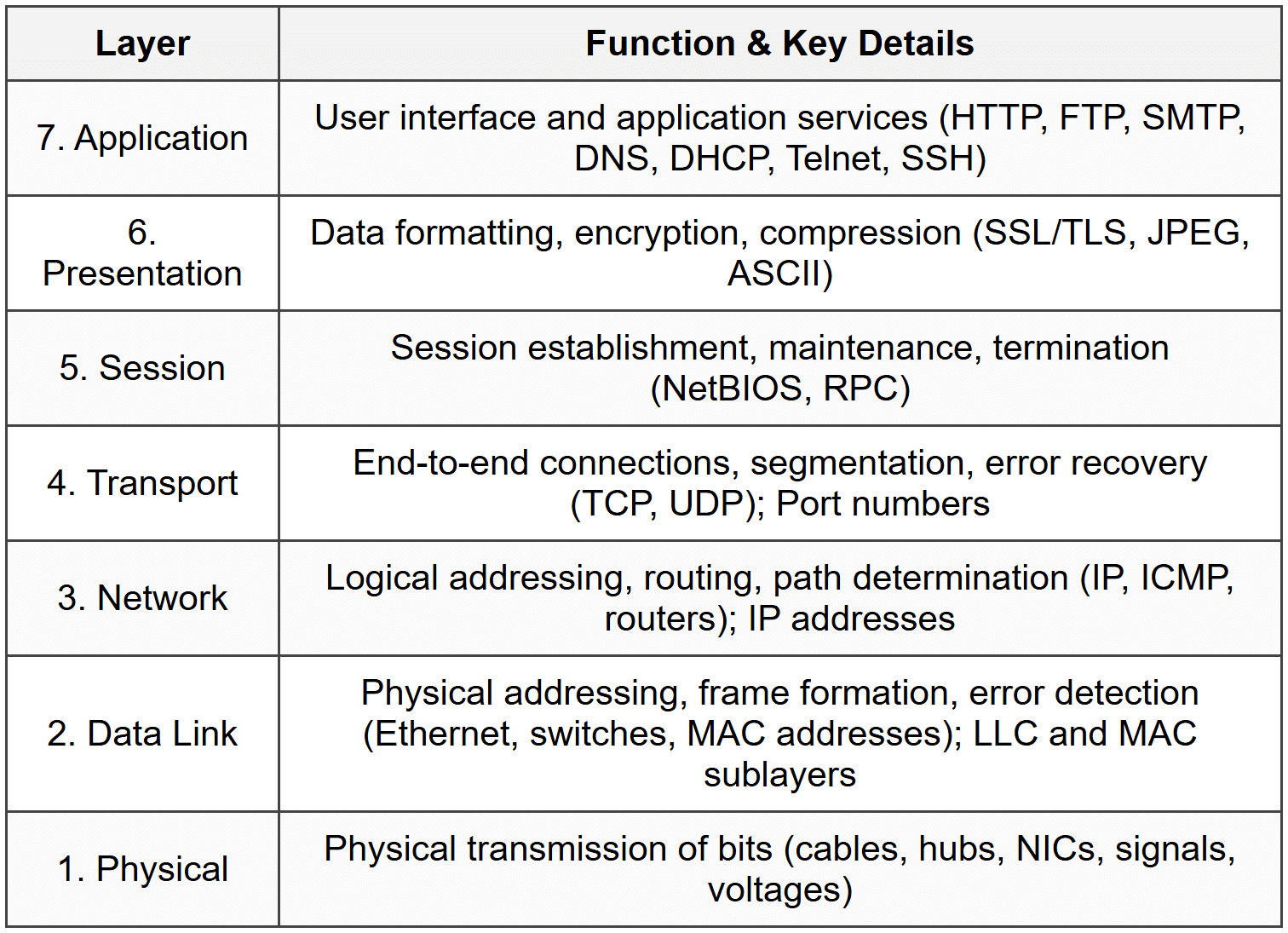
1.1 OSI Model
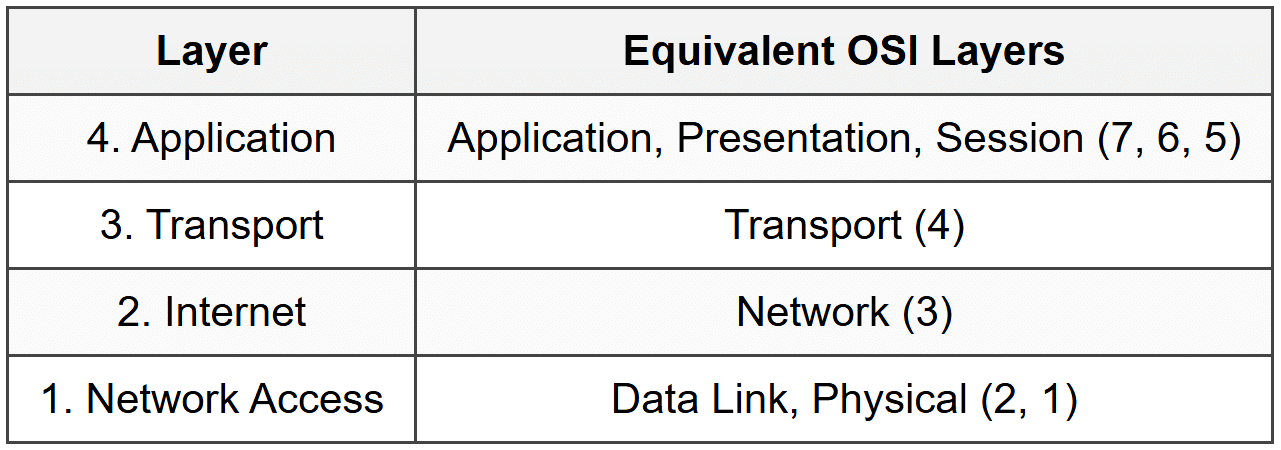
1.2 TCP/IP Model
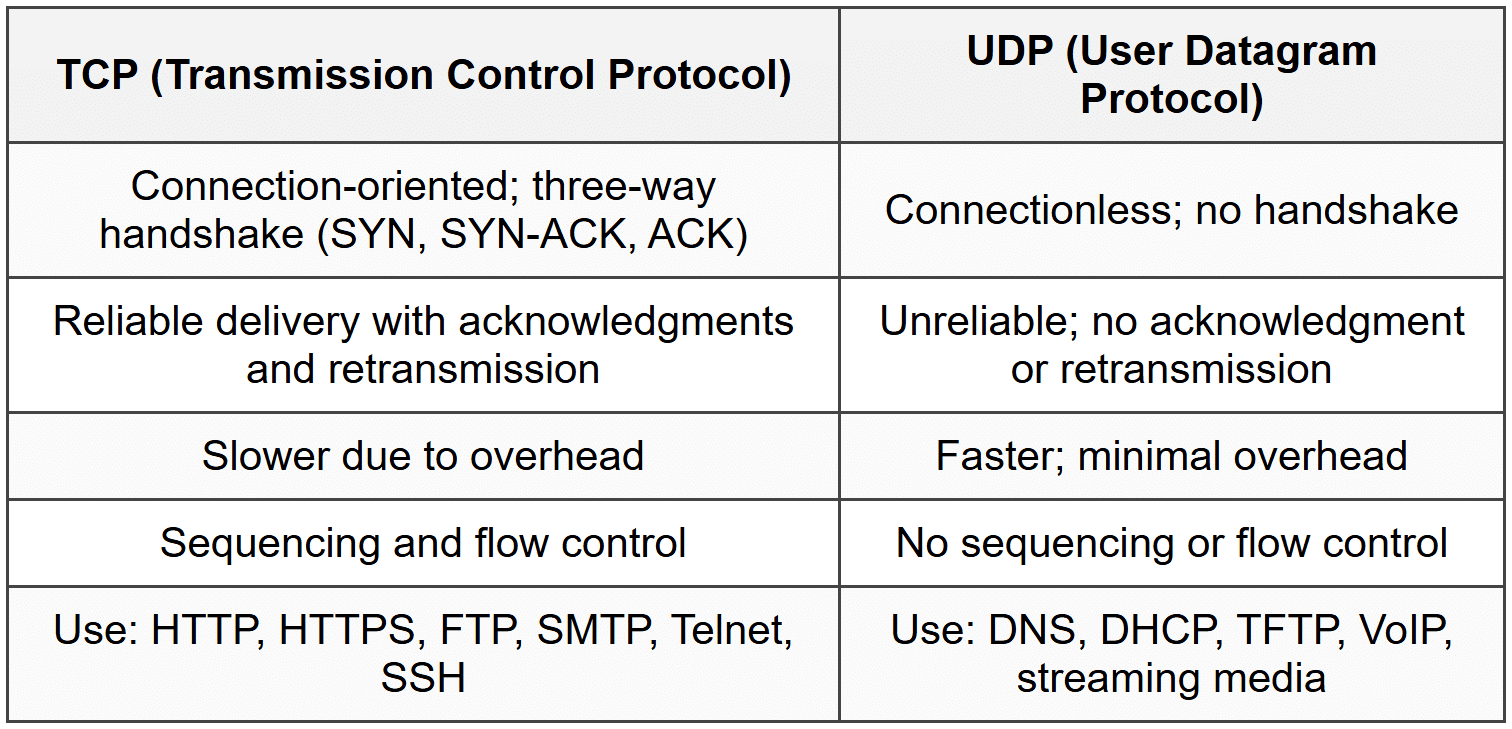
2. TCP vs UDP
3. IP Addressing
3.1 IPv4
- 32-bit address; dotted decimal notation (e.g., 192.168.1.1)
- Address classes: A (1-126), B (128-191), C (192-223), D (224-239 multicast), E (240-255 experimental)
- Private ranges: 10.0.0.0/8, 172.16.0.0/12, 192.168.0.0/16
- Loopback: 127.0.0.0/8 (127.0.0.1)
- APIPA: 169.254.0.0/16 (automatic when DHCP unavailable)
3.2 IPv6
- 128-bit address; hexadecimal notation (e.g., 2001:0db8:85a3:0000:0000:8a2e:0370:7334)
- Shorthand: omit leading zeros, compress consecutive zeros with :: (once per address)
- Link-local: fe80::/10 (auto-configured, not routable)
- Unique local: fc00::/7 (private addresses)
- Global unicast: 2000::/3 (routable internet addresses)
- Loopback: ::1
3.3 Subnetting
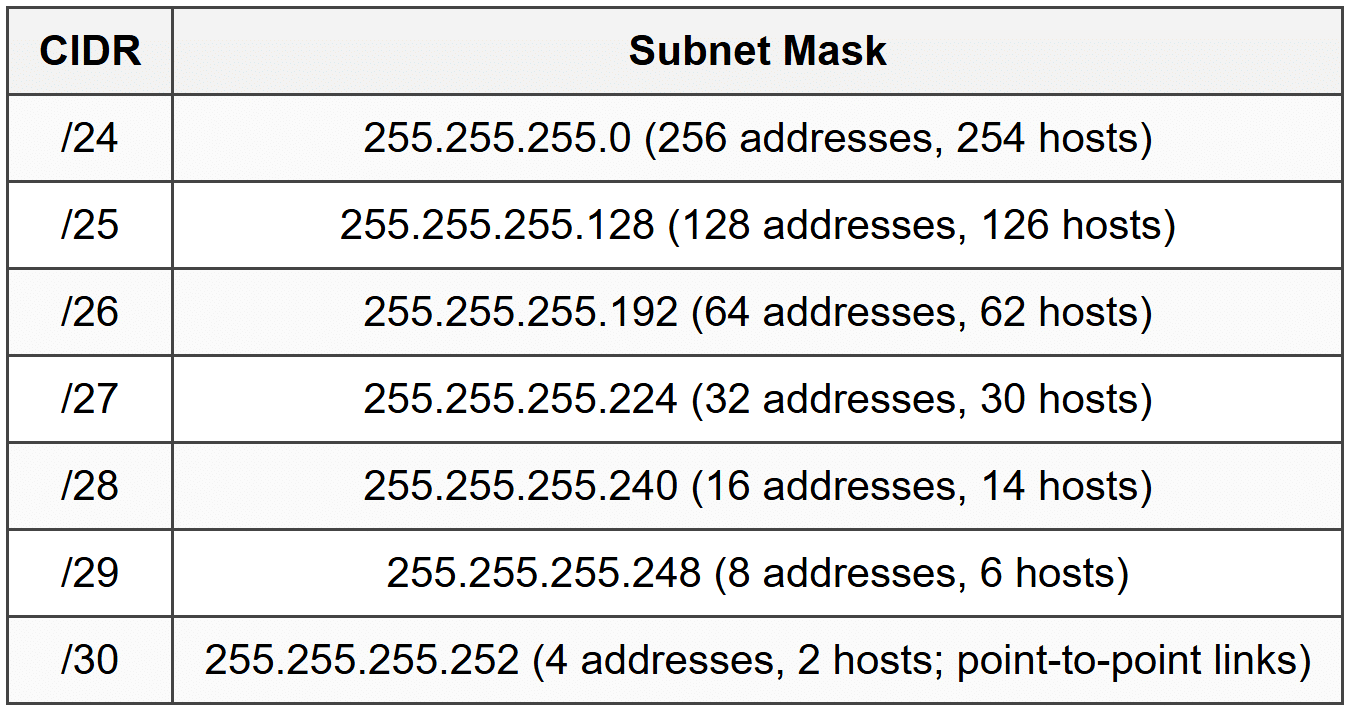
- Formula: 2^n - 2 usable hosts (n = host bits); subtract network and broadcast addresses
- Subnet calculation: Network address (all host bits 0), Broadcast address (all host bits 1)
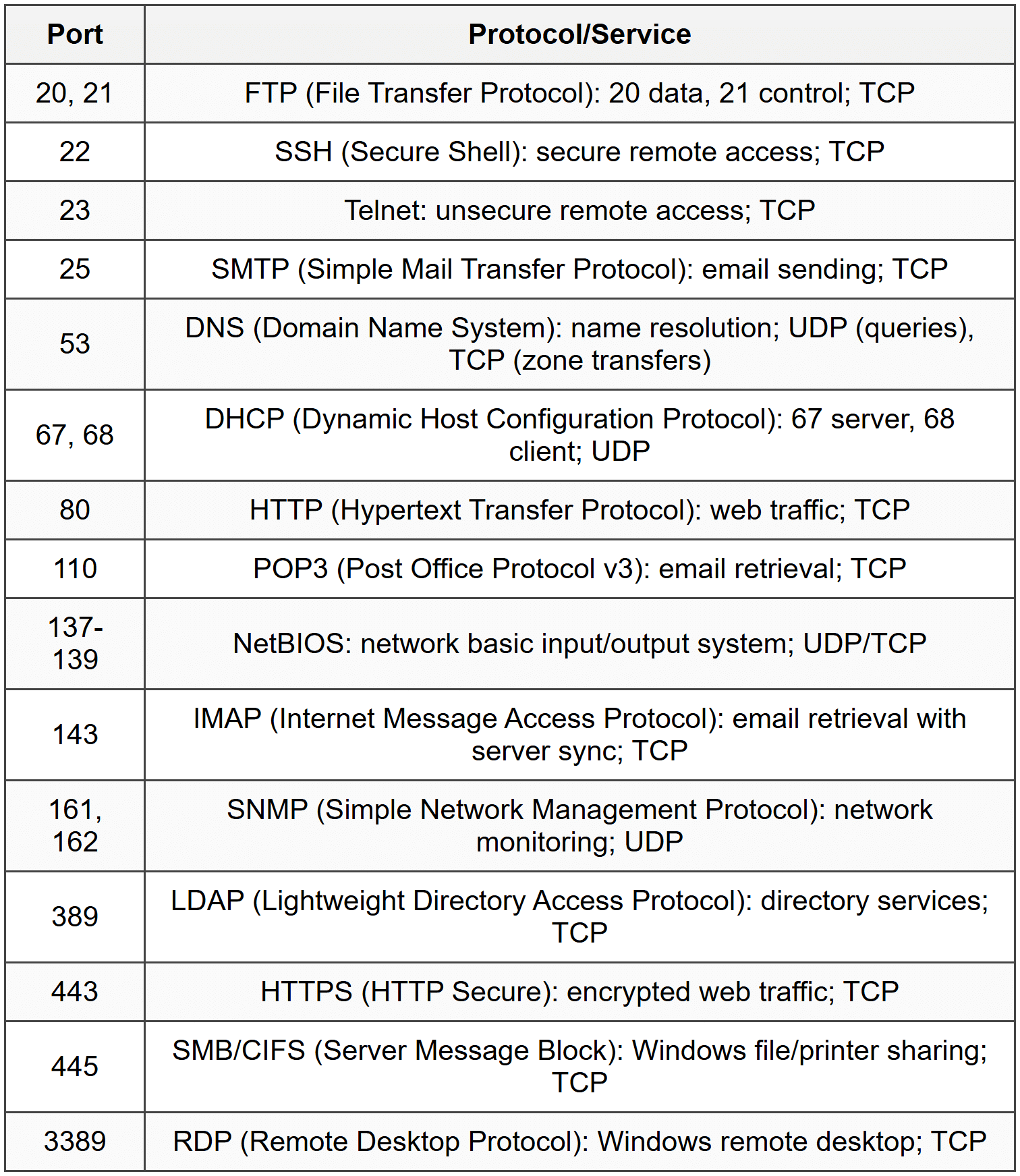
4. Common Ports and Protocols
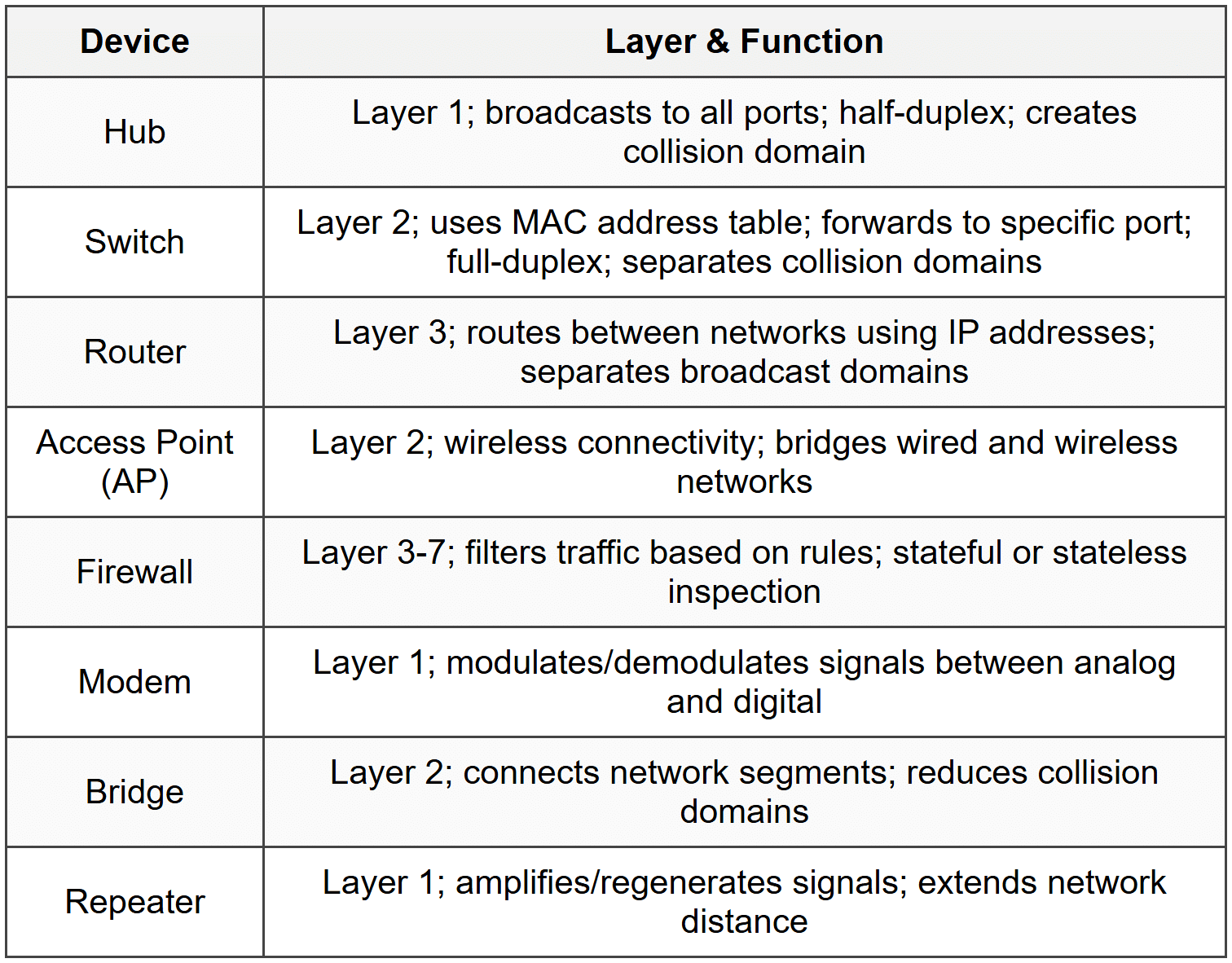
5. Network Devices
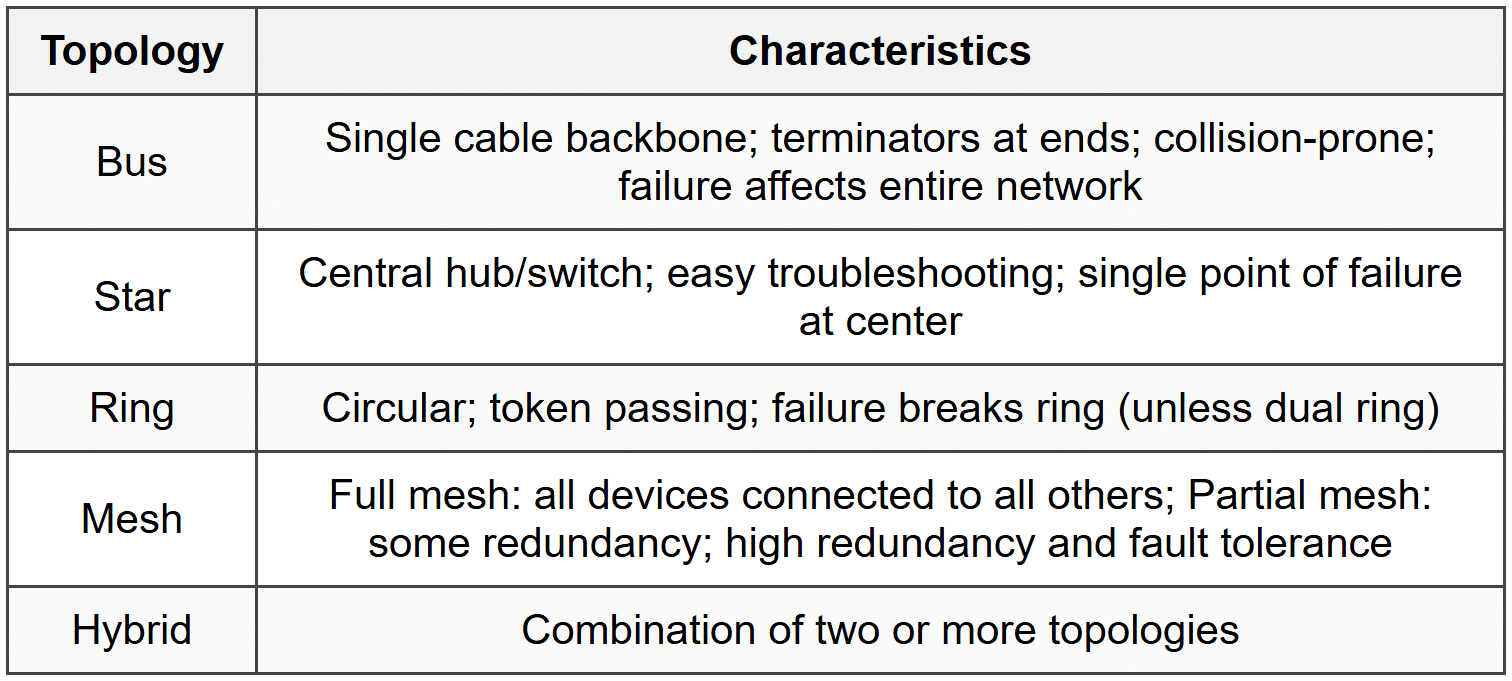
6. Network Topologies
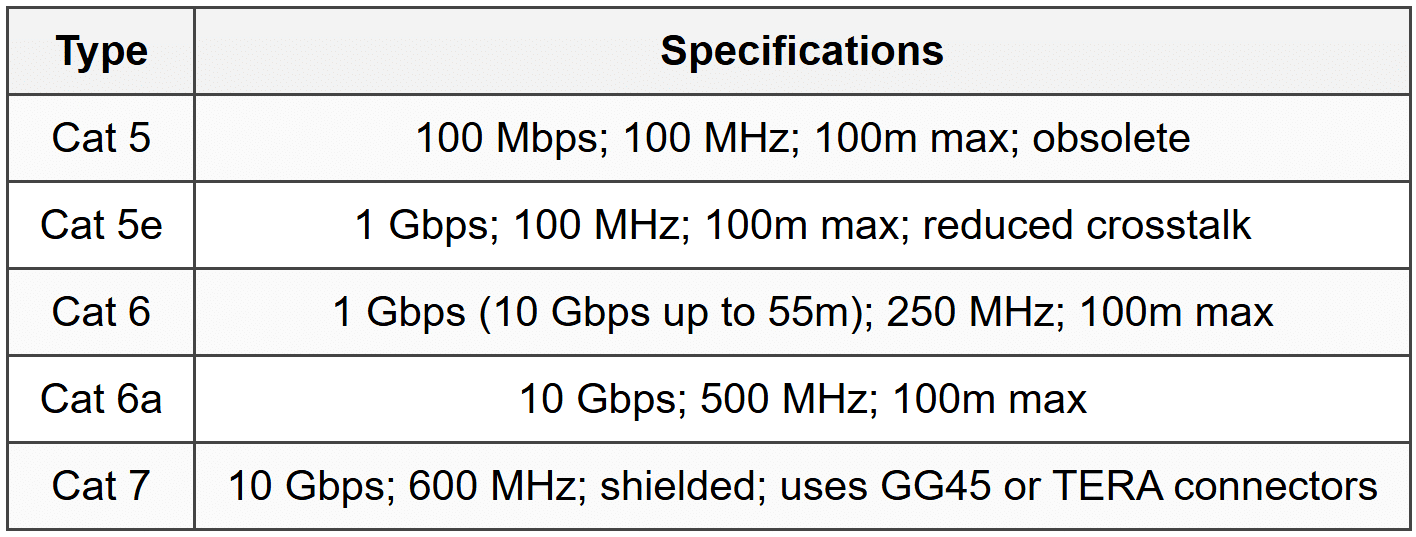
7. Cable Types
7.1 Twisted Pair
- UTP (Unshielded Twisted Pair): no shielding; common in offices
- STP (Shielded Twisted Pair): foil/braided shielding; reduces EMI
- RJ45 connector: 8P8C; 8 pins
- T568A and T568B: wiring standards; straight-through uses same standard both ends; crossover uses different standards
7.2 Coaxial
- RG-6: cable TV, cable internet; 75 ohm; F-connector
- RG-59: older CCTV, short runs; 75 ohm
- Center conductor, insulation, shielding, outer jacket
7.3 Fiber Optic
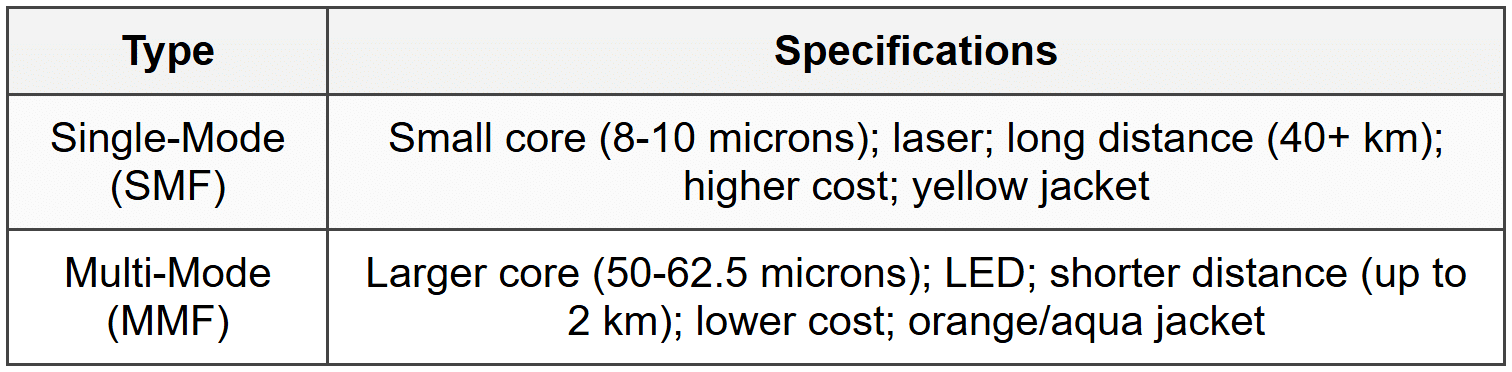
- Connectors: LC (small form-factor), SC (square), ST (round, twist-lock), MTRJ (duplex)
- Immune to EMI; secure; high bandwidth
8. Wireless Standards (802.11)
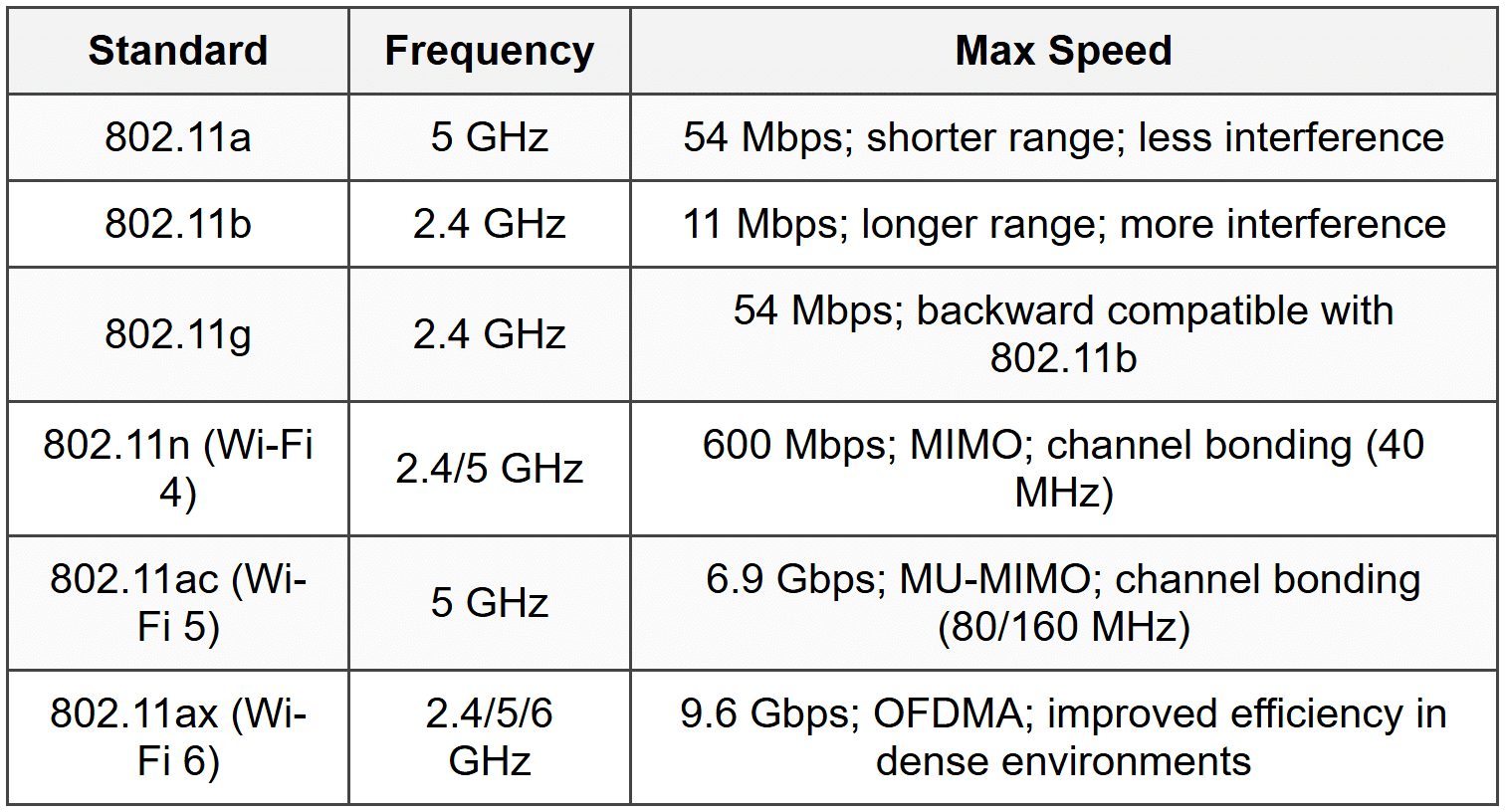
- 2.4 GHz channels: 1, 6, 11 (non-overlapping in North America)
- 5 GHz: more channels; less congestion; shorter range
- MIMO: Multiple Input Multiple Output; multiple antennas for increased throughput
- MU-MIMO: Multi-User MIMO; simultaneous communication with multiple devices
9. Wireless Security
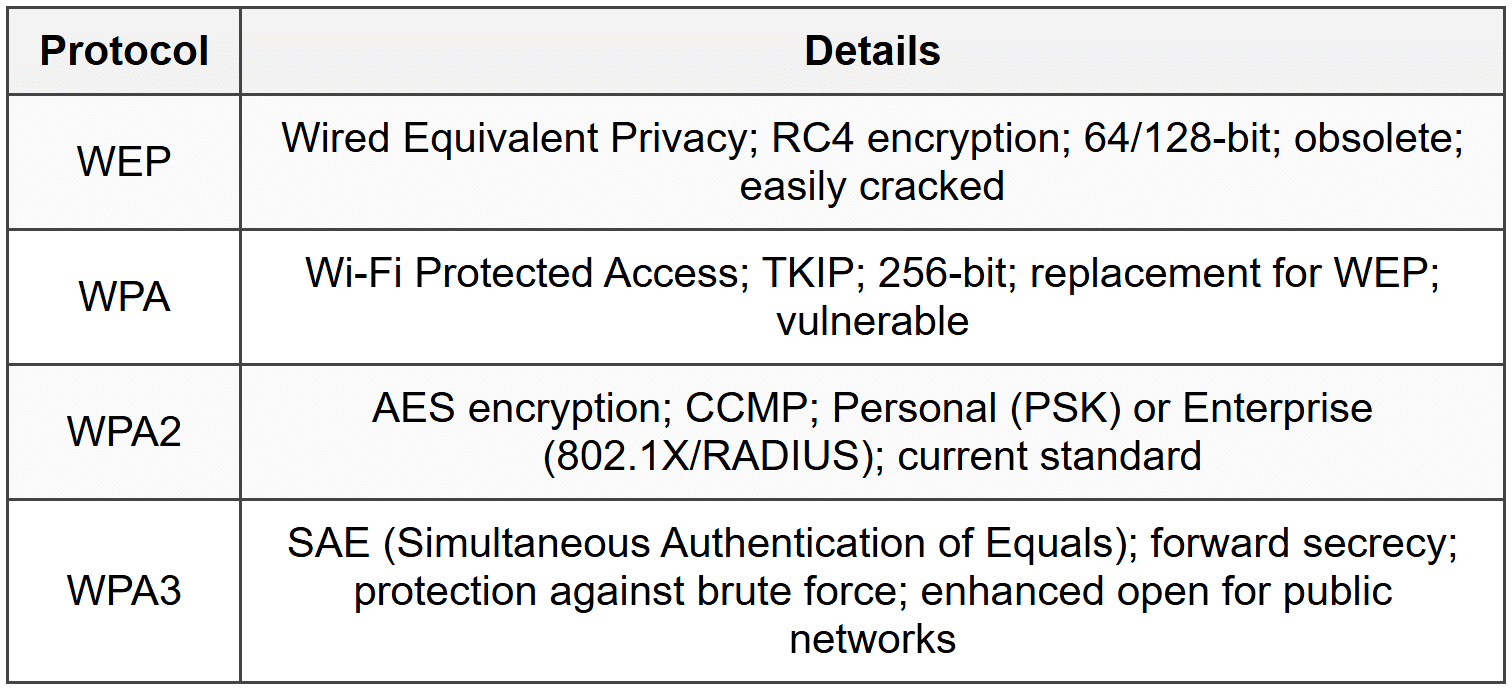
- Disable SSID broadcast: security through obscurity (limited effectiveness)
- MAC filtering: whitelist/blacklist MAC addresses (can be spoofed)
- Change default credentials and SSID
10. DHCP
- Automatic IP address assignment
- DORA process: Discover (client broadcast), Offer (server response), Request (client acceptance), Acknowledge (server confirmation)
- Lease time: duration IP address is assigned
- Scope: range of IP addresses available for assignment
- Reservation: assigns specific IP to specific MAC address
- Options: subnet mask, default gateway, DNS server, lease duration
- Ports: UDP 67 (server), UDP 68 (client)
11. DNS
- Resolves domain names to IP addresses
- Hierarchical: Root servers → TLD servers (.com, .org) → Authoritative servers
- Record types: A (IPv4 address), AAAA (IPv6 address), MX (mail exchange), CNAME (alias), PTR (reverse lookup), NS (name server), SOA (start of authority)
- Port 53: UDP for queries; TCP for zone transfers
- Recursive vs Iterative: Recursive (DNS server does all work); Iterative (client follows referrals)
- DNS cache: stores recent lookups for faster resolution
12. Network Address Translation (NAT)
- Translates private IP addresses to public IP addresses
- Conserves public IP addresses
- Provides basic security by hiding internal network structure
- Types: Static NAT (one-to-one), Dynamic NAT (pool of addresses), PAT/NAT Overload (many-to-one using port numbers)
- PAT (Port Address Translation): maps multiple private IPs to single public IP using different port numbers
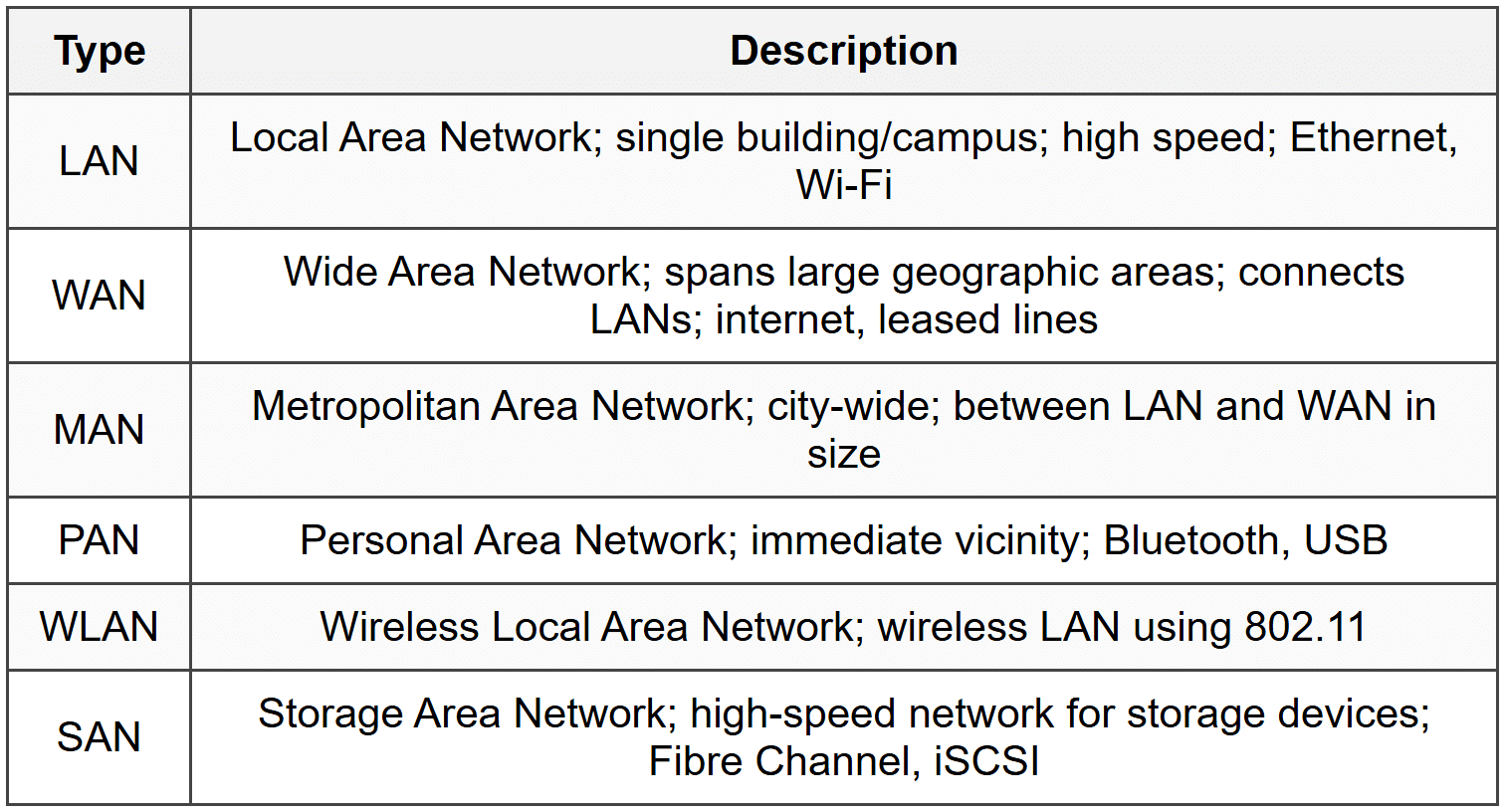
13. Network Types
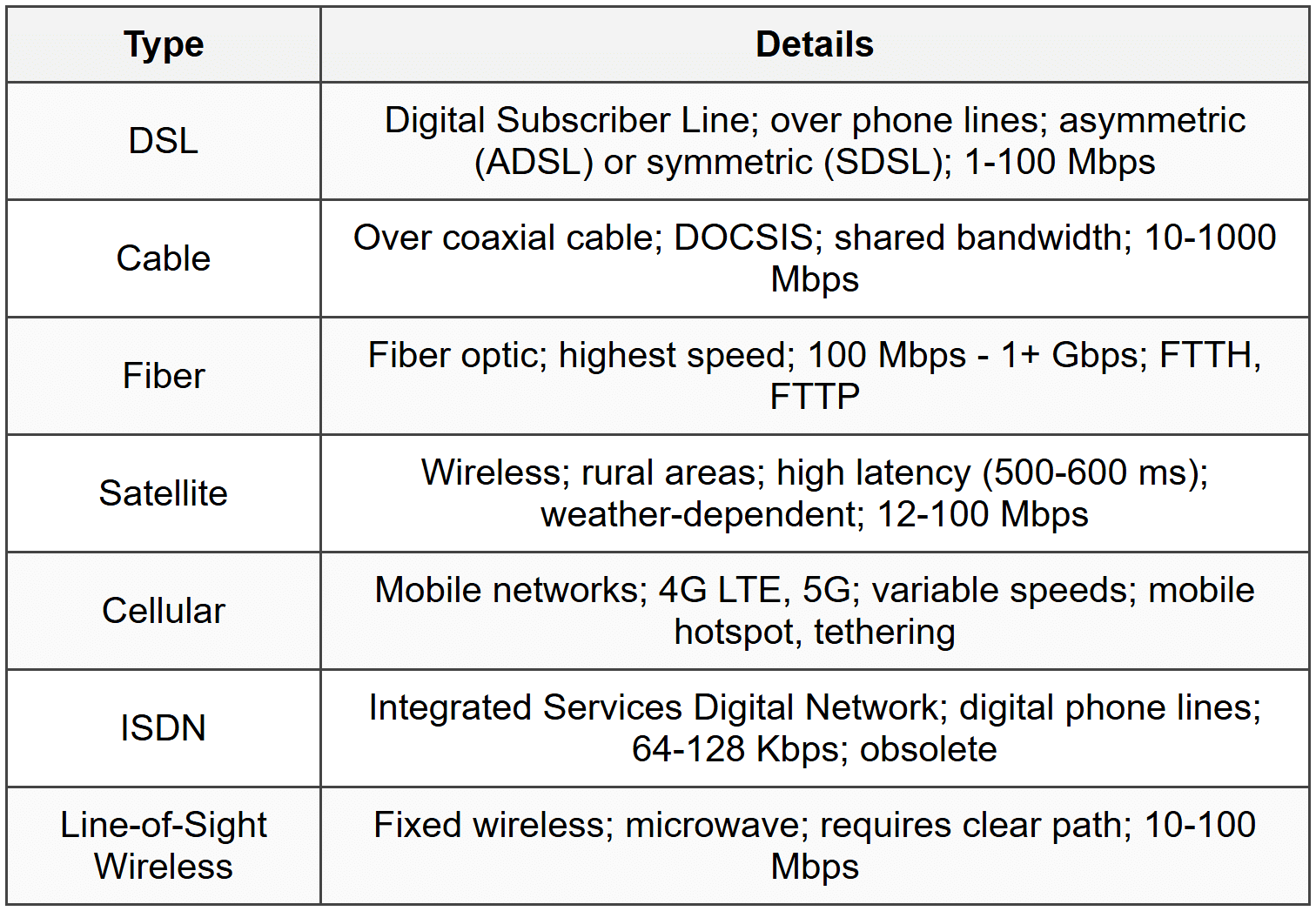
14. Internet Connection Types
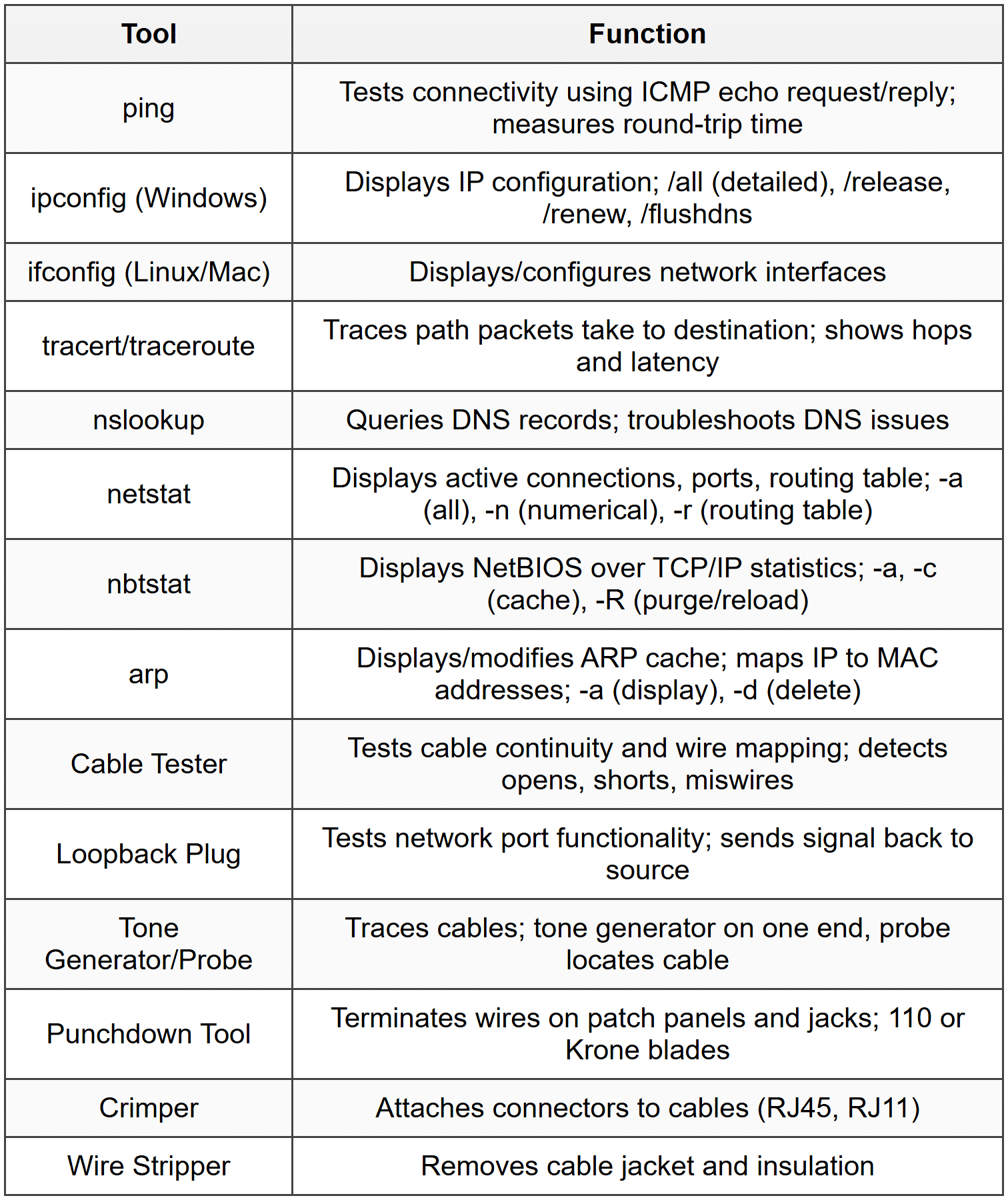
15. Network Tools
16. VLANs and VPNs
16.1 VLAN (Virtual Local Area Network)
- Logically segments network at Layer 2
- Reduces broadcast domains; improves security and performance
- Configured on managed switches
- Trunk ports: carry traffic for multiple VLANs; 802.1Q tagging
- Access ports: belong to single VLAN; connect end devices
- Inter-VLAN routing: requires Layer 3 device (router or Layer 3 switch)
16.2 VPN (Virtual Private Network)
- Creates encrypted tunnel over public network (internet)
- Site-to-Site VPN: connects two networks (branch offices)
- Remote Access VPN: connects individual user to network
- Protocols: IPSec, SSL/TLS, PPTP, L2TP
- Provides confidentiality, integrity, authentication
17. QoS (Quality of Service)
- Prioritizes network traffic to ensure performance
- Traffic shaping: controls bandwidth usage
- Traffic policing: enforces bandwidth limits; drops or marks excess traffic
- Classification: categorizes traffic (voice, video, data)
- Queuing: buffers and schedules packets based on priority
- CoS (Class of Service): Layer 2 priority marking
- DSCP (Differentiated Services Code Point): Layer 3 priority marking in IP header
18. Network Troubleshooting Methodology
- Identify the problem: gather information, question users, determine symptoms
- Establish a theory of probable cause: question the obvious, consider multiple approaches
- Test the theory: confirm theory or establish new theory
- Establish a plan of action: resolve problem, identify effects
- Implement the solution or escalate
- Verify full system functionality: implement preventive measures
- Document findings, actions, outcomes
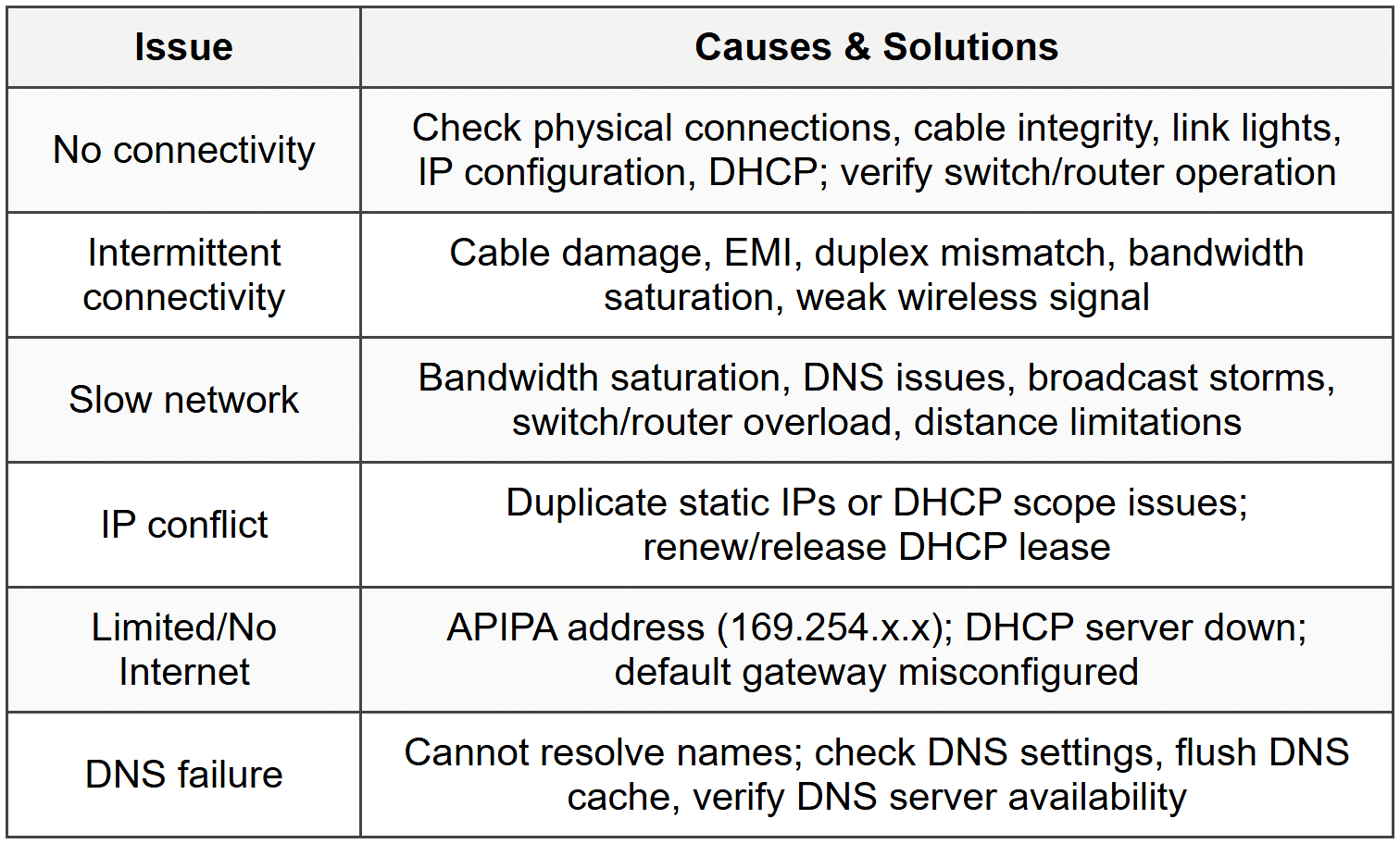
19. Common Network Issues
The document Cheatsheet: Networking Fundamentals is a part of the CompTIA A+ Course CompTIA A+ Core 1.
All you need of CompTIA A+ at this link: CompTIA A+
About this Document

Apr 20, 2026 Last updated
Related Exams
Document Description: Cheatsheet: Networking Fundamentals for CompTIA A+ 2026 is part of CompTIA A+ Core 1 preparation. The notes and questions for Cheatsheet: Networking Fundamentals have been prepared according to the CompTIA A+ exam syllabus. Information about Cheatsheet: Networking Fundamentals covers topics like and Cheatsheet: Networking Fundamentals Example, for CompTIA A+ 2026 Exam. Find important definitions, questions, notes, meanings, examples, exercises and tests below for Cheatsheet: Networking Fundamentals.
Introduction of Cheatsheet: Networking Fundamentals in English is available as part of our CompTIA A+ Core 1 for CompTIA A+ & Cheatsheet: Networking Fundamentals in Hindi for CompTIA A+ Core 1 course. Download more important topics related with notes, lectures and mock test series for CompTIA A+ Exam by signing up for free. CompTIA A+: Cheatsheet: Networking Fundamentals
Description
Cheatsheet: Networking Fundamentals of CompTIA A+ Core 1 to help you remember important concepts with short tricks. Start learning for CompTIA A+ exam & improve retention with EduRev.
Information about Cheatsheet: Networking Fundamentals
In this doc you can find the meaning of Cheatsheet: Networking Fundamentals defined & explained in the simplest way possible. Besides explaining types of Cheatsheet: Networking Fundamentals theory, EduRev gives you an ample number of questions to practice Cheatsheet: Networking Fundamentals tests, examples and also practice CompTIA A+ tests



Related Searches
pdf , video lectures, Objective type Questions, Summary, shortcuts and tricks, ppt, Cheatsheet: Networking Fundamentals, study material, Free, Important questions, Sample Paper, past year papers, mock tests for examination, MCQs, Extra Questions, Semester Notes, Cheatsheet: Networking Fundamentals, Cheatsheet: Networking Fundamentals, Previous Year Questions with Solutions, Viva Questions, Exam, practice quizzes;