CompTIA A+ Exam > CompTIA A+ Notes > Core 2 > Cheatsheet: Other Operating Systems
Cheatsheet: Other Operating Systems


1. Linux Overview
1.1 Key Characteristics
- Open-source, Unix-like operating system kernel developed by Linus Torvalds (1991)
- Free to use, modify, and distribute under GPL (General Public License)
- Case-sensitive file system and commands
- Multiuser, multitasking architecture
- Strong security model with user permissions and groups
- Kernel-based architecture with modular design
1.2 Common Distributions

2. Linux File System Structure
2.1 Directory Hierarchy

2.2 File System Types
- ext4: Most common Linux file system, journaling, supports volumes up to 1 EB
- ext3: Older journaling file system, predecessor to ext4
- XFS: High-performance 64-bit journaling file system
- Btrfs: Copy-on-write file system with snapshot and RAID support
- NTFS: Supported via ntfs-3g driver for Windows compatibility
- FAT32/exFAT: Supported for removable media compatibility
3. Linux Basic Commands
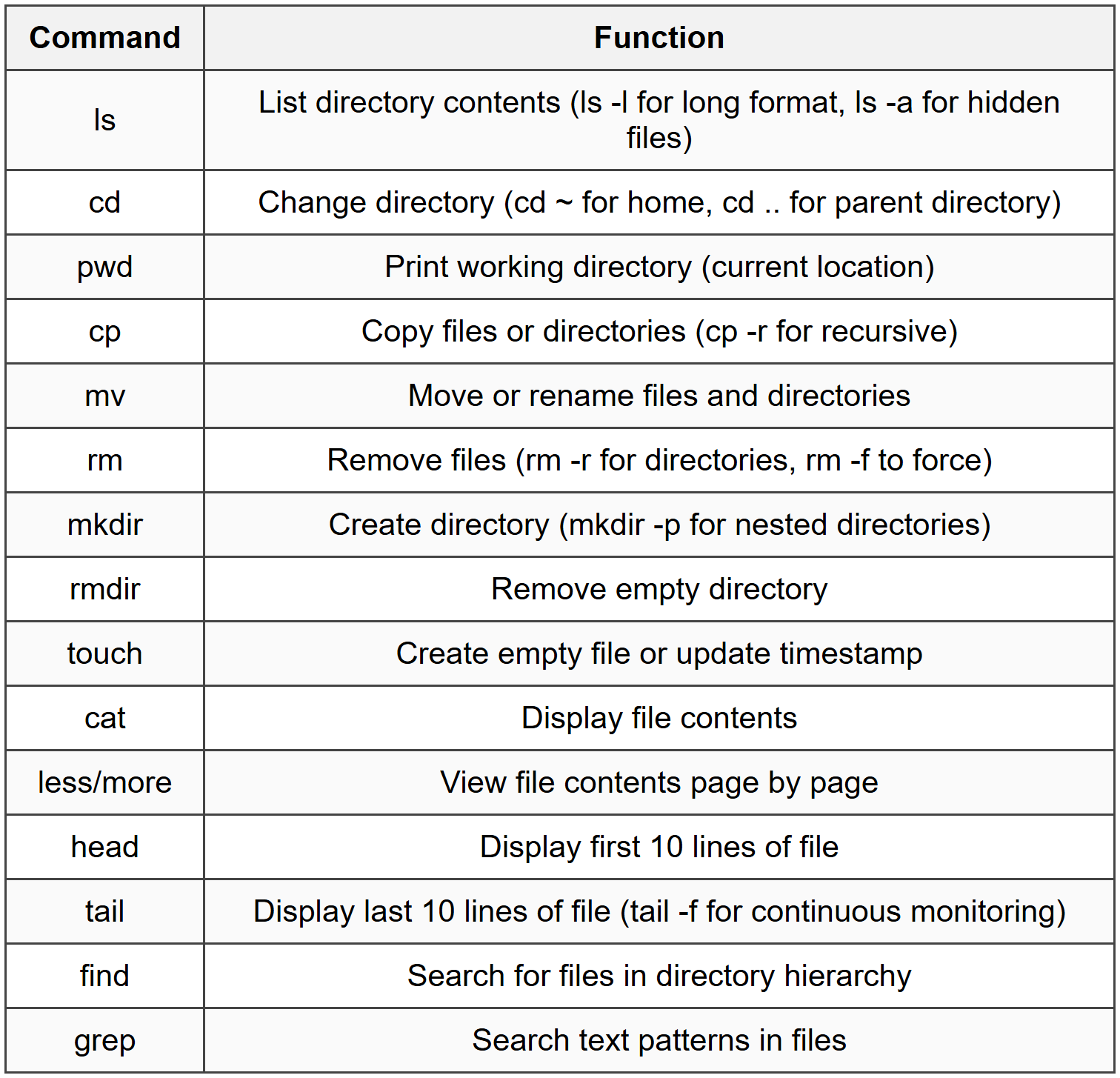
3.1 File and Directory Operations
3.2 File Permissions
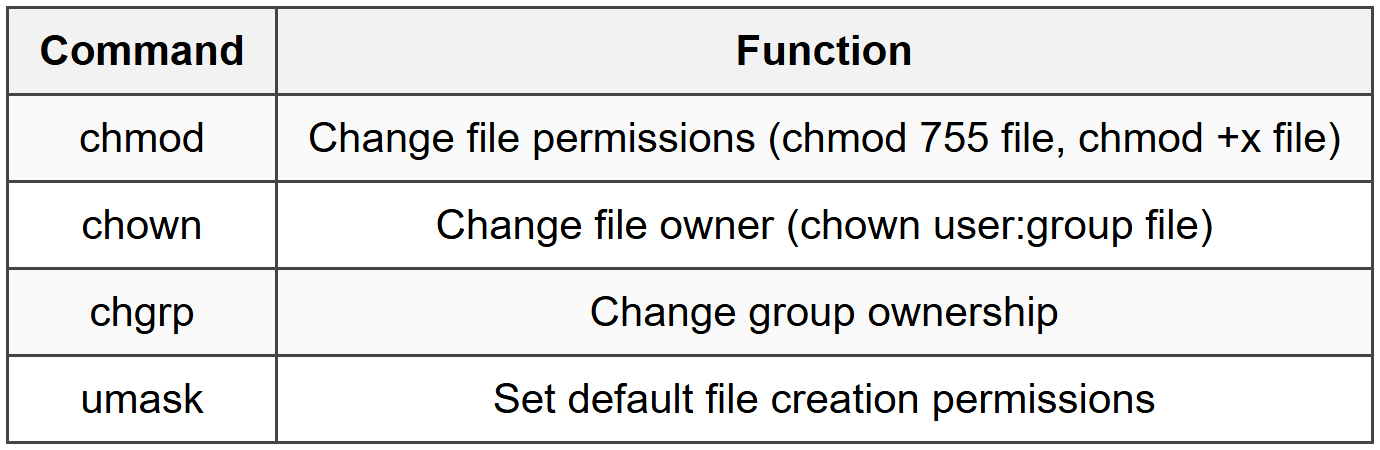
3.2.1 Permission Values
- Read (r) = 4, Write (w) = 2, Execute (x) = 1
- Three groups: Owner, Group, Others
- Example: 755 = rwxr-xr-x (owner full, group/others read+execute)
- Example: 644 = rw-r--r-- (owner read+write, group/others read only)
3.3 System Information

3.4 Process Management

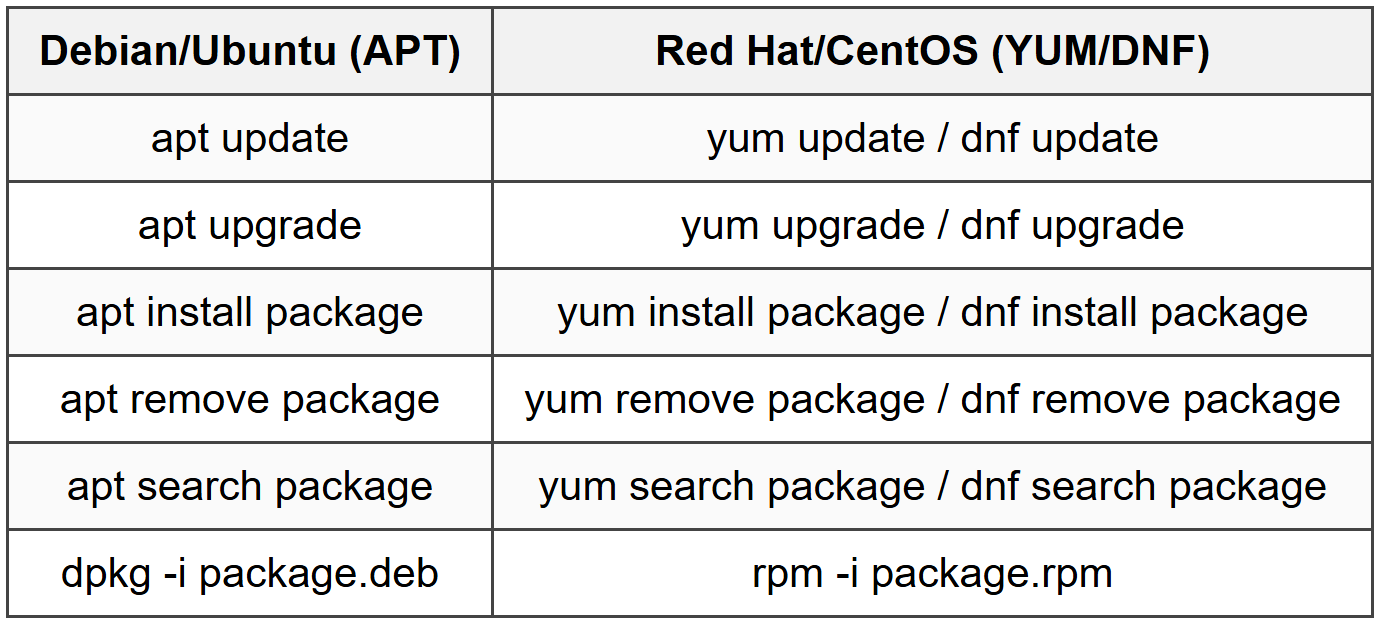
3.5 Package Management
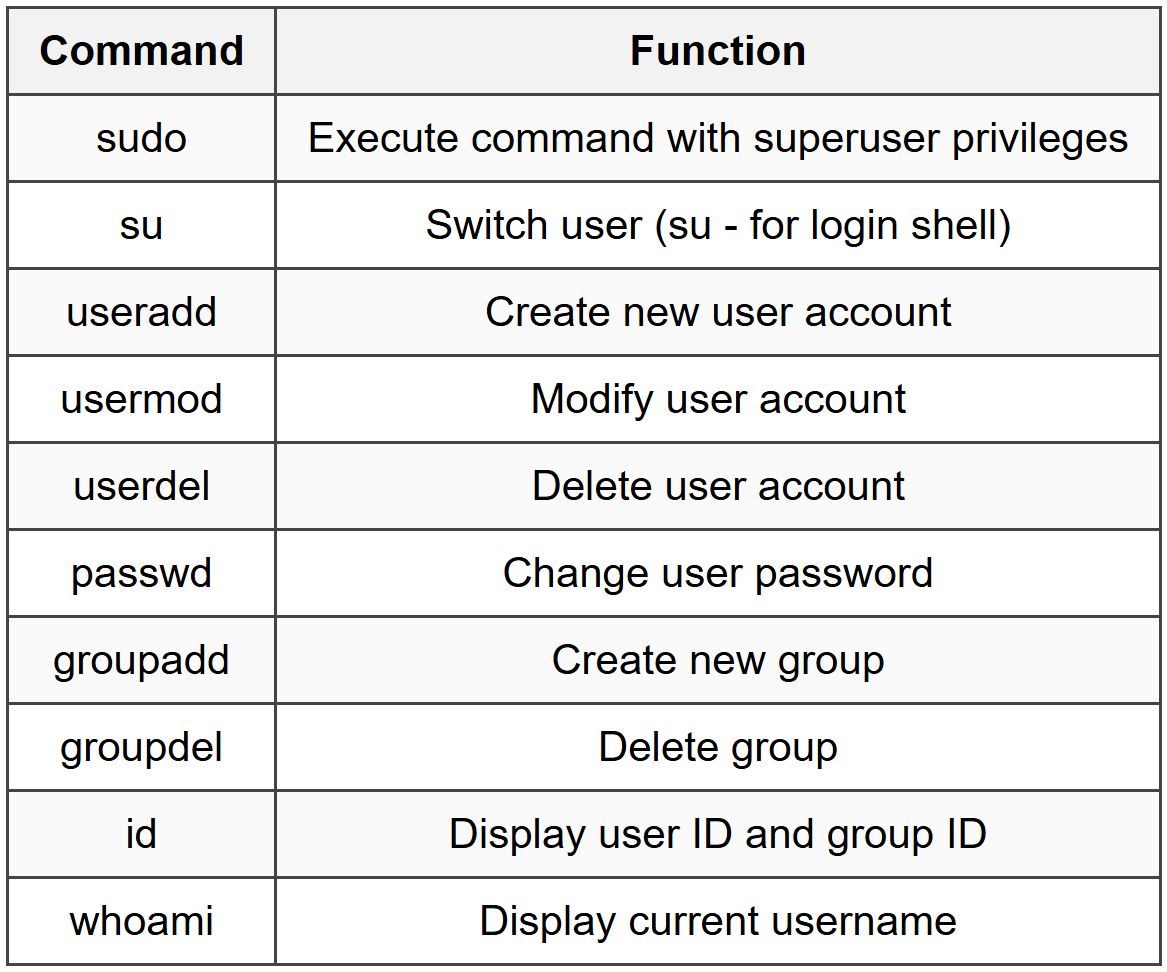
3.6 User Management
3.7 Network Commands

4. Linux Shell and Scripting
4.1 Shell Types
- Bash (Bourne Again Shell): Default shell on most Linux distributions
- sh (Bourne Shell): Original Unix shell
- csh/tcsh (C Shell): C-like syntax
- zsh (Z Shell): Extended Bash with additional features
4.2 Shell Basics

4.3 Common Bash Script Elements
- Shebang: #!/bin/bash (first line of script)
- Variables: VAR="value" (no spaces around =)
- Comments: # comment text
- Execute permission required: chmod +x script.sh
- Run script: ./script.sh or bash script.sh
5. macOS Overview
5.1 Key Characteristics
- Unix-based operating system developed by Apple Inc.
- Built on Darwin foundation (BSD Unix derivative)
- Proprietary OS for Macintosh computers
- GUI-focused with command-line interface available via Terminal
- File system: APFS (Apple File System) since macOS High Sierra
- Case-insensitive by default, case-preserving file system
5.2 System Architecture

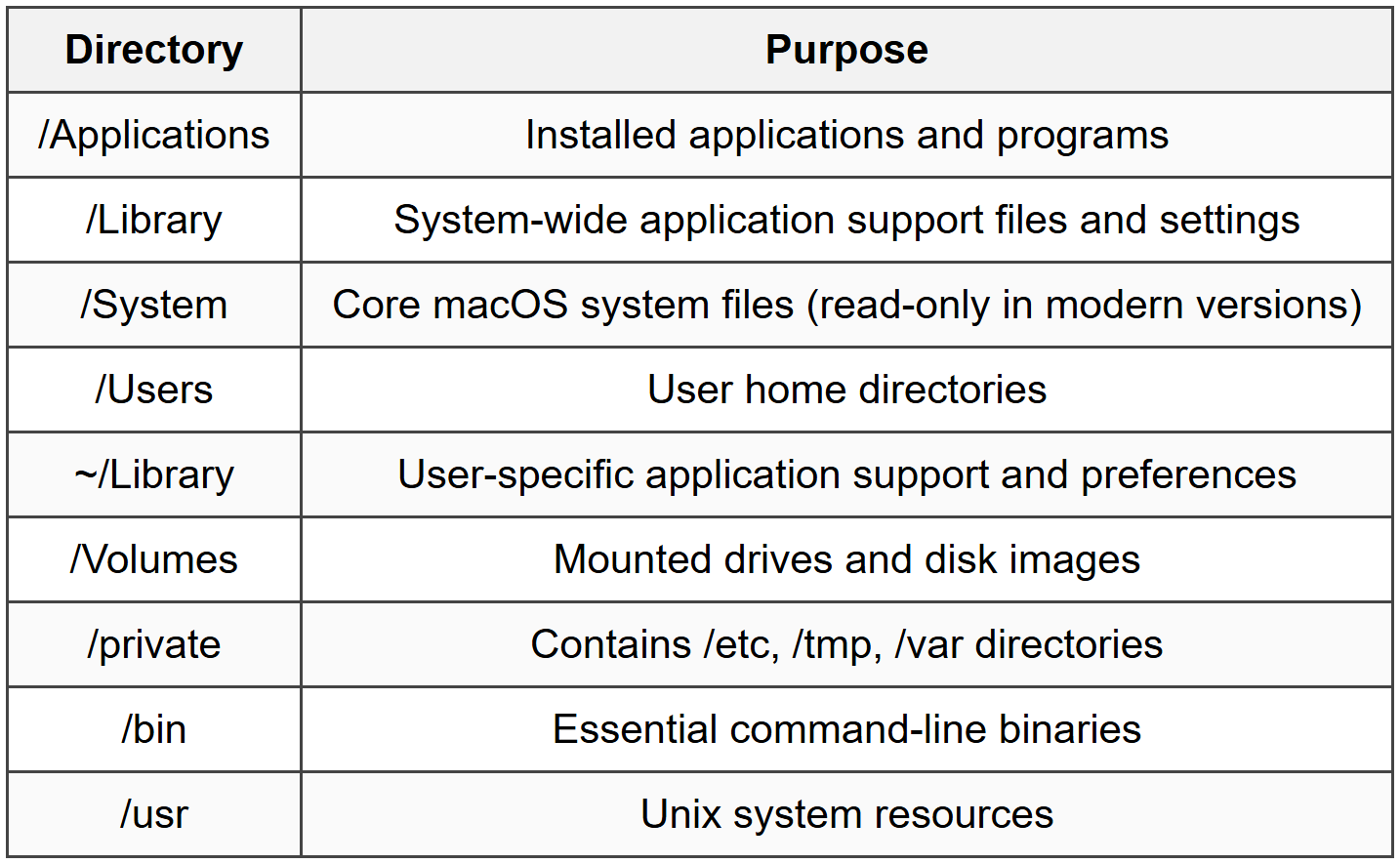
5.3 File System Structure
6. macOS Tools and Features
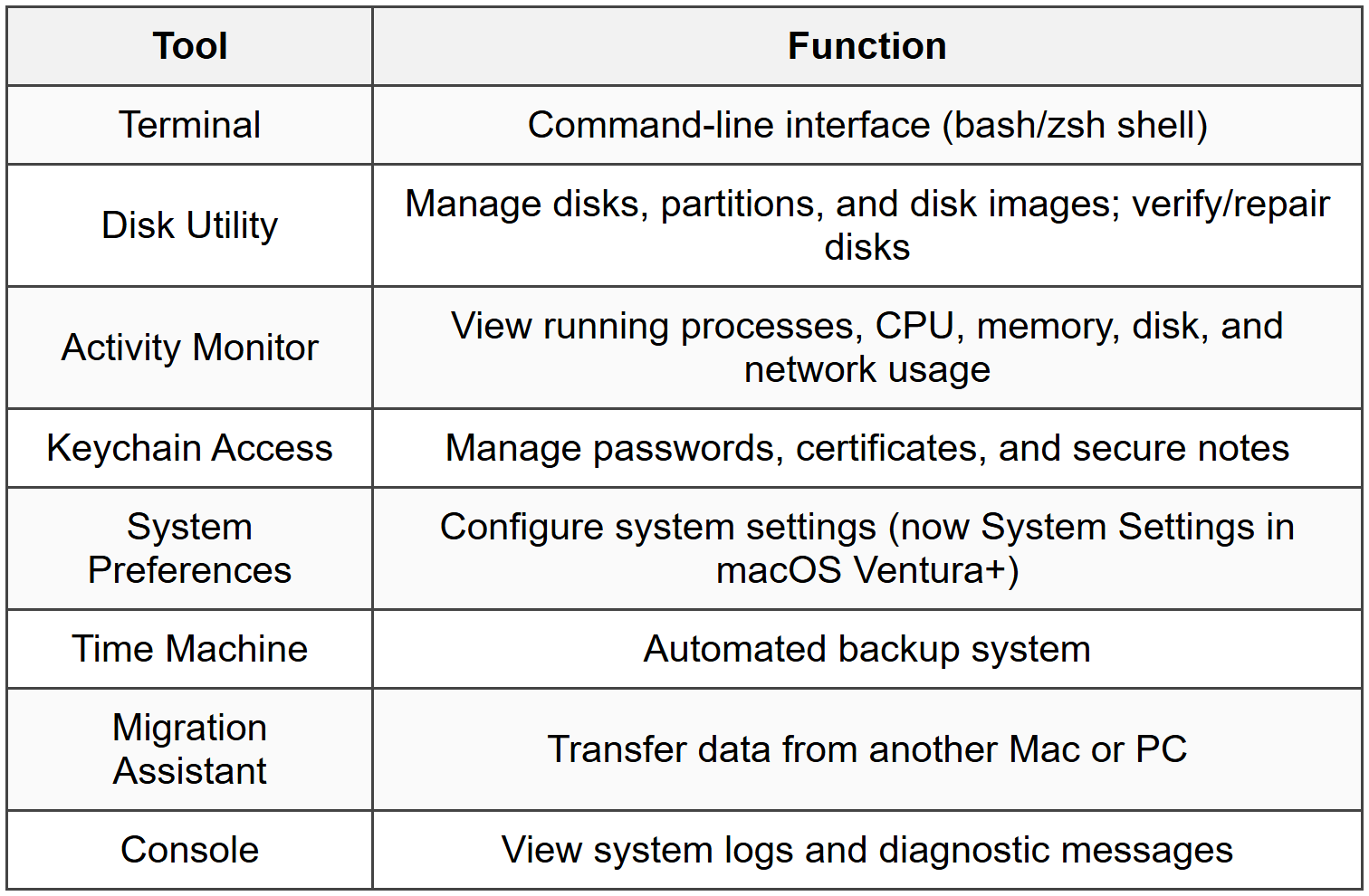
6.1 System Utilities
6.2 Finder Features
- Spotlight: System-wide search (Cmd+Space)
- Quick Look: Preview files without opening (Space bar)
- Tags: Color-coded labels for file organization
- AirDrop: Wireless file sharing between Apple devices
- iCloud Drive: Cloud storage integration
- Smart Folders: Saved searches
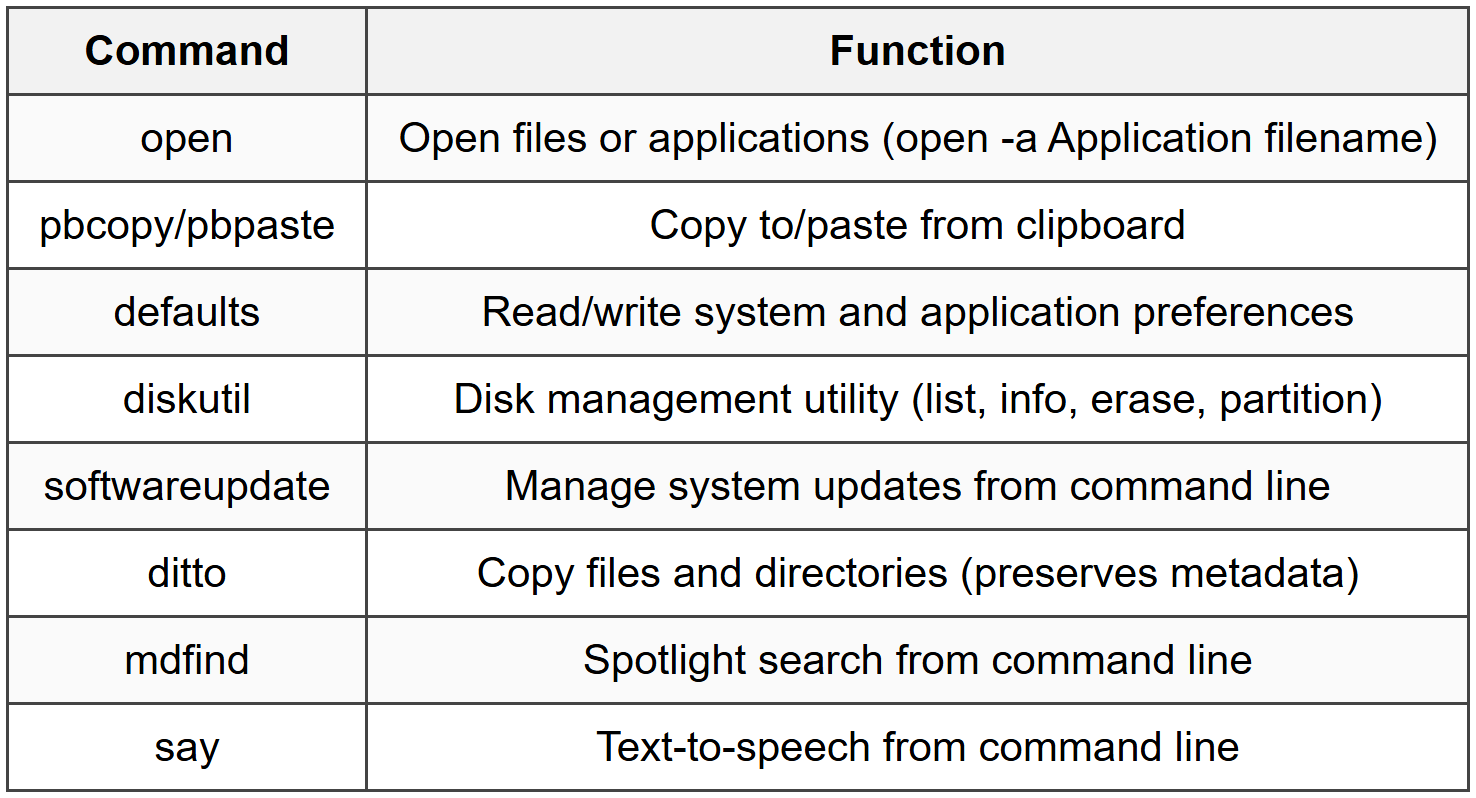
6.3 Common macOS Terminal Commands
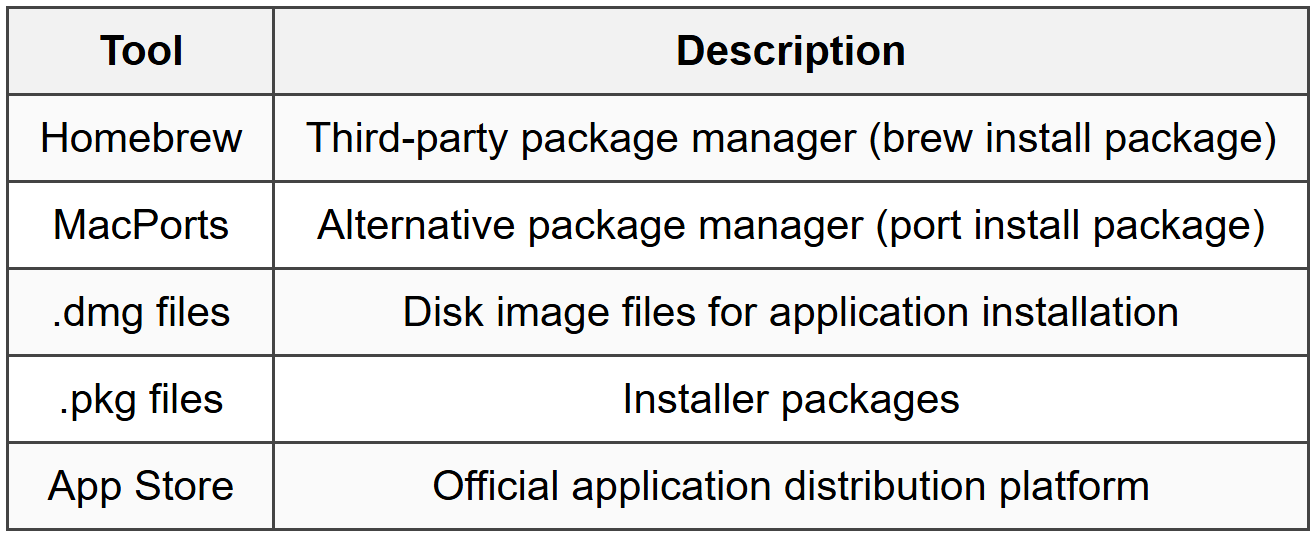
6.4 Package Management
6.5 Security Features
- Gatekeeper: Controls which applications can be installed and run
- FileVault: Full disk encryption
- XProtect: Built-in malware detection
- System Integrity Protection (SIP): Protects system files from modification
- Firewall: Application-based firewall control
- Touch ID/Face ID: Biometric authentication (hardware dependent)
7. Chrome OS
7.1 Key Characteristics
- Linux-based operating system developed by Google
- Built on Gentoo Linux foundation with Chrome browser as primary interface
- Cloud-centric, designed for web applications
- Automatic updates and security patches
- Fast boot times (typically under 10 seconds)
- Primarily for Chromebook devices
- Supports Android apps via Google Play Store
- Linux application support via Crostini container
7.2 Architecture
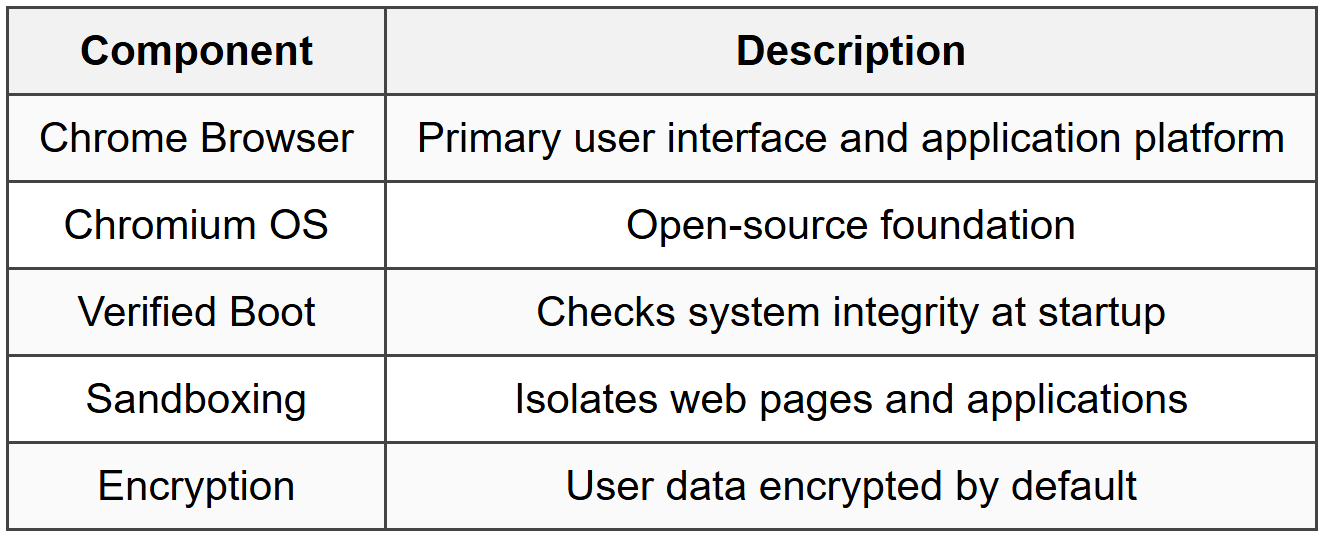
7.3 File Management
- Files app: Built-in file manager
- Downloads folder: Local storage location
- Google Drive integration: Primary cloud storage
- Limited local storage (emphasizes cloud storage)
- Support for external drives and SD cards
- File types: .crx for Chrome extensions
7.4 Key Features

7.5 Common Crosh Commands

7.6 System Updates
- Automatic updates in background
- A/B partition system for seamless updates
- Updates applied after reboot
- No user intervention required
- Check for updates: Settings > About Chrome OS > Check for updates
8. Cross-Platform Comparisons
8.1 File System Comparison

8.2 Command Line Comparison
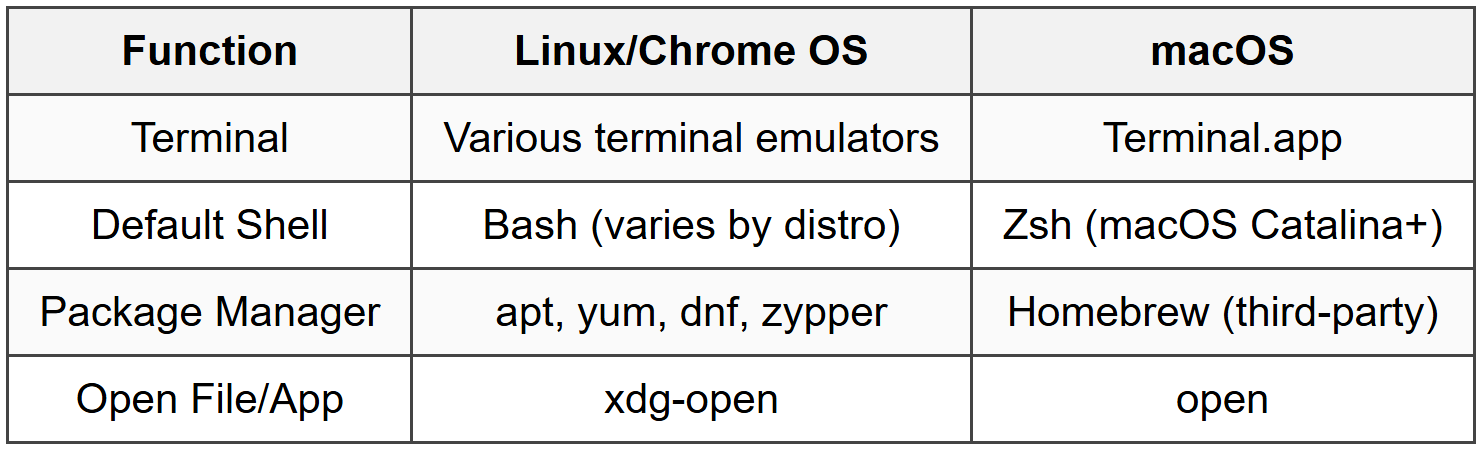
8.3 User Interface Elements

9. Troubleshooting and Maintenance
9.1 Linux Troubleshooting
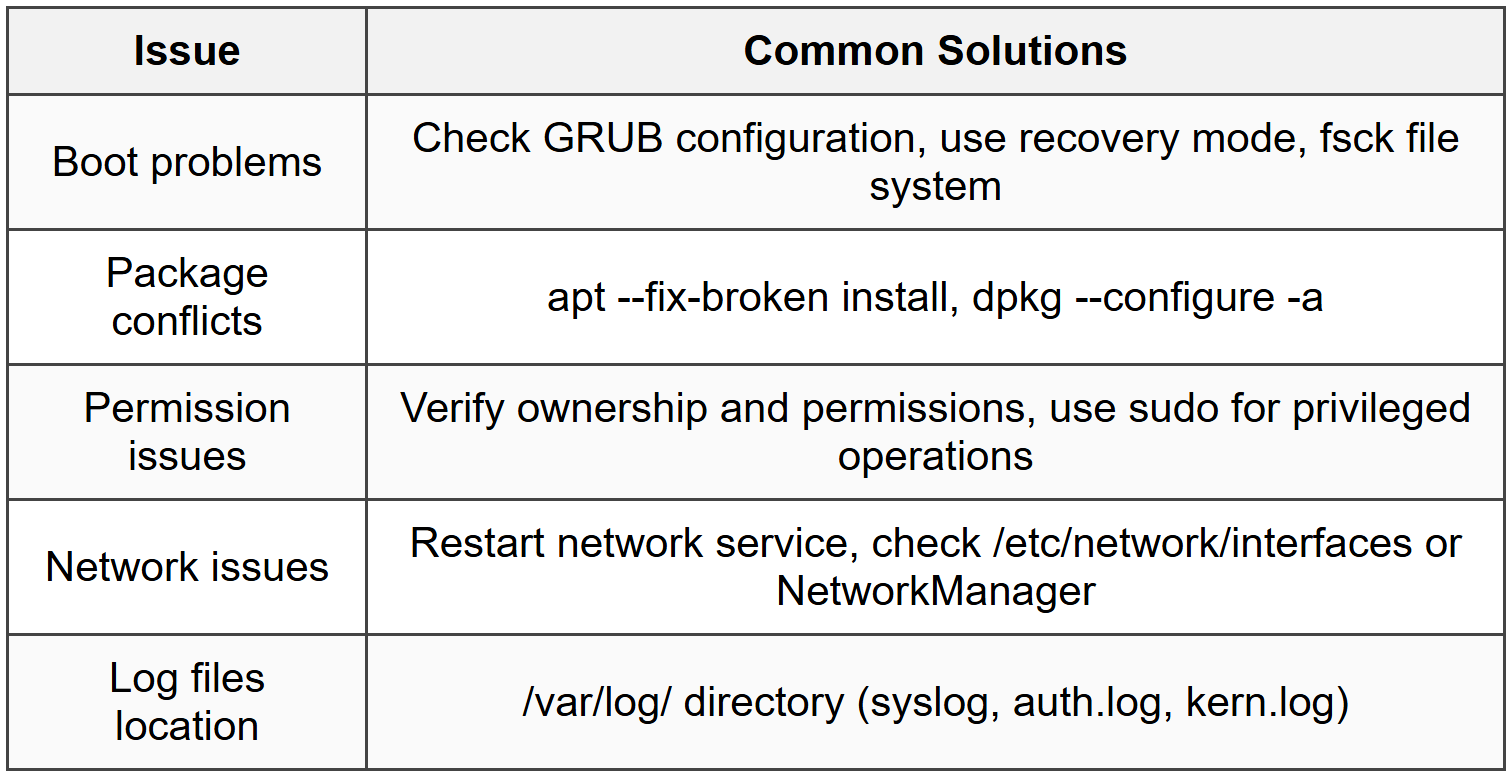
9.2 macOS Troubleshooting
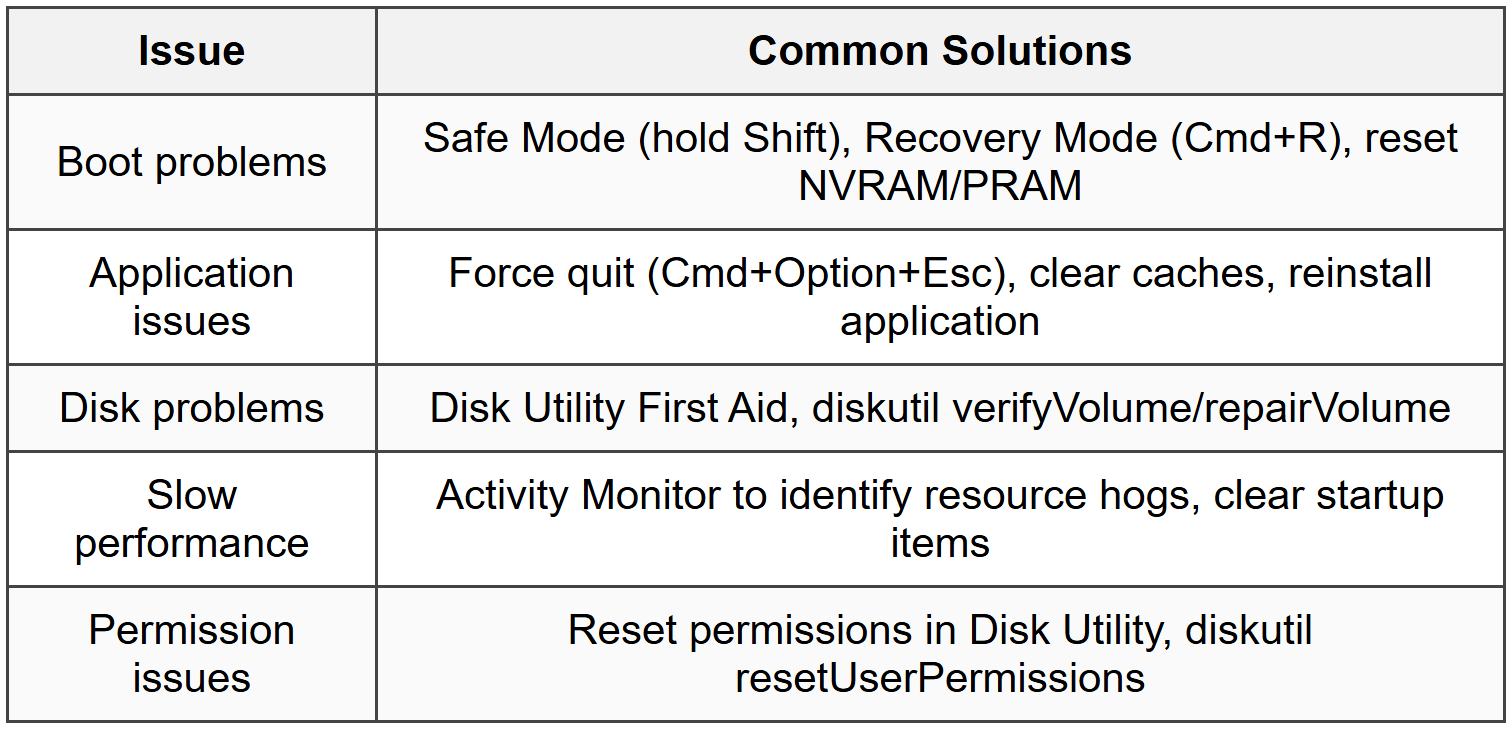
9.3 Chrome OS Troubleshooting
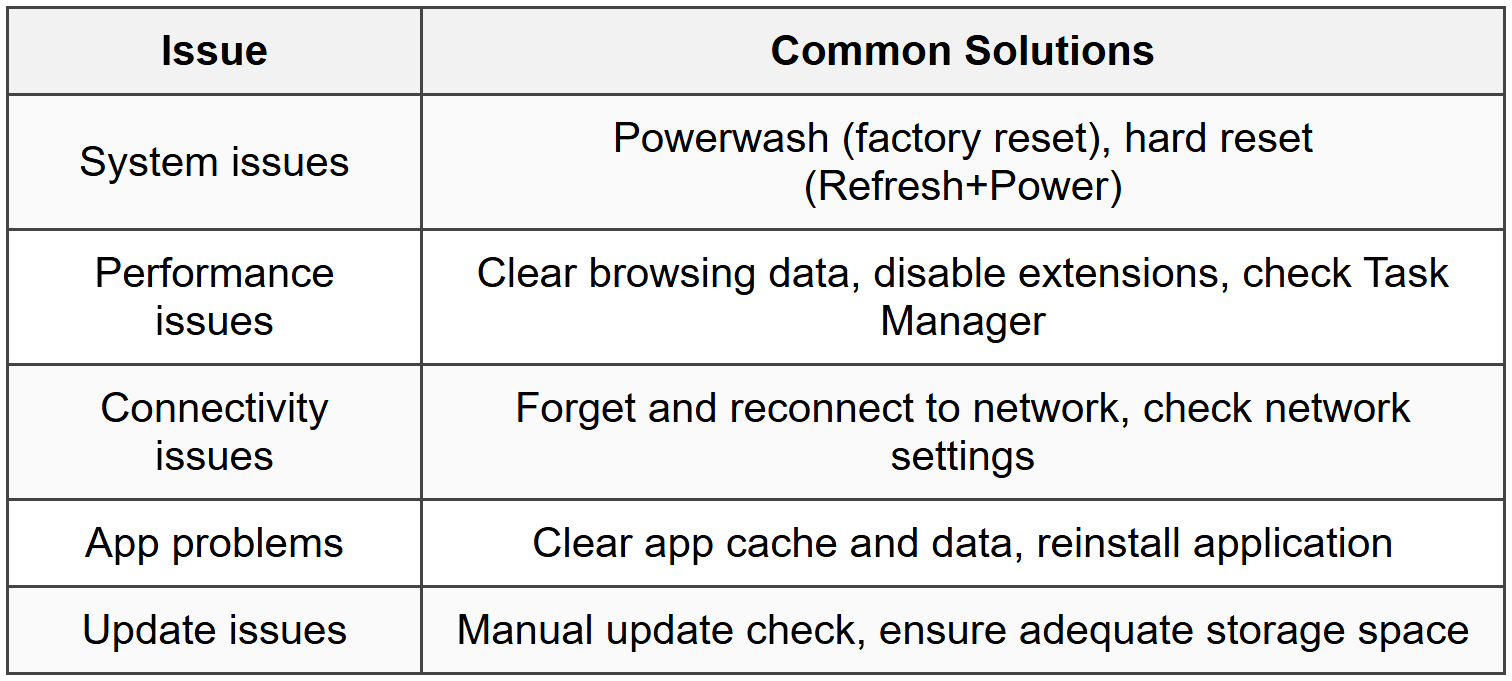
9.4 Recovery and Reset Options

The document Cheatsheet: Other Operating Systems is a part of the CompTIA A+ Course CompTIA A+ Core 2.
All you need of CompTIA A+ at this link: CompTIA A+
About this Document

Apr 20, 2026 Last updated
Related Exams
Document Description: Cheatsheet: Other Operating Systems for CompTIA A+ 2026 is part of CompTIA A+ Core 2 preparation. The notes and questions for Cheatsheet: Other Operating Systems have been prepared according to the CompTIA A+ exam syllabus. Information about Cheatsheet: Other Operating Systems covers topics like and Cheatsheet: Other Operating Systems Example, for CompTIA A+ 2026 Exam. Find important definitions, questions, notes, meanings, examples, exercises and tests below for Cheatsheet: Other Operating Systems.
Introduction of Cheatsheet: Other Operating Systems in English is available as part of our CompTIA A+ Core 2 for CompTIA A+ & Cheatsheet: Other Operating Systems in Hindi for CompTIA A+ Core 2 course. Download more important topics related with notes, lectures and mock test series for CompTIA A+ Exam by signing up for free. CompTIA A+: Cheatsheet: Other Operating Systems
Description
Cheatsheet: Other Operating Systems of CompTIA A+ Core 2 to help you remember important concepts with short tricks. Start learning for CompTIA A+ exam & improve retention with EduRev.
Information about Cheatsheet: Other Operating Systems
In this doc you can find the meaning of Cheatsheet: Other Operating Systems defined & explained in the simplest way possible. Besides explaining types of Cheatsheet: Other Operating Systems theory, EduRev gives you an ample number of questions to practice Cheatsheet: Other Operating Systems tests, examples and also practice CompTIA A+ tests



Related Searches
pdf , Cheatsheet: Other Operating Systems, Exam, shortcuts and tricks, Free, Extra Questions, Summary, Cheatsheet: Other Operating Systems, Previous Year Questions with Solutions, Semester Notes, Objective type Questions, MCQs, Sample Paper, ppt, Viva Questions, Cheatsheet: Other Operating Systems, mock tests for examination, past year papers, video lectures, study material, practice quizzes, Important questions;