IAM — Identity & Access Management

IAM is the foundation of AWS security and appears in nearly every exam scenario involving access control, resource permissions, and identity federation. You need to understand its core components, permission models, and how to apply least privilege in multi-account architectures. This topic tests your ability to design secure authentication and authorization strategies for AWS resources.
Core Concepts
IAM Users
An IAM user is a permanent named identity within an AWS account that represents a person or application requiring long-term credentials. Each user can have a unique set of security credentials including console password and/or access keys (access key ID + secret access key).
How it works: You create an IAM user, attach permissions via policies, and the user authenticates using credentials. IAM users are account-specific and cannot be shared across AWS accounts without assuming roles. Users can belong to multiple groups, and permissions accumulate from all attached policies and group memberships.
- Maximum 2 access keys per user (active or inactive) for rotation purposes
- Maximum 10 managed policies attached directly to a single user
- Maximum 2 KB inline policy size per user
- Console password and access keys are separate authentication methods
- Access keys should never be embedded in code or stored in version control
- Root user credentials should not be used for daily tasks
When to Use This
- When a specific person or application needs permanent, long-term access to AWS resources within a single account
- When the exam asks about credential rotation-IAM users support two access keys simultaneously for zero-downtime rotation
- When you need to differentiate between human users (console password) and application users (access keys only)
- Avoid IAM users when the scenario involves temporary access, cross-account access, or federated identities-use roles instead
IAM Groups
An IAM group is a collection of IAM users that simplifies permission management by allowing you to attach policies to multiple users simultaneously. Groups are not true identities and cannot be referenced as a principal in resource-based policies.
How it works: You create a group, attach policies to it, and add users as members. Users inherit all permissions from every group they belong to. Groups cannot contain other groups (no nesting), and a user can belong to up to 10 groups.
- Maximum 10 groups per user
- Maximum 10 managed policies per group
- Groups cannot be used as principals in resource policies (S3 bucket policies, KMS key policies, etc.)
- Groups do not have security credentials of their own
- No nesting-groups cannot contain other groups
When to Use This
- When the exam scenario involves managing permissions for multiple users with similar job functions (e.g., "all developers need S3 access")
- When you need to simplify permission management rather than attaching policies to each user individually
- Not applicable when the question asks about cross-account access or resource-based policy principals-groups cannot be referenced in those contexts
IAM Roles
An IAM role is an identity with permissions that can be assumed temporarily by trusted entities, including IAM users, AWS services, federated users, or principals from other AWS accounts. Roles provide temporary security credentials via the AWS Security Token Service (STS).
How it works: A role has two key policies-a trust policy (who can assume the role) and permission policies (what actions the role can perform). When an entity assumes a role, STS generates temporary credentials (access key ID, secret access key, and session token) that expire after a defined duration (1-12 hours for most roles, up to 36 hours for certain role chaining scenarios).
- Default session duration: 1 hour; maximum configurable: 12 hours (for user-assumed roles)
- Service-linked roles have predefined trust and permission policies managed by AWS
- Temporary credentials include an additional session token that must be passed with requests
- Role assumption does not count against IAM user or policy limits
- Roles can be assumed across AWS accounts via cross-account trust relationships
- EC2 instances use roles via instance profiles (a container that passes role credentials to the instance)
When to Use This
- When the exam scenario involves temporary access, cross-account access, or federated users (SAML, OIDC, web identity)
- When AWS services need permissions to access other AWS resources (e.g., EC2 accessing S3, Lambda writing to DynamoDB)
- When avoiding long-term credentials is a security requirement-roles eliminate the need for embedded access keys
- Choose roles over users when the scenario mentions "external identity provider," "mobile app users," "third-party access," or "cross-account access"
IAM Policies
An IAM policy is a JSON document that defines permissions by specifying allowed or denied actions on AWS resources. Policies are the mechanism by which permissions are granted to identities (users, groups, roles) or resources.
How it works: Policies evaluate to Allow or Deny based on statements containing Effect, Action, Resource, and optionally Condition elements. AWS evaluates all applicable policies and uses an explicit Deny to override any Allow. If no policy explicitly allows an action, it is implicitly denied by default.
- Identity-based policies: Attached to users, groups, or roles; define what the identity can do
- Resource-based policies: Attached to resources (S3 buckets, KMS keys, SQS queues); define who can access the resource
- Managed policies: Standalone policies with ARNs that can be attached to multiple identities (AWS-managed or customer-managed)
- Inline policies: Embedded directly into a single user, group, or role; deleted when the identity is deleted
- Maximum 6,144 characters for managed policy size
- Maximum 10 managed policies per user, group, or role
- Explicit Deny always wins in policy evaluation
When to Use This
- Use managed policies when permissions need to be reused across multiple identities or when centralized policy management is required
- Use inline policies when a permission set is tightly coupled to a single identity and should be deleted with it (rare in exam scenarios)
- Use resource-based policies when granting cross-account access or when the scenario mentions "bucket policy" or "queue policy"
- Identify resource-based policies when the question asks how to grant access without modifying IAM roles or users in the requesting account
Policy Evaluation Logic
AWS evaluates permissions by combining all applicable policies and following a strict decision flow. Understanding this logic is critical for troubleshooting access denials and designing least-privilege architectures.
How it works: AWS starts with an implicit Deny for all requests. It then checks for explicit Deny statements in any applicable policy-if found, access is denied immediately. If no explicit Deny exists, AWS checks for explicit Allow statements. If at least one Allow is found and no Deny blocks it, access is granted. If no Allow exists, the request is denied.
- Default Deny: All requests start as implicitly denied
- Explicit Deny check: Evaluate all policies for explicit Deny-if found, deny immediately
- Organizations SCPs: Service Control Policies can enforce permission boundaries at the OU or account level
- Resource-based policies: Check if the resource policy allows the action
- IAM permissions boundaries: Define maximum permissions an identity can have
- Session policies: Apply when assuming a role via STS; further restrict permissions
- Identity-based policies: Check user/group/role policies for Allow
- Final decision: Allow if explicitly permitted and not denied; otherwise, Deny
When to Use This
- When troubleshooting scenarios where access is denied despite apparent Allow statements-check for explicit Deny or SCP restrictions
- When the exam asks "why is this action denied?"-look for missing Allow statements or explicit Deny in any policy layer
- When designing least-privilege access-apply Allow statements narrowly and use Deny only for critical restrictions
- Remember that resource-based policies and identity-based policies are evaluated together; either can grant access in same-account scenarios
Multi-Factor Authentication (MFA)
MFA adds an extra layer of security by requiring a second authentication factor beyond username and password. AWS supports virtual MFA devices, hardware tokens, and U2F security keys.
How it works: After enabling MFA on an IAM user or root account, authentication requires both the password and a time-based one-time password (TOTP) or U2F response. You can enforce MFA in IAM policies using condition keys like aws:MultiFactorAuthPresent or aws:MultiFactorAuthAge.
- Virtual MFA devices use apps like Google Authenticator or Authy
- Hardware tokens include Gemalto and YubiKey devices
- Root account MFA is a security best practice tested on the exam
- Condition key aws:MultiFactorAuthPresent checks if MFA was used during authentication
- Condition key aws:MultiFactorAuthAge specifies maximum seconds since MFA authentication
When to Use This
- When the exam asks how to secure the root account or enforce stronger authentication for privileged operations
- When a policy must restrict sensitive actions (e.g., deleting S3 buckets) to MFA-authenticated sessions only
- When the scenario mentions compliance requirements for two-factor authentication
- Combine with IAM policies containing MFA condition keys to enforce MFA for specific API calls
IAM Policy Conditions
Condition elements in IAM policies allow fine-grained access control by evaluating context keys like IP address, date/time, MFA status, or resource tags before granting permissions.
How it works: Condition blocks contain one or more condition operators (StringEquals, IpAddress, DateGreaterThan, etc.) that test context keys. The action is allowed only if all conditions evaluate to true. Common keys include aws:SourceIp, aws:CurrentTime, aws:PrincipalTag, and aws:RequestedRegion.
- aws:SourceIp: Restricts access based on requester's IP address or CIDR block
- aws:SecureTransport: Requires HTTPS (SSL/TLS) for API calls
- aws:CurrentTime: Limits access to specific date/time ranges
- aws:PrincipalTag: Matches tags attached to the IAM user or role
- aws:RequestedRegion: Restricts actions to specific AWS regions
- StringEquals, StringLike, IpAddress, DateGreaterThan: Common condition operators
When to Use This
- When the exam scenario requires restricting access based on IP ranges (e.g., "allow access only from corporate network")
- When enforcing encryption in transit-use
aws:SecureTransportto deny non-HTTPS requests - When implementing attribute-based access control (ABAC) using tags on identities and resources
- When limiting actions to specific regions for compliance or cost control
IAM Permissions Boundaries
A permissions boundary is a managed policy that sets the maximum permissions an IAM entity can have, regardless of identity-based policies. It does not grant permissions itself-it only limits them.
How it works: You attach a permissions boundary to a user or role. Even if identity-based policies allow an action, the boundary must also allow it; otherwise, the action is denied. This is useful for delegating user/role creation without granting excessive permissions.
- Permissions boundaries apply only to IAM users and roles, not groups
- The effective permissions are the intersection of identity-based policies and the permissions boundary
- Commonly used to prevent privilege escalation when delegating IAM administration
- Does not apply to resource-based policies or session policies
When to Use This
- When the exam asks how to delegate user creation without allowing the delegated admin to grant themselves full permissions
- When implementing developer self-service IAM but limiting the maximum permissions they can assign
- When the scenario mentions "prevent privilege escalation" or "sandbox developer access"
- Not applicable when restricting entire accounts-use SCPs for organization-wide restrictions
Service Control Policies (SCPs)
SCPs are organization-level policies in AWS Organizations that set permission guardrails for all accounts in an organizational unit (OU) or the entire organization. They do not grant permissions-they define maximum allowed permissions.
How it works: SCPs act as filters on top of all IAM policies in member accounts. Even if an IAM policy allows an action, the SCP must also allow it. SCPs affect all users and roles in an account, including the root user (except for actions like changing the root account password or enabling MFA).
- SCPs apply to member accounts, not the management account (except when explicitly attached)
- Root user in member accounts is restricted by SCPs
- SCPs do not affect service-linked roles
- Default SCP: FullAWSAccess allows all actions; remove or replace to enforce restrictions
- Effective permissions = intersection of SCPs and IAM policies
When to Use This
- When the exam scenario involves multi-account environments and organization-wide restrictions (e.g., "prevent all accounts from launching instances in specific regions")
- When you need to enforce compliance guardrails across all accounts without modifying individual IAM policies
- When the question asks how to restrict actions even for the root user in member accounts
- Not applicable for single-account restrictions-use IAM policies or permissions boundaries instead
IAM Roles for EC2 Instances
EC2 instances access AWS services using IAM roles attached via an instance profile. The instance retrieves temporary credentials from the EC2 instance metadata service (IMDS).
How it works: You attach an instance profile (containing a role) to an EC2 instance at launch or after launch. The instance queries the metadata endpoint at http://169.254.169.254/latest/meta-data/iam/security-credentials/ROLE_NAME to retrieve temporary credentials, which are automatically rotated by AWS.
- Instance profiles enable applications on EC2 to make AWS API calls without embedding access keys
- Credentials are automatically rotated before expiration
- One instance profile per instance; one role per instance profile (1:1:1 mapping)
- Supports both IMDSv1 (request/response) and IMDSv2 (session-oriented with token)
- IMDSv2 requires a session token obtained via PUT request, improving security against SSRF attacks
- Roles can be attached or replaced on running instances
When to Use This
- When applications running on EC2 need to access AWS services (S3, DynamoDB, SQS, etc.) without hardcoded credentials
- When the exam asks how to securely grant EC2 instances access to other AWS resources
- When avoiding embedded access keys is a security requirement
- Prefer IMDSv2 when the scenario mentions security best practices or SSRF attack mitigation
Cross-Account Access with IAM Roles
Cross-account access allows identities in one AWS account (Account A) to assume a role in another account (Account B) to access resources. This requires a trust relationship defined in the role's trust policy.
How it works: Account B creates a role with a trust policy that specifies Account A's principal (user, role, or account root). Account A's users or roles then call sts:AssumeRole to obtain temporary credentials for the role in Account B. Permissions in Account A must also explicitly allow sts:AssumeRole for the target role ARN.
- Trust policy in Account B specifies which principals can assume the role
- Identity policy in Account A grants permission to call
sts:AssumeRolefor the role ARN - External ID can be added to the trust policy to prevent the "confused deputy" problem with third-party access
- Session duration: default 1 hour, configurable up to 12 hours
- Temporary credentials include access key, secret key, and session token
When to Use This
- When the exam scenario involves sharing resources between AWS accounts (e.g., "Account A needs S3 access in Account B")
- When third-party access is required (e.g., "allow a partner AWS account to access your resources")-use External ID in the trust policy
- When centralizing access from a hub account to multiple spoke accounts in a multi-account architecture
- Prefer cross-account roles over resource-based policies when consistent permission logic is needed across resource types
Identity Federation
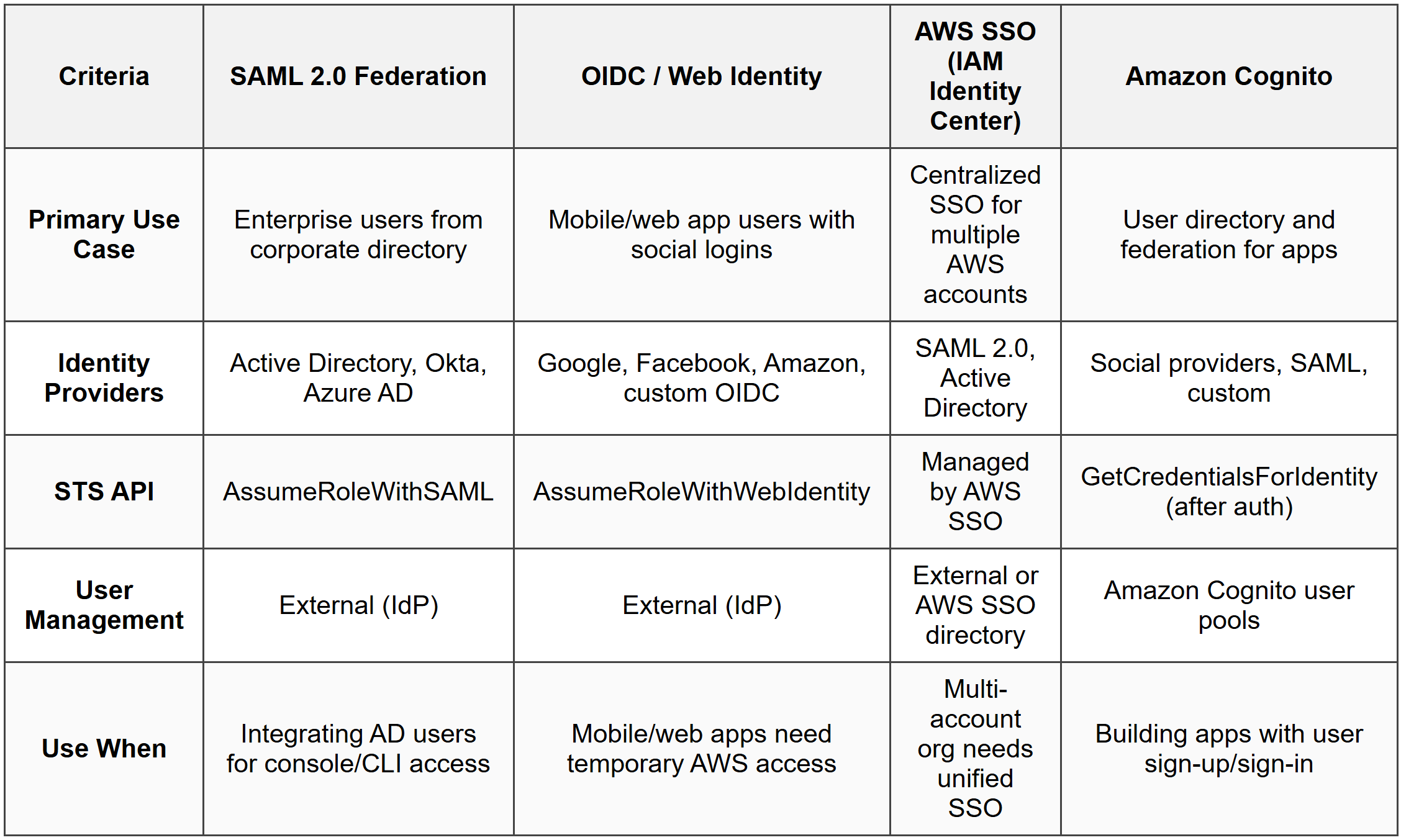
Identity federation allows users from external identity providers (corporate directories, social logins, SAML providers) to access AWS resources without creating IAM users. AWS supports SAML 2.0, OpenID Connect (OIDC), and custom identity brokers.
How it works: Users authenticate with their external identity provider, which returns a token (SAML assertion or OIDC JWT). AWS STS exchanges this token for temporary AWS credentials via AssumeRoleWithSAML or AssumeRoleWithWebIdentity. These credentials are then used to access AWS resources according to the role's permissions.
- SAML 2.0: Integrates with enterprise identity providers (Active Directory, Okta, Azure AD)
- OpenID Connect (OIDC): Integrates with web identity providers (Google, Facebook, Amazon)
- AWS SSO (IAM Identity Center): Centralized SSO for multiple AWS accounts and SAML applications
- Amazon Cognito: Provides user directories and identity federation for mobile/web apps, including social logins
- Federation eliminates the need to create IAM users for external identities
- Temporary credentials are time-limited and automatically expire
When to Use This
- When the exam scenario mentions "Active Directory users need AWS console access" or "enterprise single sign-on"-use SAML 2.0 federation
- When mobile or web app users need temporary access to AWS resources (e.g., uploading to S3)-use Amazon Cognito with OIDC
- When the question asks how to avoid creating IAM users for large numbers of external users
- Choose AWS SSO (IAM Identity Center) for centralized access across multiple accounts; choose Cognito for application-level user management
IAM Access Analyzer
IAM Access Analyzer uses automated reasoning to identify resources that are shared with external principals outside your AWS account or organization. It analyzes resource-based policies and generates findings for unintended access.
How it works: You enable Access Analyzer at the account or organization level and define a zone of trust (your account or organization). Access Analyzer continuously scans resource policies (S3 buckets, IAM roles, KMS keys, Lambda functions, SQS queues, Secrets Manager secrets) and reports any access granted to principals outside the zone of trust.
- Identifies public or cross-account access to supported resources
- Generates findings with resource ARN, external principal, and access level
- Supports S3, IAM roles, KMS keys, Lambda, SQS, Secrets Manager, and more
- Findings can be archived or set as "resolved" after review
- Does not automatically remediate-findings require manual review and action
When to Use This
- When the exam asks how to detect or audit external access to AWS resources
- When compliance requires identifying publicly accessible resources or unintended cross-account sharing
- When designing a security audit process for resource-based policies
- Not a remediation tool-use AWS Config rules or Lambda automation for automatic policy changes
IAM Credential Report and Access Advisor
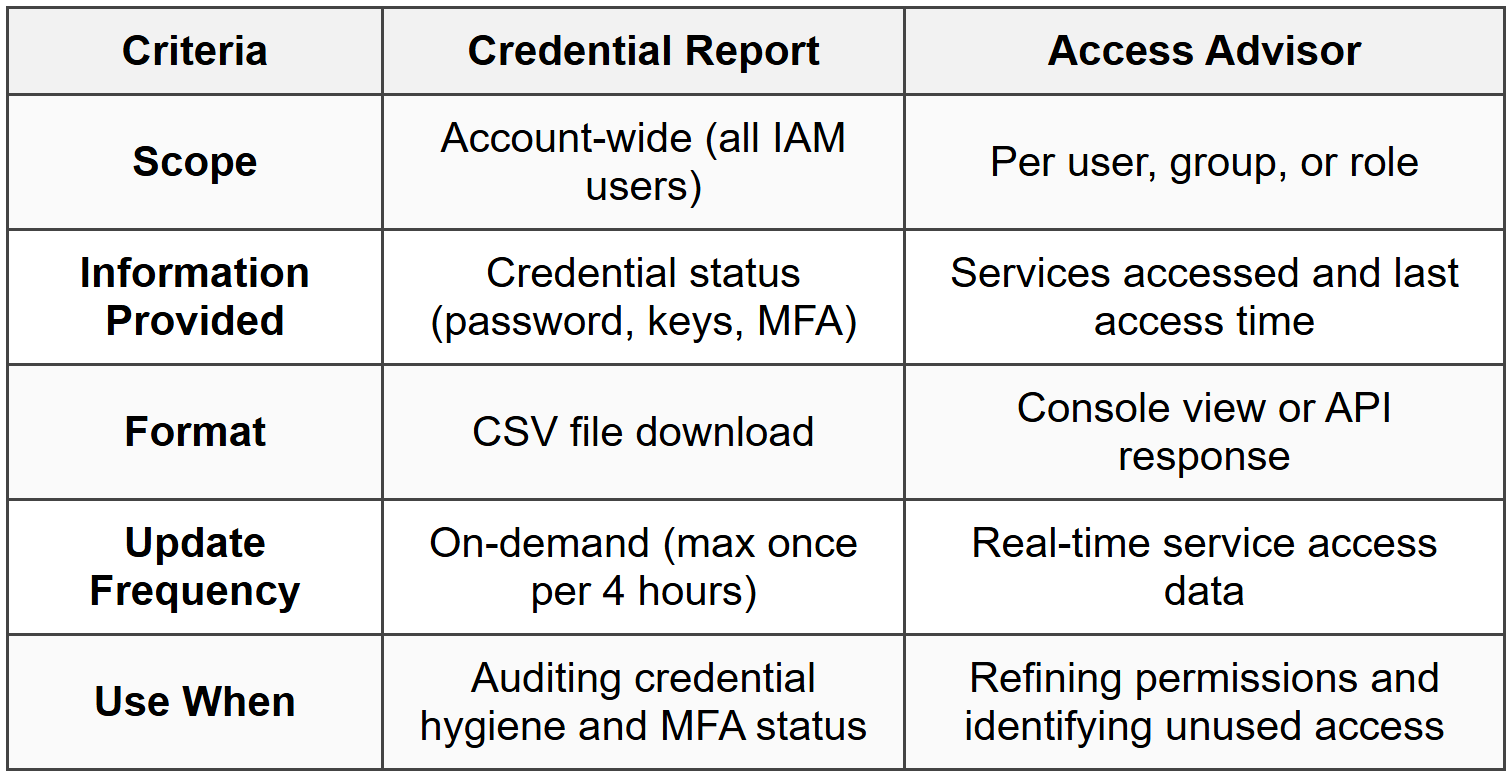
The credential report is an account-level CSV report listing all IAM users and the status of their credentials (passwords, access keys, MFA). Access Advisor shows service-level permissions granted to a user, group, or role and when those services were last accessed.
How it works: The credential report is generated on-demand and downloaded as a CSV file. It includes fields like password enabled, password last used, password last changed, MFA active, access key 1/2 active, and access key last rotated. Access Advisor displays permissions and last accessed timestamps, helping identify unused permissions for least-privilege refinement.
- Credential report is account-wide and includes all IAM users
- Generated on-demand; maximum one report every 4 hours
- Access Advisor shows last accessed data for up to 400 days
- Useful for identifying unused credentials and revoking access keys
- Does not include role session activity or federated user activity
When to Use This
- When the exam asks how to audit credential usage or identify inactive access keys for rotation or deletion
- When implementing least privilege by identifying and removing unused permissions
- When compliance requires regular credential audits or MFA enforcement checks
- Use credential report for user credential status; use Access Advisor for permission usage analysis
Commonly Tested Scenarios / Pitfalls
1. Scenario: A user has an identity-based policy allowing s3:PutObject on a bucket, but the S3 bucket policy explicitly denies all PutObject actions from that user's account. The user cannot upload objects and the exam asks why.
Correct Approach: Explicit Deny in any policy (resource-based or identity-based) always overrides Allow statements. The bucket policy's Deny takes precedence, blocking the action regardless of the user's Allow policy.
Check first: Verify if any policy (identity-based, resource-based, SCP, permissions boundary) contains an explicit Deny for the action-this immediately terminates the evaluation with a Deny.
Do NOT do first: Do not assume the identity-based Allow is sufficient. Candidates often overlook resource-based policies or SCPs, leading to incorrect answers when access is denied.
Why other options are wrong: Adding more Allow statements or attaching additional managed policies will not help if an explicit Deny exists-Deny always wins in AWS policy evaluation logic.
2. Scenario: An application running on an EC2 instance needs to write to DynamoDB. The exam asks for the most secure method to grant the necessary permissions.
Correct Approach: Attach an IAM role to the EC2 instance via an instance profile, with a policy granting DynamoDB write permissions. The application retrieves temporary credentials from the instance metadata service without embedding access keys.
Check first: Confirm the scenario involves AWS service-to-service access from EC2-this signals the use of IAM roles, not IAM users or access keys.
Do NOT do first: Do not create an IAM user with access keys and embed those keys in the application code or configuration files. This violates security best practices and is never the correct answer for EC2-based access.
Why other options are wrong: Embedding access keys creates long-term credentials that are difficult to rotate, can be exposed in version control, and increase risk of credential leakage. Roles provide automatic credential rotation and eliminate this risk.
3. Scenario: A Solutions Architect needs to allow users from a corporate Active Directory to access the AWS Management Console without creating IAM users. The exam asks which approach to use.
Correct Approach: Implement SAML 2.0 federation by configuring the corporate identity provider (IdP) as a SAML provider in IAM. Users authenticate with AD, receive a SAML assertion, and exchange it for temporary AWS credentials via AssumeRoleWithSAML.
Check first: Identify whether the scenario mentions an enterprise directory (Active Directory, Okta, Azure AD) or web/mobile apps. Enterprise directories require SAML 2.0; web/mobile apps use OIDC or Cognito.
Do NOT do first: Do not create individual IAM users for each AD user or attempt to use OpenID Connect for enterprise directories-OIDC is for web identity providers, not SAML-based enterprise IdPs.
Why other options are wrong: Creating IAM users defeats the purpose of federation and creates management overhead. OIDC is not designed for enterprise directories; it's intended for social logins and web identity providers.
4. Scenario: An organization uses AWS Organizations with multiple accounts. The security team needs to prevent any account from launching EC2 instances in specific regions. The exam asks how to enforce this restriction across all accounts.
Correct Approach: Create a Service Control Policy (SCP) that denies ec2:RunInstances for the restricted regions using the aws:RequestedRegion condition, and attach it to the root of the organization or specific OUs.
Check first: Confirm the scenario involves organization-wide enforcement across multiple accounts-this indicates the need for SCPs, which apply to all accounts in the organization.
Do NOT do first: Do not attempt to modify IAM policies in each individual account or use permissions boundaries on users. These approaches do not scale and can be bypassed by account administrators.
Why other options are wrong: IAM policies apply only within a single account and can be overridden by account administrators. Permissions boundaries apply to users/roles, not entire accounts. Only SCPs enforce restrictions at the organization level.
5. Scenario: A developer can create IAM users but must not be able to grant themselves or others full administrator access. The exam asks how to delegate user creation while preventing privilege escalation.
Correct Approach: Attach a permissions boundary to the developer's IAM user that defines maximum allowed permissions (e.g., allows specific services but denies IAM policy changes or admin actions). Grant the developer iam:CreateUser and iam:AttachUserPolicy with a condition that requires the permissions boundary to be attached to any created users.
Check first: Identify if the scenario mentions "delegating IAM management" or "preventing privilege escalation"-this signals the use of permissions boundaries to cap maximum permissions.
Do NOT do first: Do not grant the developer broad IAM permissions without restrictions or attempt to use SCPs for single-account user-level control-SCPs are for organization-wide account restrictions, not individual users.
Why other options are wrong: Without a permissions boundary, the developer can grant themselves full admin permissions through the users or roles they create. SCPs do not apply to individual users within a single account-they restrict entire accounts or OUs.
Step-by-Step Procedures or Methods
Task: Enabling cross-account access from Account A (trusting account) to resources in Account B (trusted account) using IAM roles
- In Account B (the account with resources), create an IAM role with appropriate permissions (e.g., S3 read access).
- Edit the role's trust policy to specify Account A's principal. Example trust policy:
{ "Version": "2012-10-17", "Statement": [{ "Effect": "Allow", "Principal": {"AWS": "arn:aws:iam::ACCOUNT-A-ID:root"}, "Action": "sts:AssumeRole" }] }
- Note the role ARN in Account B (e.g.,
arn:aws:iam::ACCOUNT-B-ID:role/CrossAccountRole). - In Account A, attach an IAM policy to the user or role that will assume the cross-account role. This policy must allow
sts:AssumeRolefor the Account B role ARN:{ "Version": "2012-10-17", "Statement": [{ "Effect": "Allow", "Action": "sts:AssumeRole", "Resource": "arn:aws:iam::ACCOUNT-B-ID:role/CrossAccountRole" }] }
- From Account A, the user or application calls
aws sts assume-role --role-arn arn:aws:iam::ACCOUNT-B-ID:role/CrossAccountRole --role-session-name session-name. - STS returns temporary credentials (access key ID, secret access key, session token) with permissions defined by the Account B role's policies.
- Use the temporary credentials to access Account B resources until the session expires (default 1 hour, max 12 hours).
Task: Rotating IAM user access keys without downtime
- Create a second access key for the IAM user (users can have up to 2 access keys simultaneously).
- Update applications or scripts to use the new access key. Test functionality to confirm the new key works correctly.
- Monitor CloudTrail logs for usage of the old access key. Ensure no active requests use the old key.
- Once confirmed that the old key is no longer in use, deactivate the old access key (set status to Inactive). Do not delete it immediately.
- Monitor for any failures or errors. If issues arise, reactivate the old key temporarily while troubleshooting.
- After a safe period (e.g., 24-48 hours) with no issues, delete the old access key permanently.
Task: Configuring SAML 2.0 federation for AWS console access
- In your corporate identity provider (IdP) (e.g., Active Directory Federation Services, Okta), configure AWS as a SAML application. Obtain the IdP metadata XML file or URL.
- In the AWS Management Console, navigate to IAM → Identity providers → Add provider. Select SAML and upload the IdP metadata XML.
- Create an IAM role for federated users with a trust policy that allows the SAML provider to assume the role:
{ "Version": "2012-10-17", "Statement": [{ "Effect": "Allow", "Principal": {"Federated": "arn:aws:iam::ACCOUNT-ID:saml-provider/ProviderName"}, "Action": "sts:AssumeRoleWithSAML", "Condition": { "StringEquals": { "SAML:aud": "https://signin.aws.amazon.com/saml" } } }] }
- Attach permission policies to the role granting necessary AWS access (e.g., ReadOnlyAccess, PowerUserAccess).
- Configure the IdP to return a SAML assertion containing the role ARN and provider ARN in the
https://aws.amazon.com/SAML/Attributes/Roleattribute. - Users authenticate with the IdP, which redirects them to the AWS sign-in endpoint with the SAML assertion.
- AWS verifies the SAML assertion, calls
AssumeRoleWithSAML, and grants temporary credentials. Users are logged into the AWS console with the role's permissions.
Practice Questions
Q1: A company has multiple AWS accounts managed by AWS Organizations. The security team needs to prevent all accounts from using any services outside the us-east-1 and us-west-2 regions. What is the most effective way to enforce this restriction?
(a) Create an IAM policy denying all actions outside the specified regions and attach it to all users in each account
(b) Enable AWS Config in all accounts and create a rule to detect and alert on resource creation in other regions
(c) Create a Service Control Policy (SCP) denying all actions when aws:RequestedRegion is not us-east-1 or us-west-2, and attach it to the organization root
(d) Use permissions boundaries on all IAM roles across all accounts to restrict actions to the specified regions
Ans: (c)
Service Control Policies (SCPs) are the only mechanism that enforces restrictions organization-wide across all accounts, including limiting actions based on region. Option (a) is ineffective because IAM policies must be managed per account and can be overridden by account administrators. Option (b) only detects violations after the fact and does not prevent them. Option (d) applies only to individual users/roles and does not scale or prevent account admins from bypassing the restriction.
Q2: An application running on an EC2 instance must access objects in an S3 bucket. The security team requires that no long-term credentials be stored on the instance. What should a Solutions Architect do?
(a) Create an IAM user, generate access keys, and store them in the instance's environment variables
(b) Attach an IAM role to the EC2 instance with a policy granting S3 read permissions
(c) Embed access keys in the application code and encrypt the code with AWS KMS
(d) Configure an S3 bucket policy to allow access from the EC2 instance's IP address
Ans: (b)
Attaching an IAM role to the EC2 instance provides temporary credentials automatically rotated by AWS, eliminating long-term credentials. Option (a) violates the requirement by storing long-term credentials (access keys). Option (c) still uses long-term credentials even if encrypted. Option (d) does not authenticate the application and is IP-based, which is fragile and not a credential mechanism.
Q3: A user in Account A needs to assume a role in Account B to access an RDS database. The user has an identity-based policy in Account A allowing sts:AssumeRole for the Account B role ARN, but the assume role call fails. What is the most likely cause?
(a) The role in Account B does not have a trust policy specifying Account A as a trusted principal
(b) The user in Account A does not have MFA enabled
(c) The RDS database security group does not allow connections from Account A
(d) The role in Account B has a permissions boundary that blocks AssumeRole actions
Ans: (a)
Cross-account role assumption requires both an identity-based policy in Account A allowing sts:AssumeRole and a trust policy in Account B's role specifying Account A as a trusted principal. If the trust policy is missing or incorrect, the assume role call fails. Option (b) is incorrect unless the role's trust policy explicitly requires MFA (using a condition key). Option (c) is irrelevant to role assumption, which is an IAM operation, not network access. Option (d) is incorrect because permissions boundaries do not affect the assume role operation itself-they limit the permissions of the role after it is assumed.
Q4: A developer must be allowed to create IAM users but must not be able to grant those users administrator permissions. How can this be achieved?
(a) Grant the developer iam:CreateUser and iam:AttachUserPolicy, and attach a permissions boundary to the developer that prevents creating admin users
(b) Use an SCP to deny iam:AttachUserPolicy for any policy granting AdministratorAccess
(c) Grant the developer iam:CreateUser with a condition requiring a permissions boundary be attached to newly created users, and attach a boundary limiting maximum permissions
(d) Create an IAM group with limited permissions and require the developer to add all new users to this group only
Ans: (c)
The correct approach requires the developer to attach a permissions boundary when creating users, limiting the maximum permissions those users can receive. This prevents the developer from escalating privileges by creating admin users. Option (a) applies the boundary to the developer, not the created users, which does not prevent the developer from granting admin permissions to new users. Option (b) uses SCPs incorrectly-SCPs apply to entire accounts, not specific users or actions within a single account. Option (d) does not enforce the restriction; the developer could remove users from the group or create new groups.
Q5: A company wants to grant temporary access to an S3 bucket for a third-party AWS account while ensuring the third party cannot pass the role to other accounts. Which configuration should be used?
(a) Create a cross-account IAM role with a trust policy specifying the third-party account, and include an External ID in the trust policy condition
(b) Create an S3 bucket policy allowing the third-party account's root principal to access the bucket
(c) Share an IAM user's access keys with the third party and restrict the user's permissions to the S3 bucket only
(d) Enable S3 bucket versioning and grant the third-party account read-only access via an Access Control List (ACL)
Ans: (a)
Using a cross-account role with an External ID prevents the "confused deputy" problem, ensuring the third party cannot assume the role on behalf of other entities. The External ID acts as a shared secret between you and the third party. Option (b) grants access but does not address the confused deputy issue or prevent privilege escalation. Option (c) shares long-term credentials, which is a security risk and not temporary access. Option (d) uses ACLs, which are deprecated in favor of bucket policies and do not address role assumption or External ID requirements.
Q6: An IAM user has an Allow policy for s3:GetObject on a bucket, but the bucket policy has an explicit Deny for all GetObject requests from the user's account. What happens when the user attempts to download an object?
(a) Access is allowed because identity-based policies take precedence over resource-based policies
(b) Access is denied because explicit Deny always overrides Allow in AWS policy evaluation
(c) Access is allowed if the user has MFA enabled
(d) Access is denied only if the bucket is in a different region
Ans: (b)
AWS policy evaluation logic states that an explicit Deny in any applicable policy (identity-based or resource-based) always takes precedence over any Allow. Option (a) is incorrect because no policy type takes precedence over an explicit Deny. Option (c) is incorrect unless the bucket policy conditions require MFA, which is not mentioned. Option (d) is irrelevant-region does not affect policy evaluation logic for Deny statements.
Quick Review
- Explicit Deny always wins in policy evaluation-no Allow can override it
- IAM users support maximum 2 access keys for rotation; roles use temporary credentials with automatic rotation
- IAM groups cannot be referenced as principals in resource-based policies-only users, roles, or AWS accounts
- EC2 instances access AWS services via IAM roles attached through instance profiles-never embed access keys
- Cross-account access requires both a trust policy in the target account's role and an Allow policy in the source account's identity
- Service Control Policies (SCPs) apply organization-wide to all accounts and restrict even the root user in member accounts
- Permissions boundaries set maximum permissions for users/roles but do not grant permissions-they only limit
- SAML 2.0 federates enterprise users (Active Directory); OIDC federates web/mobile app users; Cognito manages app user directories
- Use External ID in cross-account role trust policies to prevent the confused deputy problem with third-party access
- IMDSv2 requires a session token and is more secure than IMDSv1 against SSRF attacks-prefer it for EC2 metadata access
- IAM Access Analyzer detects external access to resources but does not remediate-manual review required
- Default role session duration is 1 hour; maximum configurable duration is 12 hours for user-assumed roles
- Credential Report audits user credential status (passwords, keys, MFA); Access Advisor shows last service access to refine permissions
- Policy evaluation order: Default Deny → Explicit Deny (immediate stop) → Organizations SCP → Resource policy → Permissions boundary → Session policy → Identity policy → Final Allow or Deny