Amazon Cognito

Amazon Cognito is a fully managed user identity and access service that provides authentication, authorization, and user management for web and mobile applications. For the exam, you need to know when to use User Pools versus Identity Pools, how they integrate with other AWS services, and how to design secure authentication architectures using federation and multi-factor authentication.
Core Concepts
Amazon Cognito User Pools
A User Pool is a user directory that provides sign-up and sign-in functionality for application users. It acts as an identity provider (IdP) that manages user registration, authentication, account recovery, and user attributes without requiring custom code.
User Pools return JSON Web Tokens (JWT) after successful authentication. These tokens include an ID token (contains user claims), access token (grants access to resources), and refresh token (obtains new tokens without re-authentication). Token expiration is configurable from 5 minutes to 1 day for access and ID tokens.
- Supports username/password authentication, email/phone verification, and password policies
- Provides built-in UI for sign-in/sign-up or customizable hosted UI
- Integrates with social identity providers (Facebook, Google, Amazon, Apple)
- Supports SAML 2.0 and OpenID Connect (OIDC) federation
- Offers Multi-Factor Authentication (MFA) via SMS or TOTP (Time-based One-Time Password)
- Advanced security features include adaptive authentication, compromised credentials detection, and account takeover protection
- Custom attributes can be added to user profiles (up to 50 custom attributes)
- Lambda triggers enable customization at various authentication flow stages
When to Use User Pools
- Question asks for authenticating application users with their own username and password
- Scenario requires social media login (Sign in with Google/Facebook) for a mobile app
- Need to manage user registration, password reset, and MFA without building custom authentication
- Question mentions JWT tokens for application authentication
Amazon Cognito Identity Pools (Federated Identities)
An Identity Pool grants temporary AWS credentials to users so they can directly access AWS services like S3, DynamoDB, or API Gateway. It works with authenticated users (from User Pools, social IdPs, or SAML) and unauthenticated (guest) users.
Identity Pools exchange authentication tokens for temporary AWS credentials via AWS Security Token Service (STS). These credentials are scoped by IAM roles that you define for authenticated and unauthenticated access. You can customize permissions per user using policy variables based on the user's identity.
- Returns temporary AWS credentials (access key, secret key, session token) valid for 15 minutes to 1 hour
- Supports authenticated identities from Cognito User Pools, social providers, SAML, and OpenID Connect
- Supports unauthenticated (guest) access with limited permissions
- Uses IAM roles to control what AWS resources users can access
- Policy variables enable fine-grained access control (e.g., limit S3 access to user-specific folders)
- Does NOT authenticate users itself-relies on external identity providers
When to Use Identity Pools
- Scenario requires mobile or web app users to directly access AWS services (S3, DynamoDB) without backend server
- Question asks how to grant temporary AWS credentials to application users
- Need to provide different permissions for authenticated versus guest users
- Requirement to implement user-specific access patterns (e.g., each user accesses only their S3 folder)
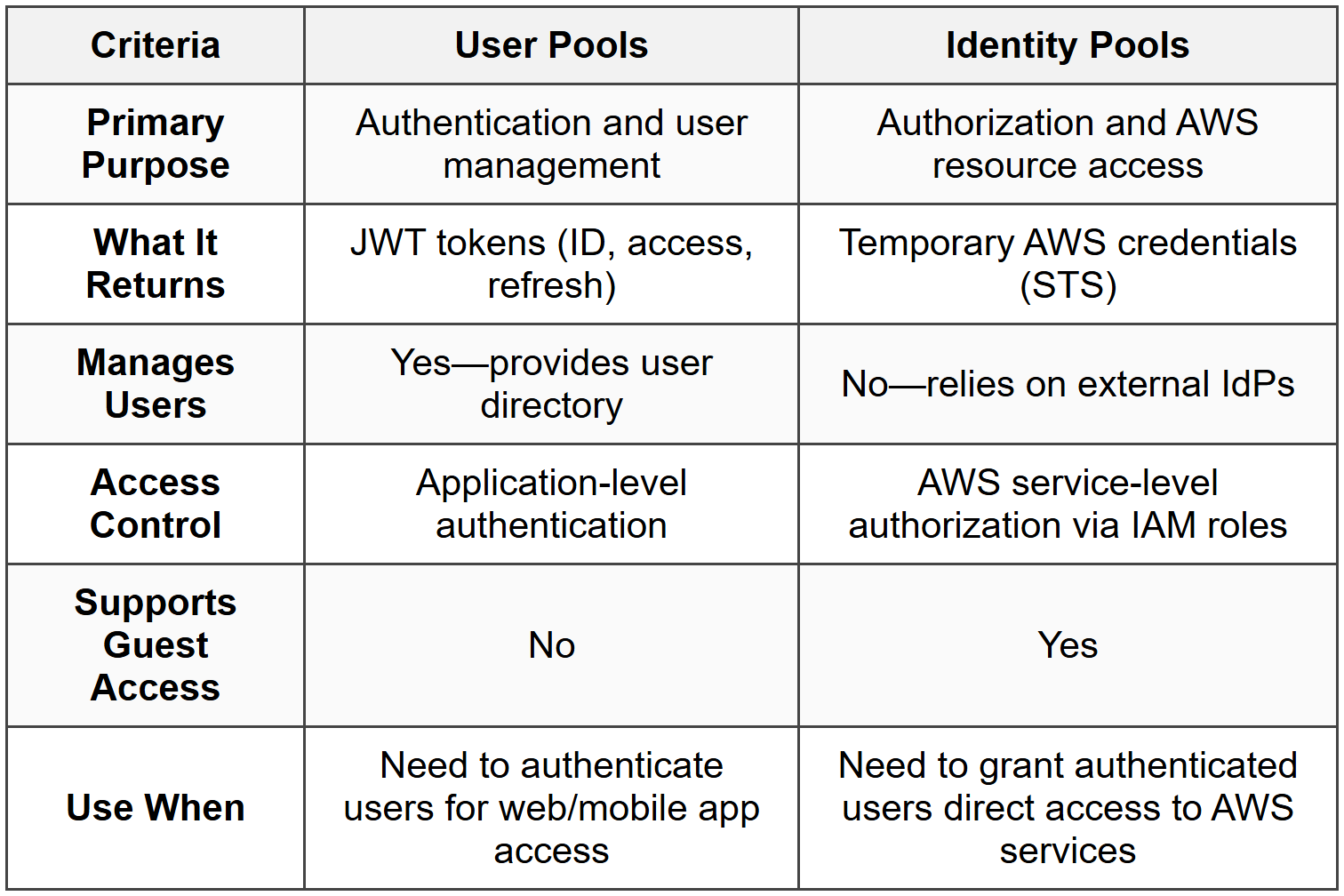
Comparison: User Pools vs Identity Pools
Federation and External Identity Providers
Federation allows users to authenticate using external identity providers instead of creating separate credentials in your application. Cognito User Pools support federation with social providers (Google, Facebook, Amazon, Apple), SAML 2.0 providers (Active Directory, Okta, Shibboleth), and OIDC providers.
When using SAML federation, the User Pool acts as a service provider (SP), and the external system is the identity provider (IdP). Users authenticate with the IdP, receive a SAML assertion, which User Pools exchange for JWT tokens. For enterprise scenarios, this enables single sign-on (SSO) without managing passwords in Cognito.
- Social federation requires configuring app IDs and secrets from provider developer consoles
- SAML federation requires uploading IdP metadata XML to Cognito
- OIDC federation requires specifying issuer URL and client ID
- User attributes can be mapped from federated provider to User Pool attributes
- Federation does not require users to have passwords stored in the User Pool
When to Use Federation
- Question mentions corporate users should sign in with existing Active Directory credentials
- Scenario requires "Sign in with Google" or social provider login
- Need to provide SSO experience without managing separate user credentials
- Requirement to integrate with enterprise SAML 2.0 identity providers like Okta or Azure AD
Multi-Factor Authentication (MFA)
MFA adds a second authentication factor beyond username and password, significantly improving security. User Pools support SMS-based MFA (verification code via text message) and software token MFA using TOTP applications like Google Authenticator or Authy.
MFA can be configured as optional (users choose whether to enable), required (all users must use MFA), or off. For SMS MFA, Cognito sends codes via Amazon SNS, and you are charged for SMS delivery. TOTP is generally more secure and cost-effective than SMS.
- SMS MFA requires phone number verification and incurs SNS charges
- TOTP MFA requires users to register an authenticator app and is free
- Adaptive authentication can require MFA only for risky sign-in attempts
- MFA can be enforced per user or globally for all User Pool users
- SMS MFA is not available in all AWS regions due to telecom regulations
When to Use MFA
- Question asks how to enhance security for sensitive user accounts
- Scenario involves compliance requirements for two-factor authentication
- Need to protect against compromised password attacks
- Adaptive authentication requirement-MFA only when risk is detected
Lambda Triggers
Lambda triggers enable custom workflows at various stages of authentication and user lifecycle events. You can invoke Lambda functions before and after authentication, during token generation, for custom email/SMS messages, and during user migration.
Common triggers include pre-authentication (deny or allow sign-in based on custom logic), pre-token generation (modify token claims), custom message (customize email/SMS content), and user migration (migrate users from legacy systems during first sign-in).
- Pre Authentication: Executes custom validation before allowing sign-in
- Post Authentication: Logs events, updates databases after successful authentication
- Pre Token Generation: Adds custom claims to ID tokens or modifies group membership
- Custom Message: Customizes verification codes, welcome emails, or MFA messages
- User Migration: Authenticates users against legacy system and imports them into User Pool seamlessly
- Pre Sign-Up: Auto-confirms users, validates attributes, or denies registration
- Post Confirmation: Triggers actions after user confirms account (e.g., send welcome email, add to database)
- Lambda functions must complete within 5 seconds or Cognito will timeout
When to Use Lambda Triggers
- Question requires custom user validation logic during sign-up or sign-in
- Need to add custom attributes or claims to JWT tokens based on business logic
- Scenario involves migrating users from an existing authentication system without downtime
- Requirement to customize email/SMS messages beyond default Cognito templates
Advanced Security Features
Advanced Security Features provide additional protection against common attacks. These include adaptive authentication (risk-based authentication), compromised credentials detection, and account takeover protection.
Adaptive authentication assigns a risk score to each sign-in attempt based on factors like device, location, and IP address. High-risk attempts can trigger MFA challenges or be blocked entirely. Compromised credentials detection checks passwords against known breaches and prevents use of leaked credentials.
- Adaptive authentication requires Advanced Security Features to be enabled (incurs additional charges)
- Risk-based actions include allowing sign-in, requiring MFA, or blocking sign-in
- Compromised credentials check runs during sign-in, sign-up, and password changes
- Account takeover protection monitors for unusual account access patterns
- Device tracking and remembering reduces MFA prompts for trusted devices
- Event logging sends security events to CloudWatch Logs
When to Use Advanced Security
- Question mentions detecting and preventing account takeover attacks
- Scenario requires risk-based authentication that challenges suspicious sign-ins
- Need to prevent users from using passwords found in data breaches
- Compliance requirements for monitoring and logging authentication security events
Integration with API Gateway and Application Load Balancer
Cognito User Pools integrate directly with API Gateway and Application Load Balancer (ALB) to protect backend resources. API Gateway can use Cognito authorizers to validate JWT tokens, while ALB can authenticate users before routing requests to targets.
For API Gateway, you configure a Cognito User Pool authorizer that validates the ID or access token in the Authorization header. ALB uses built-in authentication that redirects unauthenticated users to Cognito's hosted UI, authenticates them, and passes user claims to backend applications via headers.
- API Gateway authorizer validates JWT signature and expiration automatically
- ALB authentication integrates with Cognito User Pools, OIDC, and SAML providers
- ALB passes user information to targets in X-Amzn-Oidc-* headers
- API Gateway requires client to obtain token and include in each request
- ALB manages entire authentication flow including redirects and session cookies
- Both integrations offload authentication from application code
When to Use These Integrations
- Question asks how to protect REST API endpoints with user authentication
- Scenario requires authentication for users accessing applications behind an Application Load Balancer
- Need to offload authentication logic from application servers to AWS-managed services
- Requirement for session management and automatic token refresh for web applications
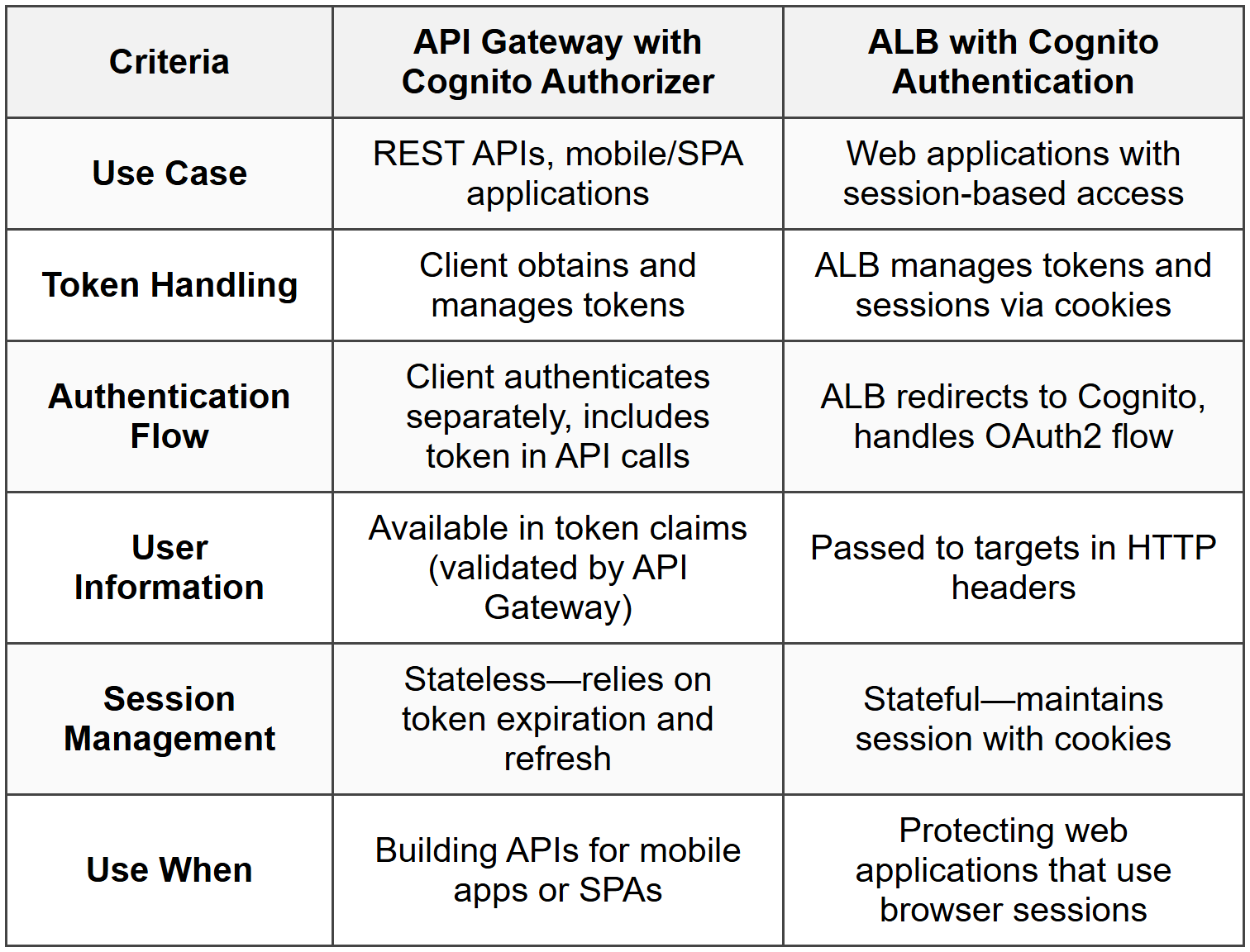
Comparison: API Gateway vs ALB Authentication
Sync and User Data
Cognito Sync is a deprecated service that synchronized user profile data across devices. AWS now recommends using AWS AppSync for this functionality. For the exam, know that Cognito Sync is legacy and AppSync is the current solution for syncing user data across devices.
- Cognito Sync stored up to 20 datasets per identity, each up to 1 MB
- AppSync provides real-time data sync with GraphQL APIs
- User Pool attributes store profile information (email, phone, custom attributes)
- Identity Pool datasets are not recommended for new implementations
When to Address User Data
- If question mentions Cognito Sync, recognize it as legacy and suggest AppSync instead
- Scenario requires storing and syncing user preferences across devices-use AppSync
- User profile attributes stored in User Pool do not automatically sync-design accordingly
Commonly Tested Scenarios / Pitfalls
1. Scenario: A mobile application needs to allow users to sign up with email and password, then directly upload photos to an S3 bucket. The question asks which Cognito components are required.
Correct Approach: Use both a User Pool (for authentication) and an Identity Pool (for AWS credentials). User Pool handles sign-up and authentication, returns JWT tokens. Identity Pool exchanges those tokens for temporary AWS credentials that permit S3 uploads.
Check first: Does the application need just authentication, or also direct access to AWS services? Direct AWS service access requires Identity Pool.
Do NOT do first: Do not select only User Pool thinking it provides AWS credentials. User Pools only authenticate users and return JWT tokens, not AWS credentials.
Why other options are wrong: Using only Identity Pool fails because it does not manage user registration or authentication-it requires an external IdP like a User Pool. Using IAM users for each application user is not scalable and violates best practices for temporary credentials.
2. Scenario: A company wants employees to access an internal application using their existing Active Directory credentials via SAML. The question asks how to configure authentication.
Correct Approach: Configure a Cognito User Pool with SAML federation, setting up the company's Active Directory Federation Services (ADFS) or similar as the SAML identity provider. Users authenticate with AD, receive SAML assertion, which User Pool exchanges for JWT tokens.
Check first: Identify that the requirement is for enterprise SSO with existing credentials, indicating SAML federation rather than creating new user accounts.
Do NOT do first: Do not create individual user accounts in the User Pool for each employee. This defeats the purpose of federation and creates duplicate credential management.
Why other options are wrong: Social federation (Google, Facebook) does not connect to Active Directory. Identity Pool alone does not authenticate users-it requires an IdP like a federated User Pool. Direct IAM authentication is not designed for application user access.
3. Scenario: An application needs to grant each authenticated user access to only their own folder in S3 (e.g., s3://bucket/user123/ for user123). The question asks how to implement this with Cognito.
Correct Approach: Use Identity Pool to provide temporary AWS credentials, and configure the authenticated IAM role with a policy that uses the policy variable ${cognito-identity.amazonaws.com:sub} to restrict S3 access to a user-specific prefix. For example: "Resource": "arn:aws:s3:::bucket/${cognito-identity.amazonaws.com:sub}/*".
Check first: Confirm the need for user-specific AWS resource access, which requires Identity Pool with fine-grained IAM policies using policy variables.
Do NOT do first: Do not create separate IAM roles for each user. This is not scalable and defeats the purpose of temporary credentials with dynamic policy variables.
Why other options are wrong: User Pool tokens alone cannot enforce AWS resource-level permissions. Creating individual S3 bucket policies per user is unmanageable. Using a single shared IAM role without policy variables grants all users access to all folders.
4. Scenario: A web application behind an Application Load Balancer needs to authenticate users with Cognito and pass user information to backend EC2 instances. The question asks how to configure this.
Correct Approach: Enable authentication on the ALB listener rule, configure the User Pool as the identity provider. ALB handles the OAuth2 flow, authenticates users, and forwards user claims to EC2 instances in HTTP headers (X-Amzn-Oidc-Data, X-Amzn-Oidc-Identity, etc.).
Check first: Recognize this is a web application scenario (browser-based) using an ALB, which supports built-in authentication-different from API-based access.
Do NOT do first: Do not implement authentication in the application code on EC2 instances. ALB's built-in authentication offloads this and reduces complexity.
Why other options are wrong: API Gateway Cognito authorizer is for REST APIs, not web applications behind ALB. Implementing authentication in application code duplicates ALB's capability and adds maintenance burden. Using IAM authentication does not fit application user authentication scenarios.
5. Scenario: A company wants to prevent users from signing in with passwords that have been compromised in known data breaches. The question asks which Cognito feature to enable.
Correct Approach: Enable Advanced Security Features in the User Pool and configure compromised credentials detection. This checks passwords against known breaches during sign-up, sign-in, and password changes, blocking or alerting when compromised passwords are detected.
Check first: Identify that the requirement is for proactive security against known compromised passwords, which is a specific feature within Advanced Security.
Do NOT do first: Do not rely only on password policies (complexity, length). These do not detect passwords found in breaches-they only enforce structural rules.
Why other options are wrong: MFA prevents account access even with compromised passwords but does not prevent users from using compromised passwords initially. Lambda triggers could implement custom checks but are complex and unnecessary when built-in compromised credentials detection is available. Adaptive authentication detects risky sign-ins but does not specifically check passwords against breach databases.
Step-by-Step Procedures or Methods
Task: Configure a User Pool and Identity Pool to allow mobile users to authenticate and access S3
- Create a Cognito User Pool with email/username sign-in, configure password policies and MFA as needed
- Configure User Pool app client with appropriate OAuth flows (Authorization code grant for web, Implicit grant for mobile/SPA, or Client credentials for machine-to-machine)
- Optionally configure hosted UI or integrate SDK into your application for custom authentication UI
- Create a Cognito Identity Pool and link it to the User Pool created in step 1
- Configure authenticated and unauthenticated IAM roles in the Identity Pool settings
- Edit the authenticated role's IAM policy to grant specific S3 permissions, using policy variables like ${cognito-identity.amazonaws.com:sub} for user-specific access if needed
- In the application, authenticate users against the User Pool to obtain JWT tokens (ID, access, refresh tokens)
- Exchange the ID token with the Identity Pool using AWS SDK's GetCredentialsForIdentity or AssumeRoleWithWebIdentity to obtain temporary AWS credentials
- Use the temporary credentials to access S3 or other AWS services directly from the mobile application
- Implement token refresh logic to obtain new credentials when current ones expire (typically after 1 hour)
Task: Set up ALB authentication with Cognito User Pool for a web application
- Create a Cognito User Pool and configure users, password policies, and authentication flows
- In the User Pool app client settings, add the ALB's DNS name or custom domain as a callback URL (e.g., https://alb.example.com/oauth2/idpresponse)
- Enable the OAuth 2.0 authorization code grant flow in the app client
- Configure the User Pool domain (either Amazon Cognito domain or custom domain)
- In the Application Load Balancer, select the listener (typically HTTPS on port 443)
- Add an authentication action to the listener rule: Action type → Authenticate, then select Cognito User Pool
- Select the User Pool and app client created earlier, configure session timeout and authentication parameters
- Add a forward action after the authenticate action to route authenticated requests to the target group
- Ensure backend applications parse user information from X-Amzn-Oidc-* headers injected by ALB
- Test authentication flow by accessing the ALB endpoint-unauthenticated users should be redirected to Cognito hosted UI
Practice Questions
Q1: A company is building a mobile application that allows users to sign in with their Google accounts and then upload images directly to an S3 bucket. Which combination of Cognito services should the Solutions Architect recommend?
(a) User Pool with Google federation only
(b) Identity Pool with Google as an authenticated provider only
(c) User Pool with Google federation and Identity Pool linked together
(d) Identity Pool with unauthenticated access enabled
Ans: (c)
User Pool handles the Google federation and user authentication, returning JWT tokens. Identity Pool exchanges those tokens for temporary AWS credentials that allow direct S3 access. Option (a) provides authentication but no AWS credentials. Option (b) could work with Google as a direct provider to Identity Pool, but using a User Pool provides better user management and token handling. Option (d) grants guest access which is not secure for user-specific uploads.
Q2: An organization needs to ensure that each authenticated user can only access their own folder in an S3 bucket (s3://mybucket/user-id/). The application uses Cognito for authentication. What is the most efficient way to implement this?
(a) Create a separate IAM role for each user with specific S3 permissions
(b) Use Identity Pool with an IAM role that includes policy variables referencing the Cognito identity ID
(c) Create individual S3 bucket policies for each user folder
(d) Use Lambda functions triggered by S3 events to validate user access
Ans: (b)
Identity Pool's authenticated role can use the policy variable ${cognito-identity.amazonaws.com:sub} to dynamically grant each user access only to their folder. Option (a) is not scalable-creating thousands of IAM roles is impractical. Option (c) is similarly unscalable and difficult to manage. Option (d) validates access after the fact rather than preventing unauthorized access at the IAM level.
Q3: A web application behind an Application Load Balancer needs to authenticate users using a corporate SAML identity provider. After authentication, user email should be available to the backend application. What should the Solutions Architect configure?
(a) API Gateway with Cognito authorizer and SAML federation
(b) ALB listener rule with authenticate action using Cognito User Pool configured with SAML federation
(c) Identity Pool with SAML provider and IAM roles
(d) Direct SAML integration between ALB and corporate identity provider
Ans: (b)
ALB supports authentication actions that integrate with Cognito User Pools, and User Pools support SAML federation. ALB passes user claims (including email) to backend in HTTP headers. Option (a) uses API Gateway which is for REST APIs, not web applications behind ALB. Option (c) provides AWS credentials but does not handle authentication flow for web applications. Option (d) is incorrect because ALB does not support direct SAML integration-it requires Cognito User Pool or OIDC providers.
Q4: A mobile app developer wants to implement adaptive authentication that requires MFA only when users sign in from new devices or unusual locations. Which Cognito configuration is required?
(a) Enable MFA as required in User Pool settings
(b) Enable Advanced Security Features and configure risk-based adaptive authentication
(c) Use Lambda pre-authentication trigger to evaluate device and location
(d) Configure MFA as optional and use Lambda to enforce it based on device
Ans: (b)
Advanced Security Features provide adaptive authentication that assigns risk scores and can trigger MFA based on device, location, and other factors. Option (a) requires MFA for all sign-ins, not just risky ones. Option (c) could work but is complex and unnecessary when built-in adaptive authentication exists. Option (d) places enforcement burden on custom Lambda code rather than using Cognito's built-in capability.
Q5: A Solutions Architect needs to migrate 500,000 users from a legacy authentication system to Cognito without requiring users to reset passwords. What is the FIRST thing to check before implementing the migration?
(a) Whether the User Pool Lambda triggers support user migration trigger
(b) Whether the legacy system can export user passwords in plaintext
(c) Whether the User Pool supports the same password hashing algorithm as the legacy system
(d) Whether the migration can be completed during a maintenance window
Ans: (a)
The user migration Lambda trigger is the correct approach-it authenticates users against the legacy system during first sign-in and seamlessly imports them into the User Pool. First, verify Lambda triggers are available and can integrate with the legacy system. Option (b) is a security risk and unnecessary-the migration trigger handles authentication without accessing plaintext passwords. Option (c) is not required because the migration trigger authenticates against the legacy system, not by comparing password hashes. Option (d) misunderstands the migration approach-user migration trigger works transparently without downtime.
Q6: An application uses API Gateway with a Cognito User Pool authorizer. Users report that their API calls are being rejected with 401 Unauthorized errors even though they successfully signed in. What should the Solutions Architect check FIRST?
(a) Whether the IAM execution role has permissions to validate tokens
(b) Whether the client is sending the ID token or access token in the Authorization header as configured in the authorizer
(c) Whether MFA is enabled and users have completed the second factor
(d) Whether the User Pool app client has API Gateway in its callback URLs
Ans: (b)
API Gateway Cognito authorizers can be configured to validate either ID tokens or access tokens-the client must send the correct token type in the Authorization header. This is the most common configuration error. Option (a) is incorrect because Cognito authorizers do not use IAM execution roles-API Gateway validates tokens directly using the User Pool's public keys. Option (c) is irrelevant because successful sign-in means MFA was completed if required. Option (d) confuses OAuth callback URLs (for authentication flows) with API authorization-callback URLs are not used for API Gateway authorizers.
Quick Review
- User Pools authenticate users and return JWT tokens; Identity Pools exchange tokens for temporary AWS credentials
- Use both User Pool and Identity Pool when mobile/web apps need authentication AND direct AWS service access
- JWT tokens from User Pools include ID token (user claims), access token (resource access), and refresh token (obtain new tokens)
- Identity Pool IAM roles can use policy variable ${cognito-identity.amazonaws.com:sub} for user-specific resource access
- SAML and OIDC federation enable SSO with enterprise identity providers without storing passwords in Cognito
- API Gateway authorizer validates JWT tokens for API access; ALB authentication manages OAuth flow and sessions for web apps
- Advanced Security Features provide adaptive authentication, compromised credentials detection, and account takeover protection (additional charges apply)
- Lambda triggers customize authentication flows-user migration trigger enables seamless migration from legacy systems
- MFA can be SMS-based (incurs SNS charges) or TOTP-based (free, more secure); adaptive authentication triggers MFA only for risky sign-ins
- Cognito Sync is deprecated-use AWS AppSync for syncing user data across devices