EFS, FSx & Shared Storage

This topic covers AWS shared file storage services-EFS and FSx-and when to use each. These services appear frequently in exam scenarios involving Linux/Windows file sharing, high-performance workloads, and multi-instance access patterns. Expect questions comparing these services and matching them to specific use cases.
Core Concepts
Amazon Elastic File System (EFS)
EFS is a fully managed, elastic NFS file system designed for Linux workloads that automatically scales storage capacity up or down as you add or remove files.
How it works: EFS uses the NFSv4 protocol and can be mounted concurrently to thousands of EC2 instances across multiple Availability Zones in a region. When an EC2 instance writes data to EFS, that data becomes immediately available to all other instances mounting the same file system. Storage capacity grows and shrinks automatically-you never provision storage size upfront.
- Performance modes: General Purpose (default, lowest latency for most workloads) and Max I/O (higher aggregate throughput and operations per second, slightly higher latency per operation)
- Throughput modes: Bursting (throughput scales with file system size), Provisioned (you specify throughput independent of storage size), and Elastic (automatically scales throughput up or down)
- Storage classes: Standard (frequently accessed data) and Infrequent Access (IA, lower-cost tier for files not accessed daily)
- Lifecycle management: Automatically moves files to IA storage class based on policy (e.g., files not accessed for 30 days)
- Regional service: Data stored redundantly across multiple AZs within a single region
- One Zone option: EFS One Zone stores data in a single AZ for cost savings (approximately 47% lower cost than Standard)
- Encryption: Supports encryption at rest using AWS KMS and encryption in transit using TLS
- Performance: Up to 10 GB/s throughput, 500,000 IOPS, sub-millisecond latencies
When to Use EFS
- Linux-based applications requiring shared file storage accessible from multiple EC2 instances simultaneously
- Content management systems, web serving environments, development environments where many instances need read-write access to the same files
- Workloads requiring automatic scaling-you don't know storage requirements upfront or they fluctuate significantly
- Multi-AZ deployments where file system must survive AZ failure (use Standard, not One Zone)
Amazon FSx Overview
FSx is a family of fully managed third-party file systems optimized for specific workloads. AWS manages hardware, patching, backups, and replication. The exam tests four FSx types: FSx for Windows File Server, FSx for Lustre, FSx for NetApp ONTAP, and FSx for OpenZFS.
FSx for Windows File Server
A fully managed native Windows file system built on Windows Server with full support for SMB protocol, Windows NTFS, and Active Directory integration.
How it works: Provides a file server running Windows Server that can be accessed from Windows, Linux, and macOS instances using SMB protocol. Integrates with Microsoft Active Directory for user authentication and access control using Windows ACLs. Supports Distributed File System (DFS) namespaces and replication.
- Protocols: SMB (Server Message Block) versions 2.0 through 3.1.1
- Deployment types: Single-AZ (lower cost) and Multi-AZ (automatic failover to standby in separate AZ)
- Storage types: SSD (low-latency, IOPS-intensive workloads) and HDD (throughput-intensive workloads like media processing)
- Performance: SSD storage delivers up to 2 GB/s throughput, 100,000s IOPS, sub-millisecond latencies; HDD storage up to 2 GB/s throughput
- Data deduplication: Built-in Windows data deduplication reduces storage costs
- Shadow copies: User-initiated previous versions of files using Windows Volume Shadow Copy Service
- Active Directory: Requires integration with either AWS Managed Microsoft AD or self-managed AD
- Access: Can be accessed from on-premises via VPN or Direct Connect
When to Use FSx for Windows File Server
- Windows-based applications requiring SMB file shares (SQL Server, SharePoint, IIS, custom .NET applications)
- Lift-and-shift migrations of Windows file servers to AWS
- Workloads requiring Windows ACLs, Active Directory integration, or DFS namespaces
- Multi-AZ option when you need automatic failover for high availability (choose Multi-AZ deployment)
FSx for Lustre
A high-performance parallel file system optimized for compute-intensive workloads requiring fast processing of large datasets.
How it works: Lustre is designed for applications that need sub-millisecond latencies, high throughput, and millions of IOPS. FSx for Lustre can link directly to S3 buckets, presenting S3 objects as files and automatically writing changed data back to S3. When linked to S3, the file system can be thought of as a high-performance cache layer in front of S3.
- Deployment types: Scratch (temporary storage, no replication, highest performance, lowest cost) and Persistent (long-term storage, automatically replicated within single AZ)
- Performance: Up to hundreds of GB/s throughput, millions of IOPS, sub-millisecond latencies
- Storage types: SSD (low-latency IOPS-intensive workloads) and HDD (throughput-intensive, less latency-sensitive)
- S3 integration: Can link to S3 bucket-reads S3 objects as files, writes file changes back to S3
- Data compression: Automatic LZ4 compression reduces storage costs
- Use cases: High-performance computing (HPC), machine learning, video processing, financial modeling, electronic design automation
- Access: Mounted from Linux instances using Lustre client
When to Use FSx for Lustre
- HPC workloads requiring parallel access to same dataset from hundreds or thousands of compute instances
- Machine learning training jobs processing large datasets where training data stored in S3 needs fast, repeated access
- Media processing workflows that need to process video files rapidly
- Temporary high-performance storage for compute jobs (use Scratch deployment)-file system deleted after job completes to save costs
FSx for NetApp ONTAP
A fully managed NetApp ONTAP file system providing enterprise features like snapshots, cloning, and multi-protocol access (NFS, SMB, iSCSI).
How it works: Runs NetApp's ONTAP operating system on AWS infrastructure, giving you NetApp features without managing physical NetApp hardware. Supports simultaneous access from Linux, Windows, and macOS using NFS and SMB protocols. Also provides block storage via iSCSI.
- Protocols: NFS (v3, v4.0, v4.1, v4.2), SMB (2.0, 2.1, 3.0, 3.1.1), iSCSI
- Multi-protocol: Same data accessible via NFS and SMB simultaneously
- Deployment: Always Multi-AZ for high availability
- Storage efficiency: Data deduplication, compression, compaction, thin provisioning
- Snapshots: Point-in-time snapshots, SnapMirror replication for disaster recovery
- FlexClone: Instant, space-efficient clones of volumes
- Data tiering: Automatically moves cold data to lower-cost capacity pool
When to Use FSx for NetApp ONTAP
- Migrating existing NetApp deployments to AWS while maintaining NetApp workflows and tools
- Applications requiring both NFS and SMB access to same data (mixed Linux/Windows environments)
- Workloads needing advanced storage features like instant cloning for dev/test environments
- Multi-AZ availability requirement for file storage (ONTAP always deploys across two AZs)
FSx for OpenZFS
A fully managed OpenZFS file system providing Linux-compatible ZFS features including snapshots, data compression, and point-in-time cloning.
How it works: Runs OpenZFS file system on AWS, accessible via NFS protocol from Linux, Windows, and macOS clients. Provides up to 1 million IOPS with latencies under 0.5 milliseconds for frequently accessed cached data.
- Protocol: NFSv3, NFSv4.0, NFSv4.1, NFSv4.2
- Deployment: Single-AZ
- Performance: Up to 12.5 GB/s throughput, 1 million IOPS
- Snapshots: User-accessible .zfs snapshots, up to 10,000 snapshots per volume
- Data compression: ZStandard, LZ4, GZIP algorithms reduce storage costs
- Migration: AWS DataSync can migrate existing ZFS or other file data to FSx for OpenZFS
When to Use FSx for OpenZFS
- Migrating Linux workloads currently using ZFS on-premises to AWS
- Workloads requiring high IOPS with low latency (sub-millisecond for cached data)
- Development environments needing instant clones of production data
- Cost optimization when compression can significantly reduce storage footprint (OpenZFS provides multiple compression algorithms)
Comparison: EFS vs FSx Services
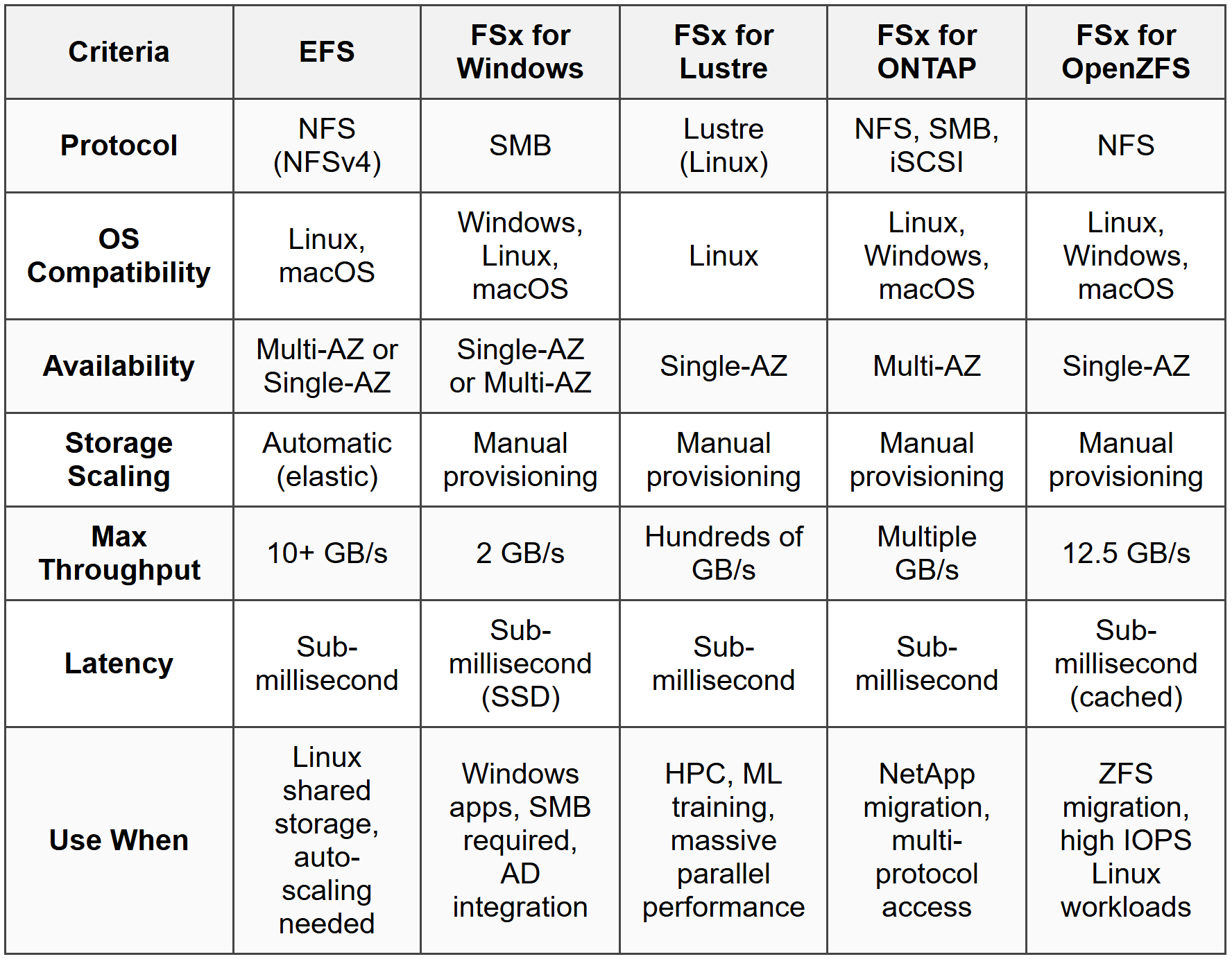
Storage Class and Lifecycle Management
Both EFS and some FSx services offer tiered storage to optimize costs by moving infrequently accessed data to lower-cost tiers.
EFS storage classes: Standard stores data across multiple AZs with frequent access patterns. Infrequent Access (IA) stores data at lower cost for files accessed less frequently. Lifecycle management policies automatically transition files between Standard and IA based on access patterns (e.g., move files not accessed for 30, 60, or 90 days to IA). One Zone and One Zone-IA provide similar functionality but store data in single AZ at lower cost.
FSx for ONTAP data tiering: Automatically moves infrequently accessed data from primary SSD storage to a lower-cost capacity pool tier. You set a cooling period (2-183 days); data not accessed during this period moves to capacity tier. Accessed data automatically moves back to primary tier.
- EFS IA cost savings: Up to 92% lower cost than Standard storage class
- EFS One Zone cost savings: Approximately 47% lower cost than Standard (but single-AZ, not resilient to AZ failure)
- Retrieval: Accessing IA data incurs retrieval charges and slightly higher latency than Standard
- Automatic transition: Set lifecycle policy once-no manual intervention required
When to Use Storage Tiering
- Workloads with files that are written once and accessed infrequently afterward (logs, archives, backups)
- Cost optimization scenarios where significant portion of data not accessed regularly
- When combined access patterns exist-some files accessed daily, others rarely (lifecycle policy handles this automatically)
- Choose EFS One Zone when high availability across AZs not required and cost minimization is priority (dev/test environments)
Backup and Disaster Recovery
EFS and FSx integrate with AWS Backup for centralized backup management and also provide service-specific backup capabilities.
EFS backups: AWS Backup provides automatic, scheduled backups to separate EFS file system. Backups are incremental-only changed data backed up after initial full backup. Backups stored regionally, encrypted, and can be copied to another region for disaster recovery. EFS-to-EFS replication also available for continuous replication to another region.
FSx for Windows backups: Automatic daily backups and user-initiated backups stored in S3. Supports copying backups to another region. Also supports AWS Backup for centralized management. Shadow copies provide user-accessible previous versions of files.
FSx for Lustre backups: Automatic daily backups (Persistent deployment type only-Scratch has no backup). Backups stored in S3. File system linked to S3 bucket can export changes back to S3 for additional data protection.
- Retention periods: EFS backups retained 1 day to indefinitely; FSx backups typically 1-35 days for automatic, indefinite for user-initiated
- RPO/RTO: EFS replication provides RPO/RTO in minutes; backups require restore operation (hours)
- Cross-region: EFS replication and backup copy to another region support disaster recovery strategies
When to Use Backup Features
- Compliance requirements mandating point-in-time recovery capabilities
- Protecting against accidental deletion or corruption (user error scenarios)
- Disaster recovery strategy requiring cross-region copy (choose EFS replication for lowest RPO/RTO, backups for cost-effective longer retention)
- FSx for Windows shadow copies when end users need self-service recovery of previous file versions
Access Control and Security
EFS and FSx provide multiple layers of security controls including network access, IAM policies, and file-level permissions.
Network access: EFS and FSx mount targets placed in VPC subnets. Security groups control network access to mount targets-only instances with appropriate security group rules can connect. VPC endpoints (for EFS) or ENIs (for FSx) provide private connectivity without internet gateway.
IAM policies: Control administrative actions (creating/deleting file systems). EFS also supports IAM policies for client access-you can enforce that only specific IAM roles can mount file system or that mounts must use encryption in transit.
File-level permissions: EFS uses standard Linux/POSIX permissions and ownership. FSx for Windows uses Windows ACLs integrated with Active Directory. FSx for ONTAP supports both POSIX and Windows ACLs depending on protocol used.
- Encryption in transit: EFS supports TLS encryption; mount helper automatically enables. FSx for Windows uses SMB encryption. FSx for Lustre uses in-transit encryption option.
- Encryption at rest: EFS uses AWS KMS with keys you control. FSx services use KMS encryption for all storage (automatic, cannot be disabled).
- EFS Access Points: Application-specific entry points into file system with specific IAM permissions and POSIX user identity enforcement-allows multiple applications to share file system with isolation.
When to Use Security Features
- Compliance requiring encryption at rest and in transit (enable both for EFS, automatic for FSx)
- Multi-tenant applications sharing file system but requiring isolation (use EFS Access Points with separate IAM policies per application)
- Windows environments requiring Active Directory authentication (FSx for Windows with AD integration)
- Least-privilege access scenarios (IAM policies restricting which roles can mount EFS, security groups limiting network access to specific instance groups)
Performance Optimization
Choosing the correct performance mode, throughput mode, and storage type directly impacts application performance and cost.
EFS performance modes: General Purpose provides lowest latency per operation, suitable for most workloads. Max I/O scales to higher aggregate throughput and IOPS but introduces higher latency per operation-use when hundreds or thousands of instances access file system concurrently and aggregate performance matters more than per-operation latency.
EFS throughput modes: Bursting throughput scales with file system size (50 MB/s per TB of Standard storage). Provisioned throughput decouples throughput from storage size-specify throughput independently. Elastic automatically scales throughput based on workload (simplest option, but higher cost per GB transferred compared to Bursting).
FSx storage types: SSD storage for low-latency, IOPS-intensive workloads (databases, virtual desktops). HDD storage for throughput-intensive workloads where latency less critical (media processing, big data analytics). FSx for Lustre offers SSD for IOPS-intensive HPC and HDD for throughput-intensive HPC.
- EFS bursting credit system: File systems earn burst credits when using less than baseline throughput, spend credits when bursting above baseline. Larger file systems have higher baseline and burst rates.
- Provisioned throughput cost: Pay for provisioned amount even if not fully utilized-use when consistent high performance required regardless of data size stored.
- Max I/O use case: Big data analytics, media processing with many parallel workers-accept slightly higher per-op latency for much higher aggregate throughput.
When to Use Performance Options
- Small file systems needing high throughput (choose Provisioned or Elastic throughput mode, not Bursting which scales with storage size)
- Hundreds/thousands of concurrent clients (choose EFS Max I/O performance mode or FSx for Lustre)
- Low-latency requirements with moderate concurrency (choose EFS General Purpose mode with SSD-based FSx options)
- Cost-sensitive throughput-intensive workloads (choose HDD storage in FSx for Windows or FSx for Lustre)
Commonly Tested Scenarios / Pitfalls
1. Scenario: A company needs shared file storage for a fleet of Windows EC2 instances running SQL Server. The solution must integrate with their existing on-premises Active Directory and provide automatic failover across Availability Zones. What storage service should they use?
Correct Approach: FSx for Windows File Server with Multi-AZ deployment. This provides native Windows SMB file shares, integrates with Active Directory for authentication, and Multi-AZ deployment gives automatic failover to standby in separate AZ.
Check first: Operating system and protocol requirements. The mention of Windows instances and SQL Server immediately indicates SMB protocol needed, which points to FSx for Windows rather than EFS (which uses NFS for Linux).
Do NOT do first: Do not jump to EFS because it's a shared file system. EFS uses NFS protocol intended for Linux workloads, not SMB for Windows. Windows instances can technically mount EFS using NFS client software, but this doesn't provide native Windows features like ACLs or AD integration that Windows applications expect.
Why other options are wrong: EFS is wrong because it lacks SMB protocol and Windows integration. FSx for Lustre is Linux-only HPC workload focused. FSx for ONTAP could work (supports SMB) but is typically chosen when migrating NetApp infrastructure or requiring multi-protocol access, not standard Windows file server replacement.
2. Scenario: A machine learning team needs to train models using 500 TB of data currently in S3. Training requires reading the dataset hundreds of times with sub-millisecond latencies. After training completes (3 days), the file storage is no longer needed. What's the most cost-effective solution?
Correct Approach: FSx for Lustre with Scratch deployment type linked to the S3 bucket. Scratch provides highest performance at lowest cost, designed for temporary storage. Link to S3 allows Lustre to read S3 objects as files. After training, delete the Scratch file system-no ongoing storage costs.
Check first: Temporary versus persistent storage requirement. The key phrase "after training completes...no longer needed" signals temporary storage where Scratch deployment type saves significant cost compared to Persistent.
Do NOT do first: Do not choose FSx for Lustre Persistent deployment. While it provides the performance needed, Persistent deployment costs more and provides replication for durability-unnecessary when data already exists in S3 and file system is temporary.
Why other options are wrong: EFS cannot match Lustre's parallel processing performance for HPC/ML workloads and lacks direct S3 integration. FSx for Windows is wrong protocol (SMB not suitable for Linux ML frameworks). Directly reading from S3 introduces far higher latency than sub-millisecond requirement-S3 typically measured in tens of milliseconds per operation.
3. Scenario: A content management system running on 20 Linux EC2 instances across three Availability Zones needs shared file storage that automatically scales as content grows. The application writes files that are accessed frequently for 30 days, then rarely accessed afterward. Storage costs must be minimized. What configuration should you use?
Correct Approach: EFS with Standard storage class, lifecycle management policy to transition files to Infrequent Access (IA) storage after 30 days. Standard storage deployed across multiple AZs handles the multi-AZ requirement and automatic scaling. Lifecycle policy automatically reduces costs for older content.
Check first: Access pattern over time. The pattern "frequently accessed for 30 days, then rarely accessed" directly maps to lifecycle management transitioning to lower-cost IA storage class after defined period.
Do NOT do first: Do not choose EFS One Zone to save costs. While cheaper, One Zone stores data in single AZ-if that AZ fails, the content management system across three AZs loses access to files. The cost savings isn't worth the availability risk for production workload.
Why other options are wrong: FSx services require manual provisioning of storage capacity (no automatic scaling like EFS). FSx for Windows uses SMB (question specifies Linux instances typically use NFS). FSx for Lustre is HPC-focused, far more expensive than needed for content management, and doesn't provide lifecycle cost optimization like EFS IA.
4. Scenario: Your EFS file system performance monitor shows clients experiencing latency spikes during peak hours. The file system is 2 TB in size using Bursting throughput mode. During peaks, aggregate throughput reaches 200 MB/s. What's the first action to resolve latency spikes?
Correct Approach: Switch to Provisioned or Elastic throughput mode. With only 2 TB of data, Bursting mode provides baseline of approximately 100 MB/s (50 MB/s per TB). Peak demand of 200 MB/s exceeds baseline, depleting burst credits and causing throttling/latency. Provisioned throughput at 200 MB/s or Elastic mode provides consistent performance.
Check first: Relationship between file system size and throughput in Bursting mode. Calculate baseline: \( 2 \text{ TB} \times 50 \text{ MB/s per TB} = 100 \text{ MB/s baseline} \). Peak demand (200 MB/s) exceeds this, indicating burst credit exhaustion.
Do NOT do first: Do not immediately add data to increase file system size. While larger file systems have higher baseline throughput in Bursting mode, artificially inflating storage with unused data costs money and is inefficient. Provisioned or Elastic throughput solves the problem without wasting storage.
Why other options are wrong: Switching to Max I/O performance mode addresses aggregate IOPS and concurrent client scaling, not throughput limitations. Changing to EFS One Zone doesn't affect performance characteristics. Adding more EC2 instances would increase demand, worsening the problem.
5. Scenario: A development team needs to create 50 copies of a 10 TB production database volume for parallel testing. Each copy must be created quickly (under 1 minute) and storage costs minimized since copies are mostly identical to production data. Which service and feature should you use?
Correct Approach: FSx for NetApp ONTAP with FlexClone feature. FlexClone creates instant, space-efficient clones that initially consume minimal additional storage (only stores differences from original). Creates clones in seconds regardless of volume size, and only changed data in clones consumes additional space.
Check first: Instant cloning requirement and space efficiency. The combination of "quickly (under 1 minute)" and "storage costs minimized" for large volumes points to copy-on-write cloning technology, which ONTAP's FlexClone provides.
Do NOT do first: Do not use EFS with manual copying or snapshots. EFS doesn't provide instant clone features-copying 10 TB takes significant time and doubles storage costs (full copy). EFS snapshots (via AWS Backup) require restore operation creating separate file system with full storage cost.
Why other options are wrong: FSx for Windows lacks instant cloning (shadow copies are snapshots, not clones). FSx for Lustre doesn't provide clone features. FSx for OpenZFS has snapshot cloning but is typically chosen for ZFS migrations, not database workloads. EBS snapshots would work for block storage but question asks about file storage for database files requiring shared access pattern.
Step-by-Step Procedures or Methods
Task: Determine the appropriate EFS throughput mode based on workload requirements
- Calculate baseline throughput in Bursting mode: \( \text{Baseline MB/s} = \text{File system size in TB} \times 50 \text{ MB/s} \)
- Determine peak throughput requirement from application specifications or monitoring data
- If peak requirement consistently exceeds baseline: consider Provisioned or Elastic throughput mode
- If workload is unpredictable or highly variable: choose Elastic mode (automatic scaling)
- If workload has predictable sustained throughput need above baseline: choose Provisioned mode and specify required throughput
- If peak requirement is temporary (short bursts) and baseline is sufficient most of the time: Bursting mode is cost-effective-verify burst credit balance doesn't deplete during peak periods
- Monitor burst credit balance metric (BurstCreditBalance)-if frequently approaching zero, throughput mode change needed
Task: Select the correct FSx service for a migration scenario
- Identify source file system or application platform: Windows file server → FSx for Windows; NetApp storage → FSx for ONTAP; ZFS → FSx for OpenZFS; HPC/Lustre → FSx for Lustre
- Identify protocol requirements: SMB only → FSx for Windows; NFS only → EFS, FSx for ONTAP, or FSx for OpenZFS; both SMB and NFS → FSx for ONTAP; Lustre protocol → FSx for Lustre
- Check performance requirements: hundreds of GB/s throughput, millions of IOPS → FSx for Lustre; moderate throughput with Windows → FSx for Windows; Linux with high IOPS → FSx for OpenZFS
- Verify availability requirements: Multi-AZ required → EFS Standard, FSx for Windows Multi-AZ, or FSx for ONTAP (always Multi-AZ); Single-AZ acceptable → any service with Single-AZ option
- Assess additional features needed: Active Directory integration → FSx for Windows; instant cloning → FSx for ONTAP or FSx for OpenZFS; S3 integration → FSx for Lustre with S3 link
- Cost optimization: temporary storage → FSx for Lustre Scratch; infrequent access pattern → EFS with lifecycle management; long-term persistent → match service to protocol and performance, choose appropriate storage type (SSD vs HDD)
Practice Questions
Q1: An application running on 15 Linux EC2 instances distributed across two Availability Zones needs shared storage that scales automatically without provisioning. Files are accessed frequently for the first week after creation, then rarely accessed. The solution must survive an AZ failure. Which storage configuration meets these requirements at the lowest cost?
(a) EFS One Zone with lifecycle policy transitioning to One Zone-IA after 7 days
(b) EFS Standard with lifecycle policy transitioning to Infrequent Access after 7 days
(c) FSx for Lustre Persistent deployment with data compression enabled
(d) FSx for OpenZFS with automated snapshots and compression
Ans: (b)
EFS Standard stores data across multiple AZs (survives AZ failure) and scales automatically. Lifecycle management to IA after 7 days optimizes costs for the infrequent access pattern. Option (a) fails the AZ failure requirement-One Zone stores data in single AZ. Options (c) and (d) use FSx which requires manual capacity provisioning (doesn't scale automatically) and costs more than EFS for this standard file sharing use case.
Q2: A financial services company runs Monte Carlo simulations on 500 EC2 instances that must process 1 PB of data stored in S3 with sub-millisecond latencies. Simulations run for 2 days each month; file storage is not needed after completion. What is the most cost-effective storage solution?
(a) EFS with Provisioned throughput and Max I/O performance mode
(b) FSx for Lustre Persistent deployment linked to S3 bucket
(c) FSx for Lustre Scratch deployment linked to S3 bucket
(d) FSx for Windows File Server with HDD storage type
Ans: (c)
FSx for Lustre provides the parallel performance needed for HPC workloads (Monte Carlo simulations) with 500 instances. Scratch deployment is temporary storage at lowest cost-perfect for 2-day simulation where storage not needed afterward. S3 link allows reading data from S3 as files. Option (b) Persistent costs more and provides unnecessary replication. Option (a) EFS cannot match Lustre performance for this scale. Option (d) FSx for Windows uses wrong protocol (SMB, not suitable for Linux-based HPC).
Q3: Your Windows-based application requires SMB file shares with Multi-AZ availability and integration with on-premises Active Directory for user authentication. Which storage service should you deploy?
(a) Amazon EFS with Mount Targets in multiple AZs
(b) FSx for Windows File Server Multi-AZ deployment
(c) FSx for NetApp ONTAP with SMB protocol enabled
(d) FSx for OpenZFS with NFS protocol
Ans: (b)
FSx for Windows File Server provides native Windows SMB shares, integrates with Active Directory (including on-premises AD via trust or federation), and Multi-AZ deployment provides automatic failover. Option (a) EFS uses NFS protocol (Linux), not SMB. Option (c) FSx for ONTAP supports SMB but is typically chosen when migrating NetApp infrastructure or needing multi-protocol access, not standard Windows file server replacement. Option (d) OpenZFS uses NFS, not SMB.
Q4: An EFS file system with 8 TB of data using Bursting throughput mode experiences throttling during daily batch jobs requiring 500 MB/s throughput for 2 hours. What is the FIRST thing you should check before making changes?
(a) The number of concurrent clients accessing the file system
(b) The BurstCreditBalance metric in CloudWatch
(c) The performance mode setting (General Purpose vs Max I/O)
(d) The file system's availability zone configuration
Ans: (b)
With 8 TB in Bursting mode, baseline throughput is \( 8 \times 50 = 400 \text{ MB/s} \). The 500 MB/s requirement exceeds baseline, so the file system must use burst credits. Checking BurstCreditBalance shows whether credits are depleted (causing throttling). This confirms the problem before deciding solution (switch to Provisioned/Elastic throughput). Option (a) concurrent clients relates to IOPS/operations, not throughput limits. Option (c) performance mode affects IOPS scaling, not throughput. Option (d) AZ configuration doesn't affect throughput performance.
Q5: A development team needs to create 100 copies of a 5 TB production file system for parallel testing. Each clone must be created in under 60 seconds and storage costs minimized since clones share most data with production. Which solution meets these requirements?
(a) EFS with AWS Backup to restore multiple copies
(b) FSx for Windows File Server with Shadow Copies
(c) FSx for NetApp ONTAP with FlexClone
(d) FSx for OpenZFS with snapshot-based clones
Ans: (c)
FSx for ONTAP FlexClone creates instant, space-efficient clones using copy-on-write technology. Clones created in seconds regardless of size, and only changed data consumes additional storage. Option (a) EFS restore takes significant time for 5 TB and creates full copies (expensive). Option (b) Shadow Copies are snapshots for file recovery, not separate clones. Option (d) OpenZFS supports cloning but is typically chosen for ZFS migrations; ONTAP's FlexClone is more established for this exact use case and explicitly designed for rapid dev/test cloning.
Q6: A media processing company needs to store 200 TB of video files with throughput of 3 GB/s for rendering workloads. After rendering completes, processed videos are archived to S3. The rendering file system is Windows-based. What storage configuration provides the required performance at lowest cost?
(a) FSx for Windows File Server with SSD storage type
(b) FSx for Windows File Server with HDD storage type
(c) FSx for Lustre Scratch with HDD storage type
(d) EFS with Max I/O performance mode and Provisioned throughput
Ans: (b)
FSx for Windows provides SMB protocol for Windows workloads. The 3 GB/s throughput requirement is achievable with both SSD and HDD storage types (both support up to 2 GB/s per file system; you'd deploy multiple or scale storage capacity). HDD storage type is designed for throughput-intensive workloads like media processing and costs significantly less than SSD. Option (a) SSD costs more without benefit-media rendering is throughput-intensive, not IOPS-intensive (latency not critical). Option (c) Lustre is Linux-only, not Windows. Option (d) EFS is NFS for Linux, not Windows SMB.
Quick Review
- EFS is for Linux workloads (NFS protocol), automatically scales storage, choose Standard for Multi-AZ or One Zone for single-AZ cost savings
- EFS Bursting throughput: 50 MB/s per TB of storage-if workload needs more than this consistently, use Provisioned or Elastic throughput mode
- EFS lifecycle management automatically moves files to IA storage class (92% cost reduction) based on access patterns-set policy to 30, 60, or 90 days
- FSx for Windows provides SMB file shares for Windows workloads with Active Directory integration-use Multi-AZ for automatic failover
- FSx for Lustre delivers hundreds of GB/s throughput for HPC/ML workloads-Scratch deployment for temporary storage, Persistent for long-term, can link to S3 bucket
- FSx for NetApp ONTAP supports both NFS and SMB simultaneously (multi-protocol), always Multi-AZ, FlexClone creates instant space-efficient clones for dev/test
- FSx for OpenZFS provides up to 1 million IOPS with sub-millisecond latencies for cached data, ideal for migrating ZFS workloads to AWS
- Storage types: SSD for IOPS-intensive low-latency workloads; HDD for throughput-intensive workloads where latency less critical (media processing, big data)
- Multi-AZ requirement → EFS Standard, FSx for Windows Multi-AZ, or FSx for ONTAP (always Multi-AZ); Single-AZ acceptable for cost savings → EFS One Zone, FSx Single-AZ options
- Performance mode (EFS only): General Purpose for most workloads; Max I/O when hundreds/thousands of concurrent clients need aggregate performance over per-operation latency