AWS Solutions Architect Exam > AWS Solutions Architect Notes > : Associate Level > Cheat Sheet: AWS Backup & Elastic Disaster Recovery
Cheat Sheet: AWS Backup & Elastic Disaster Recovery


1. AWS Backup Overview
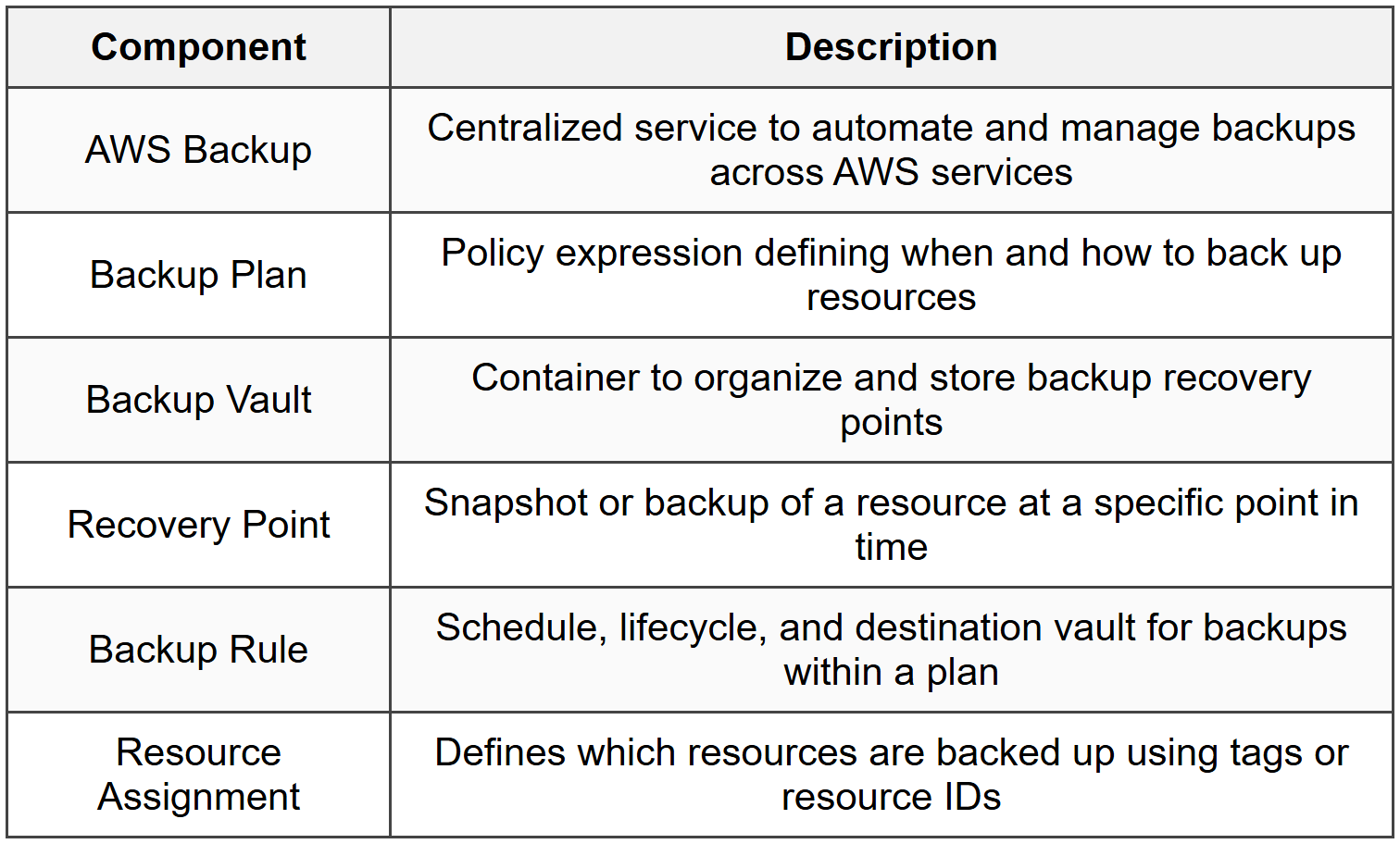
1.1 Core Concepts
1.2 Supported AWS Services
- Amazon EBS volumes
- Amazon EC2 instances
- Amazon RDS databases (all engines)
- Amazon Aurora clusters
- Amazon DynamoDB tables
- Amazon EFS file systems
- Amazon FSx file systems (Windows File Server, Lustre, NetApp ONTAP, OpenZFS)
- Amazon S3 buckets
- AWS Storage Gateway volumes
- Amazon DocumentDB clusters
- Amazon Neptune databases
- Amazon Timestream databases
- VMware CloudTM on AWS virtual machines
1.3 Key Features
- Centralized backup management across accounts and regions
- Policy-based backup scheduling and retention
- Tag-based resource selection
- Cross-region and cross-account backup copy
- Encryption at rest and in transit (AES-256)
- Compliance reporting and audit trails via AWS Backup Audit Manager
- Lifecycle management to move backups to cold storage
- Legal hold support for regulatory compliance
- Incremental backups for most services
2. Backup Plans and Policies
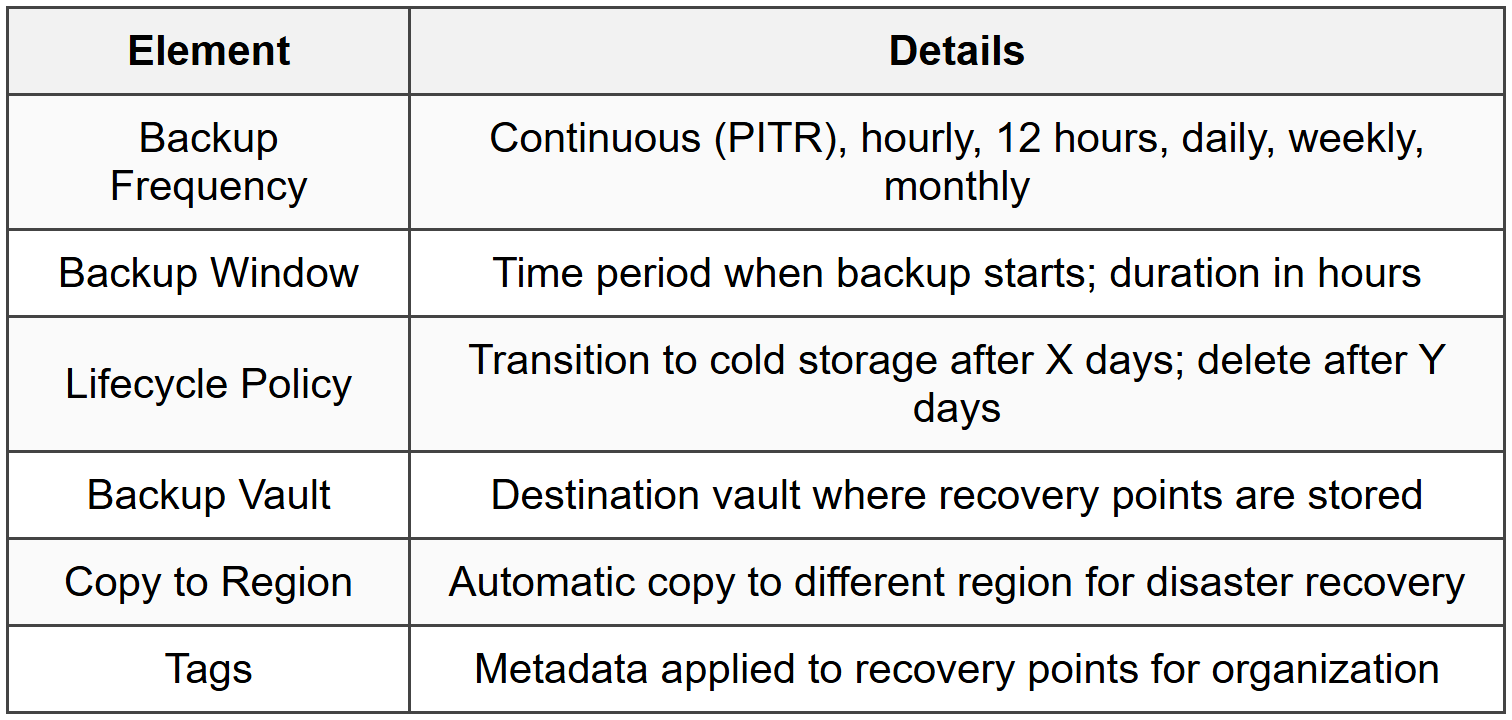
2.1 Backup Plan Components
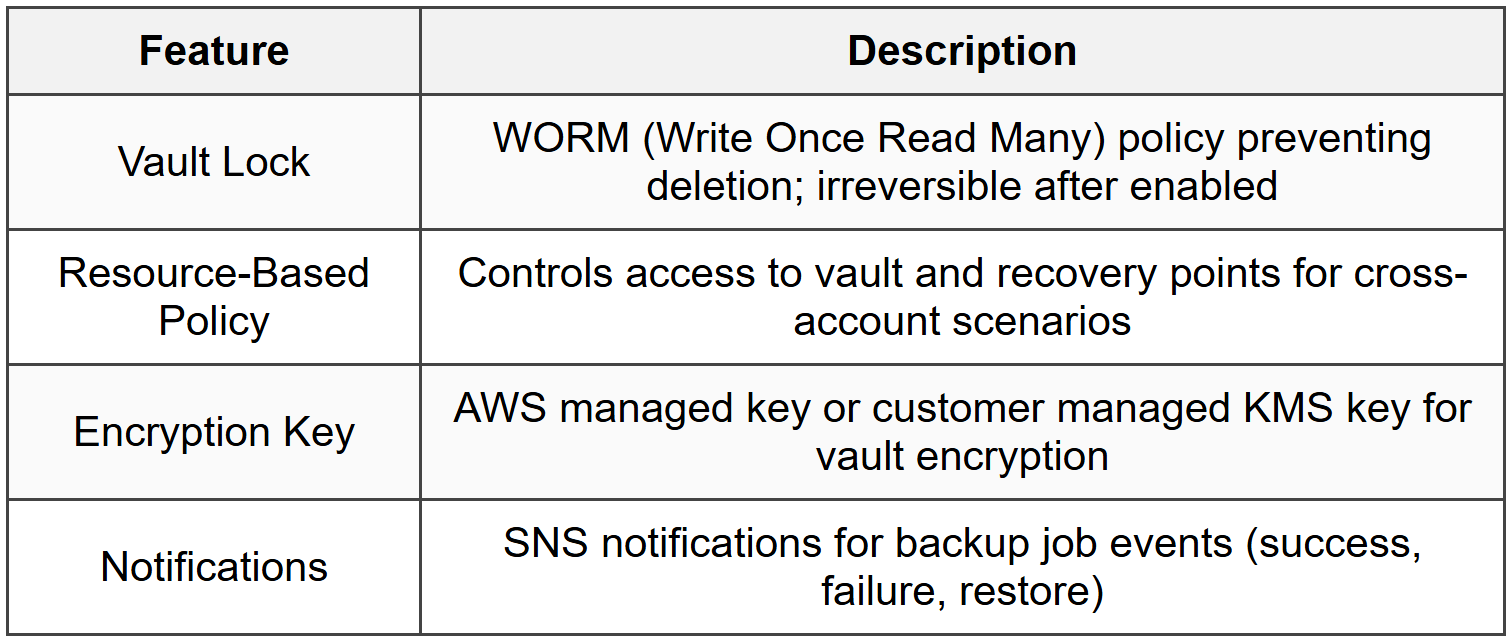
2.2 Backup Vault Features
2.3 Lifecycle Management
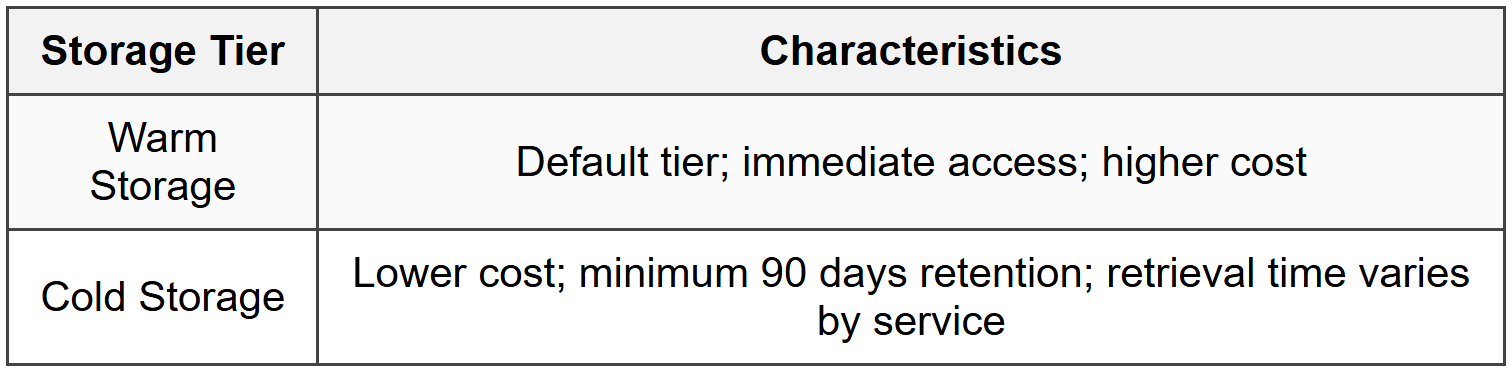
- Transition to cold storage: minimum 1 day after creation for eligible services
- EFS, DynamoDB, and S3 support cold storage transitions
- Delete after: minimum retention period varies by service (1-100+ days)
3. Backup Operations
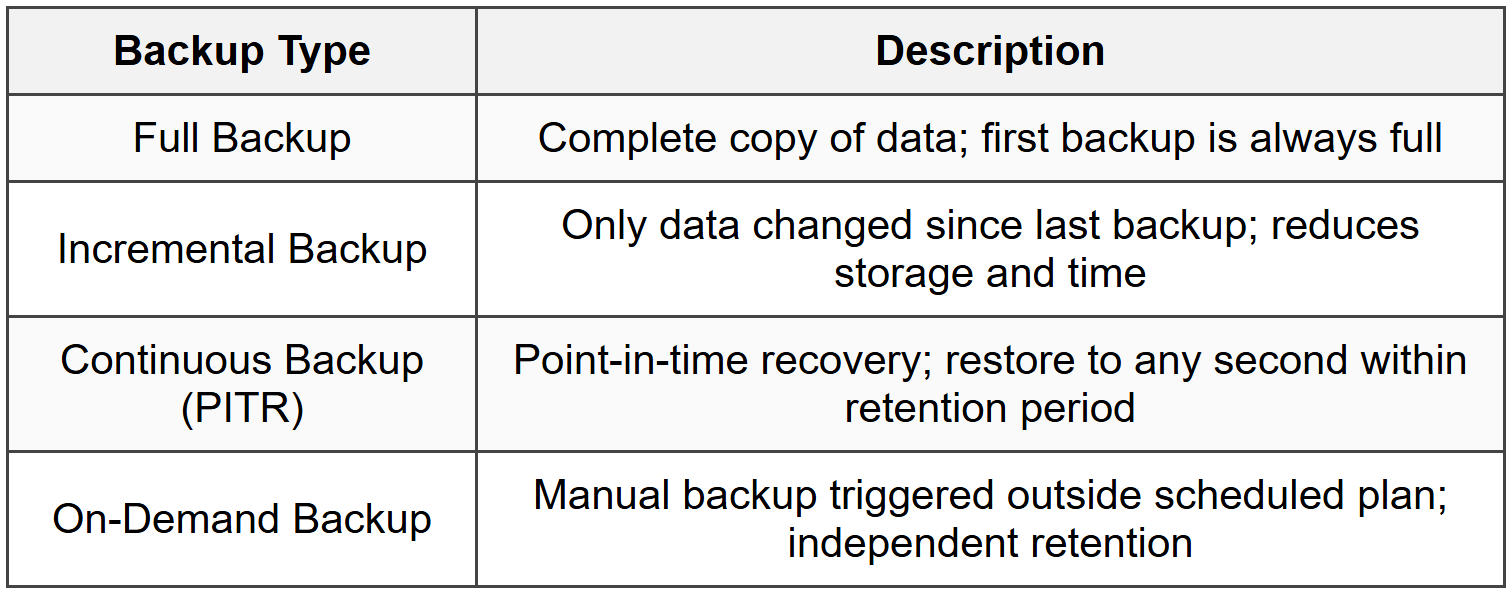
3.1 Backup Types
3.2 Point-in-Time Recovery (PITR)
- Supported services: RDS, Aurora, DynamoDB, S3
- Retention: 1 to 35 days for RDS/Aurora; up to 35 days for DynamoDB
- Restore to any second within retention window
- Continuous backup automatically enabled when PITR configured
- Separate from snapshot-based backups
3.3 Restore Operations
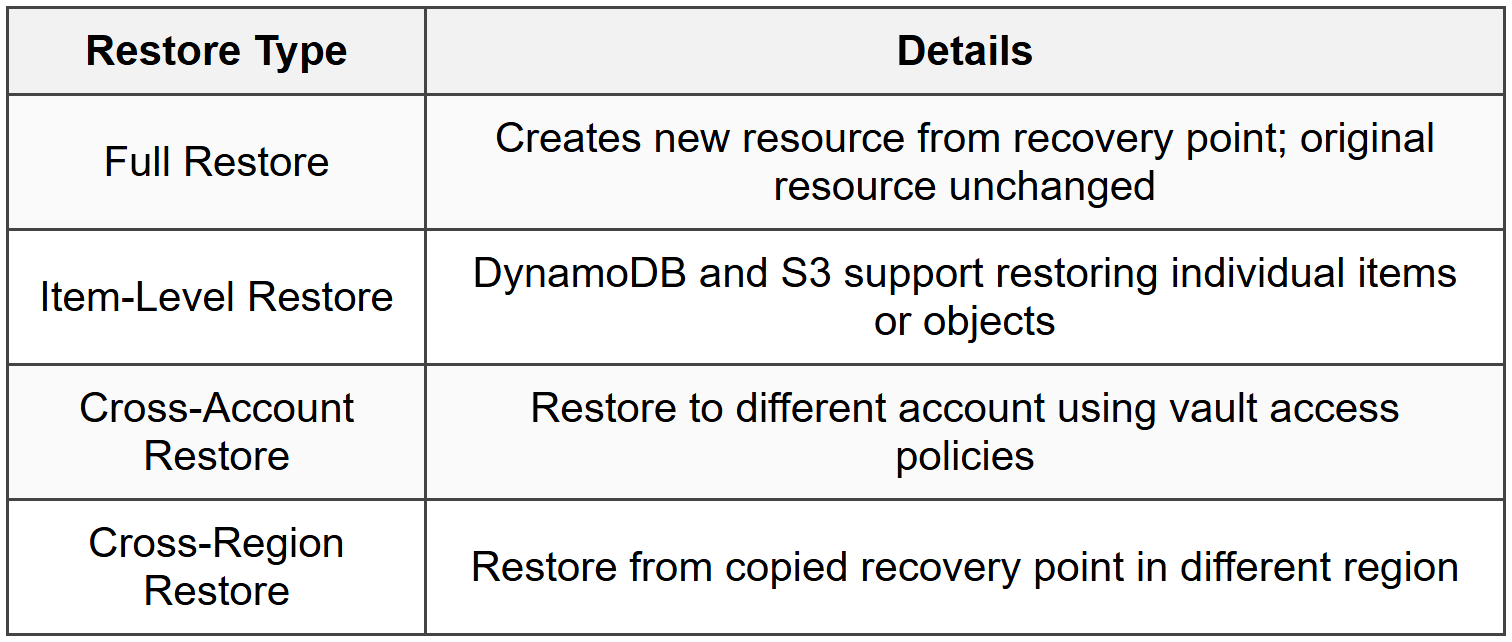
- RDS/Aurora restores create new database instance
- EBS restores create new volume
- EC2 restores create new AMI and can launch instance
- Restore time varies by service and data size
4. Cross-Region and Cross-Account Backup
4.1 Cross-Region Backup
- Configure copy action in backup plan rules
- Specify destination region and vault
- Independent lifecycle policies for copied backups
- Encrypted using destination region KMS key
- Additional charges for cross-region data transfer and storage
- Asynchronous copy after source backup completes
4.2 Cross-Account Backup
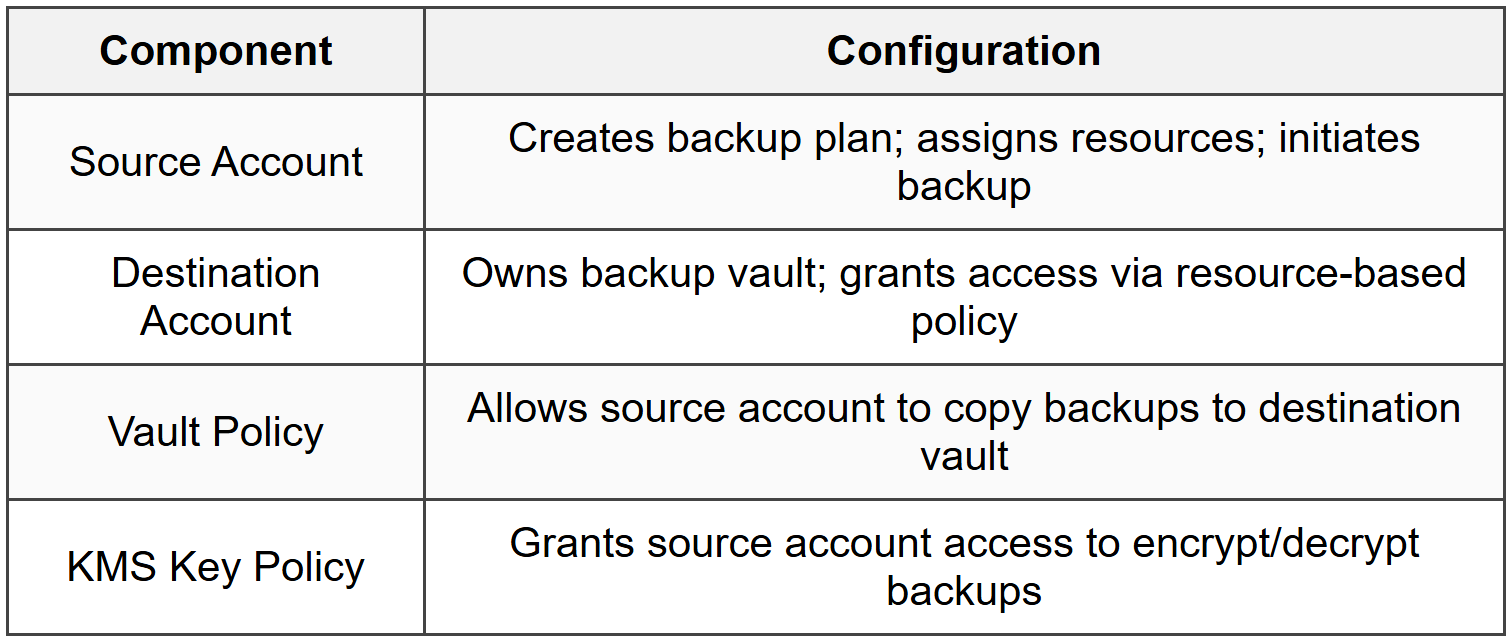
- Requires resource-based policy on destination vault
- Copy action configured in backup plan with destination account and vault
- Useful for centralized backup management or security isolation
5. AWS Backup Audit Manager
5.1 Core Functionality
- Audit and report on backup compliance across organization
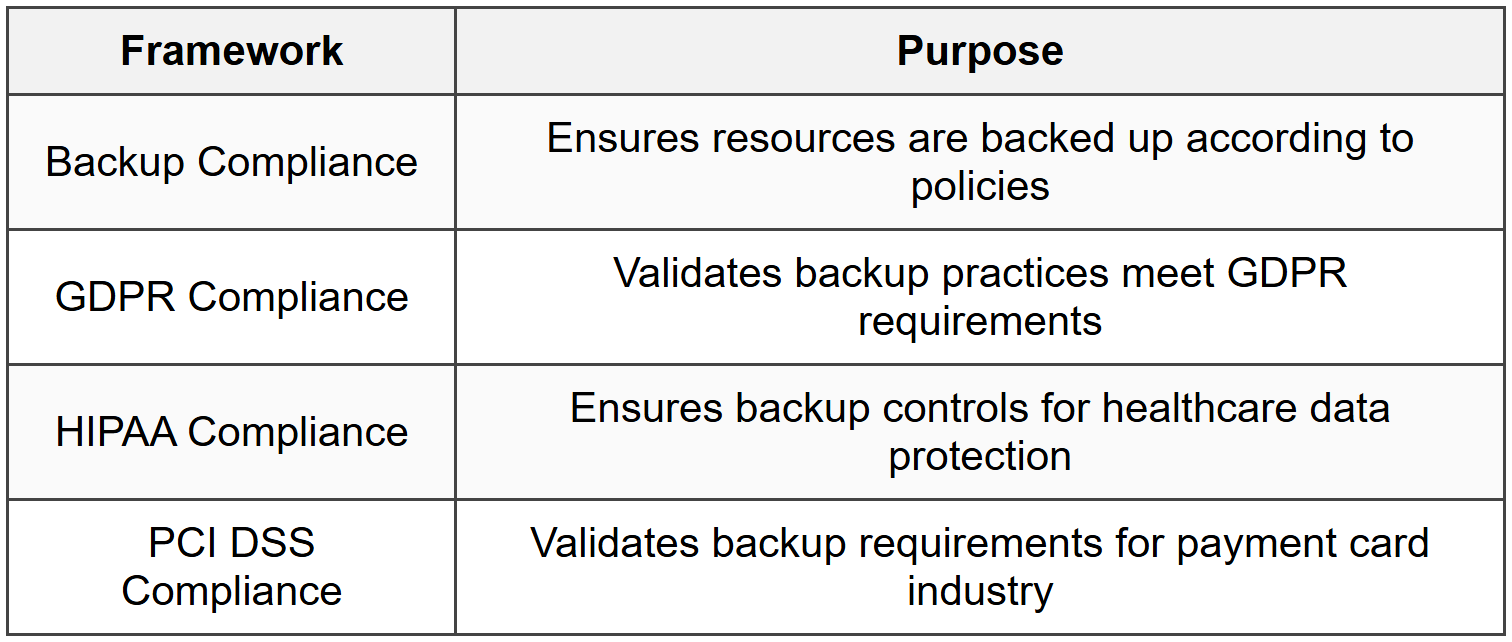
- Pre-built and custom frameworks for compliance standards
- Continuous monitoring of backup activity
- Automated compliance reports delivered to S3
- Integration with AWS Security Hub and CloudWatch
5.2 Built-In Frameworks
5.3 Controls and Monitoring
- Control: specific compliance rule (e.g., backup frequency, retention, encryption)
- Compliance status: Compliant, Non-Compliant, Insufficient Data
- Daily automated evaluation of resources
- SNS notifications for compliance violations
- Reports generated daily, weekly, or monthly
6. AWS Elastic Disaster Recovery (DRS)
6.1 Overview
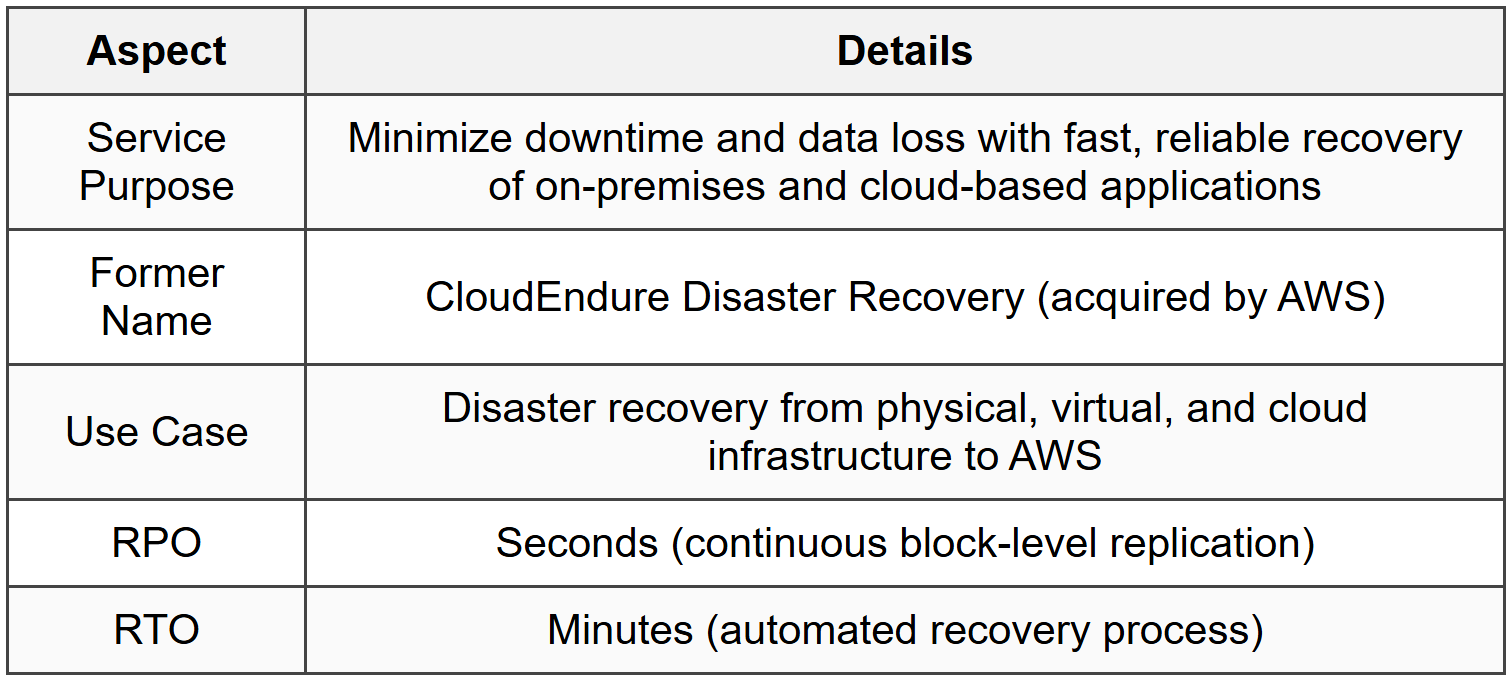
6.2 Architecture Components
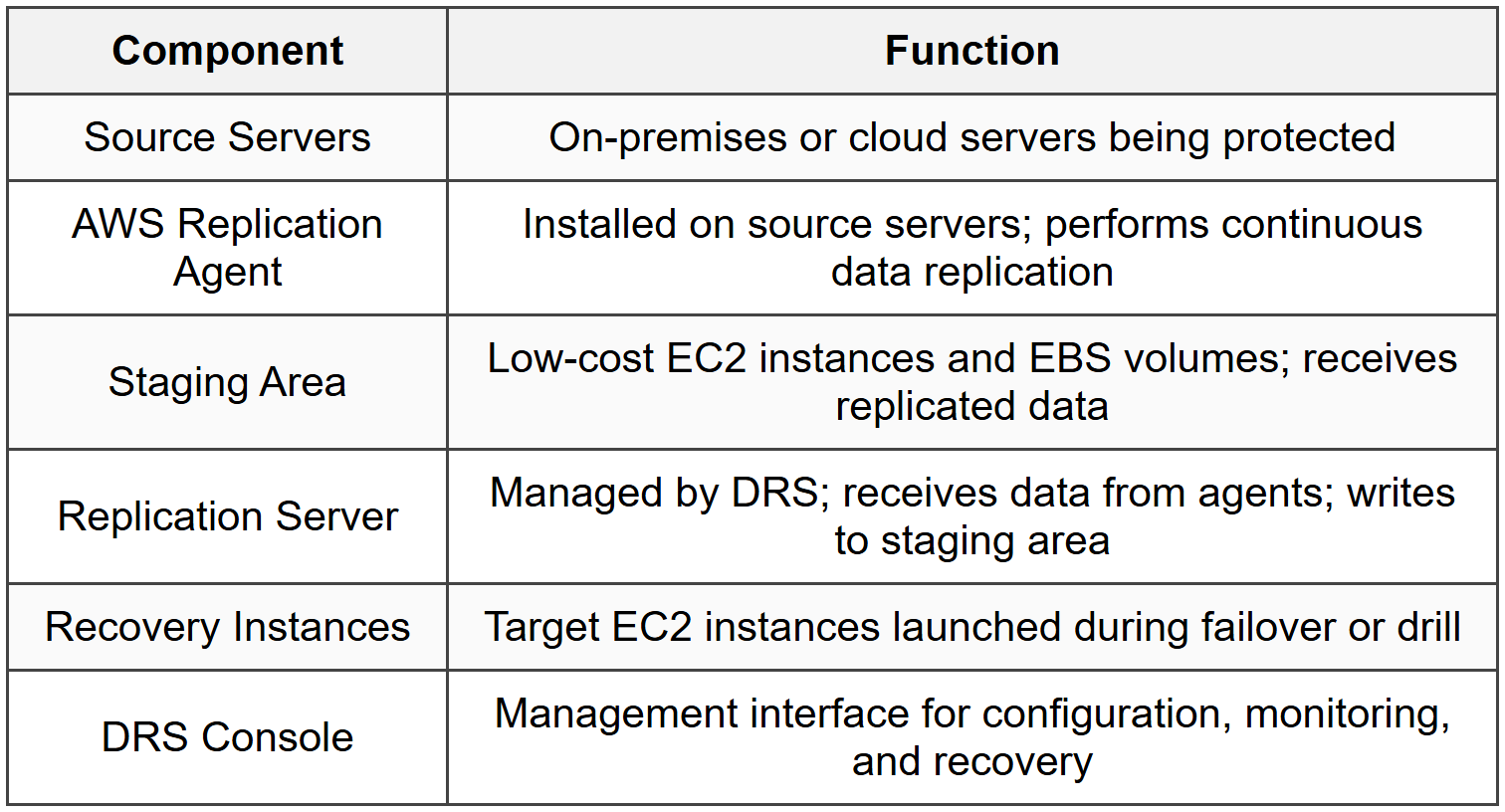
6.3 Replication Process
- Initial Sync: Full replication of source server data to staging area
- Continuous Replication: Block-level asynchronous replication of changes
- Data encrypted in transit using TLS
- Data encrypted at rest using EBS encryption
- Minimal performance impact on source systems
- Bandwidth throttling configurable to control network usage
7. Elastic Disaster Recovery Operations
7.1 Recovery Workflow
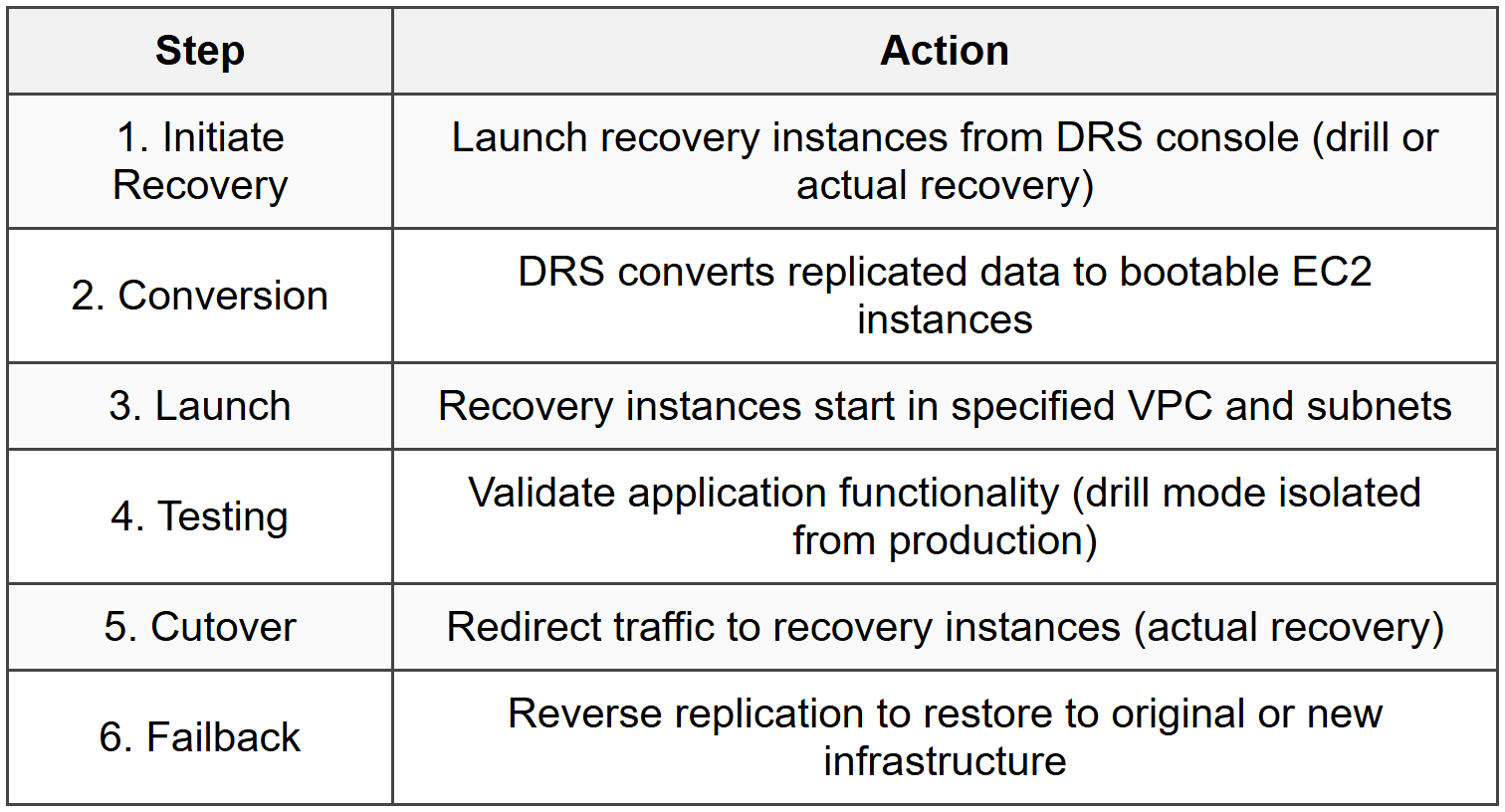
7.2 Recovery Types
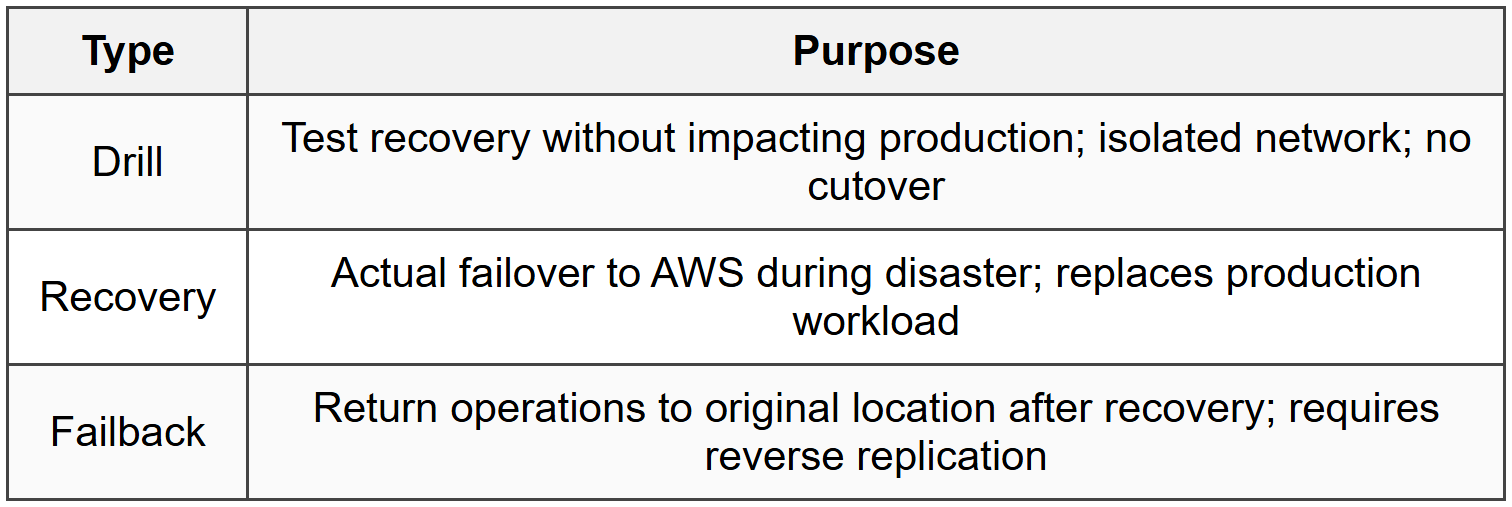
7.3 Launch Settings
- Instance Type Conversion: Map source specifications to EC2 instance types
- Network Settings: VPC, subnet, security groups, and public IP configuration
- IAM Role: Permissions for recovery instances
- Launch Template: Customize instance configuration (user data, tags, placement)
- Right-sizing recommendations provided based on source utilization
7.4 Failback Process
- Install failback agent on AWS recovery instances
- Configure reverse replication to target environment
- Data replicates from AWS back to on-premises or alternate cloud
- Perform cutover when ready to restore original production
- Terminate AWS resources to stop charges
8. DRS Monitoring and Management
8.1 Replication Status
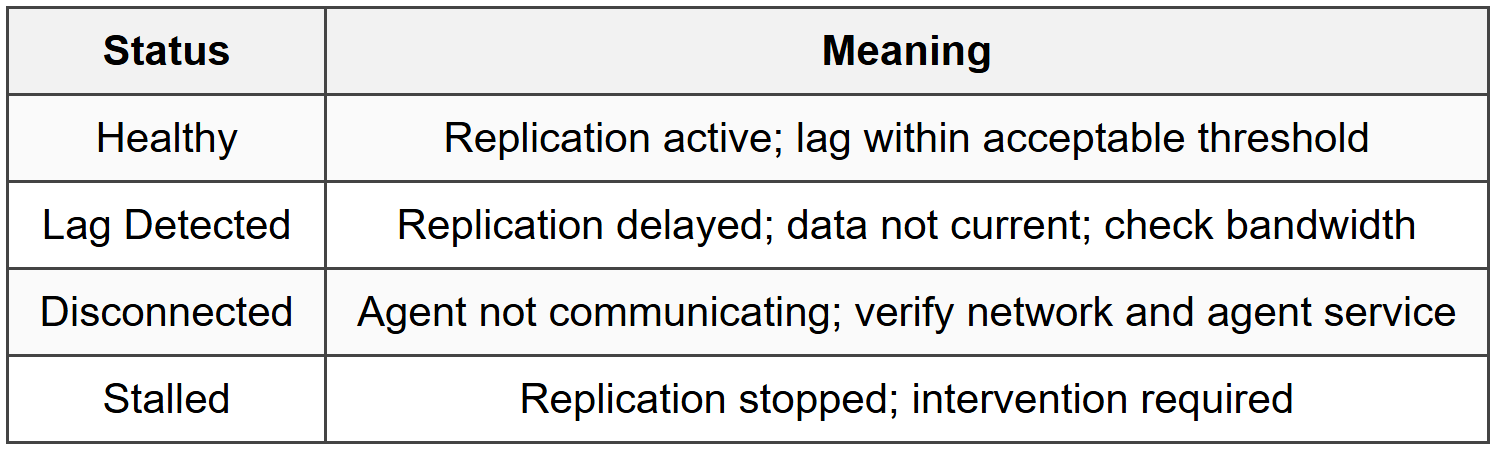
8.2 Key Metrics
- Replication Lag: Time difference between source and replicated data
- Data Replication Progress: Percentage of initial sync completed
- Backlog: Amount of data pending replication
- Bandwidth Usage: Network throughput for replication traffic
- Source Server Health: Agent connectivity and system resources
8.3 Integration and Alerts
- CloudWatch integration for metrics and alarms
- SNS notifications for replication issues and recovery events
- AWS Health Dashboard for service events
- EventBridge for automated workflows based on DRS events
- Service Catalog for standardized recovery configurations
9. Cost Optimization
9.1 AWS Backup Costs
- Backup Storage: Charged per GB-month for warm and cold storage
- Restore Requests: Charges for data restored (varies by service)
- Data Transfer: Cross-region copy incurs transfer fees
- Cold Storage Retrieval: Charges for retrieving from cold tier
- Use lifecycle policies to transition to cold storage after appropriate period
- Delete old backups that exceed retention requirements
9.2 DRS Costs
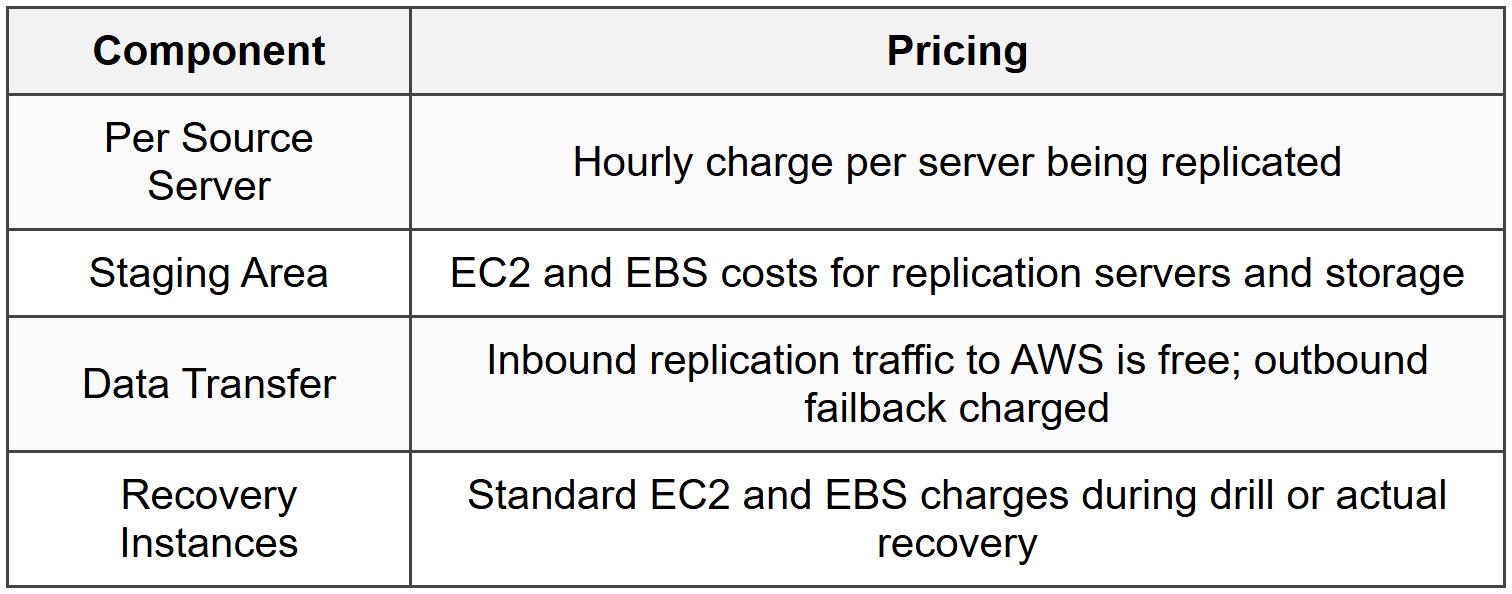
- Terminate drill instances immediately after testing
- Use smaller instance types for staging area when acceptable
- Monitor replication lag to avoid unnecessary data transfer
10. Best Practices
10.1 AWS Backup Best Practices
- Use tag-based resource assignment for automatic backup of new resources
- Implement cross-region backup copies for disaster recovery
- Enable Vault Lock for compliance and immutability requirements
- Test restore operations regularly to validate backup integrity
- Use AWS Backup Audit Manager to continuously monitor compliance
- Separate backup vaults for different data classifications or retention requirements
- Apply least privilege IAM policies for backup administrators
- Configure SNS notifications for backup job failures
- Document retention and lifecycle policies aligned with compliance requirements
- Use customer managed KMS keys for sensitive workloads
10.2 DRS Best Practices
- Perform regular recovery drills to validate RTO and RPO targets
- Document recovery runbooks with specific steps for failover
- Configure right-sized instance types to balance cost and performance
- Monitor replication lag and resolve issues promptly
- Use multiple availability zones for recovery instances
- Implement automation for recovery workflows using EventBridge
- Test failback procedures to ensure bidirectional recovery capability
- Apply security groups and network ACLs to recovery instances before drill
- Maintain inventory of source servers and their dependencies
- Coordinate with application teams for recovery validation criteria
10.3 RTO and RPO Planning
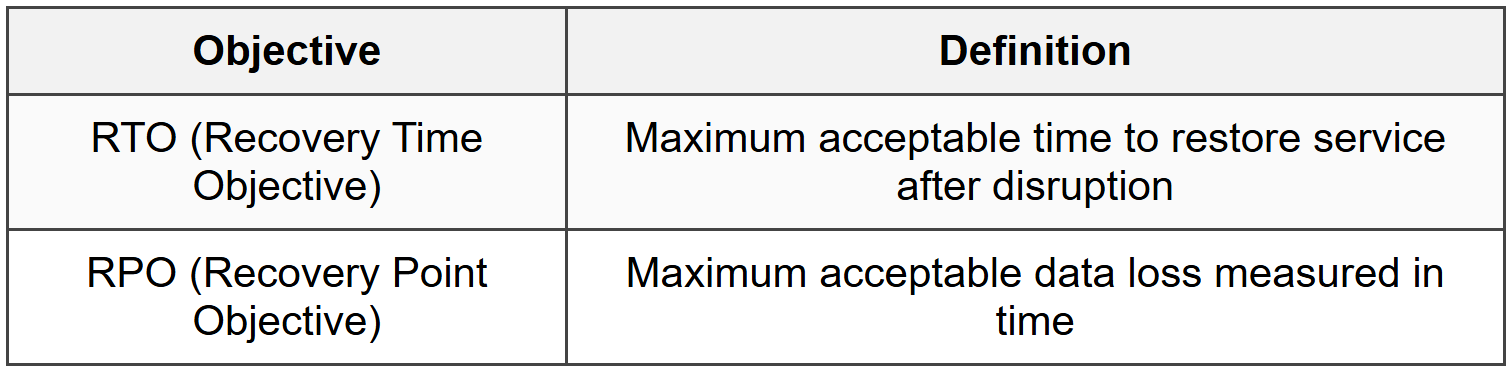
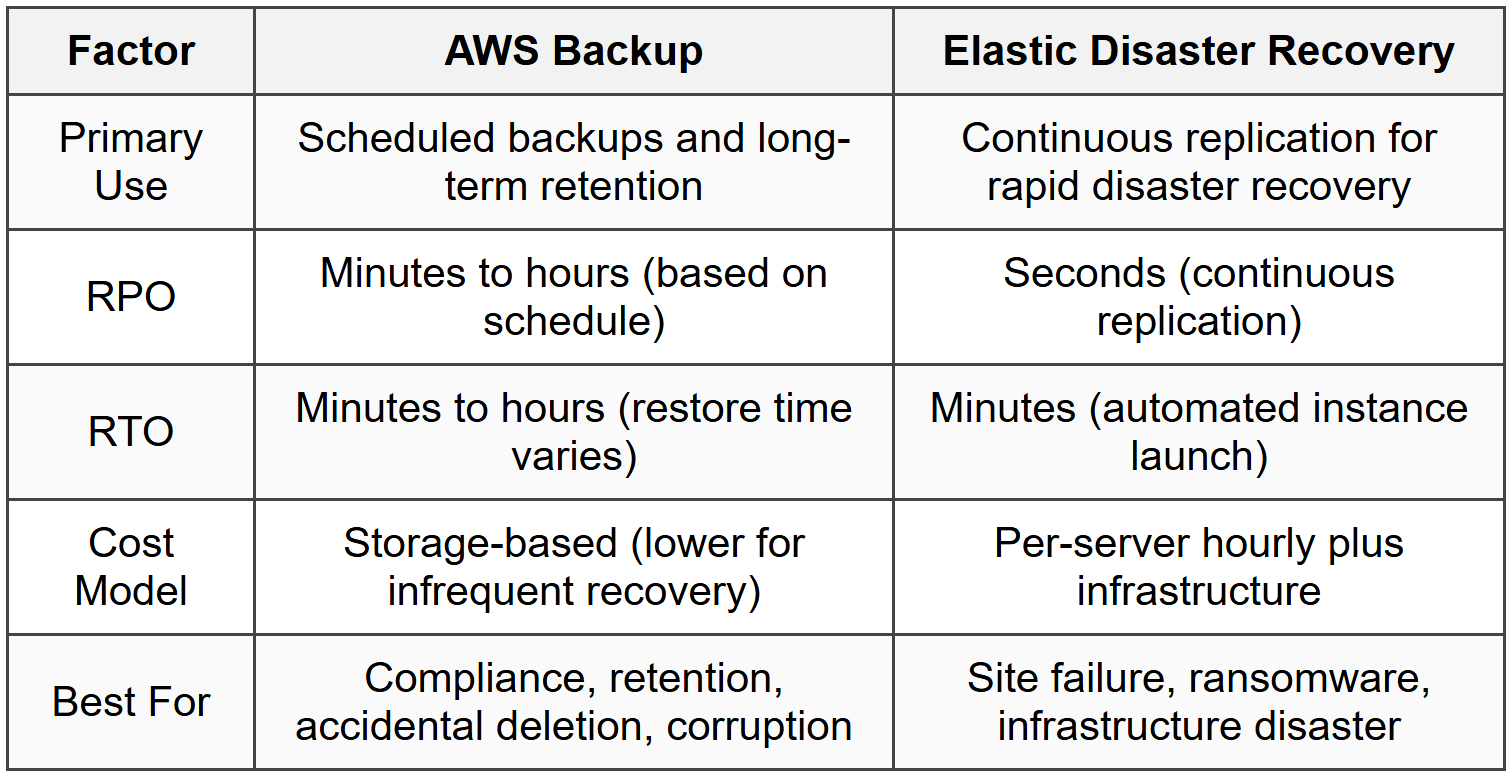
- AWS Backup: RPO determined by backup frequency; RTO depends on restore time
- DRS: RPO in seconds with continuous replication; RTO in minutes with automated launch
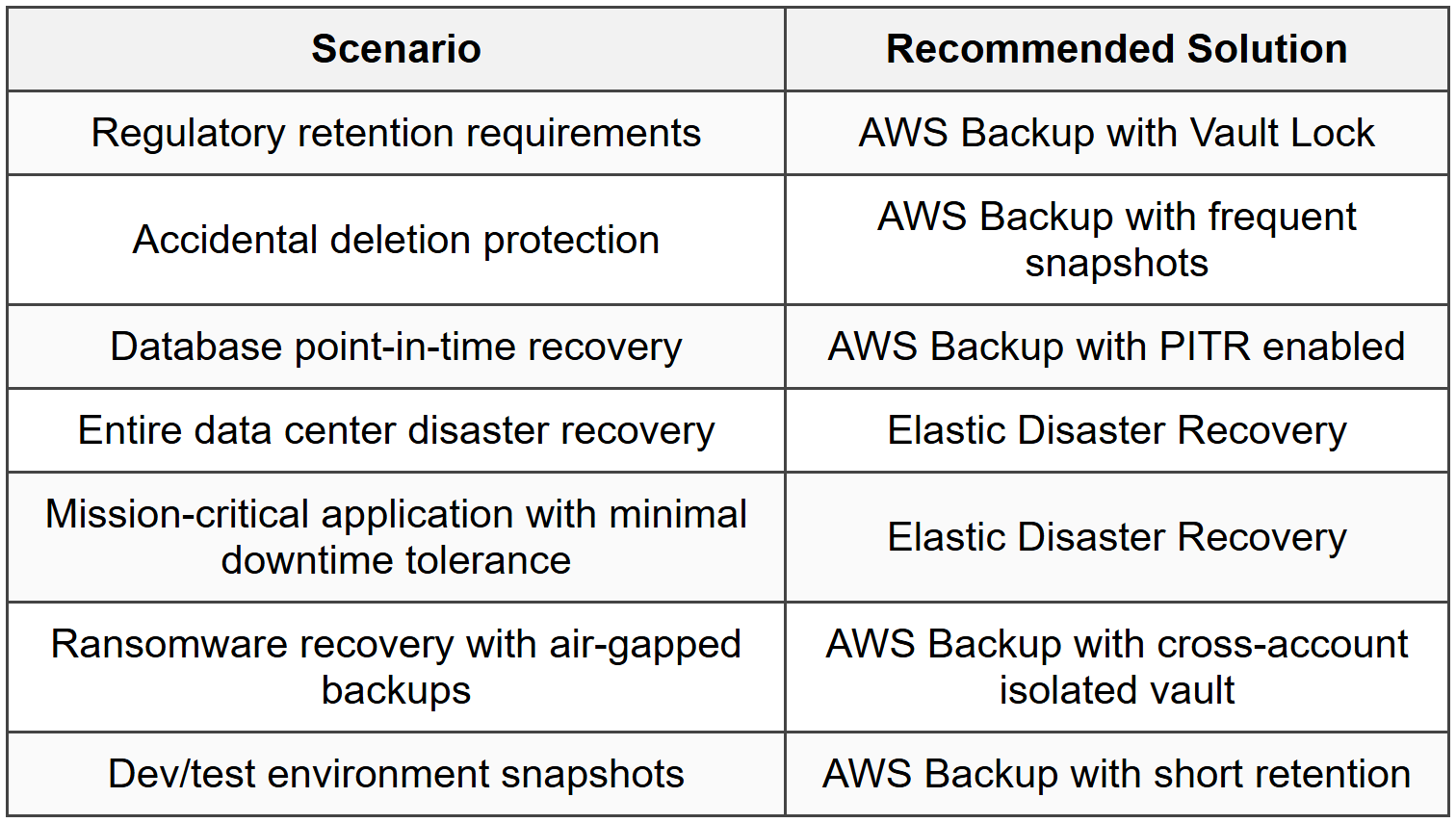
- Choose service based on business requirements for data loss and downtime tolerance
- Critical systems: DRS for active-active or active-passive DR
- Less critical systems: AWS Backup with appropriate frequency
11. Security and Compliance
11.1 Encryption
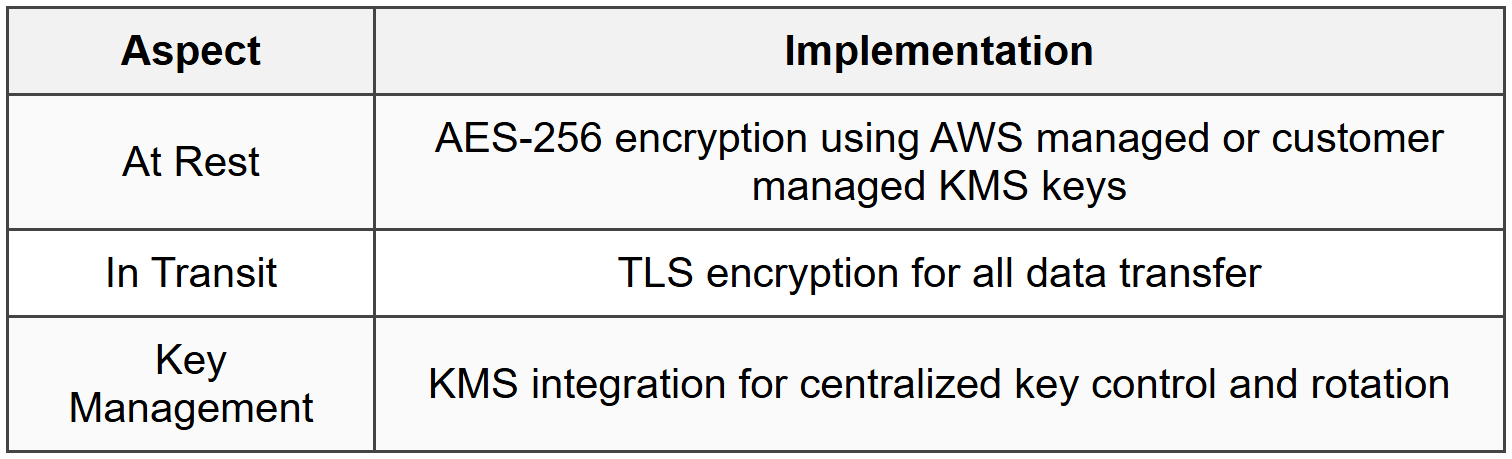
11.2 Access Control
- IAM policies control who can create and manage backup plans
- Resource-based policies on backup vaults for cross-account access
- Service Control Policies (SCPs) enforce backup requirements across organization
- Backup Vault Lock prevents deletion by any user including root
- MFA delete option for additional protection
- CloudTrail logs all API calls for audit trail
11.3 Compliance Features
- HIPAA eligible service for healthcare workloads
- PCI DSS compliant for payment processing systems
- GDPR compliant with data residency controls
- SOC 1, 2, 3 certified
- ISO 27001, 27017, 27018 certified
- FedRAMP authorized for government workloads
- AWS Backup Audit Manager for continuous compliance monitoring
12. Service Comparison and Use Cases
12.1 AWS Backup vs DRS
12.2 Use Case Selection
12.3 Hybrid Approach
- Use both services for defense-in-depth strategy
- DRS for rapid failover capability (near-zero RPO/RTO)
- AWS Backup for long-term retention and compliance
- AWS Backup provides additional recovery points independent of DRS
- Combine for comprehensive protection against multiple failure scenarios
The document Cheat Sheet: AWS Backup & Elastic Disaster Recovery is a part of the AWS Solutions Architect Course AWS Solutions Architect: Associate Level.
All you need of AWS Solutions Architect at this link: AWS Solutions Architect
About this Document

Apr 21, 2026 Last updated
Related Exams
Document Description: Cheat Sheet: AWS Backup & Elastic Disaster Recovery for AWS Solutions Architect 2026 is part of AWS Solutions Architect: Associate Level preparation. The notes and questions for Cheat Sheet: AWS Backup & Elastic Disaster Recovery have been prepared according to the AWS Solutions Architect exam syllabus. Information about Cheat Sheet: AWS Backup & Elastic Disaster Recovery covers topics like and Cheat Sheet: AWS Backup & Elastic Disaster Recovery Example, for AWS Solutions Architect 2026 Exam. Find important definitions, questions, notes, meanings, examples, exercises and tests below for Cheat Sheet: AWS Backup & Elastic Disaster Recovery.
Introduction of Cheat Sheet: AWS Backup & Elastic Disaster Recovery in English is available as part of our AWS Solutions Architect: Associate Level for AWS Solutions Architect & Cheat Sheet: AWS Backup & Elastic Disaster Recovery in Hindi for AWS Solutions Architect: Associate Level course. Download more important topics related with notes, lectures and mock test series for AWS Solutions Architect Exam by signing up for free. AWS Solutions Architect: Cheat Sheet: AWS Backup & Elastic Disaster Recovery
Description
Cheat Sheet: AWS Backup & Elastic Disaster Recovery of AWS Solutions Architect to help you remember important concepts with short tricks. Start learning for AWS Solutions Architect exam & improve retention with EduRev.
Information about Cheat Sheet: AWS Backup & Elastic Disaster Recovery
In this doc you can find the meaning of Cheat Sheet: AWS Backup & Elastic Disaster Recovery defined & explained in the simplest way possible. Besides explaining types of Cheat Sheet: AWS Backup & Elastic Disaster Recovery theory, EduRev gives you an ample number of questions to practice Cheat Sheet: AWS Backup & Elastic Disaster Recovery tests, examples and also practice AWS Solutions Architect tests



Related Searches
past year papers, Cheat Sheet: AWS Backup & Elastic Disaster Recovery, study material, Extra Questions, Cheat Sheet: AWS Backup & Elastic Disaster Recovery, shortcuts and tricks, Semester Notes, video lectures, Summary, Important questions, Cheat Sheet: AWS Backup & Elastic Disaster Recovery, Sample Paper, mock tests for examination, Free, Viva Questions, Objective type Questions, pdf , MCQs, ppt, practice quizzes, Exam, Previous Year Questions with Solutions;