Chapter Notes: Multiply 2-Digit Numbers With Area Models


Multiplication is a powerful tool that helps us solve problems quickly. When we multiply larger numbers, like 2-digit numbers, we need a smart way to organize our work. One helpful method is called the area model. The area model breaks big multiplication problems into smaller, easier parts that we already know how to solve. It uses the idea of finding the area of a rectangle, which is why it's called an area model. This method helps us see exactly how multiplication works and makes it easier to keep track of all the parts.
Understanding the Area Model
The area model is a visual way to multiply numbers by drawing a rectangle. We split each number into smaller parts based on place value, then find the area of each smaller rectangle. Finally, we add all those smaller areas together to get our answer.
Think of it like this: Imagine you have a big garden that measures 23 feet by 14 feet. Instead of trying to figure out the whole area at once, you could divide the garden into four smaller sections, find the area of each section, and then add them all together.
The area model works because of something called the distributive property. This property tells us that we can break apart numbers, multiply the parts separately, and then add the results. For example, 23 can be broken into 20 + 3, and 14 can be broken into 10 + 4.
Parts of the Area Model
When we use the area model to multiply two 2-digit numbers, we create a rectangle divided into four smaller rectangles. Here's what each part represents:
- The large rectangle: Represents the entire multiplication problem
- The length and width: Represent the two numbers we're multiplying
- The four smaller rectangles: Represent the parts we get when we split each number by place value
- The areas of the smaller rectangles: Represent the partial products that we add together
Breaking Numbers into Parts
Before we can use the area model, we need to break each 2-digit number into tens and ones. This is called decomposing a number by place value.
For example:
- 34 = 30 + 4
- 52 = 50 + 2
- 67 = 60 + 7
- 81 = 80 + 1
When we decompose numbers this way, we're getting ready to multiply each part separately. The tens place tells us how many groups of ten we have, and the ones place tells us how many individual ones we have.
Building the Area Model Rectangle
Let's learn how to draw and label an area model step by step. We'll use the problem 23 × 14 as our example.
Step 1: Draw the Rectangle
Start by drawing a large rectangle. This rectangle will represent the entire multiplication problem.
Step 2: Divide the Rectangle
Draw one vertical line and one horizontal line inside the rectangle to divide it into four smaller rectangles. Now you have four sections to work with.
Step 3: Label the Dimensions
Break apart both numbers by place value:
- 23 = 20 + 3
- 14 = 10 + 4
Write 20 and 3 above the rectangle (one number above each column). Write 10 and 4 to the left of the rectangle (one number next to each row).
Step 4: Find Each Partial Product
Now multiply the numbers at the edge of each small rectangle to find its area. These are called partial products because they are parts of the final answer.
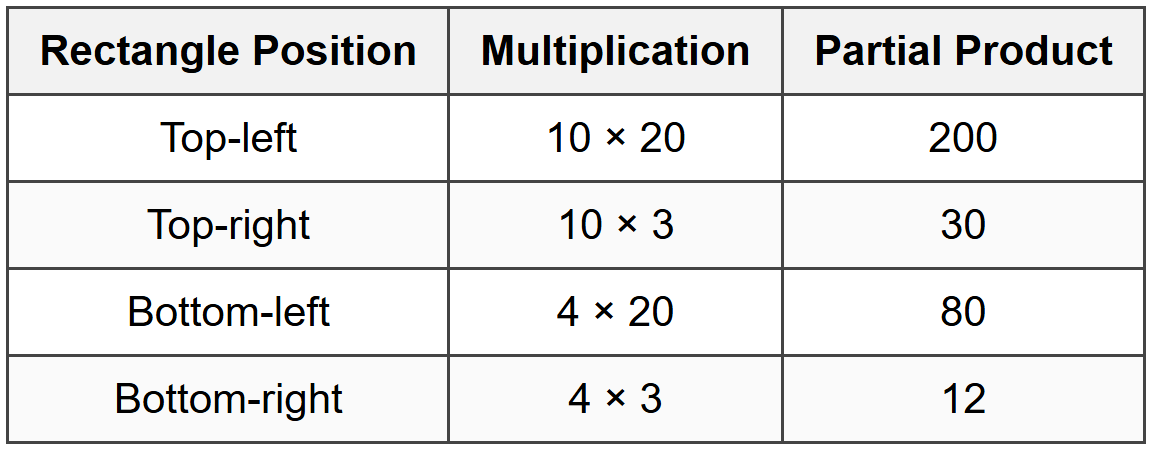
Step 5: Add All the Partial Products
Add all four partial products together to get the final answer:
200 + 30 + 80 + 12 = 322
So, 23 × 14 = 322
Complete Example with the Area Model
Example: A rectangular playground measures 32 meters by 15 meters.
The school wants to know the total area of the playground.What is 32 × 15?
Solution:
Step 1: Break apart each number by place value.
32 = 30 + 2
15 = 10 + 5Step 2: Draw a rectangle and divide it into four parts. Label the sides with the decomposed numbers.
Step 3: Find each partial product by multiplying the numbers at the edges of each small rectangle.
Top-left rectangle: 10 × 30 = 300
Top-right rectangle: 10 × 2 = 20
Bottom-left rectangle: 5 × 30 = 150
Bottom-right rectangle: 5 × 2 = 10Step 4: Add all the partial products together.
300 + 20 + 150 + 10 = 480The area of the playground is 480 square meters.
Working Through More Examples
Example: A baker makes 24 trays of cookies each day.
Each tray holds 18 cookies.How many cookies does the baker make in one day?
Solution:
Step 1: Decompose both numbers by place value.
24 = 20 + 4
18 = 10 + 8Step 2: Set up the area model with these parts.
Step 3: Calculate each partial product.
Top-left: 10 × 20 = 200
Top-right: 10 × 4 = 40
Bottom-left: 8 × 20 = 160
Bottom-right: 8 × 4 = 32Step 4: Add the partial products.
200 + 40 + 160 + 32 = 432The baker makes 432 cookies in one day.
Example: A school auditorium has 36 rows of seats.
Each row contains 27 seats.How many seats are in the auditorium altogether?
Solution:
Step 1: Break each number into tens and ones.
36 = 30 + 6
27 = 20 + 7Step 2: Draw and label the area model rectangle.
Step 3: Find all four partial products.
Top-left: 20 × 30 = 600
Top-right: 20 × 6 = 120
Bottom-left: 7 × 30 = 210
Bottom-right: 7 × 6 = 42Step 4: Add all the partial products together.
600 + 120 + 210 + 42 = 972The auditorium has 972 seats in total.
Tips for Using the Area Model Successfully
Here are some helpful hints to make the area model easier and more accurate:
- Always decompose by place value: Split numbers into tens and ones before you start. Don't break them into random parts.
- Keep your rectangle neat: Draw clear lines and label each section carefully. This helps you avoid confusion.
- Write partial products inside each rectangle: This keeps your work organized and easy to check.
- Double-check your multiplication: Make sure each partial product is correct before adding.
- Line up numbers when adding: When you add the partial products, line up the place values to avoid mistakes.
Common Mistakes to Avoid
Watch out for these errors when using the area model:
Mistake 1: Breaking apart numbers incorrectly
Incorrect: 35 = 20 + 15
Correct: 35 = 30 + 5Always split by place value. The tens go together, and the ones go together.
Mistake 2: Forgetting a partial product
When you multiply two 2-digit numbers, you should always get exactly four partial products. If you have fewer than four, go back and check your work.
Mistake 3: Adding incorrectly at the end
Make sure you add all four partial products carefully. It helps to write them in a column and line up the place values.
Connecting the Area Model to Other Methods
The area model is closely related to other multiplication methods you might learn. Understanding how they connect helps you become a better problem solver.
Area Model and Partial Products Algorithm
The partial products algorithm is the area model written in number form instead of a picture. Both methods use the same steps-they just look different on paper.
For example, to multiply 23 × 14:
Area Model: Draw a rectangle, find four partial products (200, 30, 80, 12), then add them.
Partial Products Algorithm: Write the problem vertically and multiply each digit separately:
23 × 14
20 × 10 = 200
20 × 4 = 80
3 × 10 = 30
3 × 4 = 12
Total = 322
Both methods give the same answer because they're doing the same math in different ways.
Area Model and Standard Algorithm
The standard algorithm is the traditional method where you multiply from right to left and carry numbers. The area model helps you understand why the standard algorithm works. Each step in the standard algorithm represents one of the partial products from the area model.
Why the Area Model is Helpful
The area model is more than just a way to find answers. It helps you understand multiplication deeply. Here's why it's valuable:
- Visual understanding: You can see what's happening in the problem, not just memorize steps.
- Place value practice: Breaking numbers apart strengthens your understanding of tens and ones.
- Fewer errors: The organized rectangle helps you keep track of all the parts.
- Builds number sense: You learn to estimate answers by looking at the largest partial products.
- Prepares for algebra: This method connects to multiplying expressions you'll learn later.
Practicing with Different Number Combinations
The area model works for any two 2-digit numbers. Let's look at a few different types of problems.
When One Number Ends in Zero
Example: Calculate 30 × 15 using the area model.
What is the product?
Solution:
Step 1: Decompose the numbers.
30 = 30 + 0
15 = 10 + 5Step 2: Find the partial products.
10 × 30 = 300
10 × 0 = 0
5 × 30 = 150
5 × 0 = 0Step 3: Add the partial products.
300 + 0 + 150 + 0 = 450The product is 450.
Notice that when we multiply by zero, we get zero. This makes some calculations very quick!
When Both Numbers Are Close to Each Other
Example: A square tile measures 22 inches on each side.
What is the area of the tile?
Solution:
Step 1: This is 22 × 22. Decompose the number.
22 = 20 + 2Step 2: Calculate each partial product.
20 × 20 = 400
20 × 2 = 40
2 × 20 = 40
2 × 2 = 4Step 3: Add them together.
400 + 40 + 40 + 4 = 484The area of the tile is 484 square inches.
Using the Area Model for Estimation
The area model also helps you estimate answers before you calculate. By looking at the largest partial product, you can get a good idea of how big your answer will be.
For example, if you're multiplying 48 × 32, the largest partial product is 40 × 30 = 1,200. This tells you the answer will be somewhere above 1,200, probably around 1,500. The actual answer is 1,536, so your estimate was very close!
Being able to estimate helps you check if your final answer makes sense. If you expected around 1,500 but got 536 or 5,360, you know to go back and check your work.
Real-World Applications
Multiplying 2-digit numbers comes up often in everyday life. Here are some situations where you might use the area model:
- Garden planning: Finding the area of a rectangular garden bed
- Room measurements: Calculating the floor area of a room for new carpet
- Shopping: Figuring out the cost of multiple items (like 15 boxes of crayons at $24 each)
- Sports: Calculating total points scored over multiple games
- Cooking: Multiplying recipe ingredients when cooking for a large group
- Fundraising: Finding total money raised when many people donate the same amount
Each time you use the area model, you're building a deeper understanding of how multiplication works. This strong foundation will help you with more complex math in the future, including fractions, decimals, and even algebra. The area model is a powerful tool that makes big multiplication problems manageable and clear.