Chapter - Client/Server Computing, PPT, BCA, Semester, Engineering

CLIENT/SERVER COMPUTING
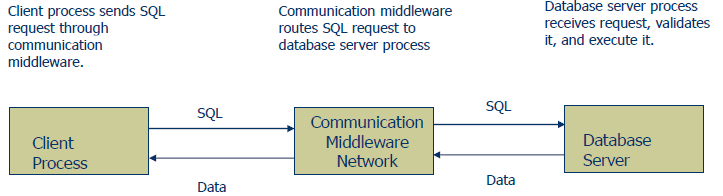
Client/Server is a term used to describe a computing model for the development of computerized systems. This model is based on the distribution of functions between two types of independent and autonomous processors: servers and clients. A client is any process that requests specific services from server processes. A server is a process that provides requested services for clients. Client and server processes can reside in the same computer or in different computers connected by a network.
Client/Server Computing------------------------------------------------------------------ Next Slide
Forces that drive the Client/Server
The general forces that drive the move to client/server computing are:
• The changing business environment.
• The growing need for enterprise data access.
• The demand for end user productivity gains based on the efficient use for data resources.
• Technological advances that have made client/server computing practical.
• Growing cost/performance advantages of PC-based platforms.
Client/Server Computing------------------------------------------------------------------ Next Slide
Client/Server Architecture
The client/Server architecture is based on hardware and software components that interacts to form a system. This system includes three main components:
•Clients
•Servers
•Communication middleware
Client/Server Computing------------------------------------------------------------------ Next Slide
Client/Server Architecture…
• Client:
The client is any computer process that requests services from the server. The client is also known as the front-end- application, reflecting the fact that the end user usually interacts with the client process.
Client/Server Computing------------------------------------------------------------------ Next Slide
• Server:
The server is any computer process providing services to the clients. The server is also known as the back-end application, reflecting the fact that the server process provides the background services for the client process.
Client/Server Computing------------------------------------------------------------------ Next Slide
• Communication middleware:
It is any computer process(es) through which clients and servers communicate. The communication middleware, also known as middleware or the communications layers, is made up of several layers of software that aid the transmission of data and control information between clients and servers.
Client/Server Computing------------------------------------------------------------------ Next Slide
How Components Interact
Client/Server Computing------------------------------------------------------------------ Next Slide
CLIENT/SERVER PRINCIPLES
• Hardware Independence
• Software Independence
• Operating System
• Network System
• Applications
• Open access to services
Client/Server Computing------------------------------------------------------------------ Next Slide
CLIENT/SERVER PRINCIPLES…
• Process distribution
•Process autonomy
•Maximization of local resources
•Scalability and flexibility
•Interoperability and Integration
•Standards
Client/Server Computing------------------------------------------------------------------ Next Slide
CLIENT/SERVER PRINCIPLES…
Hardware Independence:
The principle of hardware independence requires that the client, server, and communications middleware processes run on multiple hardware platforms(IBM, DEC, APPLE, and so on) without any functional difference.
Client/Server Computing------------------------------------------------------------------ Next Slide
CLIENT/SERVER PRINCIPLES…
Software Independence:
The principle of software independence requires that the client, server, and communications middleware processes support multiple operating system(such as win98, NT, OS/2, Linux, and Unix), multiple network protocols (such as IPX and TCP/IP), and multiple applications(spreadsheets, databases, electronic mail, and so on).
Client/Server Computing------------------------------------------------------------------ Next Slide
CLIENT/SERVER PRINCIPLES…
Open access to services:
All clients in the system must have open access to all the services provided within the network, and these services must not be dependent on the location of the client or the server. A key issue is that the services be provided on demand to the client. In fact, the provision of on-demand service is one of the main objectives of the client/server computing model.
Client/Server Computing------------------------------------------------------------------ Next Slide
CLIENT/SERVER PRINCIPLES…
Process distribution:
A prime identifying characteristic of client/server systems is that the processing of information is disturbed among clients and servers. The division of the application processing load must conform to the following rules:
Client/Server Computing------------------------------------------------------------------ Next Slide
CLIENT/SERVER PRINCIPLES…
Process distribution…
• Client and server processes must be autonomous entities with clearly defined boundaries and functions.
• Local utilization of resources(at both the client and server sides) must be maximized. The client and server processes must fully utilize the processing power of the host computers.
Client/Server Computing------------------------------------------------------------------ Next Slide
CLIENT/SERVER PRINCIPLES…
Process distribution…
• Scalability and Flexibility require that the client and server processes be easily upgradeable to run on more powerful hardware and software platforms.
• Interoperability and integration require that client and server processes be seamlessly integrated to form a system. Swapping a server process must be transparent to the client process.
Client/Server Computing------------------------------------------------------------------ Next Slide
CLIENT/SERVER PRINCIPLES…
Standards:
Finally, all the principles must be based on standards applied within the client/server architecture. For example, standards must govern the user interface, data access, network protocols, inter process communications, and so on. Standards ensures that all components interact in an orderly manner to achieve the desired results.
Client/Server Computing------------------------------------------------------------------ Next Slide
Client Components
• Power Hardware
• An operating system capable of multitasking
• A graphical user interface(GUI)
• Communications Capabilities
Client/Server Computing------------------------------------------------------------------ Next Slide
Server Components
• File services
• Print services
• Fax services
• Communication services
Client/Server Computing------------------------------------------------------------------ Next Slide
Server Components…
• Database services
• Transaction services
• Miscellaneous services
Client/Server Computing------------------------------------------------------------------ Next Slide
Client/Server Databases
A database management system (DBMS) lies at the center of most client/server systems in use today. To function properly, the client/server DBMS must be able to:
• Provide transparent data access to multiple and heterogeneous clients, regardless of the hardware, software, and network platform used by the client application.
Client/Server Computing------------------------------------------------------------------ Next Slide
Client/Server Databases…
• Allow client requests to the database server (using SQL requests) over the network.
• Process client data requests at the local server.
• Send only the SQL results to the clients over the network.
Client/Server Computing------------------------------------------------------------------ Next Slide
Client/Server Databases…
A client/server DBMS reduces network traffic because only the rows that matches the query are returned. Therefore, the client computer resources are available to perform other system chores such as the management of the graphical user interface.
Client/Server Computing------------------------------------------------------------------ Next Slide
Client/Server Databases…
Client/server systems change the way in which we approach data processing. Data may be stored in one site or in multiple sites.
Client/Server Computing------------------------------------------------------------------ Next Slide
CLIENT/SERVER DEVELOPMENT TOOLS
• GUI-based development
• A GUI builder that supports multiple interfaces
• Object-oriented development with support for code reusability
Client/Server Computing------------------------------------------------------------------ Next Slide
CLIENT/SERVER DEVELOPMENT TOOLS…
• Data dictionary with a central repository for data and applications
• Support for multiple databases
• Data access regardless of data model
Client/Server Computing------------------------------------------------------------------ Next Slide
CLIENT/SERVER DEVELOPMENT TOOLS…
•Seamless access to multiple databases.
•Complete SDLC support from planning to implementation and maintenance
•Team development support
Client/Server Computing------------------------------------------------------------------ Next Slide
CLIENT/SERVER DEVELOPMENT TOOLS…
•Support for third-party development tools
•Prototyping and rapid application development (RAD) capabilities
•Support for multiple platforms
FAQs on Chapter - Client/Server Computing, PPT, BCA, Semester, Engineering
| 1. What is client/server computing? |  |
| 2. How does client/server computing work? | |
| 3. What are the advantages of client/server computing? | |
| 4. What is the difference between client and server in client/server computing? | |
| 5. What are some examples of client/server computing? | |


