Basic Computer Model & Different Units of Computer | Computer Architecture & Organisation (CAO) - Computer Science Engineering (CSE) PDF Download

Different Units of Computer
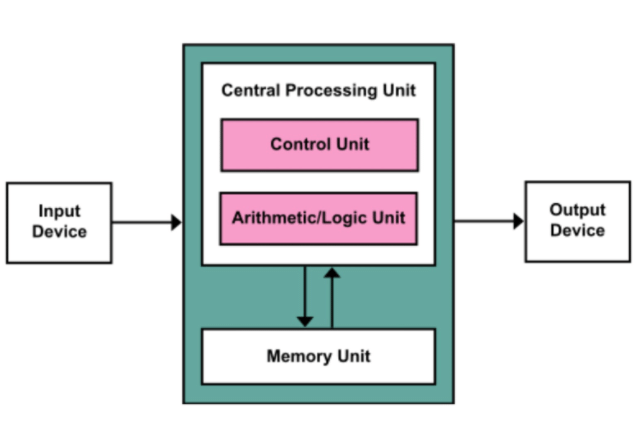
The model of a computer can be described by four basic units in high-level abstraction. These basic units are:
- Central Processor Unit
- Input Unit
- Output Unit
- Memory Unit
A. Central Processor Unit [CPU]
The central processor unit consists of two basic blocks:
- The program control unit has a set of registers and control circuit to generate control signals.
- The execution unit or data processing unit contains a set of registers for storing data and an Arithmatic and Logic Unit (ALU) for execution of arithmatic and logical operations. In addition, CPU may have some additional registers for temporary storage of data.
B. Input Unit
With the help of input unit data from outside can be supplied to the computer. Program or data is read into main storage from input device or secondary storage under the control of CPU input instruction.
Example of input devices: Keyboard, Mouse, Hard disk, Floppy disk, CD-ROM drive etc
C. Output Unit
With the help of output unit computer results can be provided to the user or it can be stored in stograge device permanently for future use. Output data from main storage go to output device under the control of CPU output instructions.
Example of output devices: Printer, Monitor, Plotter, Hard Disk, Floppy Disk etc.
D. Memory Unit
Memory unit is used to store the data and program. CPU can work with the information stored in memory unit. This memory unit is termed as primary memory or main memory module. These are basically semi conductor memories.
There ate two types of semiconductor memories -
l Volatile Memory: RAM (Random Access Memory).
l Non-Volatile Memory: ROM (Read only Memory), PROM (Programmable ROM)
EPROM (Erasable PROM), EEPROM (Electrically Erasable PROM).
There is another kind of storage device, apart from primary or main memory, which is known as secondary memory. Secondary memories are non volatile memory and it is used for permanent storage of data and program.
Example of secondary memories:
Hard Disk, Floppy Disk, Magenetic Tape ------ These are magnetic devices,
CD-ROM ------ is optical device
Thumb drive (or pen drive) ------ is semiconductor memory.
|
20 videos|113 docs|48 tests
|
FAQs on Basic Computer Model & Different Units of Computer - Computer Architecture & Organisation (CAO) - Computer Science Engineering (CSE)
| 1. What is the basic computer model? |  |
| 2. What is a memory unit in a computer? | |
| 3. What are the different units of a computer? | |
| 4. How does the memory unit work in a computer? | |
| 5. What is the difference between primary and secondary memory? | |



|
20 videos|113 docs|48 tests
|
|
Explore Courses for Computer Science Engineering (CSE) exam
|

|
Sample Paper
,study material
,practice quizzes
,Important questions
,mock tests for examination
,ppt
,Viva Questions
,Objective type Questions
,MCQs
,Extra Questions
,Basic Computer Model & Different Units of Computer | Computer Architecture & Organisation (CAO) - Computer Science Engineering (CSE)
,Previous Year Questions with Solutions
,Exam
,shortcuts and tricks
,Basic Computer Model & Different Units of Computer | Computer Architecture & Organisation (CAO) - Computer Science Engineering (CSE)
,Summary
,Free
,video lectures
,Semester Notes
,Basic Computer Model & Different Units of Computer | Computer Architecture & Organisation (CAO) - Computer Science Engineering (CSE)
,past year papers
,




Basic Computer Model & Different Units of Computer Free PDF Download
Importance of Basic Computer Model & Different Units of Computer
Basic Computer Model & Different Units of Computer Notes
Basic Computer Model & Different Units of Computer Computer Science Engineering (CSE) Questions
Study Basic Computer Model & Different Units of Computer on the App
|
© EduRev
|
Education Revolution
|


|