


All Exams > Class 3 > International Computer Science Olympiad for Class 3 > All Questions
All questions of Section - 3: Information Technology for Class 3 Exam
What is the purpose of a 'Password' on your computer? - a)It's a secret code that helps protect your computer from bugs.
- b)It's a magic word that makes your computer work faster.
- c)It's a funny picture on your computer screen.
- d)None of these
Correct answer is option 'A'. Can you explain this answer?
What is the purpose of a 'Password' on your computer?
a)
It's a secret code that helps protect your computer from bugs.
b)
It's a magic word that makes your computer work faster.
c)
It's a funny picture on your computer screen.
d)
None of these
 | Freak Artworks answered |
A password is like a secret code that only you should know. It helps keep your computer safe from people who shouldn't use it.

What is possible with the latest IT developments?- a)Grow plants
- b)Control traffic lights
- c)Paint pictures
- d)All of these
Correct answer is option 'B'. Can you explain this answer?
What is possible with the latest IT developments?
a)
Grow plants
b)
Control traffic lights
c)
Paint pictures
d)
All of these
 | Aarushi gupta answered |
Understanding IT Developments
In today's world, Information Technology (IT) has advanced significantly, enabling us to control various systems and processes. Let's explore why controlling traffic lights is the correct answer.
Control Traffic Lights
- Smart Traffic Management: IT developments allow for sophisticated systems that can manage traffic lights more efficiently.
- Real-Time Data Processing: Sensors and cameras collect data on traffic volume and flow, allowing for real-time adjustments to traffic signals.
- Reduced Congestion: By optimizing traffic light sequences based on current conditions, we can reduce waiting times and ease congestion in busy areas.
- Emergency Vehicle Priority: Advanced systems can give priority to emergency vehicles, ensuring they reach their destinations faster.
Why Other Options Are Less Relevant
- Grow Plants: While IT can support agriculture through monitoring and automation, it does not directly grow plants. Growing plants relies more on biological processes and environmental factors.
- Paint Pictures: Although technology allows for digital art creation, it is not a traditional form of painting. The act of painting itself involves human creativity and physical materials.
Conclusion
In summary, controlling traffic lights is a clear application of the latest IT developments, showcasing how technology can improve urban infrastructure. While growing plants and painting pictures are influenced by technology, they do not primarily rely on IT for their fundamental processes.
In today's world, Information Technology (IT) has advanced significantly, enabling us to control various systems and processes. Let's explore why controlling traffic lights is the correct answer.
Control Traffic Lights
- Smart Traffic Management: IT developments allow for sophisticated systems that can manage traffic lights more efficiently.
- Real-Time Data Processing: Sensors and cameras collect data on traffic volume and flow, allowing for real-time adjustments to traffic signals.
- Reduced Congestion: By optimizing traffic light sequences based on current conditions, we can reduce waiting times and ease congestion in busy areas.
- Emergency Vehicle Priority: Advanced systems can give priority to emergency vehicles, ensuring they reach their destinations faster.
Why Other Options Are Less Relevant
- Grow Plants: While IT can support agriculture through monitoring and automation, it does not directly grow plants. Growing plants relies more on biological processes and environmental factors.
- Paint Pictures: Although technology allows for digital art creation, it is not a traditional form of painting. The act of painting itself involves human creativity and physical materials.
Conclusion
In summary, controlling traffic lights is a clear application of the latest IT developments, showcasing how technology can improve urban infrastructure. While growing plants and painting pictures are influenced by technology, they do not primarily rely on IT for their fundamental processes.
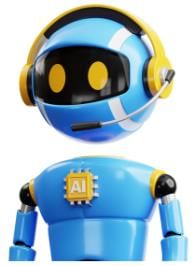
VR stands for- a)Virtual Reality
- b)Very Real
- c)Visible Reflection
- d)Vibrant Rainbow
Correct answer is option 'A'. Can you explain this answer?
VR stands for
a)
Virtual Reality
b)
Very Real
c)
Visible Reflection
d)
Vibrant Rainbow
 | Nitin naidu answered |
Understanding VR: Virtual Reality
Virtual Reality (VR) is a technology that creates immersive, interactive experiences through the use of computer-generated environments. Here's a detailed look at what VR entails:
What is Virtual Reality?
- VR refers to a simulated experience that can be similar to or completely different from the real world.
- Users typically wear VR headsets that provide visual and auditory feedback, creating the sensation of being present in a virtual environment.
How Does VR Work?
- Immersion: VR technology engages the user's senses, making them feel as though they are inside the game or simulation.
- Interactivity: Users can interact with the virtual world through controllers or motion sensors, allowing for a more engaging experience.
- Realism: Advanced graphics and sound design enhance the sense of realism, making the experience more believable.
Applications of VR
- Gaming: One of the most popular uses of VR, allowing players to experience games in a completely immersive way.
- Education: VR can be used for training simulations, allowing learners to practice in a safe, controlled environment.
- Healthcare: VR is utilized for therapy, pain management, and medical training.
Conclusion
In summary, VR stands for Virtual Reality, a groundbreaking technology that transforms how we experience digital content. It combines immersion, interactivity, and realism to create engaging experiences across various fields like gaming, education, and healthcare. Understanding VR is essential as it is becoming increasingly prevalent in our digital lives.
Virtual Reality (VR) is a technology that creates immersive, interactive experiences through the use of computer-generated environments. Here's a detailed look at what VR entails:
What is Virtual Reality?
- VR refers to a simulated experience that can be similar to or completely different from the real world.
- Users typically wear VR headsets that provide visual and auditory feedback, creating the sensation of being present in a virtual environment.
How Does VR Work?
- Immersion: VR technology engages the user's senses, making them feel as though they are inside the game or simulation.
- Interactivity: Users can interact with the virtual world through controllers or motion sensors, allowing for a more engaging experience.
- Realism: Advanced graphics and sound design enhance the sense of realism, making the experience more believable.
Applications of VR
- Gaming: One of the most popular uses of VR, allowing players to experience games in a completely immersive way.
- Education: VR can be used for training simulations, allowing learners to practice in a safe, controlled environment.
- Healthcare: VR is utilized for therapy, pain management, and medical training.
Conclusion
In summary, VR stands for Virtual Reality, a groundbreaking technology that transforms how we experience digital content. It combines immersion, interactivity, and realism to create engaging experiences across various fields like gaming, education, and healthcare. Understanding VR is essential as it is becoming increasingly prevalent in our digital lives.
Identify the tool. It is a machine that helps us write and draw on the computer. It has buttons we can press to click and move things on the screen. We use it to control the cursor.- a)Keyboard
- b)Mouse
- c)Calculator
- d)Camera
Correct answer is option 'B'. Can you explain this answer?
Identify the tool. It is a machine that helps us write and draw on the computer. It has buttons we can press to click and move things on the screen. We use it to control the cursor.
a)
Keyboard
b)
Mouse
c)
Calculator
d)
Camera
| | Arti nair answered |
Understanding the Mouse
The correct answer is option 'B' - Mouse. Here's why the mouse is the right choice.
What is a Mouse?
- A mouse is a handheld device used to interact with a computer.
- It allows users to control the cursor on the screen.
How Does it Work?
- The mouse typically has two buttons (left and right) and a scroll wheel.
- By moving the mouse on a flat surface, users can move the cursor around the screen.
Functions of a Mouse
- Clicking: The left button is usually used for selecting items and opening files.
- Dragging: Users can click and hold the left button to move items on the screen.
- Scrolling: The scroll wheel helps in navigating up and down web pages or documents.
Why Not the Other Options?
- Keyboard: Primarily used for typing text and commands, not for cursor control.
- Calculator: A device for mathematical calculations, not used for computer navigation.
- Camera: Used for capturing images and videos, not for writing or drawing.
Conclusion
The mouse is an essential tool that enhances the user experience by making it easier to navigate and interact with a computer. Its ability to control the cursor makes it indispensable for writing, drawing, and managing tasks on the screen.
The correct answer is option 'B' - Mouse. Here's why the mouse is the right choice.
What is a Mouse?
- A mouse is a handheld device used to interact with a computer.
- It allows users to control the cursor on the screen.
How Does it Work?
- The mouse typically has two buttons (left and right) and a scroll wheel.
- By moving the mouse on a flat surface, users can move the cursor around the screen.
Functions of a Mouse
- Clicking: The left button is usually used for selecting items and opening files.
- Dragging: Users can click and hold the left button to move items on the screen.
- Scrolling: The scroll wheel helps in navigating up and down web pages or documents.
Why Not the Other Options?
- Keyboard: Primarily used for typing text and commands, not for cursor control.
- Calculator: A device for mathematical calculations, not used for computer navigation.
- Camera: Used for capturing images and videos, not for writing or drawing.
Conclusion
The mouse is an essential tool that enhances the user experience by making it easier to navigate and interact with a computer. Its ability to control the cursor makes it indispensable for writing, drawing, and managing tasks on the screen.
Identify the game shown in the image below.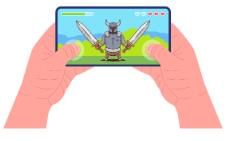
- a)Chess
- b)Soccer
- c)Scrabble
- d)Angry Birds
Correct answer is option 'D'. Can you explain this answer?
Identify the game shown in the image below.
a)
Chess
b)
Soccer
c)
Scrabble
d)
Angry Birds
 | Learning Enablers answered |
The game shown in the image is Angry Birds, a popular game on smartphones.
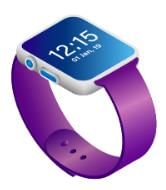
Examine the image. What type of technology is commonly associated with the device shown?
- a)Voice Recognition
- b)Augmented Reality
- c)Fitness Tracking
- d)Virtual Reality
Correct answer is option 'C'. Can you explain this answer?
Examine the image. What type of technology is commonly associated with the device shown?
a)
Voice Recognition
b)
Augmented Reality
c)
Fitness Tracking
d)
Virtual Reality
 | Yashina Kapoor answered |
The device shown is a fitness tracker, commonly associated with fitness tracking technology.
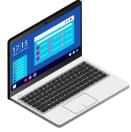
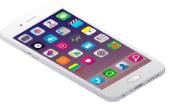
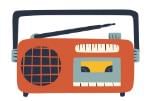
Look at the images below. Which of these devices typically comes with touchscreen technology?- a)
- b)

- c)
- d)
Correct answer is option 'C'. Can you explain this answer?
Look at the images below. Which of these devices typically comes with touchscreen technology?
a)
b)
c)
d)
| | Yashina Kapoor answered |
Smartphones commonly feature touchscreen technology for user interaction.
IoT stands for- a)Internet of Things
- b)Incredible Objects and Technologies
- c)Indoor and Outdoor Tasks
- d)Interesting Optical Tricks
Correct answer is option 'A'. Can you explain this answer?
IoT stands for
a)
Internet of Things
b)
Incredible Objects and Technologies
c)
Indoor and Outdoor Tasks
d)
Interesting Optical Tricks
| | Dipanjan Chatterjee answered |
Understanding IoT: Internet of Things
The term IoT stands for "Internet of Things." It represents a revolutionary concept where everyday objects are connected to the Internet, allowing them to send and receive data. This connectivity enhances functionality, efficiency, and user experience in various fields.
Key Features of IoT:
- Connectivity: IoT devices can communicate with each other and with centralized systems, making data sharing seamless.
- Automation: Many IoT devices automate tasks, reducing the need for human intervention. This can be seen in smart home devices that control lighting and temperature based on user preferences.
- Data Collection: IoT devices gather vast amounts of data, which can be analyzed to gain insights and make informed decisions. For example, fitness trackers collect health data that users can monitor for better health management.
- Remote Monitoring: With IoT, users can monitor their devices from anywhere in the world. This is particularly useful in sectors like agriculture, where farmers can track soil conditions and crop health remotely.
Applications of IoT:
- Smart Homes: Devices like smart thermostats and security cameras offer convenience and safety.
- Healthcare: Wearable devices monitor patient health in real-time, allowing for timely medical interventions.
- Manufacturing: IoT solutions streamline operations by monitoring machinery and predicting maintenance needs.
Conclusion:
The Internet of Things (IoT) is transforming how we interact with technology and our environment. Its ability to connect devices and analyze data leads to improved efficiency and smarter living. Understanding IoT is essential as it becomes increasingly integrated into our daily lives.
The term IoT stands for "Internet of Things." It represents a revolutionary concept where everyday objects are connected to the Internet, allowing them to send and receive data. This connectivity enhances functionality, efficiency, and user experience in various fields.
Key Features of IoT:
- Connectivity: IoT devices can communicate with each other and with centralized systems, making data sharing seamless.
- Automation: Many IoT devices automate tasks, reducing the need for human intervention. This can be seen in smart home devices that control lighting and temperature based on user preferences.
- Data Collection: IoT devices gather vast amounts of data, which can be analyzed to gain insights and make informed decisions. For example, fitness trackers collect health data that users can monitor for better health management.
- Remote Monitoring: With IoT, users can monitor their devices from anywhere in the world. This is particularly useful in sectors like agriculture, where farmers can track soil conditions and crop health remotely.
Applications of IoT:
- Smart Homes: Devices like smart thermostats and security cameras offer convenience and safety.
- Healthcare: Wearable devices monitor patient health in real-time, allowing for timely medical interventions.
- Manufacturing: IoT solutions streamline operations by monitoring machinery and predicting maintenance needs.
Conclusion:
The Internet of Things (IoT) is transforming how we interact with technology and our environment. Its ability to connect devices and analyze data leads to improved efficiency and smarter living. Understanding IoT is essential as it becomes increasingly integrated into our daily lives.
What does the word 'Website' mean?- a)It is a small book you read on the internet.
- b)It is a program that plays music on your computer.
- c)It is a place on the internet where you can find information and pictures.
- d)None of these
Correct answer is option 'C'. Can you explain this answer?
What does the word 'Website' mean?
a)
It is a small book you read on the internet.
b)
It is a program that plays music on your computer.
c)
It is a place on the internet where you can find information and pictures.
d)
None of these
| | Freak Artworks answered |
A website is like a place on the internet where you can go to read and see different things, like information, pictures, and sometimes even videos.
Identify the device. You can carry it wherever you go, as they are small in size and can fit in your pockets. It has a touchscreen as its display screen.- a)Laptop
- b)Desktop computer
- c)Smartphones
- d)None of these
Correct answer is option 'C'. Can you explain this answer?
Identify the device. You can carry it wherever you go, as they are small in size and can fit in your pockets. It has a touchscreen as its display screen.
a)
Laptop
b)
Desktop computer
c)
Smartphones
d)
None of these
 | Edgy Education answered |
Smartphones are small, portable devices that fit in your pockets and have touchscreens for display.
Which of the following tasks can be accomplished using the device shown in the image?
- a)Cook meals
- b)Capture photographs
- c)Listen to music
- d)Edit documents
Correct answer is option 'B'. Can you explain this answer?
Which of the following tasks can be accomplished using the device shown in the image?
a)
Cook meals
b)
Capture photographs
c)
Listen to music
d)
Edit documents
| | Yashina Kapoor answered |
The device shown is a camera, primarily used for capturing photographs.
Which of the following devices is equipped with a touchscreen for user interaction?- a)

- b)

- c)

- d)

Correct answer is option 'C'. Can you explain this answer?
Which of the following devices is equipped with a touchscreen for user interaction?
a)
b)
c)
d)
| | Yashina Kapoor answered |
Tablets typically come with touchscreen technology for user input.
The place where you can store your pictures, videos, and important files online is called:- a)Treasure Chest
- b)Cloud Storage
- c)Ice Cream
- d)All of these
Correct answer is option 'B'. Can you explain this answer?
The place where you can store your pictures, videos, and important files online is called:
a)
Treasure Chest
b)
Cloud Storage
c)
Ice Cream
d)
All of these
| | Learning Enablers answered |
Cloud storage is an online space where you can store and access your pictures, videos, and files from anywhere.
Identify the device in the picture. What task is it commonly used for?
- a)Send emails
- b)Heat food
- c)Take notes
- d)Play video games
Correct answer is option 'B'. Can you explain this answer?
Identify the device in the picture. What task is it commonly used for?
a)
Send emails
b)
Heat food
c)
Take notes
d)
Play video games
| | Freak Artworks answered |
The device shown is a microwave, commonly used for heating food.
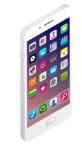
Look at the pictures below. Which of these gadgets often includes a touchscreen feature?[Image options: Clock, Camera, Smartphone, Headphones]- a)

- b)

- c)
- d)

Correct answer is option 'C'. Can you explain this answer?
Look at the pictures below. Which of these gadgets often includes a touchscreen feature?[Image options: Clock, Camera, Smartphone, Headphones]
a)
b)
c)
d)
| | Edgy Education answered |
Smartphones frequently come with touchscreen features for user interaction.
Identify the device in the picture.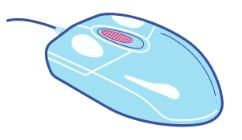
- a)Keyboard
- b)Monitor
- c)Computer Mouse
- d)Printer
Correct answer is option 'C'. Can you explain this answer?
Identify the device in the picture.
a)
Keyboard
b)
Monitor
c)
Computer Mouse
d)
Printer
| | Learning Enablers answered |
The device in the picture is a computer mouse.
Chapter doubts & questions for Section - 3: Information Technology - International Computer Science Olympiad for Class 3 2026 is part of Class 3 exam preparation. The chapters have been prepared according to the Class 3 exam syllabus. The Chapter doubts & questions, notes, tests & MCQs are made for Class 3 2026 Exam. Find important definitions, questions, notes, meanings, examples, exercises, MCQs and online tests here.
Chapter doubts & questions of Section - 3: Information Technology - International Computer Science Olympiad for Class 3 in English & Hindi are available as part of Class 3 exam. Download more important topics, notes, lectures and mock test series for Class 3 Exam by signing up for free.
International Computer Science Olympiad for Class 323 videos|59 docs|64 tests |
