Study Notes on CPM & PERT


Project
A project is a group or combination of interrelated activities that must be executed in a defined sequence to achieve a specific objective. Activities are interrelated in a logical order: some activities can start only after their predecessors are complete. Projects have a defined start and finish, consume time and resources, and are completed when all constituent activities are finished.
Project network diagram
A project network diagram is a graphical representation that shows the activities of a project, their durations and the dependencies between them. In network diagrams:
- nodes (usually boxes or circles) represent events or milestones, or-depending on the notation-activities;
- arrows show the logical relationships or precedence between activities or events;
- the diagram is used to visualise sequencing, identify critical activities and compute schedule timing.
Rules for network construction
- An activity can begin only after all its immediate predecessor activities are completed.
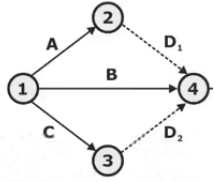
- No two or more activities may have the same head and tail event in A-O-A (Activity on Arrow) representation; if the same logic must be shown, a dummy activity is used to preserve uniqueness of head/tail.
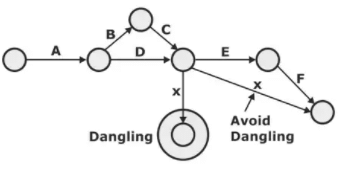
- Networks should contain no loops (circular dependencies) and no dangling activities (activities with no successor except the terminal event).
Application of network analysis (PERT and CPM)
- Research and development projects
- Equipment maintenance and overhaul scheduling
- Construction projects (buildings, bridges, dams)
- Setting up new industries and plant installations
- Planning and launching new products
- Design of plants, machines and systems
- Organisation and scheduling of large programmes
Terminology in network analysis
- Activity: A recognisable part of the project that consumes time and resources for its completion. Activities may involve physical or mental work. The project is complete only when all activities are finished.
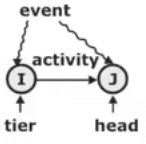
- Event: A point in time denoting the start or finish of one or more activities. An event itself does not consume time or resources; it represents a milestone or node in the network.
- Dummy activity: A dummy activity represents a logical dependency between activities but consumes no time or resources. It is shown by a dotted arrow in A-O-A diagrams. Dummy activities are used only when necessary to show correct precedence; there is no restriction on their number but they should not create loops.
- Dangling: A dangling activity is one (other than the final activity) that has no successor. Such activities must be connected directly to the final event to avoid dangling nodes in the diagram.
Types of network diagram
- Activity on Arrow (A-O-A) or Event on Node (EON): In A-O-A the activity is represented by an arrow and events by nodes. This is useful for emphasising logic and using dummy activities for certain precedence relationships.
- Activity on Node (A-O-N or Precedence Diagram): Each activity is shown in a node (box). Arrows show precedence relationships between activity nodes. This is the more common and clearer notation for modern scheduling.
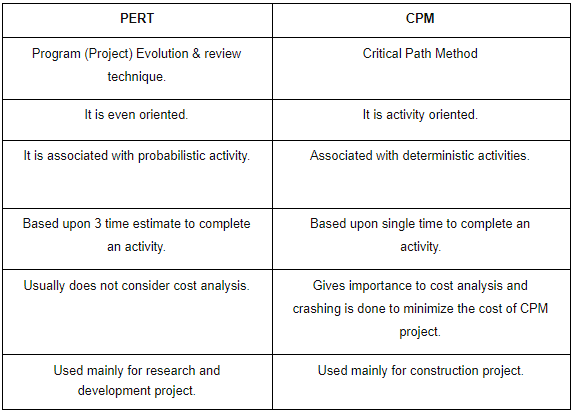
- PERT (Programme Evaluation and Review Technique): A probabilistic, event-oriented scheduling method that accounts for uncertainty in activity durations by using three time estimates for each activity.
PERT - features and process
- Event oriented: PERT emphasises events (milestones) and the probabilistic duration of activities between events.
- Probabilistic model: It recognises uncertainty in activity durations and uses three time estimates for each activity: optimistic (a), most likely (m) and pessimistic (b).
- Time estimates:
- Optimistic time (a): Minimum time required if everything goes better than expected.
- Most likely time (m): Time required under normal working conditions.
- Pessimistic time (b): Maximum time required if things go worse than expected.
- Expected (mean) activity time: The expected duration for an activity is a weighted average of the three estimates.
- Use: PERT is primarily used for projects that are non-repetitive or where activity times are uncertain (for example, R&D projects).
- Process steps in PERT analysis:
- Identify all project activities.
- Estimate their activity times (optimistic, most likely, pessimistic).
- Define inter-dependencies between activities.
- Draw the project network.
- Use the network to obtain scheduling information and probabilities of completion times.
- Application: Scheduling, coordination and integration of tasks within a project; project evaluation and control.
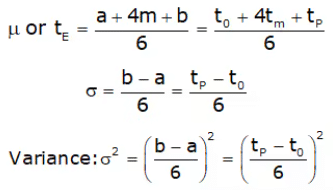
Expected (average) time for an activity:
Expected time, te = (a + 4m + b) ÷ 6
Variance of activity time:
Variance, σ² = ((b - a) ÷ 6)²
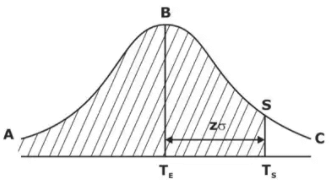
The probability of completing the entire project within a specified scheduled time can be estimated by assuming that the project completion time (sum along the critical path) is approximately normal with mean equal to the sum of expected times of activities on the critical path and variance equal to the sum of variances of those activities.
Let TE be the expected completion time of the project and σ be the standard deviation along the critical path. For a scheduled completion time TS the normal variate is:
Z = (TS - TE) ÷ σ
Probability of finishing by TS = Area under standard normal curve to the left of Z.

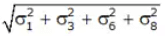
Standard deviation along the critical path:
CPM (Critical Path Method)
- CPM is used for projects where activity durations are known with reasonable certainty (deterministic). It identifies the longest path through the network which determines the shortest possible project duration.
- CPM is used to determine approximate completion time, critical activities, floats, and to support time-cost trade-off (crashing) analysis.
- A network path is a set of activities connecting the start to the finish event.
- The critical path is the longest-duration path from project start to finish; any delay in activities on this path delays the project completion.
- An activity is called critical if it has zero total float (slack) and lies on a critical path.
Prepare project scheduling
Key outputs required for a project schedule are:
- Time schedule for each activity (start and finish times).
- Earliest and latest start and finish times for each activity.
- Float (slack) values for activities.
- Identification of critical activities and critical path(s).
1. Earliest and latest times (forward and backward passes)
- Earliest Start Time (EST) of an activity: the earliest time an activity can start; numerically equal to the earliest event time of its tail node.
- Earliest Finish Time (EFT) of an activity: the earliest start time plus the activity duration.
EFT = EST + activity time - Latest Start Time (LST) of an activity: the latest time the activity can start without delaying project completion.
- Latest Finish Time (LFT) of an activity: the latest time the activity can finish without delaying project completion.
LFT = LST + activity time
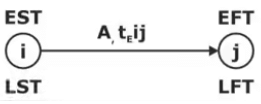
- Earliest event time, Ej: the maximum of earliest finish times of all activities entering event j.
Ej = max {Ei + tij} over all activities i → j - Latest event time, Li: the minimum of latest start times of all activities leaving event i.
Li = min {Lj - tij} over all activities i → j

2. Float (slack)
Float or slack is the margin of time by which a non-critical activity can be delayed without delaying project completion.
- Event slack (Si) (PERT term): amount by which an event can be delayed without delaying the project schedule.
Si = Li - Ei - Total Float (TF) (CPM term): extra time available for an activity without delaying the project schedule.
TF = LFT - EFT = LST - EST - Free Float (FF): portion of total float that can be used without affecting the earliest start of any successor activity.
FF = minimum (Esuccessor) - EFT of activity - Independent Float (IF): time that an activity can be delayed without affecting either its tail event or head event (when predecessor finishes at its latest and successor starts at its earliest).
IF = max{0, minimum(Esuccessor) - maximum(Lpredecessor) - activity time} - Relationship: TF ≥ FF ≥ IF
- Interfering float: part of total float that, if used, will reduce the float available to successors.
Precedence relationships, leads and lags
Common logical relationships between pairs of activities (useful in A-O-N diagrams):
- Finish-to-Start (FS): the successor activity can start only after the predecessor finishes (most common).
- Start-to-Start (SS): the successor can start when the predecessor starts (may include a lag or lead).
- Finish-to-Finish (FF): the successor can finish only after the predecessor finishes.
- Start-to-Finish (SF): the successor can finish only when the predecessor starts (rare).
- Lead: negative lag; allows the successor to start before the predecessor completes.
- Lag: positive offset delaying the successor relative to the predecessor (e.g., successor starts 3 days after predecessor finishes).
3. Crashing and time-cost trade-off (time-cost model)
Crashing is the process of shortening project duration by accelerating selected activities at extra cost. The objective is to find the minimum additional cost required to achieve a desired reduction in project time.
The cost-time slope (also called incremental cost) for an activity is:
Cost-time slope = (Crash cost - Normal cost) ÷ (Normal time - Crash time)
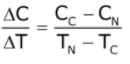
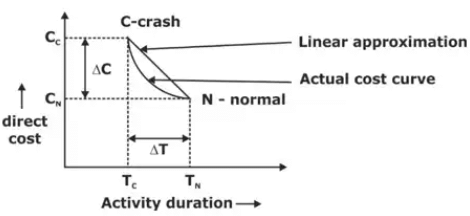
Where:
- Normal time and normal cost are the usual duration and cost for an activity.
- Crash time and crash cost are the shortest possible duration and the corresponding cost when additional resources are applied.
Objective of crashing: Determine an optimal project duration corresponding to the minimum total project cost (direct + indirect) under the desired time constraint.
- Identify the critical path(s) of the current network.
- Select the critical activity (on the critical path) with the smallest cost-time slope (least cost per unit time reduction).
- Reduce the duration of this activity by one time unit (or by the allowable increment up to its crash limit).
- Update activity times and recalculate the network to find the new critical path(s), project duration and total cost.
- If the desired project duration or optimal condition is not yet achieved, repeat from step 1.
Summary and practical notes
- PERT is best when activity times are uncertain; it provides expected times and probability estimates for completion.
- CPM is best when activity times are known; it identifies critical activities and supports time-cost trade-offs.
- Both methods rely on logical network construction, correct precedence relationships, and accurate time estimates to produce reliable schedules.
- When using PERT, compute expected times and variances for activities, sum expected times along critical path(s) and sum variances to obtain the project standard deviation for probability calculations.
- Use crashing selectively: identify activities with least cost-time slope on the critical path and ensure crashing does not create infeasible resource conflicts.
FAQs on Study Notes on CPM & PERT
| 1. What is CPM (Critical Path Method) in mechanical engineering? |  |
| 2. How does CPM help in managing mechanical engineering projects? | |
| 3. What is PERT (Program Evaluation and Review Technique) in mechanical engineering? | |
| 4. How does PERT help in estimating project timelines in mechanical engineering? | |
| 5. What are the advantages of using CPM and PERT in mechanical engineering projects? | |