Class 6 Exam > Class 6 Notes > Computer Science for Class 6 > Chapter Notes: Basics of Computer
Basics of Computer Chapter Notes | Computer Science for Class 6 PDF Download

Introduction
A computer is a programmable machine distinguished by its ability to follow a specific set of instructions and execute a predetermined list of tasks.
Key Characteristics of Computers
- Computers respond to instructions in a precise manner, operating based on well-defined commands.
- They can execute a sequence of pre-programmed instructions efficiently.
Types of Computers
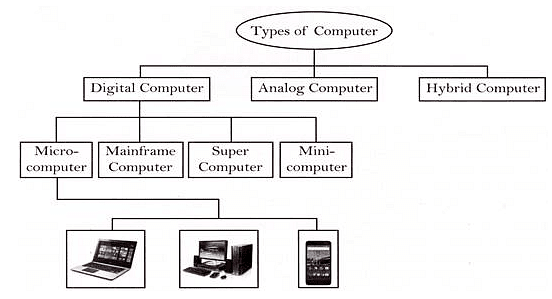
Computers come in various forms, ranging from large mainframes to portable laptops and even tiny microcontrollers embedded in mobile devices.
Varieties of Computers
- Computers differ in design and functionality, catering to diverse user needs and preferences.
- They can vary in size, from massive machines occupying entire buildings to compact laptops and handheld devices.
Classification of Computers
Computers are classified based on their operational principles, leading to three primary types of computers.
Types of Computer Classifications
Based on operation principles, computers are categorized into three main types, each serving distinct purposes.
Analog Computers
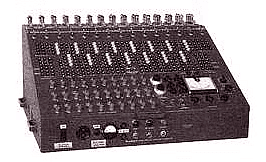
- Analog computers process continuous data such as temperature, pressure, and voltage, representing quantities with an infinite range of values.
- These were the initial computers developed and laid the foundation for modern digital computers.
Digital Computers
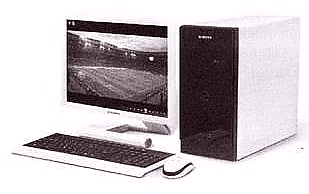
- Digital computers operate using digits to represent numbers, letters, or special symbols. They work with ON-OFF inputs and produce ON-OFF signals as outputs.
- Typically, 1 represents ON and 0 represents OFF. Digital computers can handle both numeric and non-numeric data, performing arithmetic and logical operations.
- Modern computers are predominantly digital due to their precision in results compared to analog computers. Digital computers have memory capabilities, unlike analog computers.
Hybrid Computers
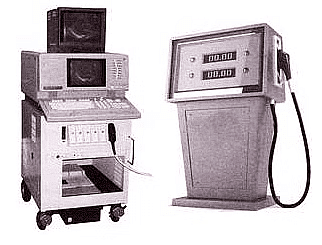
- Hybrid computers combine features of both digital and analog computers, offering the speed of analog systems and the memory and accuracy of digital ones.
- These computers are utilized in specialized applications that require processing both continuous and discrete data.
Based on Configuration
On the basic of configuration of operations, there are four types of computer. Configuration can be based on architecture, processing, power, size, memory or capabilities.
Super Computers
- Supercomputers are the most powerful in terms of performance and data processing.
- They are utilized for research, space exploration, weather forecasting, etc.
Characteristics of Supercomputers:
- Utilize Artificial Intelligence (AI)
- Known for their speed and power
- Considered very expensive and large in size
- Commonly used by manufacturing firms for various tasks
- Have exceptionally high processing speeds
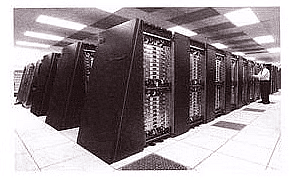
Mainframe Computers
- Mainframe computers, though less powerful than supercomputers, are still costly.
- Large organizations like banks and government agencies use them for data processing and storage.
- They serve as servers in network environments and can manage multiple users at once.
- Used by banks, educational institutions, and insurance companies for data management.
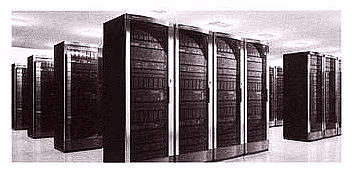
Features of Mainframe Computers
- They possess extensive memory capacity.
- Capable of running multiple operating systems simultaneously.
- Equipped with a large number of CPUs for high-speed processing.
- Utilize Tightly Coupled Clustering Technology.
Minicomputers
- Minicomputers, also referred to as 'Midrange Computers', are commonly utilized by small businesses and firms. These systems, akin to mainframes, often support multiple users and offer slightly slower processing speeds.
- For instance, a production department might leverage minicomputers to monitor specific production processes.
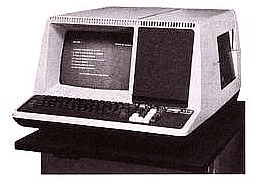
Features of Minicomputers
- Compact in size compared to Mainframes or Supercomputers.
- Less expensive than mainframes or supercomputers.
- Capable of multitasking efficiently.
- Support concurrent usage by multiple users.
- Primarily used by small enterprises.
Microcomputers
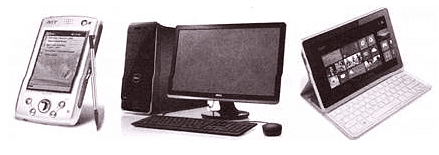
- Microcomputers, commonly known as Personal Computers (PCs), are scaled-down computing devices designed for individual use. They are typically equipped with a microprocessor as the central processing unit (CPU) and utilize RAM for memory storage.
- Microcomputers are the most affordable type of computers, typically containing components like CPU, RAM, ROM, I/O ports, and a bus system within a motherboard. They are commonly used for general purposes such as entertainment, education, and work.
Features of Microcomputers
- Microcomputers are primarily used for personal applications.
- They are relatively inexpensive and compact in size.
- Microcomputers do not support multiple users simultaneously.
- They possess lower computing power compared to larger computer systems.
- Microcomputers are known for their user-friendly interface and ease of use.
The document Basics of Computer Chapter Notes | Computer Science for Class 6 is a part of the Class 6 Course Computer Science for Class 6.
All you need of Class 6 at this link: Class 6
|
39 videos|28 docs|6 tests
|
FAQs on Basics of Computer Chapter Notes - Computer Science for Class 6
| 1. What are the different types of computers? |  |
Ans. Computers can be classified into three main types: analog computers, digital computers, and hybrid computers.
| 2. What are the features of mainframe computers? | |
Ans. Mainframe computers are known for their high processing power, large storage capacity, ability to handle multiple users simultaneously, and reliability.
| 3. What are microcomputers? | |
Ans. Microcomputers are small, low-cost computers that are commonly used for personal and small business purposes. They include desktop computers, laptops, tablets, and smartphones.
| 4. How are computers classified based on configuration? | |
Ans. Computers can be classified based on configuration into mainframe computers, mini computers, microcomputers, and supercomputers, depending on their size, processing power, and intended use.
| 5. What is the difference between analog and digital computers? | |
Ans. Analog computers use continuous data and physical quantities for calculations, while digital computers use discrete data and numerical values. Hybrid computers combine features of both analog and digital computers for specific applications.
About this Document

4.89/5
Rating

Oct 13, 2025
Last updated
Document Description: Chapter Notes: Basics of Computer for Class 6 2025 is part of Computer Science for Class 6 preparation.
The notes and questions for Chapter Notes: Basics of Computer have been prepared according to the Class 6 exam syllabus. Information about Chapter Notes: Basics of Computer covers topics
like and Chapter Notes: Basics of Computer Example, for Class 6 2025 Exam. Find important definitions, questions, notes, meanings, examples, exercises and tests below for Chapter Notes: Basics of Computer.
Introduction of Chapter Notes: Basics of Computer in English is available as part of our Computer Science for Class 6
for Class 6 & Chapter Notes: Basics of Computer in Hindi for Computer Science for Class 6 course.
Download more important topics related with notes, lectures and mock test series for Class 6
Exam by signing up for free. Class 6: Basics of Computer Chapter Notes | Computer Science for Class 6
Description
Full syllabus notes, lecture & questions for Basics of Computer Chapter Notes | Computer Science for Class 6 - Class 6 | Plus excerises question with solution to help you revise complete syllabus for Computer Science for Class 6 | Best notes, free PDF download
Information about Chapter Notes: Basics of Computer
In this doc you can find the meaning of Chapter Notes: Basics of Computer defined & explained in the simplest way possible. Besides explaining types of
Chapter Notes: Basics of Computer theory, EduRev gives you an ample number of questions to practice Chapter Notes: Basics of Computer tests, examples and also practice Class 6
tests


Related Searches
Basics of Computer Chapter Notes | Computer Science for Class 6
,ppt
,Important questions
,Free
,Semester Notes
,video lectures
,mock tests for examination
,Basics of Computer Chapter Notes | Computer Science for Class 6
,shortcuts and tricks
,Summary
,Basics of Computer Chapter Notes | Computer Science for Class 6
,Sample Paper
,MCQs
,past year papers
,study material
,Previous Year Questions with Solutions
,practice quizzes
,Viva Questions
,Extra Questions
,Exam
,Objective type Questions
;



Additional Information about Chapter Notes: Basics of Computer for Class 6 Preparation
Chapter Notes: Basics of Computer Free PDF Download
The Chapter Notes: Basics of Computer is an invaluable resource that delves deep into the core of the Class 6 exam.
These study notes are curated by experts and cover all the essential topics and concepts, making your preparation more efficient and effective.
With the help of these notes, you can grasp complex subjects quickly, revise important points easily,
and reinforce your understanding of key concepts. The study notes are presented in a concise and easy-to-understand manner,
allowing you to optimize your learning process. Whether you're looking for best-recommended books, sample papers, study material,
or toppers' notes, this PDF has got you covered. Download the Chapter Notes: Basics of Computer now and kickstart your journey towards success in the Class 6 exam.
Importance of Chapter Notes: Basics of Computer
The importance of Chapter Notes: Basics of Computer cannot be overstated, especially for Class 6 aspirants.
This document holds the key to success in the Class 6 exam.
It offers a detailed understanding of the concept, providing invaluable insights into the topic.
By knowing the concepts well in advance, students can plan their preparation effectively.
Utilize this indispensable guide for a well-rounded preparation and achieve your desired results.
Chapter Notes: Basics of Computer
Chapter Notes: Basics of Computer Notes offer in-depth insights into the specific topic to help you master it with ease.
This comprehensive document covers all aspects related to Chapter Notes: Basics of Computer.
It includes detailed information about the exam syllabus, recommended books, and study materials for a well-rounded preparation.
Practice papers and question papers enable you to assess your progress effectively.
Additionally, the paper analysis provides valuable tips for tackling the exam strategically.
Access to Toppers' notes gives you an edge in understanding complex concepts.
Whether you're a beginner or aiming for advanced proficiency, Chapter Notes: Basics of Computer Notes on EduRev are your ultimate resource for success.
Chapter Notes: Basics of Computer Class 6 Questions
The "Chapter Notes: Basics of Computer Class 6 Questions" guide is a valuable resource for all aspiring students preparing for the
Class 6 exam. It focuses on providing a wide range of practice questions to help students gauge
their understanding of the exam topics. These questions cover the entire syllabus, ensuring comprehensive preparation.
The guide includes previous years' question papers for students to familiarize themselves with the exam's format and difficulty level.
Additionally, it offers subject-specific question banks, allowing students to focus on weak areas and improve their performance.
Study Chapter Notes: Basics of Computer on the App
Students of Class 6 can study Chapter Notes: Basics of Computer alongwith tests & analysis from the EduRev app,
which will help them while preparing for their exam. Apart from the Chapter Notes: Basics of Computer,
students can also utilize the EduRev App for other study materials such as previous year question papers, syllabus, important questions, etc.
The EduRev App will make your learning easier as you can access it from anywhere you want.
The content of Chapter Notes: Basics of Computer is prepared as per the latest Class 6 syllabus.
|
© EduRev
|
Education Revolution
|


|




Signup on EduRev and stay on top of your study goals
10M+ students crushing their study goals daily