Class 1 Exam > Class 1 Notes > Year 1 Computing IGCSE (Cambridge) > Mind Map: Know your Computer
Mind Map: Know your Computer | Year 1 Computing IGCSE (Cambridge) - Class 1 PDF Download

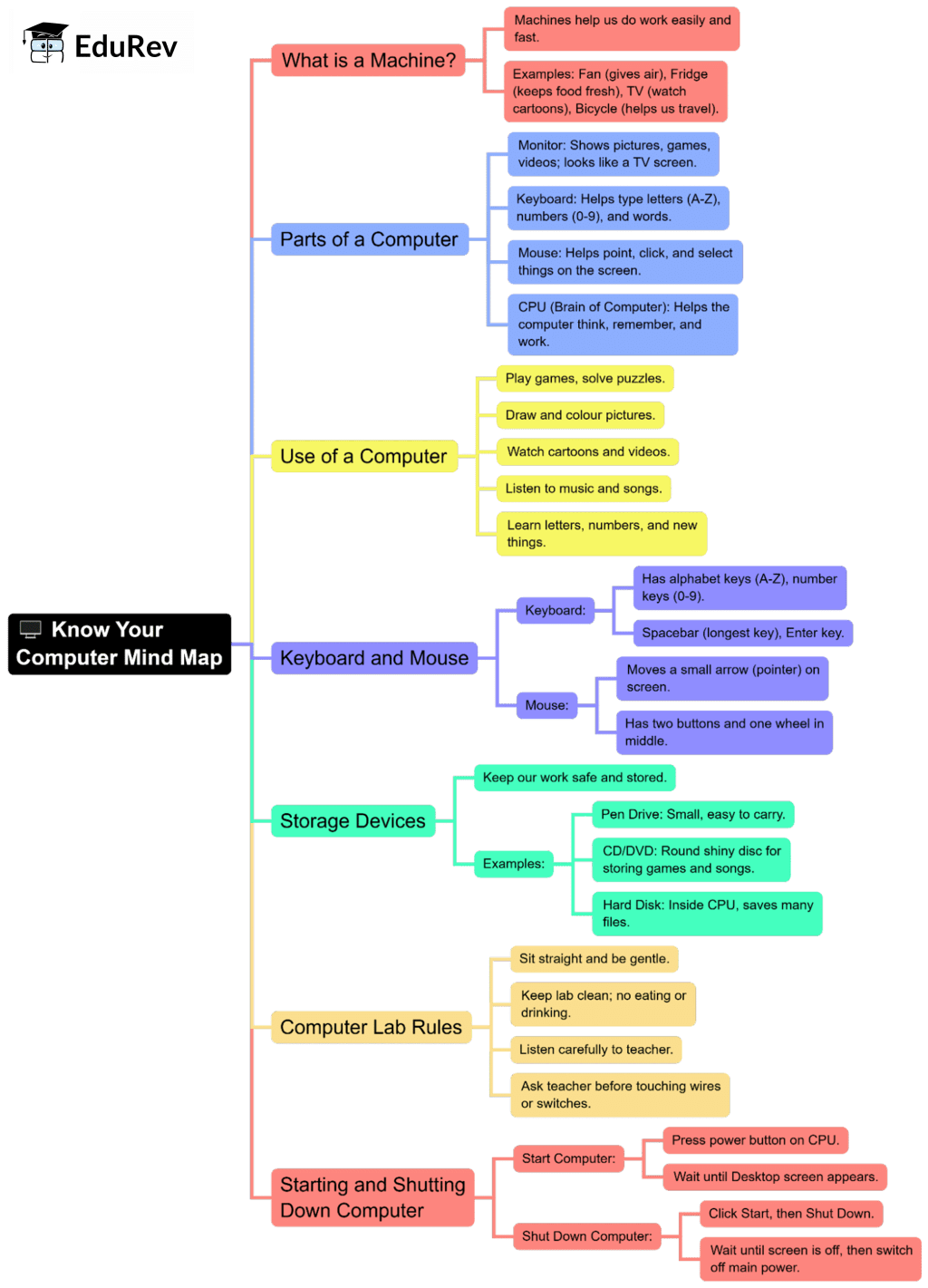
The document Mind Map: Know your Computer | Year 1 Computing IGCSE (Cambridge) - Class 1 is a part of the Class 1 Course Year 1 Computing IGCSE (Cambridge).
All you need of Class 1 at this link: Class 1
|
12 docs|6 tests
|
FAQs on Mind Map: Know your Computer - Year 1 Computing IGCSE (Cambridge) - Class 1
| 1. What is a computer and what are its main components? |  |
Ans.A computer is an electronic device that processes data and performs tasks according to a set of instructions. Its main components include the central processing unit (CPU), memory (RAM), storage devices (like hard drives), input devices (like keyboard and mouse), and output devices (like monitors and printers).
| 2. How do I turn on and off a computer properly? | |
Ans.To turn on a computer, locate the power button, usually found on the front or side of the computer case, and press it. To turn off a computer properly, click on the 'Start' menu, select 'Shut Down' or 'Power Off', and wait for the computer to close all programs and turn off completely.
| 3. What is an operating system, and why is it important? | |
Ans.An operating system (OS) is software that manages computer hardware and software resources and provides services for computer programs. It is important because it acts as an intermediary between users and the computer hardware, allowing users to run applications and manage files effectively.
| 4. What are the different types of software? | |
Ans.The two main types of software are system software and application software. System software includes the operating system and utilities that manage computer resources. Application software refers to programs that perform specific tasks for users, like word processors, web browsers, and games.
| 5. How can I stay safe while using a computer? | |
Ans.To stay safe while using a computer, always use strong passwords, keep your software updated, avoid clicking on suspicious links or downloading unknown attachments, and use antivirus software to protect against malware. Additionally, be cautious when sharing personal information online.
About this Document

4.60/5
Rating

Oct 18, 2025
Last updated
Document Description: Mind Map: Know your Computer for Class 1 2025 is part of Year 1 Computing IGCSE (Cambridge) preparation.
The notes and questions for Mind Map: Know your Computer have been prepared according to the Class 1 exam syllabus. Information about Mind Map: Know your Computer covers topics
like and Mind Map: Know your Computer Example, for Class 1 2025 Exam. Find important definitions, questions, notes, meanings, examples, exercises and tests below for Mind Map: Know your Computer.
Introduction of Mind Map: Know your Computer in English is available as part of our Year 1 Computing IGCSE (Cambridge)
for Class 1 & Mind Map: Know your Computer in Hindi for Year 1 Computing IGCSE (Cambridge) course.
Download more important topics related with notes, lectures and mock test series for Class 1
Exam by signing up for free. Class 1: Mind Map: Know your Computer | Year 1 Computing IGCSE (Cambridge) - Class 1
Description
Full syllabus notes, lecture & questions for Mind Map: Know your Computer | Year 1 Computing IGCSE (Cambridge) - Class 1 - Class 1 | Plus excerises question with solution to help you revise complete syllabus for Year 1 Computing IGCSE (Cambridge) | Best notes, free PDF download
Information about Mind Map: Know your Computer
In this doc you can find the meaning of Mind Map: Know your Computer defined & explained in the simplest way possible. Besides explaining types of
Mind Map: Know your Computer theory, EduRev gives you an ample number of questions to practice Mind Map: Know your Computer tests, examples and also practice Class 1
tests

Related Searches
Objective type Questions
,Sample Paper
,Mind Map: Know your Computer | Year 1 Computing IGCSE (Cambridge) - Class 1
,Extra Questions
,study material
,Previous Year Questions with Solutions
,ppt
,Summary
,Semester Notes
,Free
,Viva Questions
,MCQs
,shortcuts and tricks
,practice quizzes
,Mind Map: Know your Computer | Year 1 Computing IGCSE (Cambridge) - Class 1
,Important questions
,video lectures
,past year papers
,Mind Map: Know your Computer | Year 1 Computing IGCSE (Cambridge) - Class 1
,mock tests for examination
,Exam
;



Additional Information about Mind Map: Know your Computer for Class 1 Preparation
Mind Map: Know your Computer Free PDF Download
The Mind Map: Know your Computer is an invaluable resource that delves deep into the core of the Class 1 exam.
These study notes are curated by experts and cover all the essential topics and concepts, making your preparation more efficient and effective.
With the help of these notes, you can grasp complex subjects quickly, revise important points easily,
and reinforce your understanding of key concepts. The study notes are presented in a concise and easy-to-understand manner,
allowing you to optimize your learning process. Whether you're looking for best-recommended books, sample papers, study material,
or toppers' notes, this PDF has got you covered. Download the Mind Map: Know your Computer now and kickstart your journey towards success in the Class 1 exam.
Importance of Mind Map: Know your Computer
The importance of Mind Map: Know your Computer cannot be overstated, especially for Class 1 aspirants.
This document holds the key to success in the Class 1 exam.
It offers a detailed understanding of the concept, providing invaluable insights into the topic.
By knowing the concepts well in advance, students can plan their preparation effectively.
Utilize this indispensable guide for a well-rounded preparation and achieve your desired results.
Mind Map: Know your Computer Notes
Mind Map: Know your Computer Notes offer in-depth insights into the specific topic to help you master it with ease.
This comprehensive document covers all aspects related to Mind Map: Know your Computer.
It includes detailed information about the exam syllabus, recommended books, and study materials for a well-rounded preparation.
Practice papers and question papers enable you to assess your progress effectively.
Additionally, the paper analysis provides valuable tips for tackling the exam strategically.
Access to Toppers' notes gives you an edge in understanding complex concepts.
Whether you're a beginner or aiming for advanced proficiency, Mind Map: Know your Computer Notes on EduRev are your ultimate resource for success.
Mind Map: Know your Computer Class 1 Questions
The "Mind Map: Know your Computer Class 1 Questions" guide is a valuable resource for all aspiring students preparing for the
Class 1 exam. It focuses on providing a wide range of practice questions to help students gauge
their understanding of the exam topics. These questions cover the entire syllabus, ensuring comprehensive preparation.
The guide includes previous years' question papers for students to familiarize themselves with the exam's format and difficulty level.
Additionally, it offers subject-specific question banks, allowing students to focus on weak areas and improve their performance.
Study Mind Map: Know your Computer on the App
Students of Class 1 can study Mind Map: Know your Computer alongwith tests & analysis from the EduRev app,
which will help them while preparing for their exam. Apart from the Mind Map: Know your Computer,
students can also utilize the EduRev App for other study materials such as previous year question papers, syllabus, important questions, etc.
The EduRev App will make your learning easier as you can access it from anywhere you want.
The content of Mind Map: Know your Computer is prepared as per the latest Class 1 syllabus.
|
© EduRev
|
Education Revolution
|


|




Signup on EduRev and stay on top of your study goals
10M+ students crushing their study goals daily