


All Exams > Class 10 > Computer Application: Class 10 > All Questions
All questions of Scratch Programming for Class 10 Exam
Under which block do you find the instructions to change the costume of a Sprite?- a)Motion
- b)Looks
- c)Sound
- d)Events
Correct answer is option 'B'. Can you explain this answer?
Under which block do you find the instructions to change the costume of a Sprite?
a)
Motion
b)
Looks
c)
Sound
d)
Events
 | Vikram Kapoor answered |
The Switch Costume to () block is a Looks block and a Stack block that changes its sprite's costume to a specified one. This block is used whenever a sprite must switch to a specific costume (instead of the next costume block, which only switches to the next costume in the costume list).

What is the function of the 'when green flag clicked' command block?- a)Points sprite in the specified direction
- b)If condition is true, runs the blocks inside
- c)Runs the script
- d)None of the above
Correct answer is option 'C'. Can you explain this answer?
What is the function of the 'when green flag clicked' command block?
a)
Points sprite in the specified direction
b)
If condition is true, runs the blocks inside
c)
Runs the script
d)
None of the above
 | Meera Rana answered |
The When Green Flag Clicked block, commonly called the Start Block, is an Events block and a Hat block. Scripts that wear this block will activate once the Green Flag has been clicked — these scripts can activate other scripts and enable the entire program.
A Scratch script/program begins with _______- a)Ask block
- b)Say block
- c)Event block
- d)Control block
Correct answer is option 'C'. Can you explain this answer?
A Scratch script/program begins with _______
a)
Ask block
b)
Say block
c)
Event block
d)
Control block
 | Aditya Shah answered |
A script is defined within the Scratch program as one or a set of blocks that begins with a Hat Block. Even a single block can qualify. However, scripts are usually referred to as sets of blocks that consist of at least two blocks.
Scratch is a programming language- a)True
- b)False
Correct answer is option 'A'. Can you explain this answer?
Scratch is a programming language
a)
True
b)
False
| | Meera Rana answered |
Scratch is a visual programming language created by the MIT Media Lab in 2007. Its drag-and-drop interface with colorful blocks makes it one of the most intuitive programming languages to learn.
What is the backdrop of a project called?- a)Sprite
- b)Script
- c)Scratch
- d)Stage
Correct answer is option 'D'. Can you explain this answer?
What is the backdrop of a project called?
a)
Sprite
b)
Script
c)
Scratch
d)
Stage
| | Ananya Das answered |
A backdrop is an image that can be shown on the Stage. It is similar to a costume, except that it is shown on the stage instead. They are located in the backdrops library. The Stage can change its look to any of its backdrops using the Switch Backdrop to () block.
What is the function of the 'Move 10 steps' command block?- a)Runs the blocks inside over and over
- b)Move spite forward
- c)Runs script below when specified key is pressed
- d)None of the above
Correct answer is option 'B'. Can you explain this answer?
What is the function of the 'Move 10 steps' command block?
a)
Runs the blocks inside over and over
b)
Move spite forward
c)
Runs script below when specified key is pressed
d)
None of the above
| | Ananya Das answered |
The move () steps block is a stack block and a Motion block. The block moves its sprite forward the specified amount of steps in the direction it is facing. A step is equal to a one-pixel length. The Default Value is 10 and can be replaced by any number.
Tempo is measured in- a)beats per second
- b)beats per minute
- c)bytes per second
- d)bits per second
Correct answer is option 'B'. Can you explain this answer?
Tempo is measured in
a)
beats per second
b)
beats per minute
c)
bytes per second
d)
bits per second
| | Ananya Das answered |
Tempo is measured in BPM, or beats per minute. One beat every second is 60 BPM. Sometimes the tempo is written at the beginning of the music and is called a metronome marking. Tempo and stylistic feel are often indicated in classical music by Italian terminology.
A costume is- a)a code block
- b)a different way a sprite looks
- c)a motion
- d)a sound
Correct answer is option 'B'. Can you explain this answer?
A costume is
a)
a code block
b)
a different way a sprite looks
c)
a motion
d)
a sound
 | Ishan Choudhury answered |
A costume is one out of possibly many "frames" or alternate appearances of a sprite. Sprites can change their look to any of its costumes. They can be named, edited, created, and deleted, but every sprite must have at least one costume.
What is the function of the 'forever' command block?- a)Runs the script inside over and over
- b)Point sprite in specified direction
- c)If condition is true, runs the blocks inside
- d)None of the above
Correct answer is option 'A'. Can you explain this answer?
What is the function of the 'forever' command block?
a)
Runs the script inside over and over
b)
Point sprite in specified direction
c)
If condition is true, runs the blocks inside
d)
None of the above
 | Kiran Mehta answered |
The Forever If () block was a Control block and a C block. The block would continuously check its Boolean condition. If the condition is true, the code held inside the block would run, and then the script continues, but if the condition is false, nothing would happen until it becomes true again.
The background of the stage can be changed using the instructions under the ___________ block.- a)Looks
- b)Pen
- c)Motion
- d)Events
Correct answer is option 'A'. Can you explain this answer?
The background of the stage can be changed using the instructions under the ___________ block.
a)
Looks
b)
Pen
c)
Motion
d)
Events
| | Kiran Mehta answered |
The Stage can change its look to any of its backdrops using the Switch Backdrop to () block.
A collection or stack of blocks that all interlock with one another is called?- a)Sprite
- b)Scratch
- c)Script
- d)Stage
Correct answer is option 'C'. Can you explain this answer?
A collection or stack of blocks that all interlock with one another is called?
a)
Sprite
b)
Scratch
c)
Script
d)
Stage
| | Ishan Choudhury answered |
A script is a collection or stack of blocks that all interlock with one another. The blocks and their order are very important, as they determine how sprites interact with each other and the backdrop.
Scratch 2 project saves the file with file extension _________- a).sb2
- b).ss2
- c).sp2
- d).sc2
Correct answer is option 'A'. Can you explain this answer?
Scratch 2 project saves the file with file extension _________
a)
.sb2
b)
.ss2
c)
.sp2
d)
.sc2
| | Avinash Patel answered |
Unlike Scratch 1.4 files, Scratch 2.0 files are ZIP archives containing project information encoded in a text-based format called JSON and project media in separate files. Projects conventionally have the extension . sb2 , and sprites the extension . sprite2 .
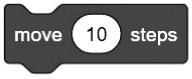 command can be found under ______________ block
- a)Looks
- b)Sound
- c)Pen
- d)Motion
Correct answer is option 'D'. Can you explain this answer?
command can be found under ______________ blocka)
Looks
b)
Sound
c)
Pen
d)
Motion
| | Kiran Mehta answered |
Motion blocks is one of the ten categories of Scratch blocks. They are color-coded medium-blue and are used to control a sprite's movement. They are available only for sprites. There are currently 18 Motion blocks: 15 stack blocks and 3 reporter blocks.
To make the sprite wait for some seconds, you can use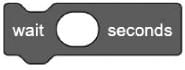 . Where can you find the instruction?
- a)Looks Block
- b)Control Block
- c)Motion block
- d)Events block
Correct answer is option 'B'. Can you explain this answer?
To make the sprite wait for some seconds, you can use . Where can you find the instruction?
. Where can you find the instruction?a)
Looks Block
b)
Control Block
c)
Motion block
d)
Events block
| | Vivek Rana answered |
Control blocks is one of the nine categories of Scratch blocks. They are color-coded gold, and are used to control scripts. In Scratch 1.4 and earlier, this category also included the blocks that are now Events Blocks.
Chapter doubts & questions for Scratch Programming - Computer Application: Class 10 2026 is part of Class 10 exam preparation. The chapters have been prepared according to the Class 10 exam syllabus. The Chapter doubts & questions, notes, tests & MCQs are made for Class 10 2026 Exam. Find important definitions, questions, notes, meanings, examples, exercises, MCQs and online tests here.
Chapter doubts & questions of Scratch Programming - Computer Application: Class 10 in English & Hindi are available as part of Class 10 exam. Download more important topics, notes, lectures and mock test series for Class 10 Exam by signing up for free.
Computer Application: Class 1010 videos|98 docs|18 tests |
