UPSC Exam  >  UPSC Notes  >  CSAT Preparation  >  Pie Charts

Pie Charts | CSAT Preparation - UPSC PDF Download

Introduction

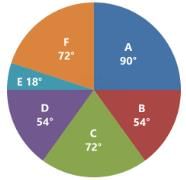
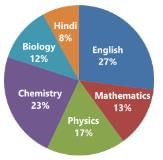
Pie charts are a graphical method to present the relative sizes of parts of a whole using a circle. In a pie chart, the circle is divided into sectors (or segments) where each sector represents a component's proportion of the total. The entire circle corresponds to the total; hence the proportions are converted either into degrees of a circle (out of 360°) or into percentages (out of 100%). The diagram resembles a pie with slices, and it is particularly useful to show the break-up of a single continuous variable into component parts.

The Types of Pie Charts

There are two common approaches to construct a pie chart from given data:

  • Degree Approach: Each component is converted into a central angle. The entire circle is 360°, so the angle for a component is given by Angle = (Component value / Total value) × 360°.
  • Percentage Approach: Each component is expressed as a percentage of the total. The percentage directly describes the fraction of the pie.
The Types of Pie Charts

Conversion between degrees and percentages

To convert percentage to degrees in a pie chart use the relation:

1% = 3.6°

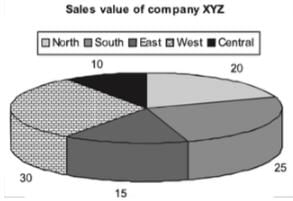
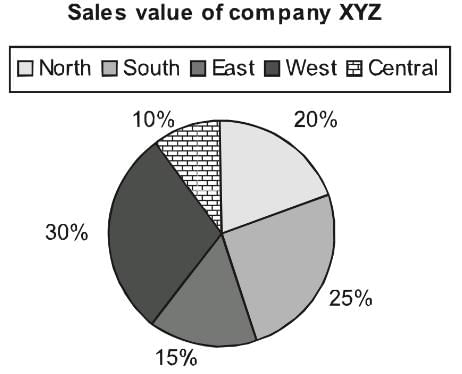
For example, if components have percentages as follows:

  • Total = 100%
  • Central = 10% → 36°
  • North = 20% → 72°
  • South = 25% → 90°
  • East = 15% → 54°
  • West = 30% → 108°
Conversion between degrees and percentages

Forms of Pie Charts

Normal Pie Chart

Normal Pie Chart

A normal pie chart displays contributions of each component as slices whose angular sizes correspond to their proportions. This gives a quick visual of which components are largest or smallest.

Exploded Pie Chart

Exploded Pie Chart

An exploded pie chart separates one or more slices from the main pie to emphasise them. It is useful to highlight specific components.

Mixed-Layer (Multi-layer) Pie Chart

A mixed-layer or multi-layer pie chart contains concentric rings where each ring represents a related dataset (for example, monthly → quarterly → annual). Such charts help compare related breakdowns across different aggregation levels.

  • Multi-layered pie charts are used when datasets have hierarchical or comparative layers (e.g., months → quarters → year).
Mixed-Layer (Multi-layer) Pie Chart

The following worked example illustrates practical steps to extract missing values from a multi-layer chart and answer percentage comparison questions.

Problem context (preserved):

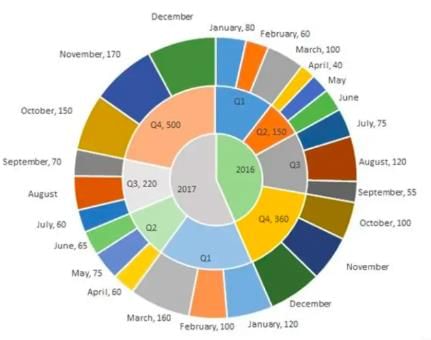
  • The multi-layered pie-chart shows the sales of LED television sets for a big retail electronics outlet during 2016 and 2017. The outer layer shows the monthly sales during this period, with each label showing the month followed by sales figure of that month.
  • For some months, the sales figures are not given in the chart. The middle-layer shows quarter-wise aggregate sales figures (in some cases, aggregate quarter-wise sales numbers are not given next to the quarter). The innermost layer shows annual sales.
  • It is known that the sales figures during the three months of the second quarter (April, May, June) of 2016 form an arithmetic progression, as do the three-monthly sales figures in the fourth quarter (October, November, December) of that year.

Q.1. What is the percentage increase in sales in December 2017 as compared to the sales in December 2016?
(a) 38.46
(b) 22.22
(c) 50.00
(d) 28.57

Q.2. In which quarter of 2017 was the percentage increase in sales from the same quarter of 2016 the highest?
(a) Q4
(b) Q1
(c) Q2
(d) Q3

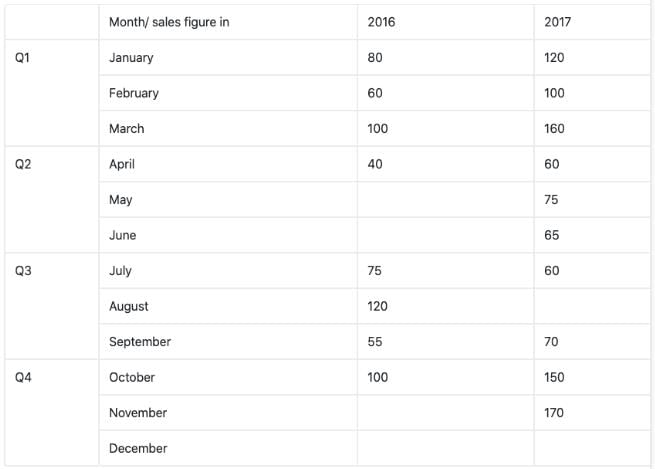
Sol: To solve the questions it helps to consolidate the information from the pie-chart into a table of monthly and quarterly sales. The table from the chart (preserved image) is shown below for clarity.

Mixed-Layer (Multi-layer) Pie Chart

The following data and relationships are given or can be deduced:

  • Total sale in Quarter 2 (Q2) of 2016 = 150.
  • The three months Apr, May, Jun of 2016 are in arithmetic progression (A.P.).
  • The three months Oct, Nov, Dec of 2016 are in arithmetic progression (A.P.).
  • Total sales in Quarter 4 (Q4) of 2017 = 500.
  • Sales in Oct'17 and Nov'17 are 150 and 170 respectively.
  • Monthly sales supplied elsewhere in the chart are used together with these relations to recover missing months.

Recovering missing monthly sales for 2016 (A.P. in Q2):

a−d, a, a+d are the three terms of the A.P., and their sum equals the quarter total.

3a = 150

a = 50

Given April sale = a−d = 40

d = 10

Therefore, April = 40, May = 50, June = 60.

Recovering missing monthly sales for 2016 (A.P. in Q4):

a−d, a, a+d are the three terms of the A.P., and their sum equals the quarter total (from chart data).

3a = (Q4 total for 2016) - using the chart data gives a = 120

d = 20 (from the known month value)

Therefore, Oct'16 = 100, Nov'16 = 120, Dec'16 = 140.

Using 2017 quarter totals and known months to find missing months:

Total sales in Q4 of 2017 = 500

Given Oct'17 = 150 and Nov'17 = 170

Therefore Dec'17 = 500 − 150 − 170 = 180

Similarly, based on chart-provided quarter totals and known monthly values, Aug'17 is obtained as:

Q3 total for 2017 = 220

Known Jul'17 = 60 and Sep'17 = 70

Therefore Aug'17 = 220 − 60 − 70 = 90

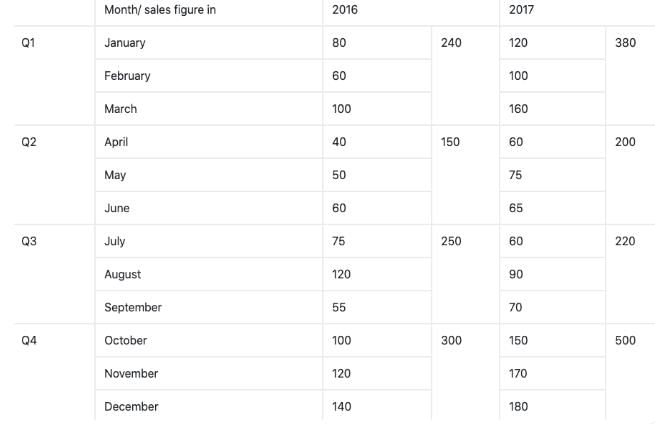
The completed consolidated table (from the chart and calculations) is shown below.

Mixed-Layer (Multi-layer) Pie Chart

Now answer the questions.

Ans 1: Percentage increase in sales of Dec'17 as compared to Dec'16 =

Difference = Dec'17 − Dec'16 = 180 − 140 = 40

Percentage increase = (Difference / Dec'16) × 100

Percentage increase = (40 / 140) × 100 = 28.5714...%

Rounded to two decimal places = 28.57%

Therefore the correct option is (d) 28.57.

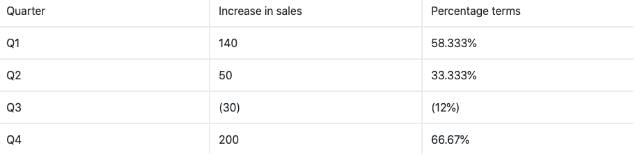
Ans 2: Compute percentage increase for each quarter by comparing 2017 quarter total with the corresponding 2016 quarter total, then identify the highest.

Q4: (500 − 360) / 360 × 100 = 140 / 360 × 100 = 38.888...% ≈ 38.89%

Compute Q1, Q2, Q3 percentage increases similarly using the consolidated table values.

Comparing the calculated quarter-wise percentage increases, Q4 has the highest percentage increase.

Therefore the correct option is (a) Q4.

Mixed-Layer (Multi-layer) Pie Chart

Significance of Pie Charts

Pie charts are widely used because they provide quick visual insight into the relative contributions of components to a whole. Key reasons for their use include:

  • They give a clear visual of the contribution of each sector to the total (for example, presentation of budgets, cost components, or market-share breakdown).
  • Comparing two pie charts (for different times or categories) is often easier than comparing two bar charts when the intent is to compare proportional compositions.
  • They are effective for communicating part‐to‐whole relationships to non‐technical audiences.

Worked Example - Cost Analysis of a Book

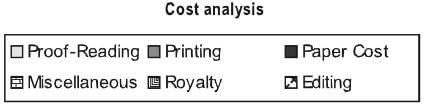
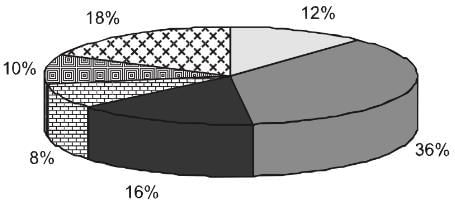
Following is the cost analysis of a book "Guide to Digital Marketing".

Worked Example - Cost Analysis of a Book

What is the central angle showing the cost of paper?
(a) 42.8°
(b) 32.6°
(c) 36.8°
(d) 57.6°

Sol:

Percentage of paper cost in total cost = 16%

The sum of angles in a pie chart = 360°

Required angle = (16 / 100) × 360°

Required angle = 57.6°

Therefore the correct option is (d) 57.6°.

Applications of Pie Charts in Engineering & CSAT Contexts

Pie charts are relevant to students preparing for competitive exams and to engineering disciplines (Civil, Computer Science, Electrical) because they help interpret and present proportional data effectively. Examples of domain-specific uses:

  • Civil Engineering: Material composition in a concrete mix, allocation of project budget across activities (foundation, superstructure, services), land‐use distribution in a planning study.
  • Computer Science & Engineering: CPU time distribution across processes, percentage of memory used by different applications, distribution of network traffic by protocol.
  • Electrical Engineering: Power generation mix (renewables vs thermal), loss breakdown in a distribution network, load composition by consumer category.

How to Construct and Read a Pie Chart - Practical Steps

  • Obtain the data values for each component and calculate their sum (the total).
  • For the degree approach, compute each component angle using Angle = (Component value / Total) × 360°.
  • For the percentage approach, compute each component percentage using Percentage = (Component value / Total) × 100.
  • Draw a circle and mark a reference radius (usually pointing right). Draw successive sectors using the computed central angles, labelling each sector with percentage or value.
  • Where comparison across time or categories is required, align multiple pie charts and use consistent colour/legend for the same component to aid comparison.

Common Pitfalls and Best Practices

  • Avoid using pie charts for too many categories; more than 6-7 slices become hard to read. Consider combining small categories into an "Other" slice.
  • Ensure that all percentages add up to 100% (allowing for rounding) and that all angles add to 360°.
  • Use exploded slices only to emphasise important components; overuse reduces clarity.
  • Label slices clearly with values or percentages and include a legend if colours are not self-explanatory.

Practice Questions

Question for Pie Charts
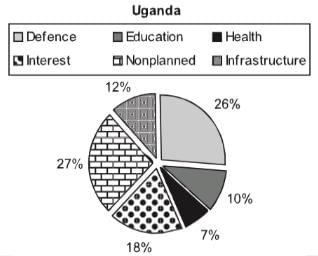
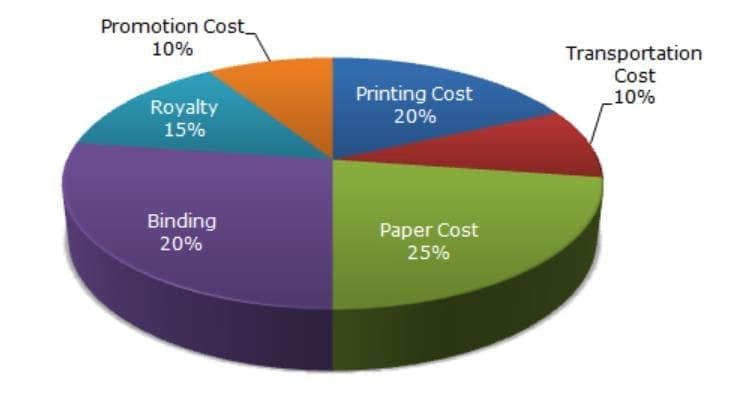
Try yourself:Direction: The following Pie-chart shows the percentage distribution of the expenditure incurred in publishing a book. Study the Pie-chart and answer the question from 31 to 35 based on it.

Practice Questions
If 5500 copies are published and the transportation cost on them amounts to Rs. 82,500, then what should be the selling price of the Book so that the publisher can earn a profit of 25%?

View Solution
Question for Pie Charts
Try yourself:The central angle of a sector is 72º. What percentage of the circle is comprised by the sector?
View Solution
Question for Pie Charts
Try yourself:During which month was the percentage increase in sales from the previous month’s sales the highest?
View Solution
Question for Pie Charts
Try yourself:During which quarter was the percentage decrease in sales from the previous quarter’s sales the highest?
View Solution

Summary

Pie charts present part‐to‐whole relationships using sectors of a circle. Use the degree formula Angle = (value / total) × 360° or the percentage formula Percentage = (value / total) × 100 to compute slices. They are valuable for quick visual comparisons and find practical applications across engineering disciplines and CSAT preparation. When working with multi‐layer charts or incomplete data, apply arithmetic relations (such as sums and arithmetic progressions) to recover missing values before making percentage comparisons.

The document Pie Charts | CSAT Preparation - UPSC is a part of the UPSC Course CSAT Preparation.
All you need of UPSC at this link: UPSC
205 videos|287 docs|137 tests

FAQs on Pie Charts - CSAT Preparation - UPSC

1. What are the two types of pie charts?
Ans. The two types of pie charts are: 1. Simple Pie Chart: This type of pie chart displays the proportion of different categories or groups as a percentage of the whole. Each category is represented by a slice of the pie, and the size of each slice represents the proportion of that category. 2. Exploded Pie Chart: In an exploded pie chart, one or more slices are pulled out or separated from the main pie to highlight a specific category or group. This helps in emphasizing the importance or significance of that particular category.
2. How are pie charts significant?
Ans. Pie charts are significant in the following ways: 1. Visualization of Proportions: Pie charts provide a visual representation of the proportions or percentages of different categories or groups. This makes it easier to understand the distribution and relative sizes of the data. 2. Comparison of Categories: Pie charts allow for easy comparison between different categories or groups. By simply comparing the sizes of the slices, one can quickly identify which category is the largest or smallest. 3. Effective Communication: Pie charts are a powerful tool for effectively communicating data to a wide audience. The visual representation helps in conveying complex information in a simple and easily understandable manner. 4. Trend Analysis: Pie charts can also be used to analyze trends over time. By comparing pie charts from different time periods, one can identify changes in the distribution of data and track the progress or decline of various categories. 5. Decision Making: Pie charts assist in decision-making processes by providing a clear visual representation of data. They help in identifying areas of focus or concern, enabling informed decision making based on the data presented.
3. How can pie charts be used in data analysis?
Ans. Pie charts can be used in data analysis in the following ways: 1. Identifying Major Contributors: Pie charts help in identifying the major contributors or categories that have the highest or lowest proportions. This information can be useful in understanding the overall distribution and impact of different categories. 2. Comparing Data Sets: Pie charts can be used to compare data sets from different time periods, regions, or groups. By visually comparing the sizes of the slices, one can identify any significant changes or differences between the data sets. 3. Highlighting Disproportions: Pie charts are effective in highlighting disproportions or imbalances in data. If one slice appears significantly larger or smaller than the others, it indicates an area that requires further analysis or attention. 4. Visualizing Percentages: Pie charts provide a visual representation of percentages, making it easier to understand the relative sizes and proportions of different categories. This aids in the interpretation and analysis of data. 5. Supporting Decision Making: Pie charts assist in data-driven decision making by presenting information in a clear and concise manner. They provide a quick overview of the data, enabling decision makers to identify patterns, trends, and areas of focus.
4. How can pie charts be created and interpreted?
Ans. Pie charts can be created and interpreted as follows: 1. Creating a Pie Chart: To create a pie chart, first, gather the data and calculate the proportions or percentages for each category. Then, plot the slices of the pie according to these proportions using a graphing software or tool. Label each slice with the corresponding category name. 2. Interpreting a Pie Chart: To interpret a pie chart, start by looking at the entire pie as a whole. The total sum of all the slices represents 100% of the data. Next, compare the sizes of the slices to understand the relative proportions of different categories. The larger the slice, the greater the proportion of that category. Finally, analyze the patterns and trends within the pie chart to draw conclusions or make informed decisions based on the data presented.
5. What are some limitations of using pie charts?
Ans. There are certain limitations of using pie charts: 1. Limited Data Representation: Pie charts are best used to represent data with a small number of categories. If there are too many categories, the pie chart can become cluttered and difficult to interpret. 2. Difficulty in Comparisons: It can be challenging to compare the sizes of slices accurately, especially when the differences are small. A bar chart or a different type of graph may be more suitable for precise comparisons. 3. Misleading Perception: The visual nature of pie charts can sometimes create a misleading perception of the data. The use of 3D effects or exploding slices can distort the proportions and make accurate interpretation difficult. 4. Lack of Time Dimension: Pie charts are not suitable for representing data over time. They are static representations and do not show changes or trends over different time periods. 5. Subjectivity in Interpretation: The interpretation of pie charts can be subjective, as individuals may perceive the proportions differently. It is essential to provide clear labels and explanations to minimize any misinterpretation of the data.
Related Searches
Pie Charts | CSAT Preparation - UPSC, ppt, practice quizzes, Pie Charts | CSAT Preparation - UPSC, study material, Exam, Important questions, Viva Questions, video lectures, Previous Year Questions with Solutions, mock tests for examination, Summary, MCQs, Semester Notes, Objective type Questions, Pie Charts | CSAT Preparation - UPSC, pdf , past year papers, Extra Questions, Sample Paper, shortcuts and tricks, Free;