Relationship between Arrays & Pointers | Programming and Data Structures - Computer Science Engineering (CSE) PDF Download

Array & Pointers
An array is a block of sequential data. Let's write a program to print addresses of array elements.
#include <stdio.h>
int main() {
int x[4];
int i;
for(i = 0; i < 4; ++i) {
printf("&x[%d] = %p\n", i, &x[i]);
}
printf("Address of array x: %p", x);
return 0;
}
Output
&x[0] = 1450734448
&x[1] = 1450734452
&x[2] = 1450734456
&x[3] = 1450734460
Address of array x: 1450734448
There is a difference of 4 bytes between two consecutive elements of array x. It is because the size of int is 4 bytes (on our compiler).
Notice that, the address of &x[0] and x is the same. It's because the variable name x points to the first element of the array.
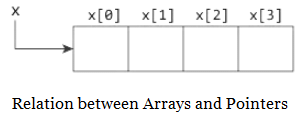
From the above example, it is clear that &x[0] is equivalent to x. And, x[0] is equivalent to *x.
Similarly,
- &x[1] is equivalent to x+1 and x[1] is equivalent to *(x+1).
- &x[2] is equivalent to x+2 and x[2] is equivalent to *(x+2).
- ...
- Basically, &x[i] is equivalent to x+i and x[i] is equivalent to *(x+i).
Example 1:
#include <stdio.h>
int main() {
int i, x[6], sum = 0;
printf("Enter 6 numbers: ");
for(i = 0; i < 6; ++i) {
// Equivalent to scanf("%d", &x[i]);
scanf("%d", x+i);
// Equivalent to sum += x[i]
sum += *(x+i);
}
printf("Sum = %d", sum);
return 0;
}
When you run the program, the output will be:
Enter 6 numbers: 2
3
4
4
12
4
Sum = 29
Here, we have declared an array x of 6 elements. To access elements of the array, we have used pointers.
In most contexts, array names decay to pointers. In simple words, array names are converted to pointers. That's the reason why you can use pointers to access elements of arrays. However, you should remember that pointers and arrays are not the same.
Example 2:
#include <stdio.h>
int main() {
int x[5] = {1, 2, 3, 4, 5};
int* ptr;
// ptr is assigned the address of the third element
ptr = &x[2];
printf("*ptr = %d \n", *ptr); // 3
printf("*(ptr+1) = %d \n", *(ptr+1)); // 4
printf("*(ptr-1) = %d", *(ptr-1)); // 2
return 0;
}
When you run the program, the output will be:
*ptr = 3
*(ptr+1) = 4
*(ptr-1) = 2
In this example, &x[2], the address of the third element, is assigned to the ptr pointer. Hence, 3 was displayed when we printed *ptr.
And, printing *(ptr+1) gives us the fourth element. Similarly, printing *(ptr-1) gives us the second element.
|
120 docs|30 tests
|





mock tests for examination
,Semester Notes
,study material
,Objective type Questions
,MCQs
,shortcuts and tricks
,Extra Questions
,practice quizzes
,Relationship between Arrays & Pointers | Programming and Data Structures - Computer Science Engineering (CSE)
,Relationship between Arrays & Pointers | Programming and Data Structures - Computer Science Engineering (CSE)
,Relationship between Arrays & Pointers | Programming and Data Structures - Computer Science Engineering (CSE)
,Viva Questions
,Previous Year Questions with Solutions
,ppt
,Exam
,video lectures
,past year papers
,Sample Paper
,Summary
,Free
,Important questions
;



Relationship between Arrays & Pointers Free PDF Download
Importance of Relationship between Arrays & Pointers
Relationship between Arrays & Pointers Notes
Relationship between Arrays & Pointers Computer Science Engineering (CSE) Questions
Study Relationship between Arrays & Pointers on the App
|
© EduRev
|
Education Revolution
|


|








within 7 days!