Chapter Notes: Data Handling


Introduction
Data handling is about organising and understanding information using different methods. You might have seen your teacher taking attendance of students in class each day or noting down the marks you received after tests or exams.
Similarly, a cricket scoreboard displays more than just the winner and loser of a match. It also provides vital information about the game, such as the time taken and the number of balls faced by the top run-scorer. In everyday life, tables like attendance records or exam scores arrange numbers to give valuable insights. These tables present data.
Data is a collection of numbers or facts gathered to give some information.

Recording Data
Recording data means collecting and writing down information in an organised way so that it can be counted, compared and used later. It is the first and most important step in data handling.
Try yourself: Which of the following best describes "data recording"?
Example of recording data
A teacher wants to know how many students prefer each mode of travel for a class trip. The options are bus, bike, car and walk.
- Initial method: The teacher writes down each student's choice and then counts how many chose each option. This works but can be slow for many students.
- Improved method: The teacher places four labelled boxes (bus, bike, car, walk). Each student drops a token (such as a pebble) into the box of their choice. At the end the teacher counts tokens in each box to find how many students chose each mode.
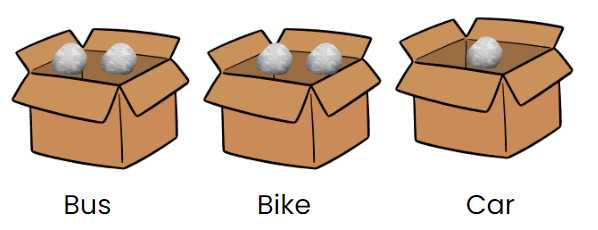
For example, if 5 students choose: bus, bike, car, then the tokens in the boxes will be:
- Bus: 2 tokens
- Bike: 2 tokens
- Car: 1 token
This box-and-token method makes it quicker and less error-prone to record preferences.
Organisation of Data
Organizing data means arranging information in a clear way to make it easy to count and understand.

- Recording information: Instead of tokens, we can use a simple table and mark a tick (✓) for each student's choice. Each tick stands for one student.
- Counting ticks: If two students choose bus, we put two ticks next to bus. Each tick represents one student's choice.
- Finding the total: To find the total number of students, add all ticks across choices. For example, 2 (bus) + 2 (bike) + 1 (car) = 5 students.
Data can also be arranged in alphabetical order or numerical order to make reading and searching easier.
Tables
A table is a tool used to gather and arrange information by counting answers.
- Different options or categories are listed in rows (for example, types of food or modes of travel).
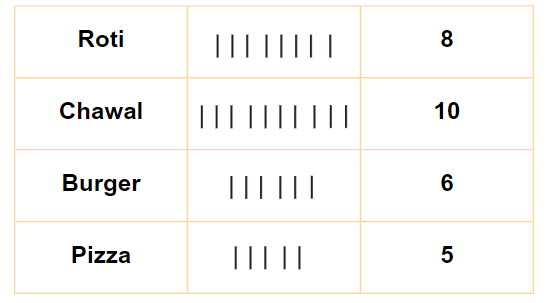
- For each response, a mark (such as a | or a tick) is added in the corresponding row to show one response.
- The total number of marks in each row shows how many people chose that option.
- Tables make it easy to see and count responses for each choice.
- Repeated counting of single marks can be tiring and may cause mistakes. To make counting faster we use tally marks.
Tally Marks
Tally marks are a simple way to count and organise data quickly.
- Making Groups: Instead of counting each mark individually, group them in sets of five. Four vertical lines and a fifth diagonal line make agroup of five (like this:
 ).
).
 Tally Marks representing 5-frequency
- Counting: Each group of five helps you count more quickly. For example,
 means five, and two groups
 means ten.
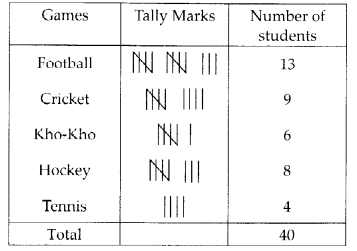
 - Using in Tables: In a table, tally marks help keep track of how many people chose each option. For example, if you have tally marks for different shoe sizes, you can easily see which size is most or least popular.
- For example, If you have tallies for games played by students, counting the marks quickly tells you how many students play which game.
Example: A survey was conducted among a few people regarding their favourite beverages. The below tally marks table shows the data:
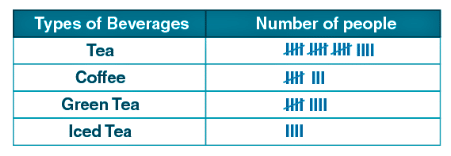
(i) How many more people like green tea than coffee?
(ii) How many people like tea?
(iii) How many total people were surveyed?
Ans:
(i) Number of people who like green tea = 9
Number of people who like coffee = 8
∴ One more person likes green tea than coffee.
(ii) Number of people who liked tea = 19
(iii) Total number of people surveyed = 40
Try yourself: How will tally marks for frequency 6 look like?



Pictograph
- A pictograph represents data using pictures or symbols.
- It helps us answer questions about data quickly by counting pictures instead of numbers.
- Each picture may represent one item or several items; the value of one picture is shown by a key.

Example:
In the image provided, pictures in front of each sport show the number of students playing it.
Baseball is played by: 6 students (count the pictures)
Soccer is played by: 8 students
Basketball is played by: 3 students
Interpretation of a pictograph
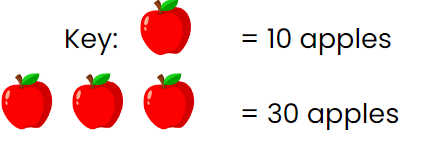
A pictograph uses pictures where each picture stands for a set number of items. The key tells how many items one picture represents. Multiply the number of pictures by the value of one picture (from the key) to find the total.
Example: If one apple picture equals 10 apples and there are 3 apple pictures, then the total number of apples is 3 × 10 = 30.
Try yourself: A fox has had three groups of cubs. The number of cubs in each group is represented in the pictograph below.
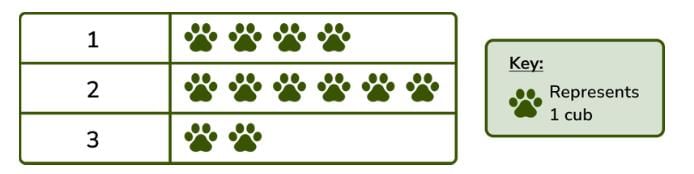
Which of the group has max number of cubs?
Example Questions on pictographs
Q1: The number of cars parked in a parking lot every day is given in the pictograph.
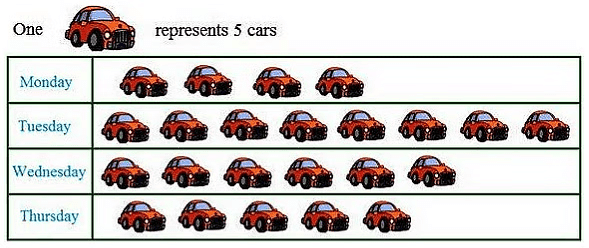
(i) Find the day when the highest number of cars are parked and how many?
(ii) When the least number of cars did park?
Ans:
(i) In the above pictograph one car picture represents 5 cars.
The maximum number of car pictures is shown on Tuesday.
Hence, number of cars parked on Tuesday = 5 × 8 = 40 cars.(ii) The least number of cars were parked on Monday as there are only 4 pictures of cars shown on that day.

Q2: The sale of electric bulbs on different days of a week is shown below. Observe the pictograph and answer the following questions:
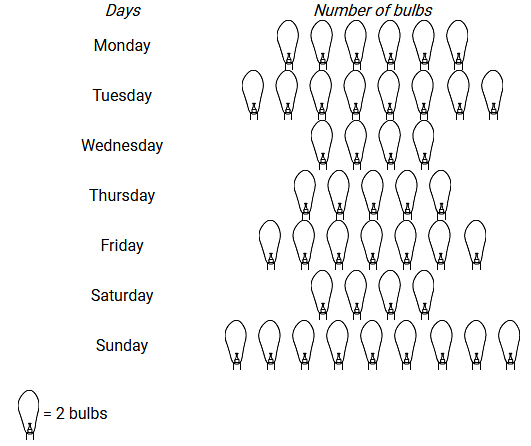
(i) How many bulbs were sold on Friday?
(ii) On which day maximum numbers of bulbs were sold?
Ans:
(i) Number of bulb figures shown against Friday = 7
Given: 1 figure = 2 bulbs
Therefore, total number of bulbs sold on Friday = 2 × 7 = 14.
(ii) Sunday shows the maximum number of bulb figures, i.e. 9.
Therefore, on Sunday maximum bulbs were sold.
Concluding notes
Key ideas to remember:
- Data is a set of numbers or facts collected to give information.
- Record data carefully and organise it in tables, tally charts or pictographs to make counting and comparison easier.
- Tally marks speed up counting by grouping marks in fives.
- Pictographs use pictures; always read the key to know what each picture stands for.
FAQs on Chapter Notes: Data Handling
| 1. What is data handling and why is it important in everyday life? |  |
| 2. How can data be recorded effectively? | |
| 3. What is a pictograph and how is it different from a bar graph? | |
| 4. How do you interpret data from a pictograph? | |
| 5. What are some common mistakes to avoid when creating a pictograph? | |