


 | INFINITY COURSE Seaboard Rise Music Production – tools, workflow & creativityKirti Sinha · Last updated on Apr 14, 2026 |
Seaboard Rise Music Production – tools, Study Material
|



Trending Courses for Music

What is the Seaboard RISE? An Introduction to MPE Controllers for Music Production
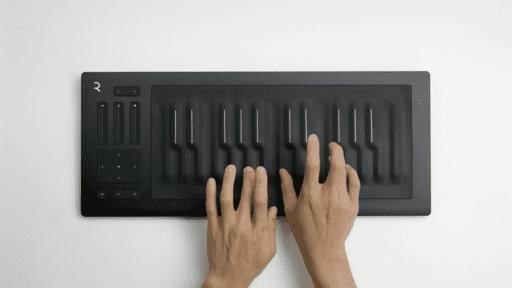
The Seaboard RISE is a revolutionary MPE (MIDI Polyphonic Expression) controller manufactured by ROLI that has transformed how music producers and musicians approach electronic music creation. If you're serious about advancing your music production skills, understanding what the Seaboard RISE is and how it works is essential. Unlike traditional MIDI keyboards with fixed keys, the Seaboard RISE features a continuous, touch-sensitive silicone keywave surface that responds to multidimensional control.
For Indian music producers looking to elevate their craft, the Seaboard RISE offers unprecedented expressive capabilities. Whether you're creating electronic beats, designing orchestral sounds, or producing ambient music, this touch-sensitive MIDI controller opens new creative possibilities. Start your journey by exploring our welcome guide to the Seaboard RISE which provides foundational knowledge every producer should know.
Understanding MPE Technology
MIDI Polyphonic Expression (MPE) is a protocol that allows each individual note on your controller to have independent pitch bend, modulation, and pressure control. This is fundamentally different from standard MIDI, where these controls affect all playing notes simultaneously. When you're learning about MPE controllers, you're essentially unlocking the ability to play synthesizers and virtual instruments with the expressiveness of traditional acoustic instruments.
The Seaboard RISE comes in two versions: a 25-key model for portable setups and a 49-key version for comprehensive performance capabilities. Both deliver the same revolutionary touch technology that has made the Seaboard RISE the best MPE controller choice for producers worldwide.
Understanding the Five Dimensions of Touch: Strike, Press, Lift, Glide, and Slide
The five dimensions of touch represent the core innovation of the Seaboard RISE. These touch gestures give you unprecedented control over your synthesizers and virtual instruments. Understanding each dimension is crucial for mastering expressive music production with this device.
The Five Key Touch Dimensions Explained
| Dimension | Description | Musical Application |
|---|---|---|
| Strike | Initial velocity when your finger contacts the keywave surface | Controls note volume and attack characteristics |
| Press | Vertical pressure applied after striking the surface | Modulates sound timbre and intensity dynamically |
| Lift | Release velocity when fingers leave the surface | Controls release envelope and decay behavior |
| Glide | Left-to-right movement along the keywave | Enables pitch bending and horizontal expression |
| Slide | Up-and-down movement perpendicular to note position | Controls modulation depth and vertical expressivity |
Mastering these Seaboard touch gestures is what separates amateur producers from professionals. When you understand how to use the five dimensions of touch effectively, you can create expressive synth leads that sound alive and responsive. Our detailed resource on the five dimensions of touch walks you through practical applications for each gesture.
Practical Playing Techniques
Learning proper Seaboard RISE playing techniques takes practice. Strike controls your initial attack-hit harder for louder, more aggressive sounds. Press adds continuous modulation after you've struck the surface, letting you shape your sound in real-time. When you need to control how notes end, lift velocity becomes your tool. For smooth pitch changes and vibrato effects, glide and slide gestures give you the flexibility traditional keyboards simply cannot provide.
Equator Synthesizer: Complete Guide to Sound Design and Preset Exploration
Equator is ROLI's proprietary software synthesizer designed specifically to maximize the capabilities of the Seaboard RISE. When you're exploring Equator sound design, you're working with a synthesizer built from the ground up to leverage physical modeling synthesis and MPE technology. The Equator synthesizer is an Equator VST that integrates seamlessly with your DAW.
If you're new to Equator, the preset exploration approach is perfect for beginners. ROLI has included hundreds of professionally designed Equator presets that demonstrate the synthesizer's capabilities. Rather than starting from scratch, you can explore existing presets and modify them to suit your needs. Check out our first look at Equator guide to begin your sound design journey.
Getting Started with Equator
The Equator VST tutorial approach begins with understanding the interface. You'll find familiar synthesis parameters: oscillators, filters, envelopes, and effects. What makes Equator unique is how it responds to MPE data from your Seaboard RISE. When you apply press, glide, or slide gestures, Equator interprets this data to modulate various parameters in real-time.
For comprehensive Equator sound design knowledge, explore our modes and mapping guide which covers advanced sound shaping techniques.
How to Integrate Seaboard RISE with Popular DAWs (Ableton Live, Logic Pro, Bitwig)
DAW integration is where the Seaboard RISE truly shines in professional music production workflows. Whether you're working with Ableton Live, Logic Pro, Bitwig Studio, or GarageBand, proper setup ensures you're capturing all the expressive potential of your controller. The process of connecting Seaboard to DAW requires understanding MIDI configuration and MPE support.
Integration Across Major DAWs
Ableton Live integration with the Seaboard RISE involves enabling MPE mode in your controller settings and selecting an MPE-compatible instrument. Logic Pro offers similar setup, with additional benefits from Apple's native instruments like Alchemy and Sculpture. Bitwig Studio has excellent MPE support built-in, making Seaboard RISE Bitwig Studio workflows particularly smooth for advanced producers.
Our detailed guides cover specific setup instructions: DAW integration fundamentals, and practical applications using Ableton Live with Native Instruments Massive for electronic bass lines.
Mastering MIDI Polyphonic Expression (MPE) for Advanced Music Production
MIDI Polyphonic Expression represents a paradigm shift in how modern synthesizers interpret controller data. Each note receives its own MIDI channel, allowing independent control of pitch, modulation, and pressure. This technology transforms your music production capabilities significantly.
Advanced music production techniques with MPE involve understanding signal flow, managing multiple MIDI channels, and automating parameters based on touch gestures. When you're mastering MPE in your DAW, you're essentially learning a new performance language that makes your productions more expressive and dynamic.
MPE Workflow Best Practices
- Always enable MPE mode on your Seaboard RISE before starting your session
- Ensure your chosen VST or plugin supports MIDI Polyphonic Expression
- Use dedicated MPE-compatible instruments like Omnisphere, Kontakt, or Massive
- Map your touch gestures to meaningful synthesizer parameters for intuitive control
- Save your MIDI automation data for consistent results across sessions
For comprehensive coverage of this topic, explore our signal flow guide and plugins and automation tutorial.
Seaboard RISE Tutorial: Signal Flow, Envelopes, and LFO Modulation Techniques
Understanding signal flow in synthesis is fundamental to getting professional results from your Seaboard RISE. Signal flow describes how audio travels through your synthesizer, from oscillators through filters to effects and output. When you comprehend signal flow, you can design sounds with intention rather than randomness.
Envelope shaping tutorial concepts are essential for controlling how your sounds evolve over time. Envelopes shape the amplitude and timbre changes that occur from note start to release. LFO modulation techniques add rhythmic variation to your sounds, creating movement and interest.
Essential Synthesis Components
Our envelopes guide covers ADSR (Attack, Decay, Sustain, Release) parameters that control sound evolution. The LFO modulation techniques resource explains how low-frequency oscillators add cyclical variations to parameters.
For hands-on learning, our global controls guide demonstrates how to manage synthesis parameters across your entire synthesizer.
Creating Expressive Electronic Music with Seaboard RISE and Native Instruments
Electronic music production with the Seaboard RISE paired with Native Instruments plugins creates powerful sonic possibilities. Native Instruments offers MPE-compatible synthesizers including Massive and Kontakt that respond beautifully to your Seaboard RISE's expressive gestures.
Creating with the Seaboard RISE using these professional tools lets you design everything from pounding synth bass lines to delicate pads. Our detailed tutorials cover spooky organ sounds, expressive synth leads, evolving arpeggios, and ambient pad sound design.
Orchestral Sound Design Using Seaboard RISE: Strings, Brass, and Solo Instruments
Orchestral sound design represents one of the most rewarding applications of the Seaboard RISE. The controller's expressive capabilities allow you to program realistic string articulations, brass dynamics, and solo instrument performances that respond naturally to your playing.
When creating orchestral strings production using Logic and sophisticated sample libraries, your Seaboard RISE becomes a virtual orchestra under your fingertips. Our tutorials demonstrate synth bass creation, orchestral strings using Logic, orchestral trombone sections, and solo cello creation.
Best Practices for DAW Integration: Plugins, Automation, and Buffer Settings
Professional DAW integration requires attention to technical details. Buffer and CPU settings for music production significantly impact your system's performance when running multiple plugins and capturing high-resolution MPE data.
| Setting | Purpose | Recommendation |
|---|---|---|
| Buffer Size | Controls latency between controller and sound output | 256-512 samples for recording, 64-128 for performance |
| Sample Rate | Audio quality determination | 44.1kHz or 48kHz for most production |
| CPU Threads | Processing power allocation | Enable maximum available threads |
| MIDI Learning | Controller parameter mapping | Map essential controls for quick access |
Our comprehensive guides on Blend functionality and buffer and CPU settings provide detailed optimization strategies.
Free Seaboard RISE Learning Resources and Course Materials
EduRev provides comprehensive free Seaboard RISE course materials covering everything from foundational concepts to advanced production techniques. Our structured learning path progresses logically through essential topics, ensuring you develop genuine expertise.
Access our free learning materials starting with the course introduction, then proceed through foundational lessons via our course outline and MIDI and Equator fundamentals.
Advanced Music Production Techniques with Touch-Sensitive MIDI Controllers
Advanced music production techniques extend beyond basic parameter control. When mastering touch-sensitive MIDI controller workflows, you're learning how to leverage multidimensional input for creating music that was previously impossible on traditional keyboards.
Expressive music production means using every available control dimension intentionally. Our practice assignments help solidify these concepts: complete assignment 1 and assignment 2 for hands-on experience.
How to Create Expressive Synth Leads and Ambient Pads with Seaboard RISE
Creating expressive synth leads requires mastering how to layer your Seaboard gestures with synthesizer modulation. Your press, glide, and slide movements should map to parameters that make your lead sound alive and responsive. Ambient pad sound design takes a different approach, emphasizing smooth textures and subtle modulation.
Our specialized tutorials guide you through creating various sound types. Explore riser effects, MIDI data editing techniques, modulated sound effects, and expressive multi-layered sounds using Omnisphere.
For live performance inspiration, watch professional performances and explore Ableton Live control, Logic Pro control, and Bitwig Studio control techniques.
Your journey into expressive music production with the Seaboard RISE begins with understanding these fundamental concepts. Whether you're creating your first electronic beat or designing complex orchestral arrangements, this touch-sensitive MIDI controller and the comprehensive learning resources on EduRev will elevate your musical capabilities dramatically. Start exploring today and unlock your creative potential.
Introduction to Seaboard Rise: Advance Music Production Exam Pattern 2026-2027
The Seaboard Rise is an innovative musical instrument that has revolutionized the way music is produced. With its unique design and advanced features, it offers musicians a new level of expression and creativity. Whether you are a professional musician or a passionate hobbyist, the Seaboard Rise can take your music production to the next level.
Exam Pattern for Music
To fully utilize the capabilities of the Seaboard Rise and enhance your music production skills, it is important to understand the exam pattern for music. This will help you prepare effectively and make the most out of your practice sessions. Here are some key pointers to keep in mind:
1. Theory and Concepts:
- Familiarize yourself with music theory and concepts such as scales, chords, harmony, and rhythm. This knowledge will provide a strong foundation for your music production journey.
2. Technical Skills:
- Develop technical skills such as note reading, sight-reading, and understanding different musical notations. This will enable you to interpret and play music accurately on the Seaboard Rise.
3. Ear Training:
- Train your ears to recognize different musical elements such as pitch, intervals, and melodies. This will help you improvise and compose music intuitively on the Seaboard Rise.
4. Repertoire:
- Build a diverse repertoire of songs and compositions that showcase your musical abilities. This will allow you to explore various genres and styles on the Seaboard Rise.
5. Performance Skills:
- Practice performing live on the Seaboard Rise to develop stage presence and confidence. This will enhance your ability to engage and captivate audiences with your music.
6. Composition and Arrangement:
- Learn the art of composing and arranging music to create unique and captivating pieces. Experiment with different techniques and explore the possibilities that the Seaboard Rise offers.
7. Music Production Software:
- Familiarize yourself with music production software such as Ableton Live, Logic Pro, or FL Studio. These tools will help you record, edit, and mix your music seamlessly with the Seaboard Rise.
By understanding the exam pattern for music production and focusing on these key pointers, you can unlock the full potential of the Seaboard Rise. Embrace the unique features and expressiveness of this instrument to create music that resonates with your audience. Get ready to elevate your music production skills and embark on a dynamic musical journey with the Seaboard Rise.


Introduction to Seaboard Rise: Advance Music Production Syllabus 2026-2027 PDF Download
Course Description:
This course is designed to provide students with an in-depth understanding of music production using the Seaboard Rise, an advanced musical instrument that offers a new way of playing and creating music. Students will learn the fundamental concepts of music production, explore various techniques for sound design and composition, and develop their skills in using the Seaboard Rise to produce high-quality music.
Course Duration: 8 weeks
Course Objectives:
- Familiarize students with the Seaboard Rise and its capabilities
- Develop an understanding of music production techniques
- Enhance skills in sound design and composition
- Utilize the Seaboard Rise to create original music tracks
- Explore advanced features and functionalities of the Seaboard Rise
- Collaborate with peers to create music projects
Course Outline:
Week 1: Introduction to the Seaboard Rise
- Overview of the Seaboard Rise and its unique features
- Understanding the expressive capabilities of the instrument
- Setting up the Seaboard Rise and connecting to music production software
Week 2: Music Production Fundamentals
- Introduction to music production software (e.g., Ableton Live, Logic Pro)
- Basic concepts of sound design and synthesis
- Introduction to MIDI and audio recording
Week 3: Sound Design Techniques
- Exploring different sound design techniques using the Seaboard Rise
- Creating custom sounds and textures for musical compositions
- Incorporating effects and modulation to enhance sound design
Week 4: Composition and Arrangement
- Understanding the principles of composition and arrangement
- Exploring various musical genres and styles
- Developing melodic, harmonic, and rhythmic ideas using the Seaboard Rise
Week 5: Advanced Features of the Seaboard Rise
- Utilizing MIDI MPE (Multidimensional Polyphonic Expression) for expressive playing
- Exploring advanced playing techniques and gestures
- Mapping and assigning parameters to the Seaboard Rise for enhanced control
Week 6: Collaborative Music Projects
- Working in teams to create music projects using the Seaboard Rise
- Collaborative composition and arrangement
- Mixing and mastering music tracks
Week 7: Performance and Live Setup
- Preparing for live performances with the Seaboard Rise
- Setting up a live performance rig with the instrument and accompanying equipment
- Exploring techniques for improvisation and live looping
Week 8: Final Project Presentation
- Presenting the final music project created during the course
- Reflecting on the skills and knowledge acquired
- Peer feedback and evaluation
Assessment Methods:
- Weekly assignments and quizzes
- Collaborative music projects
- Final project presentation and evaluation
Resources Required:
- Seaboard Rise (or access to one)
- Music production software (e.g., Ableton Live, Logic Pro)
- MIDI controller or keyboard
- Headphones or speakers for monitoring
Prerequisites:
- Basic understanding of music theory and composition
- Familiarity with music production software (preferred but not mandatory)
- Access to a computer with music production software installed
This course is helpful for the following exams: Music
How to Prepare Introduction to Seaboard Rise: Advance Music Production?
The Seaboard Rise is a revolutionary instrument that combines the expressiveness of a traditional piano with the versatility and control of modern digital music production. This course offered by EduRev is designed to introduce musicians to the Seaboard Rise and teach them how to use it to create advanced music productions.
Why Choose the Seaboard Rise?
The Seaboard Rise offers a unique playing experience that is unlike any other instrument on the market. Its soft, silicone surface allows musicians to shape sound through touch, allowing for dynamic control over pitch, timbre, and volume. With its pressure-sensitive keys and customizable touch response, the Seaboard Rise provides a level of expressiveness that is unmatched by traditional keyboards.
Course Overview
In this course, students will learn the fundamentals of playing the Seaboard Rise and explore its capabilities in advanced music production. The course will cover a range of topics, including:
1. Introduction to the Seaboard Rise: Students will be introduced to the key features and components of the Seaboard Rise, including its unique playing surface, pressure sensitivity, and connectivity options.
2. Setting up the Seaboard Rise: This section will guide students through the process of setting up the Seaboard Rise with their computer or digital audio workstation (DAW). Students will learn how to connect the instrument, install drivers, and configure the settings for optimal performance.
3. Playing Techniques: This module will cover a variety of playing techniques specific to the Seaboard Rise. Students will learn how to use slides, glides, and vibrato to add expression and emotion to their performances. They will also explore the different playing modes available on the instrument.
4. Sound Design: In this section, students will learn how to use the Seaboard Rise to create unique and expressive sounds. They will explore various synthesis techniques and effects processing, and learn how to integrate the Seaboard Rise with their preferred software synthesizers and virtual instruments.
5. Performance and Composition: Students will discover how to use the Seaboard Rise in a live performance setting and explore different approaches to composition using the instrument. They will learn how to record and layer multiple tracks, create dynamic performances, and utilize the Seaboard Rise's expressive capabilities to enhance their compositions.
6. Advanced Techniques: This module will cover advanced techniques and tips for getting the most out of the Seaboard Rise. Students will learn how to use MPE (MIDI Polyphonic Expression) and explore advanced performance techniques such as strumming, tapping, and glissando.
Conclusion
By taking the Introduction to Seaboard Rise: Advanced Music Production for Music course offered by EduRev, musicians can unlock the full potential of the Seaboard Rise and take their music production skills to the next level. With its unique playing experience, expressive capabilities, and integration with music production software, the Seaboard Rise is a powerful tool for modern musicians. Sign up for this course today and start creating advanced music productions with the Seaboard Rise!
Importance of Introduction to Seaboard Rise: Advance Music Production
Music production has evolved significantly over the years with the advancements in technology and the introduction of new instruments and tools. One such innovative instrument that has captured the attention of musicians and producers alike is the Seaboard Rise. To fully harness the potential of this extraordinary instrument, it is essential to enroll in an Introduction to Seaboard Rise: Advance Music Production Course.
Why is this course important?
1. Unleash your creativity: The Seaboard Rise offers a unique way of playing and creating music. Its expressive surface allows for a range of techniques, including sliding, gliding, and pressing, which can be used to add depth and emotion to your compositions. By enrolling in this course, you will learn how to fully utilize the capabilities of the Seaboard Rise, enabling you to explore new creative possibilities in your music production.
2. Master a cutting-edge instrument: The Seaboard Rise is a revolutionary instrument that combines the versatility of a keyboard with the expressiveness of a string instrument. By enrolling in this course, you will gain a comprehensive understanding of the Seaboard Rise's features, functionalities, and techniques. This will allow you to become a master of this cutting-edge instrument, setting you apart from other music producers and performers.
3. Enhance your music production skills: The Introduction to Seaboard Rise: Advance Music Production Course covers not only the technical aspects of playing the instrument but also delves into advanced music production techniques. You will learn how to integrate the Seaboard Rise seamlessly into your music production workflow, using it as a powerful tool to enhance your compositions. This course will equip you with the knowledge and skills needed to take your music production to the next level.
4. Stay ahead in the industry: The music industry is highly competitive, and staying ahead of the curve is crucial for success. By enrolling in this course, you will gain expertise in using the Seaboard Rise, which is increasingly being embraced by musicians and producers around the world. This will give you a competitive edge and open up new opportunities in your music career.
5. Learn from experts: The Introduction to Seaboard Rise: Advance Music Production Course is offered by EduRev, a renowned platform known for its high-quality educational content. The course is designed and taught by industry experts who have extensive experience in music production and expertise in using the Seaboard Rise. By learning from these experts, you can be confident that you are receiving the best instruction and guidance.
In conclusion, the Introduction to Seaboard Rise: Advance Music Production Course is essential for any musician or producer looking to explore the possibilities offered by the Seaboard Rise. By enrolling in this course, you will unleash your creativity, master a cutting-edge instrument, enhance your music production skills, stay ahead in the industry, and learn from industry experts. Don't miss out on this opportunity to take your music production to new heights with the Seaboard Rise.
Introduction to Seaboard Rise: Advance Music Production FAQs
| 1. What is Seaboard Rise and how does it work in music production? |  |
| 2. How do I set up Seaboard Rise with my DAW for the first time? | |
| 3. What are the main touch techniques for playing Seaboard Rise? | |
| 4. Can I use Seaboard Rise for live performance or only in the studio? | |
| 5. What is the difference between Seaboard Rise and a standard MIDI keyboard controller? | |
| 6. How do I create custom sounds using Seaboard Rise's expressive capabilities? | |
| 7. What software and plugins work best with Seaboard Rise for advanced production? | |
| 8. How can I improve my finger technique and control on Seaboard Rise? | |
| 9. What are common mistakes beginners make when learning Seaboard Rise? | |
| 10. Where can I find tutorials and practice materials for mastering Seaboard Rise techniques? | |
-Removing vocals from Pro Tools will really allow you to listen to the instruments in a clearer way. Remove vocals from Pro Tools with help from a music and recording professional in this free video clip.
-Learn about Seaboard RISE mixing and editing techniques.
 | View your Course Analysis |  |
 | Create your own Test | |



|
 Videos
 Ratings
 | Explore Courses for Music exam |  |
Course Speciality
-Removing vocals from Pro Tools will really allow you to listen to the instruments in a clearer way. Remove vocals from Pro Tools with help from a music and recording professional in this free video clip.
-Learn about Seaboard RISE mixing and editing techniques.


